
1. บทนำ
Thank you for choosing the ScopeAround M28 Digital Otoscope. This device is designed to provide a clear visual inspection of the ear canal, teeth, mouth, and other small areas. It features a 3.9mm ultra-thin HD camera with LED lights and a 2.8-inch IPS LCD screen for direct viewing. This manual provides essential information for safe and effective use, setup, operation, and maintenance of your otoscope.
2. ข้อมูลด้านความปลอดภัยที่สำคัญ
WARNING: Read all safety warnings and instructions before use. Failure to follow warnings and instructions may result in electrical shock, fire, and/or serious injury. Save all warnings and instructions for future reference.
- This device is intended for personal visual inspection and earwax removal. Consult a medical professional for diagnosis or treatment of ear conditions.
- Do not insert the otoscope too deeply into the ear canal. Use the included speculums to prevent excessive insertion and avoid injury.
- Always clean the camera lens and accessories with alcohol prep pads before and after each use to maintain hygiene and prevent cross-contamination.
- Keep the device out of reach of children. Adult supervision is required when used by children.
- อย่าใช้อุปกรณ์หากเกิดความเสียหายหรือทำงานผิดปกติ
- หลีกเลี่ยงการให้อุปกรณ์สัมผัสกับอุณหภูมิที่ร้อนจัดหรือโดนแสงแดดโดยตรง
- เพื่อให้ได้ประสิทธิภาพสูงสุด โปรดตรวจสอบให้แน่ใจว่าอุปกรณ์ชาร์จเต็มแล้วก่อนใช้งาน
3. เนื้อหาบรรจุภัณฑ์
ตรวจสอบว่ามีรายการทั้งหมดอยู่ในแพ็คเกจของคุณ:
- Otoscope Device (Main unit with 2.8" IPS LCD screen)
- Camera Cable with 3.9mm Ultra-Thin HD Camera Lens
- Ear Spoon attachment
- Specula (3 pieces)
- สายชาร์จแบบ USB Type-C
- ขาตั้งแม่เหล็ก
- คิวทิปแพ็ค
- แผ่นเตรียมแอลกอฮอล์
- คู่มือการใช้งาน
- Safety Warnings Card

4. สินค้าหมดview
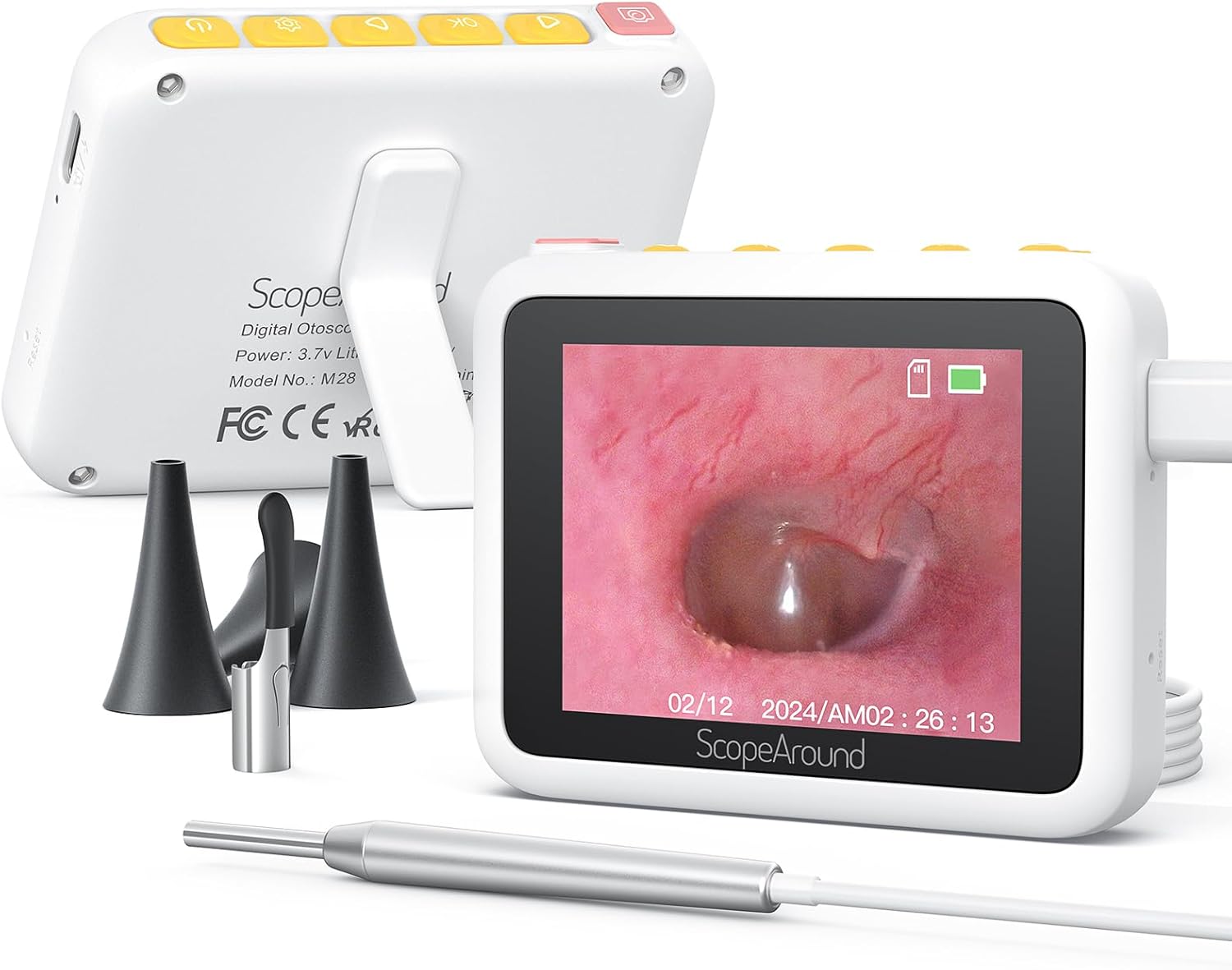
The ScopeAround M28 Digital Otoscope is a compact and user-friendly device designed for visual inspection. Key features include:
- 3.9mm Ultra-Thin Camera Lens: Allows easy entry into narrow ear canals.
- 720P HD Camera with 6 LED Lights: Provides clear, bright images and videos of the inspection area.
- หน้าจอ LCD IPS ขนาด 2.8 นิ้ว: Offers direct, real-time viewing without external apps or devices.
- การออกแบบพลักแอนด์เพลย์: Simple operation, no Wi-Fi or app required.
- ขาตั้งแม่เหล็ก: Enables hands-free operation for convenience.
- แบตเตอรี่แบบชาร์จไฟได้ 1200mAh: Provides 2-3 hours of continuous use.
- ระยะโฟกัสคงที่: Optimized for sharp images at 0.4 to 0.8 inches.


5. คำแนะนำในการตั้งค่า
Follow these steps to set up your ScopeAround M28 Digital Otoscope:
- ชาร์จอุปกรณ์: Before first use, fully charge the otoscope device using the provided USB Type-C charging cable. Connect the cable to the charging port on the device and a compatible USB power source. The battery indicator on the screen will show charging status.
- ติดตั้งหัววัดกล้อง: Plug the camera probe cable into the designated port on the otoscope device.
- เลือกและติดตั้งอุปกรณ์เสริม: Depending on your intended use, attach either an ear spoon or a speculum to the tip of the camera probe. Ensure it is securely fitted.
- เปิดเครื่อง: Long press the power button (usually located on the top right) to turn on the device. The screen will display the ScopeAround logo and then the live camera feed.
- Attach Magnetic Stand (Optional): For hands-free viewing, attach the magnetic stand to the back of the main unit. It can be positioned to prop up the screen at a comfortable viewมุมอิง


6. คู่มือการใช้งาน
Once the device is set up, you can begin your inspection:
- สด View: The 2.8" IPS LCD screen will display a real-time view จากกล้อง
- ถ่ายรูป: Press the Photo/Video button (usually the leftmost button with a camera icon) to capture a still image.
- การบันทึกวิดีโอ: Hold down the Photo/Video button to start recording a video. Press it again to stop recording.
- ฟังก์ชั่นซูม: Use the Left/Zoom buttons to adjust the magnification of the image on the screen (up to 1.5X zoom).
- การหมุนภาพ: Use the Right/Image Rotate buttons to rotate the image 180 degrees for better viewมุมการเอียง
- การเข้าถึงการตั้งค่า: Press the Setting button to enter the device menu. Here you can adjust resolution, language, date/time, and other parameters.
- Reviewสื่อสิ่งพิมพ์: Navigate to the Playback option in the settings menu to view จับภาพและวิดีโอ
- การโอนย้าย Files: Connect the device to a computer using the USB Type-C cable to transfer captured images and videos.


7. การบำรุงรักษาและการดูแล
Proper maintenance ensures the longevity and hygiene of your otoscope:
- การทำความสะอาดเลนส์: Use the provided alcohol prep pads or Q-tips to gently clean the camera lens before and after each use. Ensure no residue remains.
- อุปกรณ์ทำความสะอาด: The ear spoon and speculums should also be cleaned with alcohol prep pads after each use.
- พื้นที่จัดเก็บ: เก็บอุปกรณ์และอุปกรณ์เสริมไว้ในที่สะอาดและแห้ง หลีกเลี่ยงแสงแดดโดยตรงและอุณหภูมิที่สูงหรือต่ำเกินไป
- การดูแลแบตเตอรี่ Charge the device regularly, even if not in frequent use, to maintain battery health. Avoid fully depleting the battery for extended periods.

8 การแก้ไขปัญหา
If you encounter issues with your ScopeAround M28 Digital Otoscope, try the following:
- ไม่มีไฟฟ้า: ตรวจสอบให้แน่ใจว่าอุปกรณ์ชาร์จเต็มแล้ว เสียบอุปกรณ์เข้ากับแหล่งจ่ายไฟและรอสักครู่ก่อนที่จะลองเปิดเครื่องอีกครั้ง
- ไม่มีภาพบนหน้าจอ: Verify that the camera probe is securely plugged into the device. If the issue persists, try unplugging and re-plugging the camera probe.
- ภาพเบลอ: Ensure the camera lens is clean. The device has a fixed focal length, so adjust the distance between the camera tip and the object for optimal clarity (0.4-0.8 inches).
- อุปกรณ์ไม่ตอบสนอง: Use a thin pin to press the reset button (located near the charging port) to restart the device.
- ไม่สามารถโอนได้ Files: Ensure the device is properly connected to your computer via the USB Type-C cable. Check your computer's file explorer for the device.
9. ข้อมูลจำเพาะ
| คุณสมบัติ | ข้อมูลจำเพาะ |
|---|---|
| ขนาดสินค้า | 3.94 x 3.94 x 3.94 นิ้ว |
| น้ำหนักสินค้า | 8.8 ออนซ์ |
| เส้นผ่านศูนย์กลางเลนส์กล้อง | 3.9มม. |
| หน้าจอแสดงผล | จอ LCD IPS ขนาด 2.8 นิ้ว |
| ความละเอียดวิดีโอ | 1280 x 720 pixels (720P HD) |
| ความจุของแบตเตอรี่ | 1200mAh ลิเธียมโพลิเมอร์ |
| เวลาทำงาน | 2-3 hours (continuous usage) |
| พื้นที่จัดเก็บ | Internal (8GB, not expandable) |
| การเชื่อมต่อ | USB Type-C (for charging and data transfer) |
| ผู้ผลิต | ขอบเขตโดยรอบ |
10. การรับประกันและการสนับสนุน
ScopeAround is committed to customer satisfaction. This product comes with a standard warranty as per the retailer's policy. For any questions, technical support, or warranty claims, please contact our US-based after-sales support team. Contact information can typically be found on our official webเว็บไซต์หรือผ่านแพลตฟอร์มการซื้อของคุณ
We are dedicated to providing high-quality technology and support for your health and wellness needs.