
1. บทนำ
ขอบคุณสำหรับการซื้อasing the Blaupunkt Rock & Roll PS150 Wireless Bluetooth Outdoor Party Speaker. This manual provides essential information for the safe and efficient operation of your device. Please read it thoroughly before use and retain it for future reference.
2. ข้อมูลด้านความปลอดภัย
- ห้ามให้ลำโพงสัมผัสกับอุณหภูมิที่สูงหรือต่ำเกินไป แสงแดดโดยตรง หรือความชื้นสูง
- หลีกเลี่ยงการทำตกหรือให้ลำโพงได้รับแรงกระแทกรุนแรง
- Do not attempt to disassemble or modify the speaker. Repairs should only be performed by qualified service personnel.
- ควรเก็บลำโพงให้ห่างจากน้ำและของเหลวอื่นๆ เพื่อป้องกันไฟฟ้าช็อตหรือความเสียหาย
- ตรวจสอบให้แน่ใจว่ามีการระบายอากาศที่เหมาะสมเมื่อใช้งานลำโพง
3. อะไรอยู่ในกล่อง
- Blaupunkt Rock & Roll PS150 Party Speaker
- ไมโครโฟนคาราโอเกะ
- สายชาร์จ
- คู่มือการใช้งาน
4. สินค้าหมดview
The Blaupunkt Rock & Roll PS150 is a portable outdoor party speaker designed for robust audio performance and ease of transport. It features a powerful 100W output, X-Bass enhancement, and multiple connectivity options.

รูปที่ 1 : ด้านหน้า view of the Blaupunkt Rock & Roll PS150 Party Speaker.
5. การควบคุมและการเชื่อมต่อ
The control panel on top of the speaker provides access to all functions.

รูปที่ 2: รายละเอียด view ของแผงควบคุมลำโพง
- ปุ่มเปิด/ปิด: Press to turn the speaker ON/OFF.
- ปุ่มต้นทาง: Select input source (Bluetooth, AUX, USB).
- X-Bass Button: Activate or deactivate the X-Bass sound enhancement.
- ปุ่มเมนู: เข้าถึงการตั้งค่าต่างๆ
- Track Select Buttons (< / >): นำทางระหว่างแทร็กต่างๆ
- ปุ่ม TWS: เริ่มการจับคู่หูฟัง True Wireless Stereo
- ปุ่มปรับระดับเสียง: ปรับระดับเสียงหลัก
- ปุ่มหมายเลข (1-6): For direct track selection or preset functions.
- พอร์ต AUX IN: เชื่อมต่ออุปกรณ์เสียงภายนอกผ่านสายสัญญาณเสียงขนาด 3.5 มม.
- พอร์ต USB: For USB playback and charging (5V, 2000mAh).
6. การตั้งค่าและการชาร์จ
6.1 การชาร์จเริ่มต้น
Before first use, fully charge the speaker. Connect the charging cable to the speaker's charging port and a suitable power adapter. The charging indicator will illuminate. A full charge ensures optimal battery life for the 4500mAh battery.
6.2 การเปิด/ปิดเครื่อง
กดปุ่มเปิด/ปิดบนแผงควบคุมค้างไว้เพื่อเปิดหรือปิดลำโพง
7. การดำเนินการ
7.1 การจับคู่บลูทูธ
- เปิดลำโพง ไฟแสดงสถานะบลูทูธจะกะพริบ แสดงว่าอยู่ในโหมดจับคู่
- เปิดใช้งานบลูทูธบนสมาร์ทโฟนหรือแท็บเล็ตของคุณ แล้วค้นหาอุปกรณ์ที่ใช้งานได้
- Select "Blaupunkt PS150" from the list.
- เมื่อจับคู่แล้ว ไฟแสดงสถานะ Bluetooth จะหยุดกะพริบและคงค้างอยู่
7.2 โหมด AUX-In
Connect an external audio device (e.g., MP3 player) to the AUX IN port using a 3.5mm audio cable. Press the Source button to select AUX mode.
7.3 การเล่น USB
ใส่ไดรฟ์ USB พร้อมเสียง files into the USB port. The speaker will automatically switch to USB mode and begin playback. Use the track select buttons to navigate.
7.4 ฟังก์ชั่นคาราโอเกะ
Connect the provided karaoke microphone to the designated microphone input. Adjust the microphone volume as needed. The speaker is ready for karaoke performances.

Figure 3: Using the karaoke function with the PS150 speaker.
7.5 X-Bass Feature
Press the X-Bass button to enhance the bass output for a deeper, more impactful sound experience.

Figure 4: Visual representation of the X-Bass feature.
8. ความสะดวกในการพกพาและการออกแบบ
The PS150 is designed for portability with integrated wheels and a retractable handle, making it easy to transport to any location.
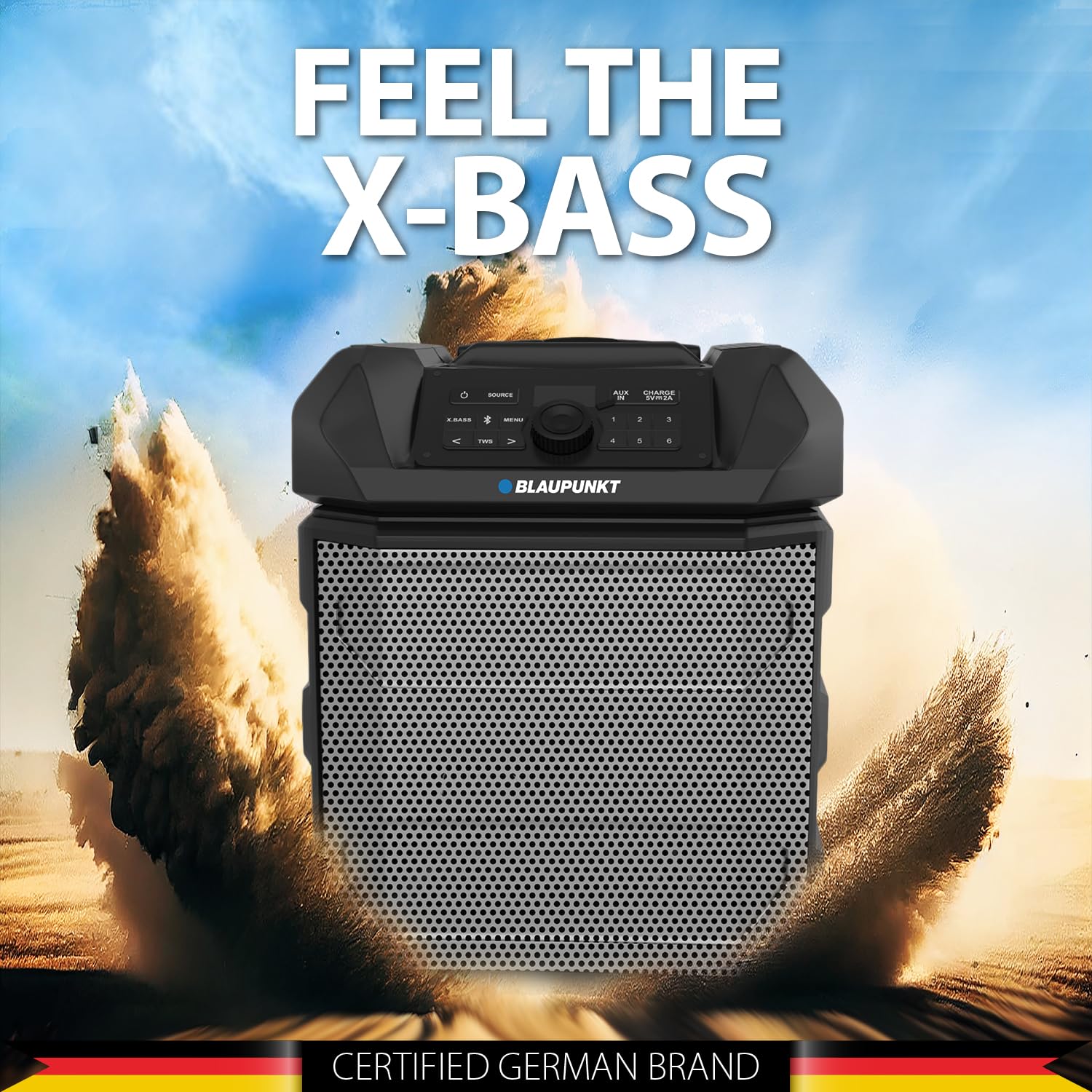
Figure 5: The PS150 speaker being transported with its wheels and handle.
9. ข้อมูลจำเพาะ
| คุณสมบัติ | ข้อมูลจำเพาะ |
|---|---|
| ยี่ห้อ | บลูพังค์ |
| หมายเลขรุ่น | PS150 BK |
| เอาท์พุต วัดtage | 100 วัตต์ |
| เทคโนโลยีการเชื่อมต่อ | บลูทูธ |
| อุปกรณ์ที่รองรับ | สมาร์ทโฟน, แท็บเล็ต |
| แหล่งพลังงาน | ใช้พลังงานจากแบตเตอรี่ |
| ความจุของแบตเตอรี่ | 4500mAh |
| อินพุตเสียง | ตัวช่วย |
| เอาท์พุต USB | 5V, 2000mAh |
| ขนาดรายการ (ยาว x กว้าง x สูง) | 43 x 31.5 x 52.5 เซนติเมตร |
| น้ำหนักสินค้า | 7500 กรัม |
| วัสดุของตู้หุ้ม | อะคริโลไนไตรล์ บิวทาไดอีน สไตรีน (ABS) |
10. การบำรุงรักษา
- ทำความสะอาดลำโพงด้วยผ้านุ่มและแห้ง ห้ามใช้น้ำยาทำความสะอาดหรือสารละลายที่มีฤทธิ์กัดกร่อน
- เก็บลำโพงไว้ในที่เย็นและแห้งเมื่อไม่ได้ใช้งาน
- หลีกเลี่ยงการสัมผัสแสงแดดโดยตรงหรืออุณหภูมิที่สูงหรือต่ำเกินไปเป็นเวลานาน
11 การแก้ไขปัญหา
11.1 ไม่มีไฟฟ้า
- ตรวจสอบให้แน่ใจว่าลำโพงชาร์จเต็มแล้ว
- ตรวจสอบว่าสายไฟเชื่อมต่อแน่นดีแล้วหรือไม่
- กดปุ่มเปิด/ปิดค้างไว้สักสองสามวินาทีเพื่อให้แน่ใจว่าไม่ใช่การกดเพียงสั้นๆ
11.2 ไม่มีเสียง
- เพิ่มระดับเสียงทั้งบนลำโพงและอุปกรณ์ที่เชื่อมต่อ
- Ensure the correct input source (Bluetooth, AUX, USB) is selected.
- หากใช้บลูทูธ โปรดตรวจสอบให้แน่ใจว่าได้จับคู่กับอุปกรณ์อย่างถูกต้องแล้ว
- หากใช้ช่องต่อ AUX โปรดตรวจสอบการเชื่อมต่อสายเคเบิล
11.3 การตัดการเชื่อมต่อบลูทูธ
- Ensure the connected device is within the Bluetooth range (typically 10 meters).
- Avoid obstacles between the speaker and the device that may interfere with the signal.
- ลองยกเลิกการจับคู่แล้วจับคู่อุปกรณ์ใหม่อีกครั้ง
12. การรับประกันและการสนับสนุน
The Blaupunkt Rock & Roll PS150 comes with a 1-year warranty from the date of purchase. For warranty claims, technical support, or any other inquiries, please contact:
- ผู้ผลิต: บริษัท เอ็นเวนท์ เวิลด์ไวด์ จำกัด
- ฝ่ายบริการลูกค้าผ่าน WhatsApp: 8860022600
- อีเมลไอดี: wecare@blaupunktaudio.in