
PTHTECHUS A22
PTHTECHUS® Smart Watch for Kids User Manual
รุ่น : A22
สินค้าเกินview
The PTHTECHUS Smart Watch for Kids (Model A22) is a versatile device designed for children aged 4-14 years. It integrates entertainment, education, and practical tools to provide a comprehensive experience for young users. This manual provides detailed instructions for setting up, operating, and maintaining your smart watch.

Image: The PTHTECHUS Smart Watch A22, shown in pink, featuring a square display with a rocket ship wallpaper and a comfortable silicone strap.
คุณสมบัติหลัก:
- HD Camera & Video Recorder: Capture photos and videos with built-in fun stickers.
- เนื้อหาการศึกษา: Includes 8 audio books and learning flashcards for vocabulary development.
- ความบันเทิง: Features 22 puzzle games, a music player, and a video player.
- การติดตามกิจกรรม: Built-in pedometer to track steps and calories.
- เครื่องมือที่ใช้งานได้จริง: Alarm clock, habit tracker, flashlight, calculator, calendar, and customizable wallpapers.
มีอะไรอยู่ในกล่อง
เมื่อเปิดบรรจุภัณฑ์ โปรดตรวจสอบให้แน่ใจว่ามีสิ่งของต่อไปนี้ครบถ้วน:
- 1 x PTHTECHUS Smart Watch (Model A22)
- สายชาร์จ (USB) 1 เส้น
- 1 x คู่มือผู้ใช้
คู่มือการติดตั้ง
1. การชาร์จสมาร์ทวอทช์
Before first use, fully charge the smart watch. The device uses a Lithium Polymer battery.
- Connect the provided USB charging cable to the charging port on the watch.
- เสียบปลายอีกด้านหนึ่งของสาย USB เข้ากับอะแดปเตอร์ไฟ USB มาตรฐาน (ไม่รวมอยู่ด้วย) หรือพอร์ต USB ของคอมพิวเตอร์
- หน้าจอแสดงผลของนาฬิกาจะแสดงสถานะการชาร์จ ใช้เวลาประมาณ 2-3 ชั่วโมงในการชาร์จจนเต็ม
2. การเปิด/ปิดเครื่อง
- การเปิดเครื่อง: Press and hold the power button (usually located on the side of the watch) until the screen lights up.
- วิธีปิดเครื่อง: กดปุ่มเปิด/ปิดค้างไว้จนกว่าตัวเลือกปิดเครื่องจะปรากฏบนหน้าจอ จากนั้นยืนยัน
3. การตั้งวันที่และเวลา
Once powered on, navigate to the 'Settings' menu on the watch to adjust the date and time as needed.
คำแนะนำการใช้งาน
The PTHTECHUS Smart Watch features a responsive touchscreen for easy navigation through its various functions.
Camera and Video Functions
The watch is equipped with an HD camera for capturing photos and videos. You can also apply fun stickers to your images.
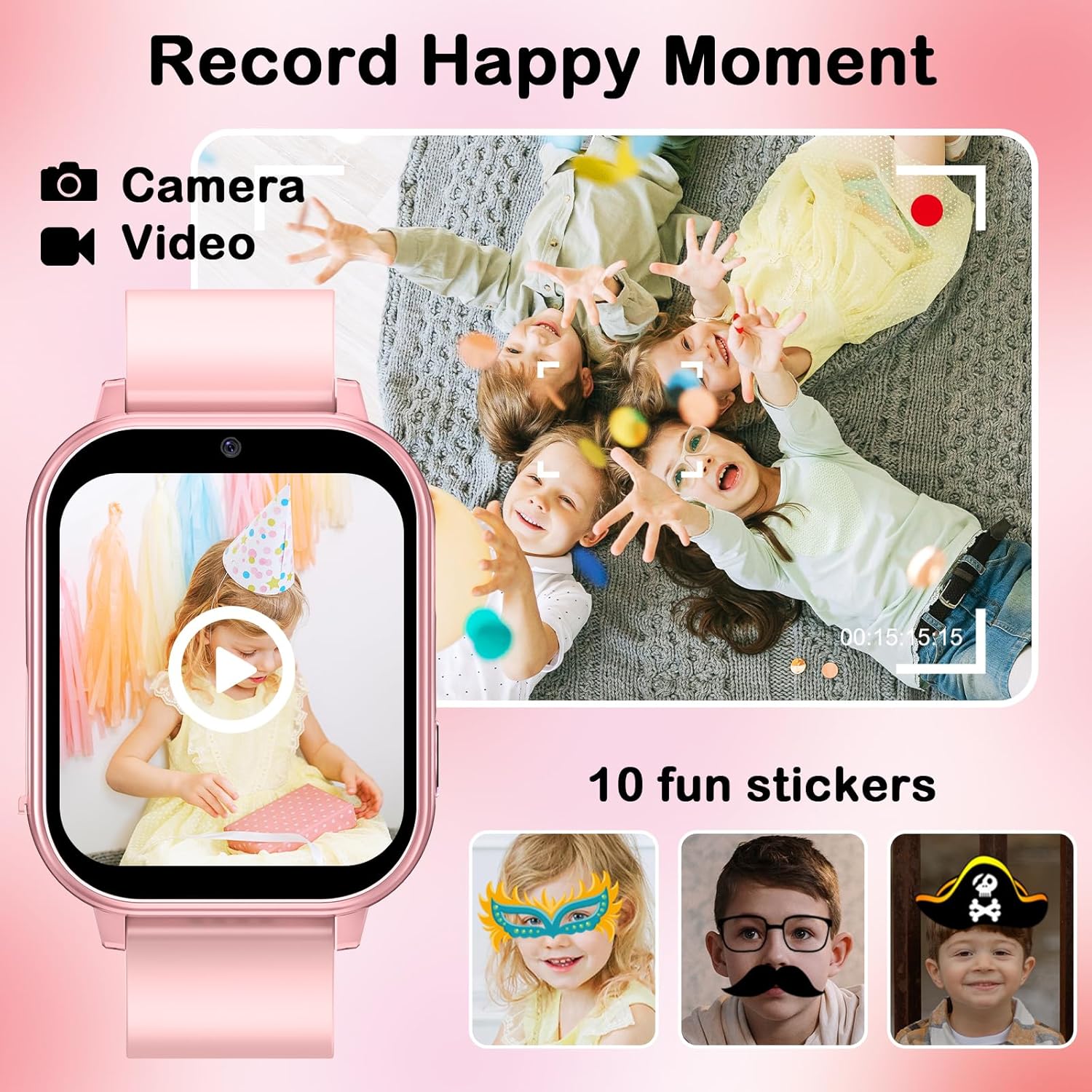
Image: A visual representation of the watch's camera and video recording capabilities, showing children playing and examples of 10 fun stickers that can be applied to photos.
- Navigate to the 'Camera' or 'Magic Camera' icon on the watch's main menu.
- Tap the screen to take a photo or switch to video recording mode.
- Explore the built-in 10 cute effect magic stickers to enhance your photos.
- Captured photos and videos can be viewed in the 'Photo Album' or 'Video Player' applications.
Music Player and Audio Books
Enjoy your favorite music and educational audio stories directly on the watch.

Image: The smart watch screen showing the music player interface, alongside illustrations of children engaging with audio books and learning cards, highlighting the device's multimedia and educational features.
- การถ่ายโอนเพลง: Connect the watch to a computer using the USB cable. The watch will appear as a removable disk. Drag and drop your child's favorite MP3 music files or audio stories into the designated music folder on the watch.
- การเล่นเพลง: Select the 'Music Player' icon to browse and play transferred audio files.
- Audio Books: Access the 'Audiobooks' section to listen to the 8 pre-loaded audio stories.
Games and Parental Controls
The watch includes 22 engaging puzzle games designed to stimulate imagination. Parental controls are available to manage game time.

Image: A child holding a game controller, with the smart watch prominently displaying a 'Parental Control' screen, surrounded by icons representing the 22 fun games available on the device.
- Navigate to the 'Games' icon to access the selection of 22 puzzle games.
- การควบคุมโดยผู้ปกครอง: Within the settings, parents can set limits on game play duration to encourage balanced use.
Educational Features: Learning Cards
The watch supports learning through interactive flashcards.
- Select the 'Study Cards' icon.
- Explore vocabulary related to animals, colors, vegetables, and fruits.
การติดตามนิสัย
Cultivate good habits with the built-in habit tracker.
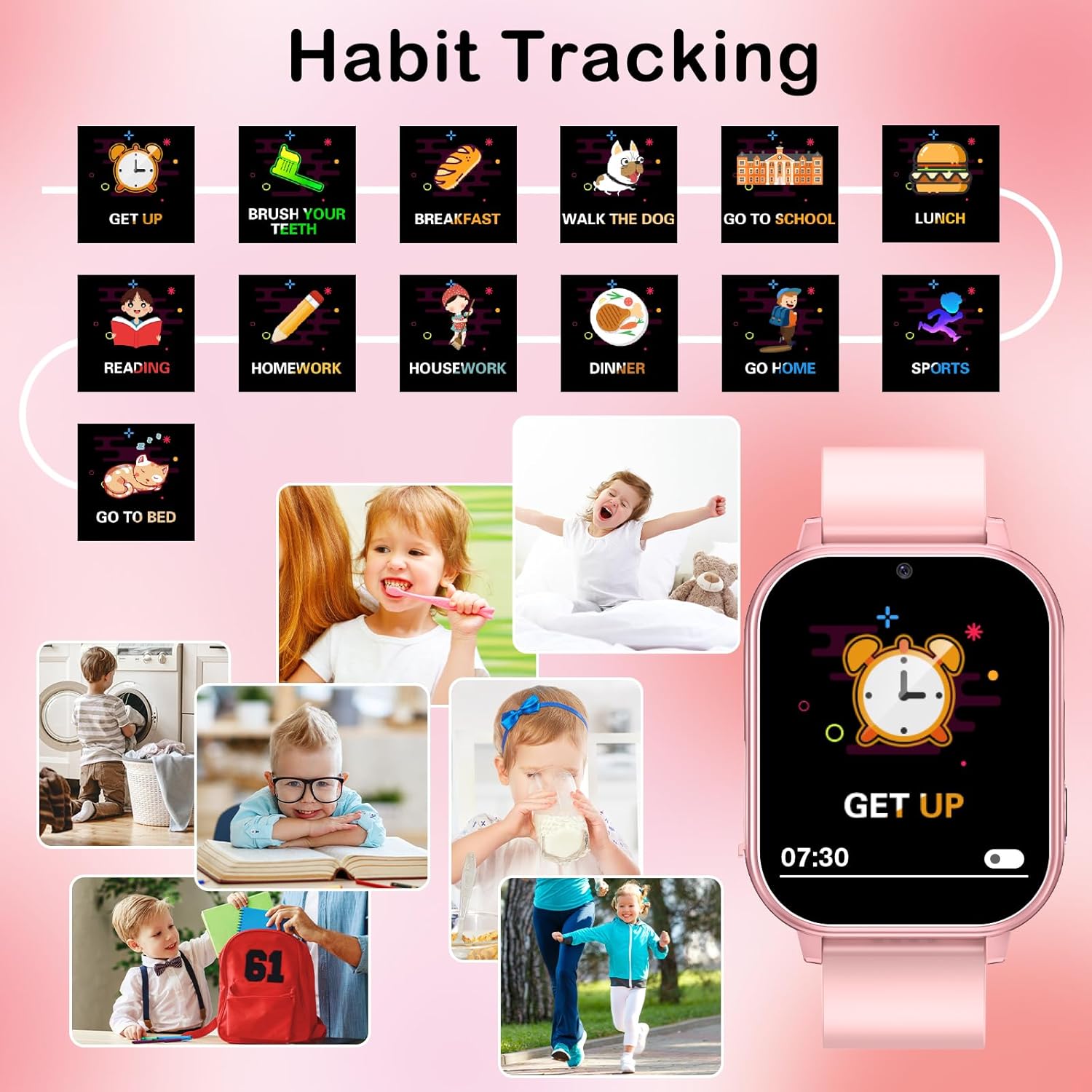
Image: The smart watch screen showing a 'GET UP' alarm, with a surrounding graphic illustrating various daily habits such as brushing teeth, eating breakfast, doing homework, and going to bed, demonstrating the habit tracking feature.
- Access the 'Habit Tracker' application.
- Set reminders for daily routines such as waking up, brushing teeth, meals, school, and bedtime.
Time Tools and Pedometer
The watch includes essential time management tools and a pedometer for activity tracking.
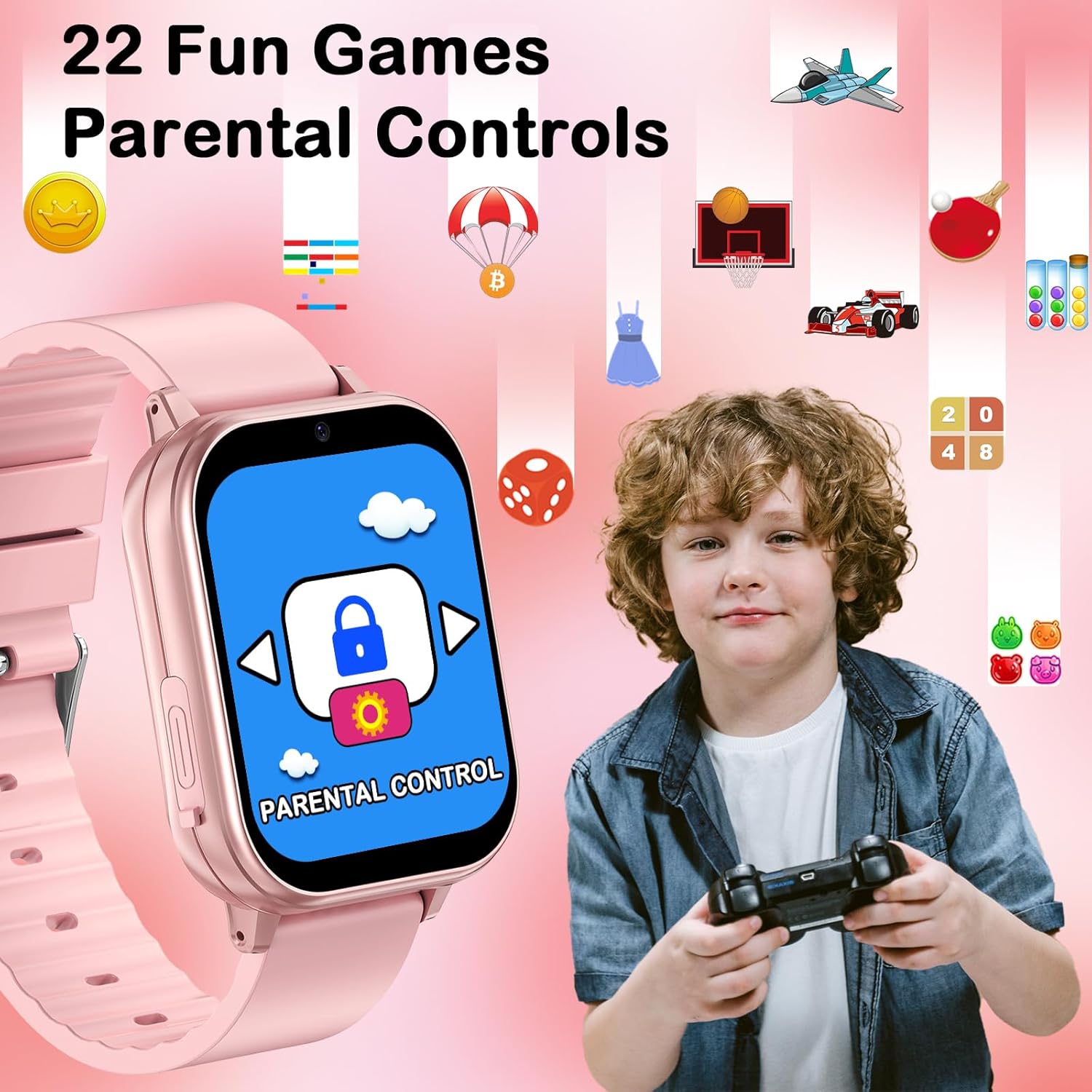
Image: A collage of four images depicting the watch's functions: a runner representing the Timer, a sleeping child for the Alarm clock, a child using a calculator, and children playing for the Pedometer, each with its corresponding icon.
- นาฬิกาปลุก: ตั้งนาฬิกาปลุกเตือนความจำได้หลายรายการ
- นาฬิกาจับเวลาและตัวจับเวลา: Use for various activities and time management.
- เครื่องคิดเลข: เครื่องคิดเลขพื้นฐานสำหรับคำนวณเลขคณิตอย่างง่าย
- pedometer: The built-in motion sensor tracks steps and estimates calories burned. Access this feature via the 'Pedometer' icon.
- ปฏิทิน: View the current date and plan events.
ฟังก์ชั่นอื่น ๆ
- ไฟฉาย: Activate the flashlight function for illumination.
- วอลเปเปอร์: Customize the watch face with 12 different wallpapers.
- เครื่องบันทึกเสียง: Record short audio notes.
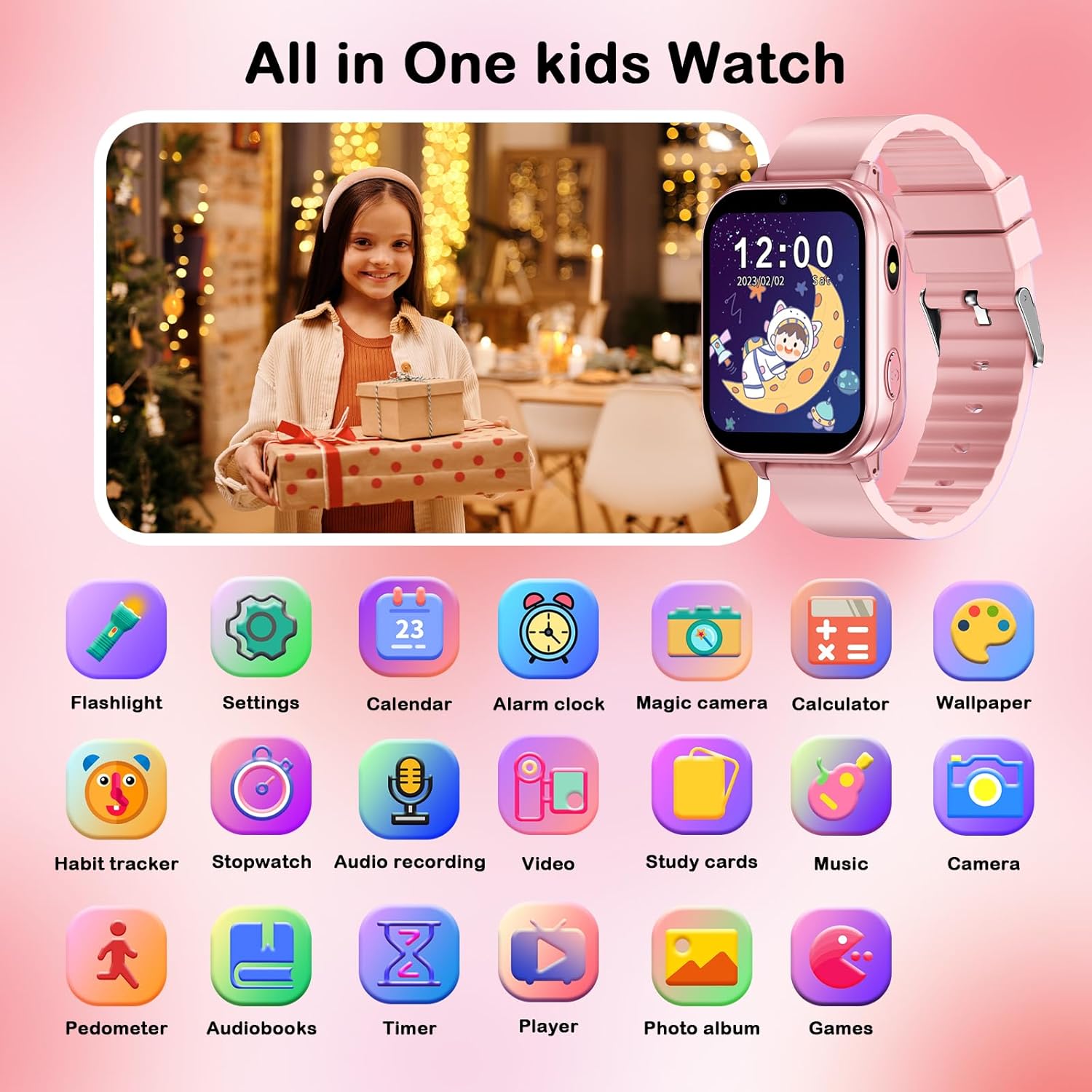
Image: A comprehensive grid displaying icons for all the integrated features of the smart watch, such as flashlight, settings, calendar, alarm clock, camera, calculator, wallpaper, habit tracker, stopwatch, audio recording, video, study cards, music, pedometer, audiobooks, timer, player, photo album, and games.
การซ่อมบำรุง
Proper care and maintenance will extend the life of your PTHTECHUS Smart Watch.
- การทำความสะอาด: Wipe the watch regularly with a soft, dry cloth. For stubborn smudges, a slightly damp cloth can be used, but ensure no moisture enters the charging port or speaker.
- ความต้านทานน้ำ: The watch is not waterproof. Avoid exposing it to water, rain, or excessive humidity.
- อุณหภูมิ: Do not expose the watch to extreme temperatures (hot or cold) or direct sunlight for prolonged periods.
- การดูแลแบตเตอรี่ To preserve battery life, avoid fully discharging the battery frequently. Charge the watch regularly, even if not in constant use.
- พื้นที่จัดเก็บ: เมื่อไม่ได้ใช้งานเป็นเวลานาน ควรเก็บนาฬิกาไว้ในที่แห้งและเย็น
การแก้ไขปัญหา
If you encounter issues with your smart watch, please refer to the following common solutions:
| ปัญหา | วิธีแก้ปัญหาที่เป็นไปได้ |
|---|---|
| นาฬิกาไม่เปิด | ตรวจสอบให้แน่ใจว่านาฬิกาชาร์จเต็มแล้ว เสียบชาร์จทิ้งไว้อย่างน้อย 30 นาทีก่อนที่จะลองเปิดเครื่องอีกครั้ง |
| หน้าจอไม่ตอบสนอง | Restart the watch by holding the power button until it powers off, then power it back on. If unresponsive, allow the battery to fully drain and then recharge. |
| ไม่สามารถโอนเพลงได้ files. | Ensure the USB cable is securely connected to both the watch and the computer. Verify that the watch is recognized as a removable storage device. Check file format compatibility (MP3 is supported). |
| Alarm goes off at unexpected times. | Check the alarm settings within the watch's 'Alarm Clock' application to ensure no unintended alarms are set. |
| คุณภาพของภาพจากกล้องไม่ดี | Ensure the camera lens is clean and free from smudges. Take photos in well-lit environments. |
หากปัญหายังคงอยู่หลังจากลองวิธีแก้ปัญหาเหล่านี้แล้ว โปรดติดต่อฝ่ายบริการลูกค้าเพื่อขอความช่วยเหลือเพิ่มเติม
ข้อมูลจำเพาะ
| คุณสมบัติ | รายละเอียด |
|---|---|
| ชื่อรุ่น | เอ22 |
| ยี่ห้อ | พีทีเอชเทคทัส |
| ขนาดหน้าจอ | 1.54 นิ้ว |
| ขนาดสินค้า | 8.66 x 1.57 x 0.79 นิ้ว |
| น้ำหนักสินค้า | 1.94 ออนซ์ (55 กรัม) |
| ประเภทแบตเตอรี่ | ลิเธียมโพลิเมอร์ (ต้องใช้ 1 อัน รวมอยู่ด้วย) |
| ความจุของหน่วยความจำ | 500MB |
| เทคโนโลยีการเชื่อมต่อ | ยูเอสบี |
| คุณสมบัติพิเศษ | Touchscreen, Video, Alarm Clock, Camera, Music Player, Pedometer, Habit Tracker, Study Cards, Audiostory, Games, Flashlight, Calculator, Calendar, Wallpapers |
| ผู้ผลิต | yangjiangshiyangdongquzhangtongjiayuankejico.LTD. |
| ประเทศต้นกำเนิด | จีน |
การรับประกันและการสนับสนุน
PTHTECHUS is committed to providing high-quality products and excellent after-sales service. If you have any questions or require assistance with your smart watch, please do not hesitate to contact our customer support team.
For support, please refer to the contact information provided on the product packaging or the official PTHTECHUS webไซต์ แผนการคุ้มครองอาจมีให้สำหรับความคุ้มครองแบบขยายเพิ่มเติม