
1. บทนำ
The DROK Digital Control Step-Down Module is a high-quality power module designed for reliable power supply across a wide range of electronic devices and projects. This manual provides essential information for safe and effective use of the product.
2. คุณสมบัติหลัก
- Digital Control and Easy Operation: ช่วยให้สามารถวัดปริมาตรได้อย่างแม่นยำtage and current settings. Converts a wide input voltage range of 10V to 100V to an adjustable output of 0V to 60V. Supports a maximum output capacity of 720W and current control from 0 to 12A, ensuring stable power supply for various applications.
- High-Quality Construction and Advanced Control Technology: Utilizes high-quality power devices and precision operational amplifiers, combined with CV and CC loops, to achieve superior module performance. Advanced microprocessor control allows for simple and quick parameter adjustment using buttons and an encoder.
- Excellent Heat Dissipation Design: Features a built-in cooling fan and external protective MOSFETs to enhance cooling performance, ensuring stable operation even under high load conditions. The LCD1602 display clearly shows output status.
- Precise Output Adjustment: ปริมาณการส่งออกtage and current can be precisely adjusted via button operation, catering to diverse needs. Its compact design offers high output and efficiency, providing stable and reliable power for projects.
- ฟังก์ชั่นการป้องกันหลากหลาย: Equipped with multiple protection features including Input Low Voltage Protection (LVP), Output Over Voltage Protection (OVP), and Output Over Current Protection (OCP), providing comprehensive safety for connected devices.
3. ข้อมูลจำเพาะผลิตภัณฑ์
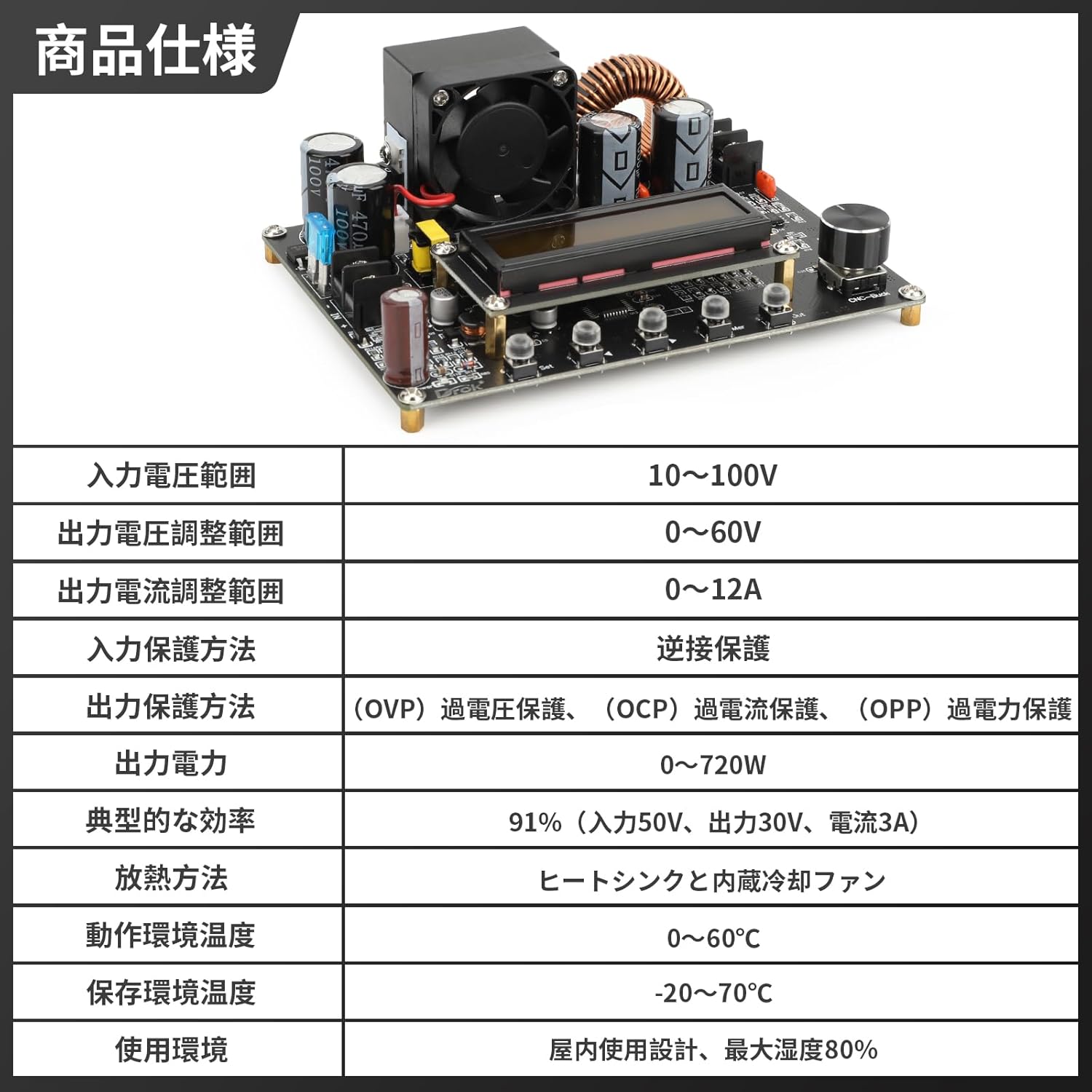
รูปที่ 3.1: ข้อมูลจำเพาะผลิตภัณฑ์โดยละเอียด
| ข้อมูลจำเพาะ | ค่า |
|---|---|
| อินพุต Voltagอี เรนจ์ | 10V ~ 100V |
| ปริมาณการส่งออกtage ช่วงการปรับ | 0V ~ 60V |
| ช่วงการปรับกระแสเอาต์พุต | 0A ~ 12A |
| Input Protection Method | การป้องกันการเชื่อมต่อย้อนกลับ |
| Output Protection Methods | มากกว่าVoltage Protection (OVP), Over Current Protection (OCP), Over Power Protection (OPP) |
| กำลังขับ | 0W ~ 720W |
| ประสิทธิภาพโดยทั่วไป | 91% (Input 50V, Output 30V, Current 3A) |
| วิธีการกระจายความร้อน | Heat Sink and Built-in Cooling Fan |
| อุณหภูมิสภาพแวดล้อมการทำงาน | 0°ซ ~ 60°ซ |
| อุณหภูมิสภาพแวดล้อมในการจัดเก็บ | -20°C ~ 70°C |
| สภาพแวดล้อมการใช้งาน | Indoor use, maximum humidity 80% |
4. สินค้าหมดview

รูปที่ 4.1: หลัก view of the DROK DC-DC Step-Down Converter.

Figure 4.2: Front and side dimensions of the converter module.

รูปที่ 4.3: รายละเอียด view of the module display, input/output ports, encoder knob, and operation buttons.

Figure 4.4: Visual representation of the multiple protection functions including reverse connection, output over-voltage, เอาต์พุตภายใต้ปริมาตรtage, and output over-current protection.

Figure 4.5: The LCD1602 display provides clear real-time output status and facilitates precise digital control.

รูปที่ 4.6: อดีตamples of various application scenarios for the converter, including laboratory and research environments, electronic device repair, industrial automation and testing, and education and training.
5. การตั้งค่า
Before connecting the module, ensure all power sources are disconnected. Observe proper polarity when making connections to prevent damage to the module or connected devices.
- การเชื่อมต่ออินพุต: Connect your DC power source (10V-100V) to the 'IN+' and 'IN-' terminals on the module. Ensure the input voltage อยู่ในช่วงที่ระบุ
- การเชื่อมต่อเอาท์พุต: Connect your load to the 'OUT+' and 'OUT-' terminals.
- การเพิ่มพลังเริ่มต้น: After verifying all connections, apply power to the input. The LCD display will illuminate, showing the current settings.
6. คู่มือการใช้งาน
The module features an LCD display, an encoder knob, and several buttons for operation.
6.1. โหมดการแสดงผล
Press the 'SW' button to cycle through different display modes:
- อินพุต Voltage / เอาท์พุท Voltage
- Output Current / Output Power
- ปริมาณการส่งออกtage / Output Current
- Temperature / Accumulated Capacity (Ah)
6.2. การปรับปริมาณเอาต์พุตtagอีและปัจจุบัน
- เล่มที่tage การปรับ: Rotate the encoder knob clockwise to increase the output voltage, and counter-clockwise to decrease it. The display will show the adjusted voltage.
- การปรับปัจจุบัน: To adjust the output current, press the 'U/I' button. The display will switch to current adjustment mode. Rotate the encoder knob to set the desired current limit.
- เอาต์พุต เปิด/ปิด: Press the 'ON/OFF' button to enable or disable the output.
7. การบำรุงรักษา
To ensure optimal performance and longevity of your DROK DC-DC Step-Down Converter, follow these maintenance guidelines:
- รักษาความสะอาด: Regularly clean the module, especially the heat sink and fan, to prevent dust accumulation which can hinder heat dissipation. Use a soft, dry cloth.
- การระบายอากาศ : Ensure adequate ventilation around the module during operation. Do not obstruct the cooling fan.
- หลีกเลี่ยงความชื้น: Keep the module away from moisture and corrosive environments.
- ตรวจสอบการเชื่อมต่อ: Periodically check all input and output connections for tightness and signs of wear.
8 การแก้ไขปัญหา
If you encounter issues with your converter, refer to the following common problems and solutions:
| ปัญหา | สาเหตุที่เป็นไปได้ | สารละลาย |
|---|---|---|
| No display/No output | No input power, incorrect wiring, or input voltage outside range. | Check input power supply, verify wiring polarity, ensure input voltagอีคือ 10-100V. |
| ปริมาณการส่งออกtagไม่เสถียร | Loose connections, excessive load, or faulty input power. | Secure all connections, reduce load, or test with a stable input power source. |
| กระแสเกิน / เกินปริมาตรtagการป้องกันอีถูกกระตุ้น | Load drawing too much current, or output voltage set too high for the load. | Reduce load, adjust output current limit, or verify output voltagอี การตั้งค่า |
| โมดูลร้อนเกินไป | Insufficient ventilation, excessive load, or fan malfunction. | Ensure proper airflow, reduce load, clean fan/heat sink, or replace fan if faulty. |
9. การรับประกันและการสนับสนุน
DROK products are designed for reliability and performance. For any technical support or warranty inquiries, please contact your retailer or the manufacturer directly. Keep your purchase receipt as proof of purchase.