
1. บทนำ
This manual provides detailed instructions for the MEIZE D115A Android 13 Tablet. Please read this manual thoroughly before using your device to ensure proper operation and to maximize its features. Keep this manual for future reference.
The MEIZE D115A tablet features a powerful Octa-Core processor, 10.1-inch HD screen, Android 13 operating system, and comes with essential accessories to enhance your user experience.
2. อะไรอยู่ในกล่อง
ตรวจสอบว่ามีรายการทั้งหมดอยู่ในแพ็คเกจ:
- MEIZE D115A Android 13 Tablet
- แป้นพิมพ์บลูทูธ
- เมาส์ไร้สาย
- ปากกาสัมผัส (สไตลัส)
- เคสป้องกัน
- อะแดปเตอร์แปลงไฟ
- สาย USB

Image: The MEIZE D115A tablet displayed with its complete set of accessories, including the Bluetooth keyboard, wireless mouse, stylus, charging cable, power adapter, and protective case.
3. เค้าโครงอุปกรณ์
ทำความคุ้นเคยกับส่วนประกอบทางกายภาพของแท็บเล็ตของคุณ:

Image: A detailed diagram illustrating the location of the front camera, flash, rear camera, headphone jack, Micro SD slot, Type-C port, volume buttons, power button, and speakers on the MEIZE D115A tablet.
- กล้องหน้า: เมื่อถือในแนวนอน ปุ่มจะอยู่ตรงกลางด้านบน ใช้สำหรับการสนทนาทางวิดีโอและการถ่ายเซลฟี่
- กล้องหลัง: Located on the back, equipped with a flash for photography and video recording.
- ปุ่มเปิด/ปิด: Used to turn the tablet on/off or put it to sleep/wake it up.
- ปุ่มปรับระดับเสียง: ปรับระดับเสียง
- พอร์ต Type-C: สำหรับการชาร์จและถ่ายโอนข้อมูล
- สล็อตไมโคร SD: Insert a Micro SD card for expanded storage (up to 512GB).
- แจ็คหูฟัง 3.5 มม.: เชื่อมต่อหูฟังแบบมีสาย
- วิทยากร: ให้เอาต์พุตเสียง
4. การตั้งค่า
4.1 การเปิดเครื่องครั้งแรก
- กดปุ่มค้างไว้ ปุ่มเปิดปิด จนกว่าหน้าจอจะสว่างขึ้น
- ทำตามคำแนะนำบนหน้าจอเพื่อเลือกภาษา ภูมิภาค และยอมรับข้อกำหนดและเงื่อนไข
4.2 การเชื่อมต่อ Wi-Fi
- ไปที่ การตั้งค่า > เครือข่ายและอินเตอร์เน็ต > ไวไฟ.
- สลับ Wi-Fi On.
- เลือกเครือข่ายที่คุณต้องการจากรายการและป้อนรหัสผ่านหากได้รับแจ้ง

Image: The tablet screen showing a graphic indicating support for both 5G and 2.4G Wi-Fi networks, ensuring stable and fast internet connectivity.
4.3 การตั้งค่าบัญชี Google
Sign in with your Google account to access the Google Play Store, Gmail, and other Google services. If you don't have one, you can create one during this step.
4.4 การเชื่อมต่ออุปกรณ์เสริม
The MEIZE D115A tablet comes with a Bluetooth keyboard, wireless mouse, and stylus for enhanced functionality.
- คีย์บอร์ดบลูทูธ: Turn on the keyboard and enable Bluetooth on your tablet (Settings > Connected devices > Bluetooth). Select the keyboard from the available devices and follow pairing instructions.
- เมาส์ไร้สาย: Insert the USB receiver from the mouse into the OTG adapter, then plug the OTG adapter into the tablet's Type-C port. The mouse should connect automatically.
- สไตลัส: The stylus is a passive input device and does not require pairing. Simply use it to interact with the screen.

Image: A user operating the MEIZE D115A tablet with the connected Bluetooth keyboard and wireless mouse, demonstrating its capability as a portable workstation.
5. การใช้งานแท็บเล็ตของคุณ
5.1 การนำทางพื้นฐาน
- สัมผัส: แตะไอคอนเพื่อเปิดแอปหรือเลือกรายการ
- ปัด: เลื่อนนิ้วของคุณไปบนหน้าจอเพื่อเลื่อนดูหน้าหรือเนื้อหา
- หยิก: ใช้สองนิ้วเพื่อซูมเข้าหรือออกจากรูปภาพและ web หน้า
- หน้าจอหลัก: ศูนย์กลางสำหรับแอปและวิดเจ็ตของคุณ
5.2 การสมัคร
- การติดตั้งแอพ: ดาวน์โหลดแอปพลิเคชันจาก Google Play Store
- Managing Apps: ไปที่ การตั้งค่า > แอปพลิเคชั่น ถึง view, manage, or uninstall applications.

Image: The tablet screen displaying numerous application icons and media content, illustrating the ample 128GB internal storage and 16GB RAM (8GB physical + 8GB virtual) for diverse usage.
5.3 การจัดการการจัดเก็บข้อมูล
The tablet comes with 128GB of internal storage. You can expand this by inserting a Micro SD card (up to 512GB) into the dedicated slot. To manage storage, go to การตั้งค่า > พื้นที่จัดเก็บ.
5.4 การใช้งานกล้อง
แท็บเล็ตนี้มีกล้องหลังความละเอียด 13 ล้านพิกเซล และกล้องหน้าความละเอียด 8 ล้านพิกเซล
- เปิด กล้อง แอป.
- Tap the shutter button to take photos or switch to video mode for recording.
- ใช้กล้องหน้าสำหรับการสนทนาทางวิดีโอและการถ่ายเซลฟี่
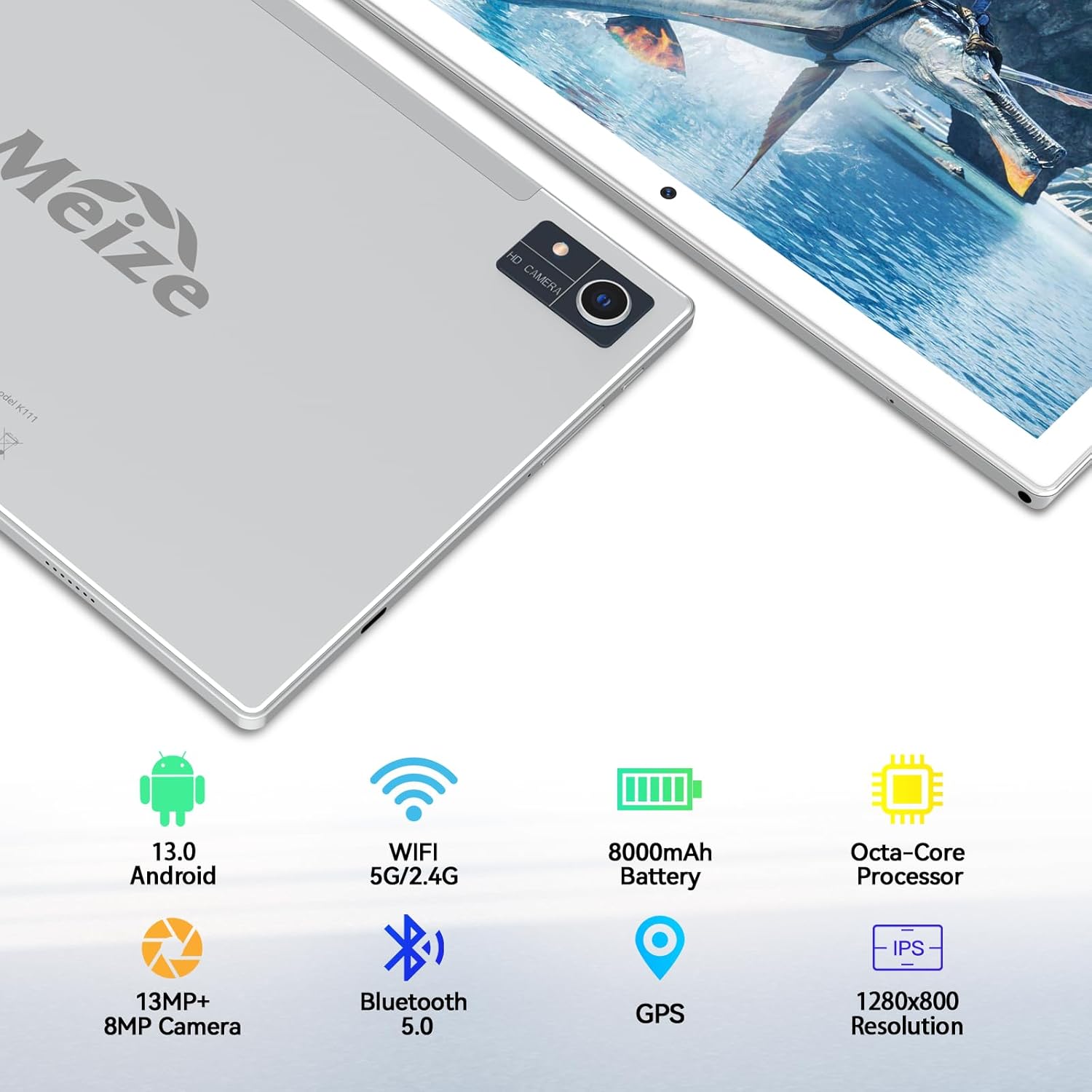
Image: An infographic highlighting the tablet's camera specifications, showing a 13MP rear camera and an 8MP front camera, alongside other key features.
5.5 การจัดการแบตเตอรี่
The 8000mAh battery provides extended usage times. To optimize battery life:
- ปรับความสว่างหน้าจอ
- ปิดแอปพลิเคชันที่ไม่ได้ใช้งานซึ่งทำงานอยู่เบื้องหลัง
- ปิด Wi-Fi หรือ Bluetooth เมื่อไม่ได้ใช้งาน

Image: A visual representation of the tablet's 8000mAh battery, indicating approximate usage durations: 10 hours for videos, 8 hours for games, and 12 hours for music playback.
6. การบำรุงรักษา
- การทำความสะอาด: ใช้ผ้านุ่มไม่เป็นขุยทำความสะอาดหน้าจอและตัวเครื่องแท็บเล็ต หลีกเลี่ยงวัสดุที่มีฤทธิ์กัดกร่อนหรือสารเคมีรุนแรง
- การอัปเดตซอฟต์แวร์: ตรวจสอบการอัปเดตระบบเป็นประจำใน การตั้งค่า > ระบบ > การอัพเดทระบบ เพื่อให้มั่นใจถึงประสิทธิภาพและความปลอดภัยที่เหมาะสมที่สุด
- การสำรองข้อมูล: Periodically back up important data to a cloud service or external storage device to prevent data loss.
7 การแก้ไขปัญหา
แท็บเล็ต 7.1 ไม่เปิด
- ตรวจสอบให้แน่ใจว่าแท็บเล็ตชาร์จแบตเตอรี่เต็มแล้ว เสียบเข้ากับอะแดปเตอร์แปลงไฟ และรอสักครู่ก่อนที่จะลองเปิดเครื่องอีกครั้ง
- Press and hold the Power Button for at least 10-15 seconds to perform a forced restart.
7.2 ปัญหาการเชื่อมต่อ Wi-Fi
- รีสตาร์ทเราเตอร์ Wi-Fi และแท็บเล็ตของคุณ
- ลืมเครือข่ายในการตั้งค่า Wi-Fi และเชื่อมต่อใหม่อีกครั้ง
- ตรวจสอบให้แน่ใจว่าคุณอยู่ในระยะสัญญาณ Wi-Fi
7.3 ประสิทธิภาพช้า
- ปิดแอปพลิเคชันที่ไม่ได้ใช้งาน
- ล้างแคชสำหรับแอปที่ใช้งานบ่อย (การตั้งค่า > แอป > [ชื่อแอป] > พื้นที่จัดเก็บและแคช > ล้างแคช)
- Consider performing a factory reset if performance issues persist (บันทึก: This will erase all data on the tablet. Back up your data first).
8. ข้อมูลจำเพาะ
| คุณสมบัติ | ข้อมูลจำเพาะ |
|---|---|
| ยี่ห้อ | ไมซ์ |
| หมายเลขรุ่น | D115A |
| ระบบปฏิบัติการ | แอนดรอยด์ 13 |
| ขนาดหน้าจอ | 10.1 นิ้ว |
| ความละเอียดหน้าจอ | 1280 x 800 พิกเซล |
| โปรเซสเซอร์ | หน่วยประมวลผลแปดคอร์ ความเร็ว 2 GHz |
| แรม | 8 GB (expandable to 16GB with virtual RAM) |
| การจัดเก็บข้อมูลภายใน | 128GB |
| พื้นที่เก็บข้อมูลแบบขยายได้ | สูงสุด 512 GB (Micro SD) |
| กล้องหลัง | 13 MP |
| กล้องหน้า | 8 MP |
| ความจุของแบตเตอรี่ | 8000 มิลลิแอมป์ |
| อายุการใช้งานแบตเตอรี่โดยเฉลี่ย | 10 Hours (video), 8 Hours (gaming), 12+ Hours (music) |
| ประเภทไร้สาย | 802.11ac (WiFi 5G/2.4G) |
| บลูทูธ | บลูทูธ 5.0 |
| ขนาด (กxยxส) | 10 x 7 x 0.3 นิ้ว |
| น้ำหนักสินค้า | 2.94 ปอนด์ |
9. การรับประกันและการสนับสนุน
MEIZE is committed to customer satisfaction. If you encounter any issues with your product, please contact our professional support team. We are dedicated to providing excellent service and assistance.
For support inquiries, please refer to the contact information provided with your product packaging or visit the official MEIZE webเว็บไซต์.