
1. บทนำ
This manual provides essential instructions for setting up, operating, maintaining, and troubleshooting your VIBOX VI-63 PC Gamer. Please read this guide thoroughly before using your new computer to ensure optimal performance and longevity.
2. ข้อมูลด้านความปลอดภัย
- Ensure the PC is placed on a stable, flat surface with adequate ventilation.
- Do not block any ventilation openings on the PC case.
- Keep the PC away from direct sunlight, heat sources, and liquids.
- Use only the power adapter supplied with your PC.
- ถอดสายไฟออกก่อนทำความสะอาดหรือดำเนินการบำรุงรักษาใดๆ
- Avoid opening the PC case unless instructed by VIBOX support, as this may void your warranty.
3. เนื้อหาบรรจุภัณฑ์
ตรวจสอบว่ารายการทั้งหมดที่ระบุไว้ด้านล่างนี้รวมอยู่ในแพ็คเกจของคุณ:
- VIBOX VI-63 PC Gamer Tower
- จอภาพ 22 นิ้ว
- คีย์บอร์ดเกม RGB
- เมาส์เล่นเกม RGB
- Black Mouse Pad
- ชุดหูฟังสำหรับเล่นเกมพร้อมไมโครโฟน
- Wireless WiFi Network Adapter (600 Mbps)
- สายไฟ
- Display Cable (HDMI or VGA, depending on monitor)
- เอกสารประกอบ (คู่มือนี้)
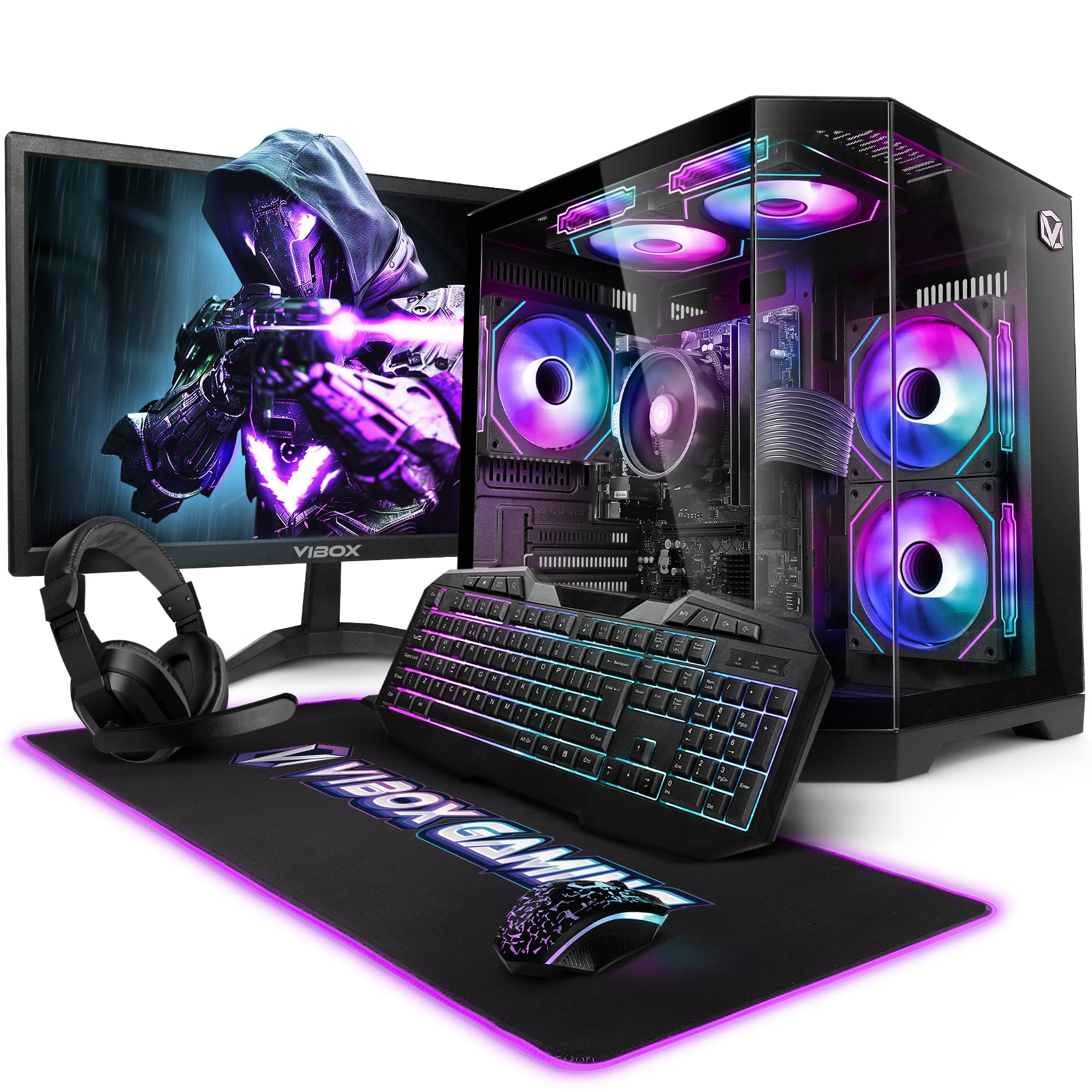
Image 3.1: VIBOX VI-63 PC Gamer Tower with internal RGB lighting.
4. คำแนะนำในการตั้งค่า
4.1. การแกะกล่องและการจัดวาง
- นำส่วนประกอบทั้งหมดออกจากบรรจุภัณฑ์อย่างระมัดระวัง
- Place the PC tower on a flat, stable surface. Ensure there is sufficient space around the tower for proper airflow.
- Place the monitor on a stable surface at a comfortable viewความสูงของไอเอ็นจี
4.2. การเชื่อมต่ออุปกรณ์ต่อพ่วง
- เฝ้าสังเกต: Connect one end of the display cable (HDMI or VGA) to the corresponding port on the back of the PC and the other end to the monitor.
- คีย์บอร์ดและเมาส์: Connect the USB cables of the keyboard and mouse to any available USB ports on the PC.
- ชุดหูฟัง: Connect the headset to the audio jacks (headphone and microphone) on the front or rear of the PC.
- อะแดปเตอร์ WiFi: Insert the wireless WiFi network adapter into an available USB port.
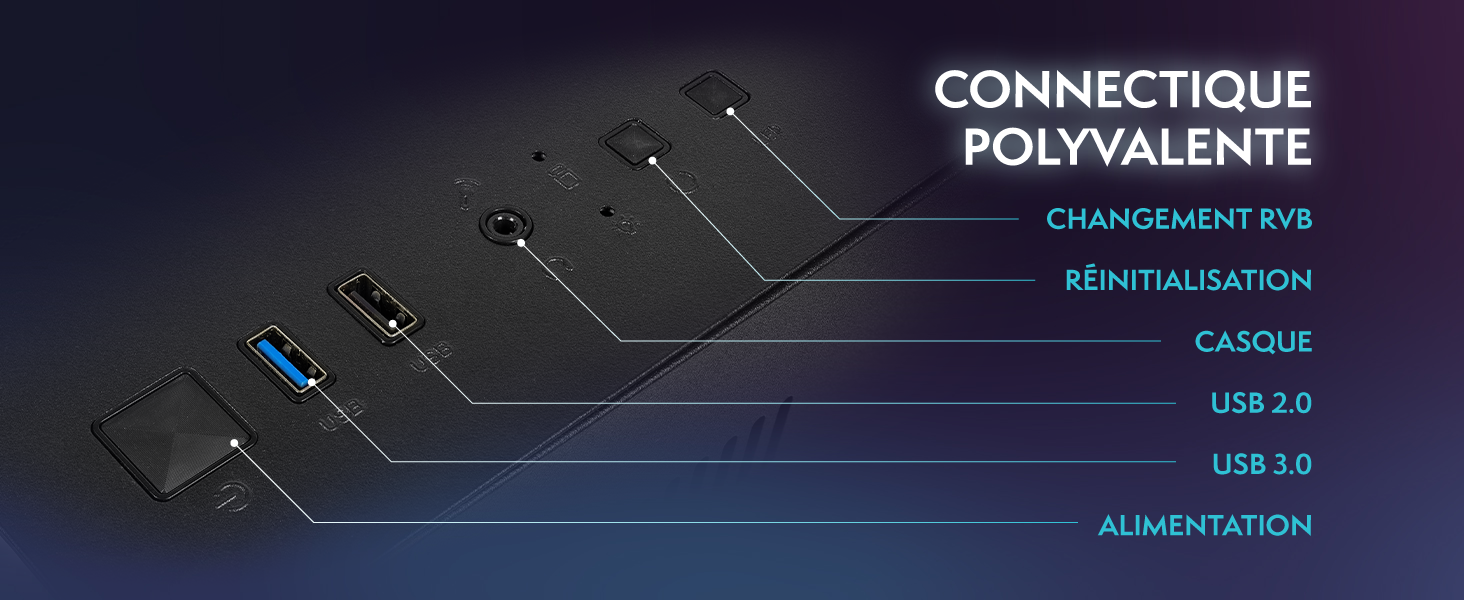
Image 4.1: Front panel connections including USB 2.0, USB 3.0, headset jack, reset button, and RGB change button.
4.3. การเชื่อมต่อไฟฟ้า
- Connect the power cable to the power supply unit (PSU) at the back of the PC.
- Connect the other end of the power cable to a wall outlet.
- Connect the monitor's power cable to a wall outlet.
4.4. Initial Boot and Windows 11 Setup
- Press the power button on the front of the PC tower.
- เปิดจอภาพ
- Follow the on-screen instructions to complete the Windows 11 Home setup. This typically involves selecting your region, language, creating a user account, and connecting to a Wi-Fi network.
5. คู่มือการใช้งาน
5.1. การทำงานพื้นฐาน
- เปิด/ปิดเครื่อง: กดปุ่มเปิด/ปิดเพื่อเปิดเครื่องคอมพิวเตอร์ หากต้องการปิดเครื่อง ให้คลิกปุ่ม Start ใน Windows จากนั้นเลือก Power > Shut down
- เริ่มต้นใหม่อีกครั้ง: จากเมนูเริ่ม เลือก เปิด/ปิดเครื่อง > เริ่มระบบใหม่
- โหมดสลีป: จากเมนูเริ่ม เลือก เปิด/ปิดเครื่อง > เข้าสู่โหมดสลีป
5.2. คุณสมบัติของ Windows 11
Your VIBOX VI-63 PC Gamer comes with Windows 11 Home pre-installed, offering features designed to enhance your computing and gaming experience:
- ไดเรกต์สตอเรจ: Enables faster loading times for compatible games.
- AutoHDR: Automatically enhances visuals for a wider range of games.
- Xbox Game Pass Integration: Seamless access to a library of games (subscription may be required).
- Optimized CPU Performance: Windows 11 is designed to optimize CPU usage for gaming and multitasking.
5.3. ประสิทธิภาพการเล่นเกม
The VIBOX VI-63 is equipped with an AMD Ryzen 3 3200GE processor and integrated Radeon Vega 8 graphics, providing solid performance for everyday computing and gaming at 720p to 1080p resolutions.

ภาพที่ 5.1: จบแล้วview of internal components including CPU, GPU, RAM, and storage.
5.4. การควบคุมแสง RGB
Your PC features RGB lighting. Use the dedicated RGB change button on the front panel (refer to Image 4.1) to cycle through different lighting modes and colors.
6. การบำรุงรักษา
6.1. การทำความสะอาดพีซี
- ภายนอก: ใช้แบบนุ่มๆamp cloth to wipe down the exterior of the PC case and monitor. Avoid abrasive cleaners.
- ฝุ่น: Periodically use compressed air to clear dust from the ventilation openings and fan grilles. Ensure the PC is powered off and unplugged before doing so.
- อุปกรณ์ต่อพ่วง: Clean your keyboard and mouse regularly to prevent dust and debris buildup.
6.2. การอัปเดตซอฟต์แวร์
- ตรวจสอบและติดตั้งการอัปเดต Windows เป็นประจำเพื่อให้มั่นใจถึงเสถียรภาพและความปลอดภัยของระบบ ไปที่ การตั้งค่า > การอัปเดต Windows
- Keep your graphics drivers updated for optimal gaming performance. You can usually download the latest drivers from the AMD webเว็บไซต์.
6.3. การดูแลรักษาระบบ
- Avoid installing unnecessary software to keep your system lean and fast.
- Run regular antivirus scans to protect against malware. Windows Defender is pre-installed.
- Ensure proper airflow around the PC to prevent overheating. The inverted airflow design helps with cooling.
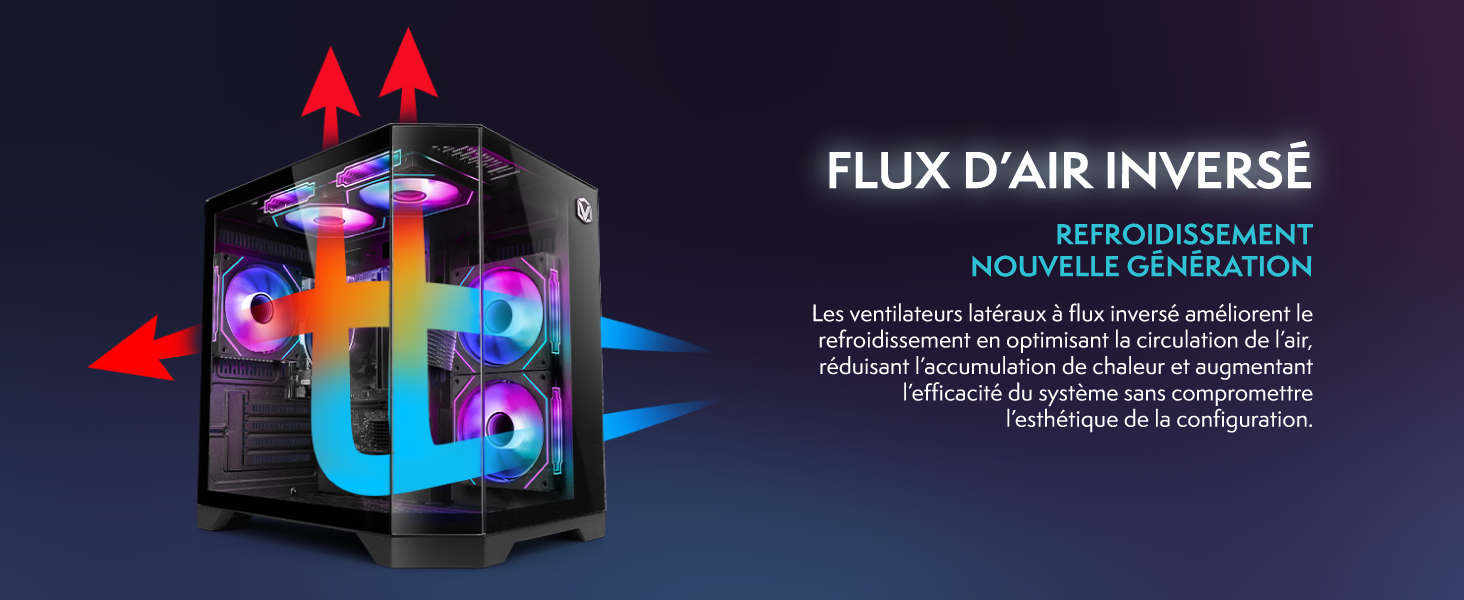
Image 6.1: Inverted airflow design for efficient cooling.
7 การแก้ไขปัญหา
- ไม่มีไฟฟ้า: Check all power cable connections. Ensure the wall outlet is functional.
- ไม่มีจอแสดงผล: Ensure the monitor is powered on and the display cable is securely connected to both the PC and the monitor. Try a different display cable or port if available.
- ไม่มีการเชื่อมต่ออินเทอร์เน็ต: Verify the WiFi adapter is properly installed. Check your router and internet service. In Windows, go to Settings > Network & internet to troubleshoot.
- PC Freezes/Crashes: Restart the PC. Ensure all drivers are updated. Check for overheating (ensure good airflow).
- อุปกรณ์ต่อพ่วงไม่ทำงาน: Try connecting the keyboard, mouse, or headset to different USB/audio ports. Ensure drivers are installed if required.
8. ข้อมูลจำเพาะ
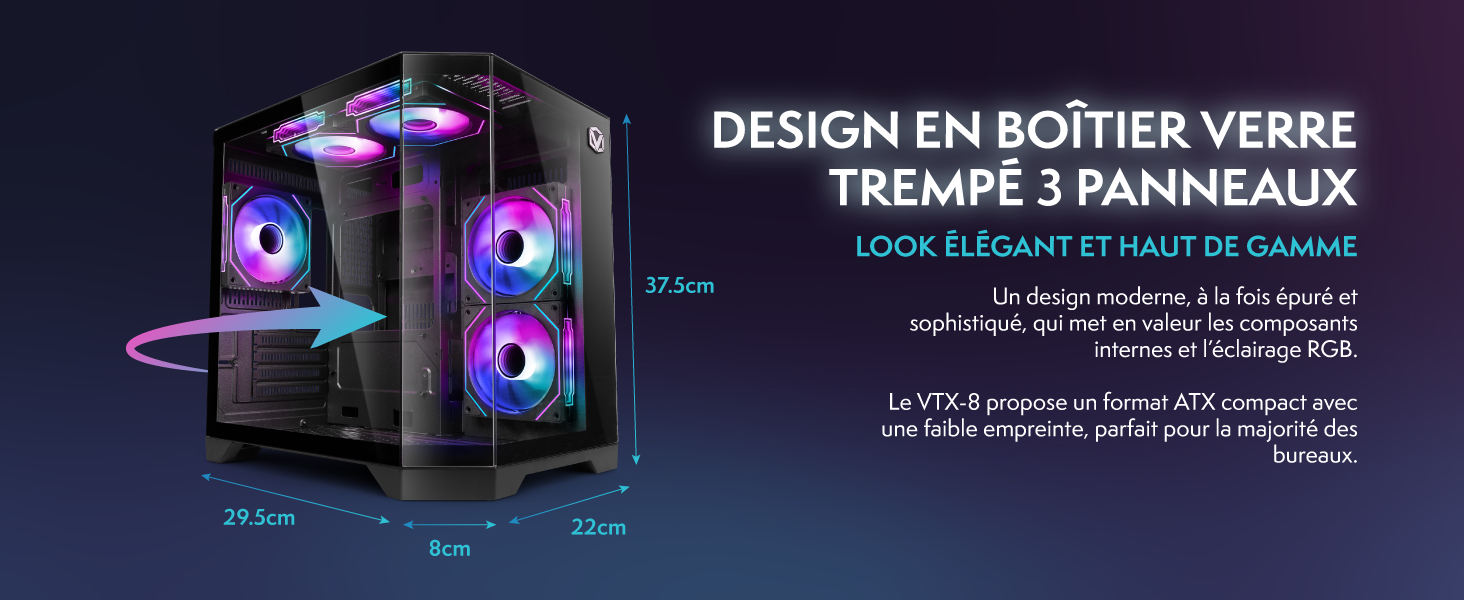
Image 8.1: VIBOX VI-63 PC Gamer case dimensions.
| คุณสมบัติ | ข้อมูลจำเพาะ |
|---|---|
| ยี่ห้อ | VIBOX |
| ชื่อรุ่น | Vibox VI-63 Gaming PC |
| ระบบปฏิบัติการ | วินโดวส์ 11 โฮม |
| รุ่นซีพียู | เอเอ็มดี ไรเซ่นส์ 3 3200G |
| ความเร็วซีพียู | 3.6 กิกะเฮิร์ตซ์ (4 กิกะเฮิร์ตซ์เทอร์โบ) |
| แกนซีพียู | 4 |
| โคโปรเซสเซอร์กราฟิก | Radeon Vega 8 (Integrated) |
| Graphics RAM | หน่วยความจำ 2 GB (ใช้ร่วมกัน) |
| RAM Installed | แรม 16GB DDR4 |
| RAM Speed | 2666 เมกะเฮิรตซ์ |
| ความจุในการเก็บข้อมูล | 1TB SSD ความจุ |
| เทคโนโลยีฮาร์ดไดรฟ์ | เอสดีเอสดี |
| ขนาดจอภาพ | 22 นิ้ว |
| ความละเอียดการแสดงผลสูงสุด | 1920x1080 พิกเซล |
| อินเทอร์เฟซเอาท์พุตวิดีโอ | hdmi, vga |
| เทคโนโลยีการเชื่อมต่อ | AMD Radeon Vega 8, Ethernet, HDMI, USB, Wi-Fi |
| ขนาด (กว้าง x ยาว x สูง) | 32.6 x 19.5 x 42 ซม. |
| สี | VTX-1 Black |
9. การรับประกันและการสนับสนุน
9.1. ข้อมูลการรับประกัน
Your VIBOX VI-63 PC Gamer comes with a รับประกัน 2 ปี on spare parts. This warranty covers manufacturing defects and component failures under normal use. Please retain your proof of purchase for warranty claims.
9.2. การสนับสนุนลูกค้า
For technical assistance, troubleshooting, or warranty inquiries, please contact VIBOX customer support. Refer to the contact information provided with your purchase documentation or visit the official VIBOX webเว็บไซต์สำหรับรายละเอียดการสนับสนุน
แหล่งข้อมูลออนไลน์: For additional support and FAQs, please visit the VIBOX official webเว็บไซต์.