
1. บทนำ
Thank you for choosing the BOGASING M6 Portable Bluetooth Speaker. This manual provides essential information for setting up, operating, and maintaining your speaker. Please read it carefully before use and retain it for future reference.
บ็อกASING M6 is designed to deliver powerful sound with deep bass, featuring IPX6 waterproofing, Bluetooth 5.3 connectivity, and multiple sound effects for an enhanced listening experience. Its portable design makes it ideal for various environments, from outdoor adventures to home use.
2. เนื้อหาบรรจุภัณฑ์
กรุณาทำเครื่องหมายในช่องสำหรับรายการต่อไปนี้:
- 1 x BOGASING M6 Bluetooth Speaker
- 1 x USB Type-C Charging Cable (Adapter Not Included)
- สายสัญญาณเสียงขนาด 1 มม. 3.5 เส้น
- 1 x สายคล้องคอ
- 1 x คู่มือผู้ใช้ (เอกสารนี้)
3. สินค้าหมดview และการควบคุม
Familiarize yourself with the buttons and ports on your BOGASING M6 speaker:
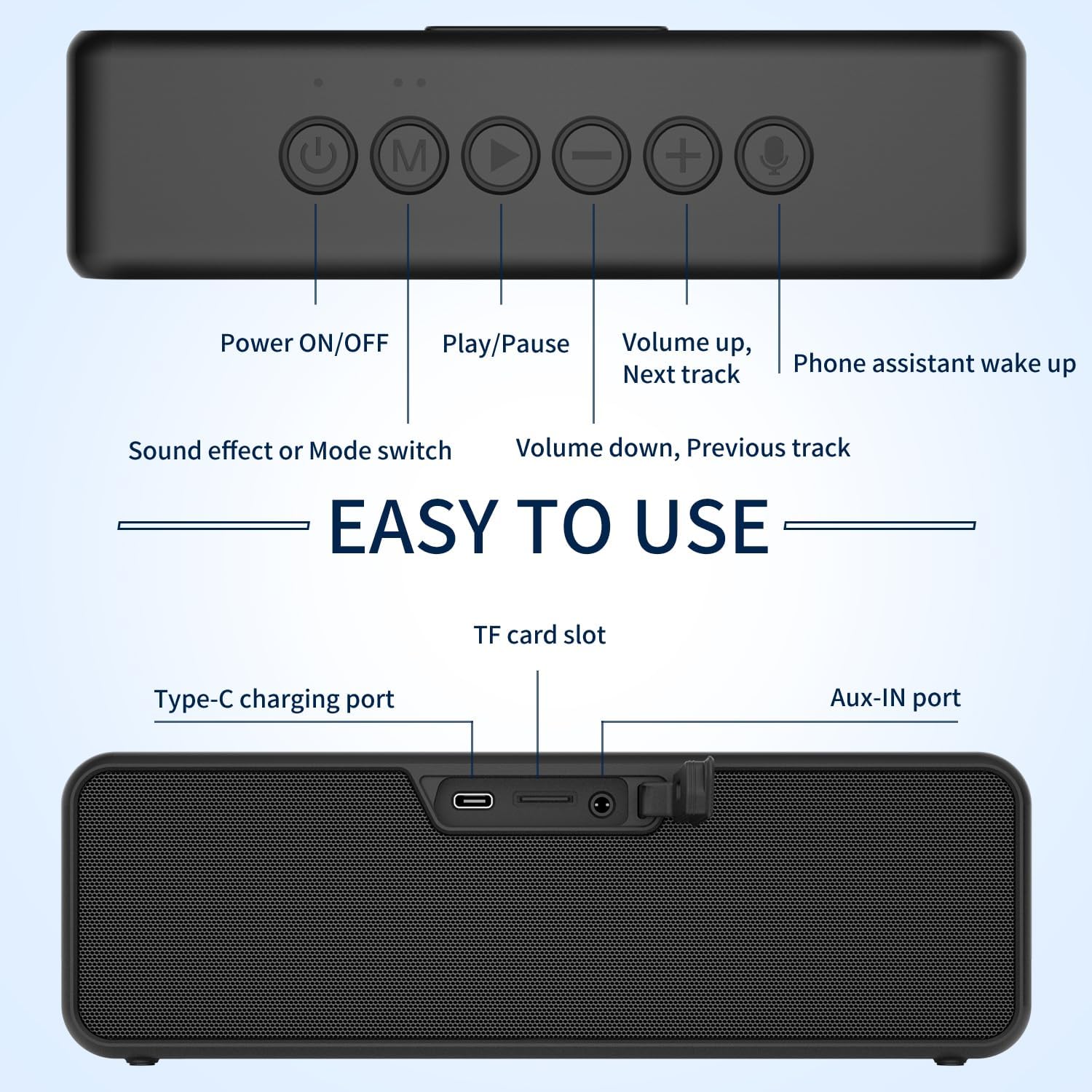
ภาพ: ด้านบนและด้านหลัง view of the BOGASING M6 speaker, highlighting the function of each button and port.
แผงควบคุมด้านบน:
- ปุ่มเปิด/ปิด: กดค้างไว้เพื่อเปิดหรือปิดลำโพง
- ปุ่ม 'M' (โหมด): กดสั้นๆ เพื่อสลับระหว่างโหมด Bluetooth, การ์ด TF และ AUX
- ปุ่มเล่น/หยุดชั่วคราว: Short press to play or pause music. In Bluetooth mode, press and hold to disconnect the current device.
- '-' (Volume Down / Previous Track) Button: กดสั้นเพื่อลดระดับเสียง กดยาวเพื่อไปยังเพลงก่อนหน้า
- '+' (Volume Up / Next Track) Button: กดสั้นๆ เพื่อเพิ่มระดับเสียง กดค้างเพื่อไปยังเพลงถัดไป
- ปุ่มไมโครโฟน: Short press to activate your device's voice assistant (e.g., Siri, Google Assistant).
พอร์ตแผงด้านหลัง:
- พอร์ตชาร์จ Type-C: สำหรับชาร์จแบตเตอรี่ภายในลำโพง
- ช่องเสียบการ์ด TF: ใส่การ์ด TF (MicroSD) เพื่อเล่นเพลงโดยตรง
- พอร์ต AUX-IN: เชื่อมต่ออุปกรณ์เสียงภายนอกโดยใช้สายสัญญาณเสียง 3.5 มม. ที่ให้มาในชุด
4. การตั้งค่าและการใช้งาน
4.1 การชาร์จลำโพง
- เชื่อมต่อสายชาร์จ USB Type-C ที่ให้มากับพอร์ต Type-C ของลำโพง
- Connect the other end of the cable to a USB power adapter (5V/2A recommended, not included) or a computer's USB port.
- ไฟ LED จะแสดงสถานะการชาร์จ โดยจะดับลงหรือเปลี่ยนสีเมื่อชาร์จเต็มแล้ว
4.2 การจับคู่บลูทูธ
- Power on the BOGASING M6 speaker by pressing and holding the Power ON/OFF button. The speaker will enter Bluetooth pairing mode, indicated by a flashing blue LED.
- บนอุปกรณ์เคลื่อนที่ของคุณ (สมาร์ทโฟน แท็บเล็ต ฯลฯ) เปิดใช้งานบลูทูธและค้นหาอุปกรณ์ที่มีอยู่
- Select "BOGASING M6" from the list of devices.
- เมื่อเชื่อมต่อเสร็จแล้ว ไฟ LED จะสว่างเป็นสีน้ำเงิน และคุณจะได้ยินเสียงยืนยัน
การจับคู่ระบบเสียงสเตอริโอไร้สาย 4.3 True Wireless Stereo (TWS)
The TWS function allows you to pair two BOGASING M6 speakers for a stereo sound experience.

Image: Two BOGASING M6 speakers connected wirelessly to a smartphone, illustrating the True Wireless Stereo feature.
- Ensure both BOGASING M6 speakers are powered on and not connected to any Bluetooth device.
- On one speaker (this will be the primary speaker), press and hold the Play/Pause button for 2-3 seconds until you hear a prompt indicating TWS pairing mode.
- The two speakers will automatically search for and connect to each other. Once connected, you will hear a confirmation sound, and the LED indicators on both speakers will change.
- ทีนี้ ให้เชื่อมต่ออุปกรณ์มือถือของคุณกับลำโพงหลักผ่านบลูทูธ ตามที่อธิบายไว้ในหัวข้อที่ 4.2
4.4 โหมดเสียง (EQ)
บ็อกASING M6 offers three distinct sound effect modes:

Image: Visual representation of the three sound effect modes: Enhanced Bass, 3D Stereo, and Vocals.
- เพิ่มพลังเสียงเบส: For music genres that benefit from deeper low frequencies.
- 3D Stereo: สร้างเสียงที่กว้างขวางและสมจริงยิ่งขึ้นtage.
- เสียงร้อง: Optimizes clarity for spoken word or vocal-heavy music.
To switch between these modes, short press the 'M' (Mode) button.
4.5 TF Card & AUX Input
- บัตร TF: Insert a TF (MicroSD) card with MP3/WAV/FLAC audio fileเสียบการ์ด TF ลงในช่องเสียบ ลำโพงจะสลับเป็นโหมดการ์ด TF โดยอัตโนมัติและเริ่มเล่น
- อินพุต AUX: Connect an external audio device (e.g., MP3 player, computer) to the AUX-IN port using the 3.5mm audio cable. The speaker will automatically switch to AUX mode.
5. คุณสมบัติหลัก
5.1 Powerful Sound with Deep Bass

ภาพ: ระเบิด view of the BOGASING M6 speaker, illustrating its dual high-performance drivers and passive radiators for powerful sound and deep bass.
บ็อกASING M6 is equipped with high-performance drivers and passive radiators, combined with an advanced DSP chip, to deliver 30W of impressive sound and deep, punchy bass.
ระดับการกันน้ำ IPX6 5.2

Image: The BOGASING M6 speaker submerged in water, showcasing คือคุณสมบัติกันน้ำระดับ IPX6
With an IPX6 waterproof rating, the M6 speaker is protected against powerful water jets, making it suitable for use in various outdoor conditions, including poolside, beach, or camping, without fear of heavy rain or splashes.
Video: Demonstration of the BOGASING M6 speaker's IPX6 waterproof feature in various outdoor settings, including being splashed by water and submerged in shallow water.
5.3 เทคโนโลยีบลูทูธ 5.3 ขั้นสูง
The latest Bluetooth 5.3 technology ensures optimized transmission, faster connection speeds, and stable connectivity with a wide range of devices, including smartphones, MP3 players, TVs, and PCs.
6. การบำรุงรักษา
- การทำความสะอาด: เช็ดลำโพงด้วย d . นุ่มๆamp ผ้า. อย่าใช้สารเคมีที่รุนแรงหรือน้ำยาทำความสะอาดที่มีฤทธิ์กัดกร่อน
- พื้นที่จัดเก็บ: เก็บลำโพงไว้ในที่แห้งและเย็น ห่างจากอุณหภูมิที่สูงและแสงแดดโดยตรง
- การดูแลแบตเตอรี่ To prolong battery life, fully charge the speaker before first use and at least once every three months if not used regularly. Avoid fully discharging the battery frequently.
- การสัมผัสน้ำ: After exposure to water, ensure the charging port and other openings are dry before charging or connecting cables.
7 การแก้ไขปัญหา
| ปัญหา | สาเหตุที่เป็นไปได้ | สารละลาย |
|---|---|---|
| ลำโพงไม่เปิดเครื่อง | แบตเตอรี่อ่อน | ชาร์จลำโพงอย่างน้อย 30 นาที |
| ไม่สามารถจับคู่ผ่านบลูทูธได้ | ลำโพงไม่ได้อยู่ในโหมดจับคู่หรือเชื่อมต่อกับอุปกรณ์อื่นแล้ว | Ensure the speaker is in pairing mode (flashing blue LED). Disconnect from other devices by long pressing the Play/Pause button. Restart both speaker and device. |
| ไม่มีเสียงหรือเสียงเบา | ระดับเสียงลำโพงหรืออุปกรณ์ที่เชื่อมต่อเบาเกินไป โหมดอินพุตไม่ถูกต้อง | Increase volume on both speaker and device. Press 'M' button to cycle through input modes (Bluetooth, TF, AUX). |
| การจับคู่ TWS ล้มเหลว | ลำโพงอยู่ห่างกันมากเกินไปหรือเชื่อมต่อกับอุปกรณ์อื่นอยู่แล้ว | Ensure both speakers are within 10 meters of each other and not connected to any other Bluetooth devices. Repeat TWS pairing steps. |
8. ข้อมูลจำเพาะ
| คุณสมบัติ | ข้อมูลจำเพาะ |
|---|---|
| ชื่อรุ่น | M6 |
| ประเภทลำโพง | ซับวูฟเฟอร์ |
| กำลังขับ | 30W (Single Speaker), 60W (TWS) |
| เวอร์ชันบลูทูธ | 5.3 |
| ระดับการกันน้ำ | IPX6 |
| เทคโนโลยีการเชื่อมต่อ | Bluetooth, Aux-in, TF-Card |
| โหมดเอาต์พุตเสียง | สเตอริโอ |
| แหล่งพลังงาน | ใช้พลังงานจากแบตเตอรี่ (รวมแบตเตอรี่ลิเธียมไอออน 1 ก้อน) |
| ขนาดสินค้า | 27D x 5.3W x 7.3H เซนติเมตร |
| น้ำหนักสินค้า | 0.9 กรัม |
9. การรับประกันและการสนับสนุน
บอคASING products come with a standard manufacturer's warranty. For detailed warranty information, product support, or technical assistance, please refer to the warranty card included in your package or visit the official BOGASING website. You may also contact our customer service team through the retailer where you purchased the product.
Please keep your purchase receipt as proof of purchase for warranty claims.