
การแนะนำ
Thank you for choosing the Hodozzy A3475 Android Car Radio. This device is designed to enhance your driving experience with advanced features such as Android 13 operating system, wireless CarPlay and Android Auto, GPS navigation, Bluetooth connectivity, and a high-resolution touch screen. This manual provides essential information for the safe installation, proper operation, and effective maintenance of your new car stereo. Please read this manual thoroughly before installation and use, and keep it for future reference.
ข้อมูลด้านความปลอดภัย
- แนะนำการติดตั้งอย่างมืออาชีพ: เนื่องจากระบบไฟฟ้าในรถยนต์มีความซับซ้อน จึงขอแนะนำให้ติดตั้งโดยผู้เชี่ยวชาญ เพื่อป้องกันความเสียหายต่อตัวเครื่องหรือรถของคุณ
- แหล่งจ่ายไฟ: ตรวจสอบให้แน่ใจว่าอุปกรณ์เชื่อมต่อกับแหล่งจ่ายไฟ DC 12V ที่มีกราวด์ลบ โวลท์ไม่ถูกต้องtagและอาจทำให้เกิดความเสียหายได้
- การเดินสายไฟ: Carefully follow all wiring diagrams. Incorrect wiring can lead to malfunctions, electrical shorts, or fire.
- ความปลอดภัยในการขับขี่: อย่าใช้งานอุปกรณ์ในลักษณะที่รบกวนสมาธิในการขับขี่ ให้ความสำคัญกับความปลอดภัยบนท้องถนนเสมอ
- อุณหภูมิ: หลีกเลี่ยงการวางเครื่องไว้ในที่ที่มีอุณหภูมิสูงหรือแสงแดดโดยตรงเป็นเวลานาน
- ความชื้น: เก็บเครื่องให้ห่างจากน้ำและความชื้นที่มากเกินไป
- การทำความสะอาด: ใช้ผ้าแห้งนุ่มๆ เช็ดทำความสะอาด ห้ามใช้สารทำความสะอาดที่มีฤทธิ์กัดกร่อนหรือตัวทำละลาย
เนื้อหาแพ็คเกจ
โปรดตรวจสอบสิ่งของในพัสดุของคุณเทียบกับรายการด้านล่าง หากมีสิ่งใดขาดหายหรือเสียหาย โปรดติดต่อผู้ค้าปลีก

Image: The packaging list showing the main unit, power cable, RCA cable, rear camera input cable, GPS antenna, USB cable, mounting bracket, user manual, AHD rear camera, and microphone. Dimensions of the main unit are also shown: 178mm (7.0 inch) width, 102mm (4.0 inch) height, 70mm (2.7 inch) depth, and 25mm (0.9 inch) bezel depth.
- Hodozzy A3475 Main Unit
- สายไฟ
- RCA Input/Output Cable
- สายเคเบิลอินพุตกล้องถอยหลัง
- เสาอากาศ GPS
- สาย USB (x2)
- ขายึด
- คู่มือการใช้งาน (เอกสารนี้)
- กล้องหลัง AHD
- ไมโครโฟนภายนอก
สินค้าเกินview
The Hodozzy A3475 is a 7-inch double din Android car stereo featuring an 8-core processor, 2GB RAM, and 64GB ROM for smooth performance. It runs on Android 13 and offers a high-resolution IPS touchscreen.

Image: Visual representation of the car stereo's core specifications: Android 13 operating system, 2GB RAM + 64GB ROM memory, 8-core processor, and integrated GPS navigation with WiFi connectivity.
คุณสมบัติหลัก:
- ระบบปฏิบัติการ: แอนดรอยด์ 13
- โปรเซสเซอร์: 8 แกน
- หน่วยความจำ: แรม 2GB + รอม 64GB
- แสดง: 7-inch IPS Capacitive Touch Screen (1280*720 resolution)
- การเชื่อมต่อ: Wireless CarPlay, Wireless Android Auto, Mirror Link, Bluetooth 5.0, Wi-Fi, USB, AUX, TF Card
- การนำทาง: Built-in GPS module with offline map support
- เสียง: 36-band DSP (Digital Sound Processor), FM/RDS Radio
- ข้อมูลอินพุต: AHD Rear Camera input, Dash CAM input, 2 USB inputs
- เอาท์พุต: Amplifier/Sub-woofer audio output
- ควบคุม: รองรับการควบคุมพวงมาลัย
การเชื่อมต่อแผงด้านหลัง:

Image: The rear panel of the Hodozzy A3475 unit, displaying various connection ports including power, RCA input/output, reversing camera input, USB, GPS antenna, and radio antenna ports.
- ขั้วต่อสายไฟ
- RCA Input/Output Connectors
- อินพุตกล้องถอยหลัง
- USB Cable Connectors (x2)
- อินพุตเสาอากาศ GPS
- อินพุตเสาอากาศวิทยุ
การติดตั้ง
คำเตือน: Incorrect installation can cause damage to the unit or your vehicle. It is highly recommended to have this unit installed by a qualified professional.
รายการตรวจสอบก่อนการติดตั้ง:
- ถอดขั้วแบตเตอรี่ลบของรถออกก่อนเริ่มงานไฟฟ้าใดๆ
- Ensure the mounting dimensions (178mm x 100mm) are compatible with your vehicle's double din opening.
- Gather all necessary tools (wire strippers, crimpers, screwdrivers, electrical tape, multimeter).
แผนผังการเดินสายไฟ (ทั่วไป):
Refer to the included wiring diagram for specific connections. The main connections typically include:
- สายสีเหลือง: แรงดันไฟฟ้าคงที่ 12V (ขั้วบวกแบตเตอรี่)
- สายสีแดง: ACC (Switched 12V, Ignition)
- สายสีดำ: พื้นดิน (แชสซี -)
- Orange/Illumination Wire: เชื่อมต่อกับวงจรไฟส่องสว่างของรถยนต์ (ไม่จำเป็น)
- สายไฟเกียร์ถอยหลัง: Connect to the vehicle's reverse light circuit for automatic camera display.
- สายลำโพง: Connect to your vehicle's speakers (Front Left +, Front Left -, etc.).
- เสาอากาศ GPS: ติดตั้งในตำแหน่งที่โล่ง view ของท้องฟ้า
- เสาอากาศวิทยุ: เชื่อมต่อกับเสาอากาศวิทยุของรถยนต์
- สาย USB: Route to an accessible location for connecting USB devices.
- กล้องหลัง: Install the AHD rear camera at the back of the vehicle and route its cable to the unit's reversing camera input.
การติดตั้ง:
Use the provided mounting brackets to secure the unit into your vehicle's double din opening. Ensure the unit is firmly seated and does not obstruct any vehicle controls or airbags.
การตั้งค่าเริ่มต้น
- เปิดเครื่อง: After installation, reconnect the vehicle's battery and turn on the ignition. The unit should power on automatically.
- ภาษาและเวลา: Follow the on-screen prompts to select your preferred language, time zone, and date settings.
- การเชื่อมต่อ Wi-Fi: ไปที่ การตั้งค่า > เครือข่ายและอินเตอร์เน็ต > ไวไฟ to connect to an available Wi-Fi network or your phone's hotspot. This is necessary for online maps, app downloads, and system updates.
- การปรับเทียบ GPS: Ensure the GPS antenna is properly connected and placed. The system will automatically acquire satellite signals for navigation.
คำแนะนำการใช้งาน
การแสดงผลและอินเทอร์เฟซผู้ใช้
The 7-inch IPS capacitive touch screen offers a clear and responsive interface. You can customize the look and feel of your stereo with various wallpapers and user interface themes.
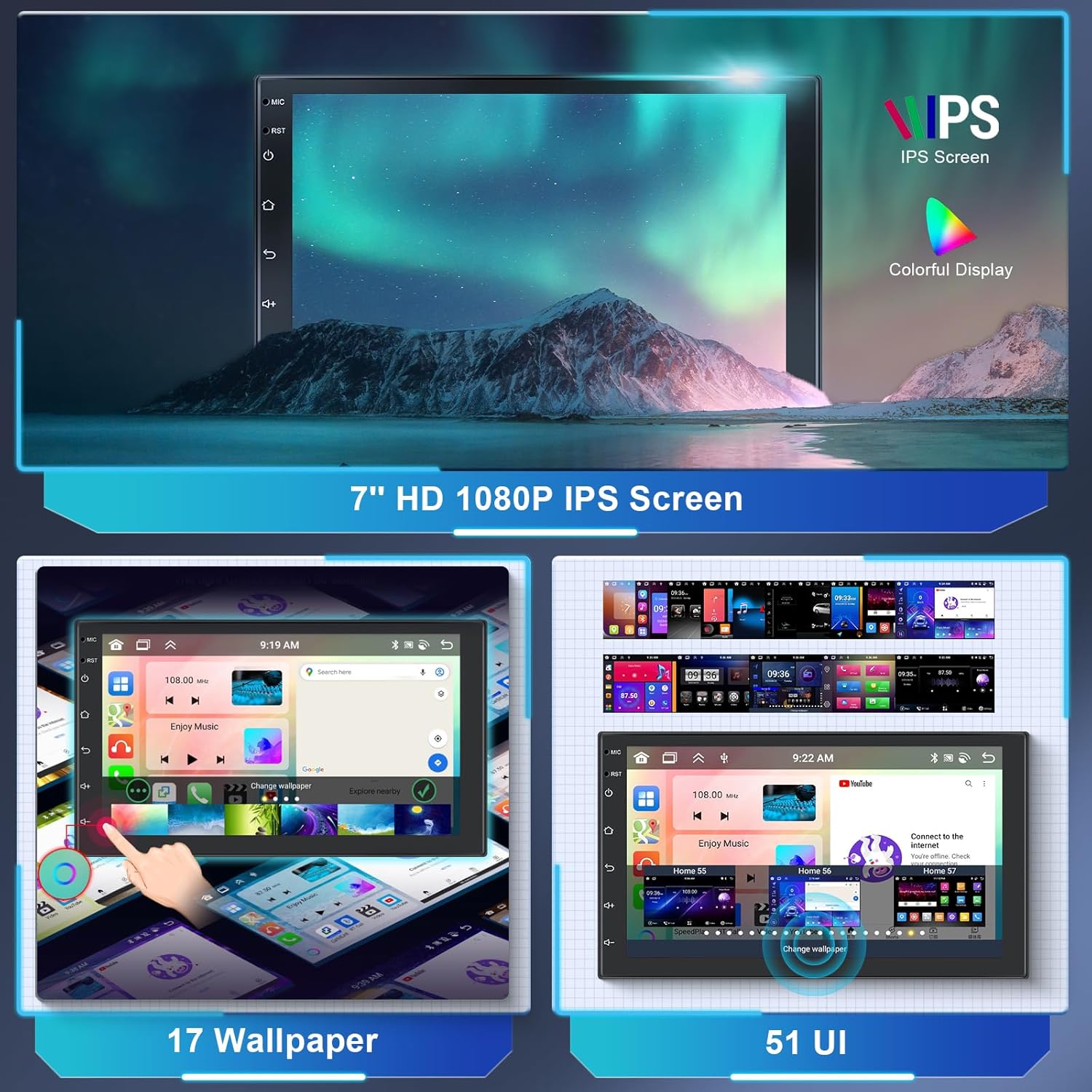
Image: The 7-inch HD 1080P IPS screen displaying various wallpaper options and different user interface layouts, highlighting customization capabilities.
- หน้าจอหลัก: Access frequently used apps and widgets.
- ลิ้นชักแอป: Swipe up or tap the app icon to view แอปพลิเคชันที่ติดตั้งทั้งหมด
- การตั้งค่า: Access system settings for audio, display, network, and more.
- การปรับแต่ง: นำทางไปที่ การตั้งค่า > แสดง to change wallpapers and UI themes.
CarPlay แบบไร้สาย & Android Auto & Mirror Link
Connect your smartphone wirelessly or via USB to access CarPlay or Android Auto for navigation, music, calls, and messages. The Mirror Link function allows you to display your phone's screen directly on the car stereo.

Image: The car stereo screen displaying the interfaces for Wireless CarPlay and Wireless Android Auto, showing phone applications like navigation, music, and communication.
- สำหรับการใช้งาน CarPlay/Android Auto แบบไร้สาย:
- โปรดตรวจสอบให้แน่ใจว่าได้เปิดใช้งานบลูทูธและ Wi-Fi บนโทรศัพท์ของคุณแล้ว
- On the car stereo, open the "CarLink" or similar app.
- จับคู่โทรศัพท์ของคุณผ่านบลูทูธกับเครื่องเสียงในรถยนต์
- Confirm the connection on both devices. CarPlay or Android Auto should launch automatically.
- For Mirror Link:
- Open the "Mirror Link" app on the stereo.
- Follow the on-screen instructions to connect your Android or iOS device, typically involving a USB connection and enabling USB debugging (for Android) or trusting the device (for iOS).
GPS Navigation & Wi-Fi
The unit comes with a built-in GPS module and pre-installed offline map applications. Connect to Wi-Fi for online maps, traffic updates, and downloading additional apps from the Play Store.

Image: The car stereo displaying GPS navigation maps and icons for various navigation applications. Also shown is a graphic representing WiFi connectivity in a car.
- แผนที่ออฟไลน์: Access the pre-installed map application. You may need to download specific regional map data via Wi-Fi for offline use.
- แผนที่ออนไลน์: Connect to Wi-Fi or a mobile hotspot to use online navigation apps like Google Maps, Waze, etc.
- ฮอตสปอตไร้สาย: The unit supports 3G/4G hotspot connectivity from your smartphone.
ฟังก์ชั่นบลูทูธ
The built-in Bluetooth 5.0 module allows for hands-free calling and wireless audio streaming.

Image: The car stereo screen displaying a phone dialer interface, indicating Bluetooth hands-free calling functionality. A smartphone is shown below, connected via Bluetooth.
- การจับคู่: Go to the Bluetooth app on the stereo. Enable Bluetooth on your phone and search for the stereo (e.g., "Hodozzy A3475"). Pair the devices.
- การโทรแบบแฮนด์ฟรี: Once paired, you can make and receive calls directly from the stereo's screen. The external microphone ensures clear audio.
- เพลงบลูทูธ: สตรีมเสียงจากโทรศัพท์ของคุณไปยังเครื่องเสียงรถยนต์
วิทยุ FM/RDS
Tune into your favorite FM radio stations. The RDS (Radio Data System) function displays station information, song titles, and other data where available.

Image: The car stereo screen displaying the FM radio interface, showing frequency (87.50 MHz) and RDS information. A microphone is visible in the background, indicating audio input capabilities.
- สแกนอัตโนมัติ: ใช้ฟังก์ชั่นสแกนอัตโนมัติเพื่อค้นหาและบันทึกสถานีที่มีอยู่
- การปรับด้วยตนเอง: ปรับความถี่ด้วยตนเองเพื่อค้นหาสถานีที่ต้องการ
- ค่าที่ตั้งล่วงหน้า: บันทึกสถานีโปรดของคุณไปยังปุ่มตั้งค่าล่วงหน้าเพื่อการเข้าถึงอย่างรวดเร็ว
DSP Sound Adjustment
The integrated 36-band Digital Sound Processor (DSP) allows for precise audio customization, including equalization, balance, fader, and subwoofer control.

Image: The car stereo screen displaying a detailed graphic equalizer interface for DSP sound adjustment, showing multiple frequency bands and gain controls. A sound mixing board is in the background.
- Access the EQ app to adjust frequency bands, Q adjustments, and gain levels.
- Choose from preset equalizer curves (e.g., Classic, Pop, Rock) or create and save your own custom settings.
- Adjust subwoofer level and other audio parameters for optimal sound.
ระบบควบคุมพวงมาลัย (SWC)
The unit supports original steering wheel controls, allowing you to manage audio and other functions without taking your hands off the wheel.

Image: The car stereo screen showing the interface for programming steering wheel controls. A steering wheel with hands is depicted below, illustrating the use of these controls.
- เข้าถึงการตั้งค่า SWC ในเมนูระบบ
- Follow the on-screen instructions to map your vehicle's steering wheel buttons to corresponding functions on the stereo (e.g., volume up/down, track skip, mode).
ฟังก์ชันกล้องถอยหลัง
When connected to the reverse gear, the car stereo automatically displays the rear camera feed, assisting with parking and reversing maneuvers.

Image: The car stereo screen displaying a reverse camera view of a parking lot with dynamic parking guidelines. A small image of a car reversing with a camera icon is shown below.
- Ensure the AHD rear camera is properly installed and connected to the unit's "Reversing Camera Input" and the vehicle's reverse light power.
- When the vehicle is shifted into reverse, the display will automatically switch to the camera view.
USB, AUX, and TF Card
The unit provides multiple options for media playback and connectivity.
- อินพุต USB: Connect USB drives for media playback (audio/video) or charging devices.
- อินพุตเสียงAUX: Connect external audio sources via the AUX input.
- บัตร TF: Insert a TF (MicroSD) card for additional storage and media playback.
ฟังก์ชันแยกหน้าจอ
The split-screen feature allows you to run two applications simultaneously on the 7-inch display, for exampเช่น ระบบนำทางอยู่ด้านหนึ่ง และดนตรีอยู่ด้านอีกด้านหนึ่ง
- To activate, open an app, then long-press the recent apps button or swipe up and hold (depending on UI) to enter split-screen mode.
- Select a second app to display alongside the first.
การซ่อมบำรุง
- การทำความสะอาดหน้าจอ: ใช้ผ้านุ่มไม่เป็นขุยเช็ดหน้าจอเบาๆ สำหรับรอยเปื้อนฝังแน่น ให้เช็ดเบาๆampชุบผ้าด้วยน้ำหรือน้ำยาทำความสะอาดที่ปลอดภัยต่อหน้าจอ หลีกเลี่ยงสารเคมีรุนแรง
- การอัปเดตซอฟต์แวร์: Periodically check for system software updates via the settings menu when connected to Wi-Fi. Updates can improve performance and add new features.
- หลีกเลี่ยงเงื่อนไขที่รุนแรง: Protect the unit from extreme heat, cold, and direct prolonged sunlight, which can affect its lifespan and performance.
- การเปลี่ยนฟิวส์: If the unit loses power, check the fuse located on the power cable. Replace it with a fuse of the same amperage rating only.
การแก้ไขปัญหา
| ปัญหา | สาเหตุที่เป็นไปได้ | สารละลาย |
|---|---|---|
| ไม่มีไฟฟ้า | สายไฟหลวม; ฟิวส์ขาด; การเดินสายไฟไม่ถูกต้อง | Check power cable connections (Yellow, Red, Black). Verify fuse integrity and replace if necessary. Consult wiring diagram. |
| ไม่มีเสียง | Volume too low; Mute activated; Incorrect speaker wiring; DSP settings. | Increase volume. Check if mute is active. Verify speaker connections. Adjust DSP/EQ settings. |
| GPS ไม่ทำงาน | GPS antenna not connected or poorly placed; No satellite signal. | ตรวจสอบให้แน่ใจว่าเสาอากาศ GPS เชื่อมต่ออย่างแน่นหนาและอยู่ในตำแหน่งที่ชัดเจน view ของท้องฟ้า รอรับสัญญาณ |
| ไม่ได้เชื่อมต่อบลูทูธ | Bluetooth off on phone/stereo; Incorrect pairing process. | Ensure Bluetooth is enabled on both devices. Delete previous pairings and re-pair. |
| กล้องหลังไม่แสดง | กล้องไม่ได้เชื่อมต่อ; สายทริกเกอร์ถอยหลังไม่ได้เชื่อมต่อ; กล้องมีปัญหา | Check camera input connection. Verify the reverse trigger wire is correctly connected to the vehicle's reverse light. Test camera if possible. |
| หน้าจอสัมผัสไม่ตอบสนอง | ข้อผิดพลาดของซอฟต์แวร์ชั่วคราว; การรบกวนจากฟิล์มกันรอยหน้าจอ | Restart the unit (turn off ignition and restart). Remove any thick screen protectors. If issue persists, contact support. |
ข้อมูลจำเพาะ

Image: The car stereo screen displaying a clear IPS touchscreen interface, highlighting its responsive touch and 2.5D curved glass design.
| คุณสมบัติ | รายละเอียด |
|---|---|
| ยี่ห้อ | โฮโดซซี่ |
| หมายเลขรุ่น | เอ3475 |
| ระบบปฏิบัติการ | แอนดรอยด์ 13 |
| โปรเซสเซอร์ | 8 แกน |
| แรม | 2GB |
| รอม | 64GB |
| ขนาดจอแสดงผล | 7 นิ้ว |
| ประเภทจอภาพ | หน้าจอสัมผัสแบบ Capacitive IPS |
| ปณิธาน | 1280*720 |
| การเชื่อมต่อ | Auxiliary, Bluetooth (5.0), RCA, USB, Wi-Fi |
| คุณสมบัติพิเศษ | DAB (support), RDS, DSP (36-band EQ), GPS Navigation, Wireless CarPlay, Wireless Android Auto, Mirror Link, Steering Wheel Control, Reverse Camera Input |
| กำลังขับ | 4 x 45 Watts (RMS), 180 Watts (Peak) |
| โหมดเอาต์พุตเสียง | สเตอริโอ |
| รูปแบบเสียงที่รองรับ | WAV, WMA, MP3, etc. |
| รูปแบบวิดีโอที่รองรับ | MKV, AVI, MP4, MDV, etc. |
| ขนาดการติดตั้ง | 178mm x 100mm (Double Din) |
| รหัส FCC | 29149-A2747 |
| รหัสไอซี | 29149-A2747 |
การรับประกันและการสนับสนุน
For warranty information, please refer to the documentation provided at the time of purchase or contact your retailer. For technical support, troubleshooting assistance, or inquiries about replacement parts, please contact Hodozzy customer service through the retailer's platform or the official Hodozzy webเว็บไซต์.
Please have your model number (A3475) and purchase details ready when contacting support.