
1. บทนำ
This manual provides detailed instructions for the operation and maintenance of your Smile S666 Multimedia Speaker. Please read this manual thoroughly before using the product to ensure proper functionality and to prevent damage.
2. ข้อมูลด้านความปลอดภัย
To ensure safe operation and prolong the lifespan of your speaker, please observe the following precautions:
- Do not expose the speaker to water or excessive moisture. This product is ไม่ ทนน้ำ.
- ควรหลีกเลี่ยงการวางลำโพงไว้ในที่ที่มีแสงแดดส่องโดยตรง หรือใกล้แหล่งความร้อน
- ห้ามถอดประกอบหรือพยายามซ่อมแซมลำโพงด้วยตนเอง โปรดติดต่อช่างผู้ชำนาญเพื่อขอรับบริการ
- โปรดใช้เฉพาะอะแดปเตอร์แปลงไฟและสายเคเบิลที่ผู้ผลิตจัดหาให้หรือแนะนำเท่านั้น
- เก็บให้พ้นจากมือเด็ก
3. เนื้อหาบรรจุภัณฑ์
กรุณาตรวจสอบแพ็คเกจสำหรับรายการต่อไปนี้:
- Smile S666 Multimedia Speaker
- สายไฟ USB
- สายสัญญาณเสียง (แจ็ค 3.5 มม.)
- คู่มือการใช้งาน

Figure 3.1: The Smile S666 Multimedia Speaker as packaged in its retail box.
4. สินค้าหมดview
The Smile S666 is a compact multimedia speaker designed for desktop use, offering clear audio output for your computer or other compatible devices.
4.1 ส่วนประกอบ
- หน่วยลำโพงหลัก: Houses the audio drivers and control circuitry.
- ปุ่มปรับระดับเสียง: Located on the top surface, used to adjust audio output level.
- พอร์ตจ่ายไฟ USB: For connecting the speaker to a power source.
- Audio Input Port (3.5mm): For connecting to audio sources like computers, phones, etc.

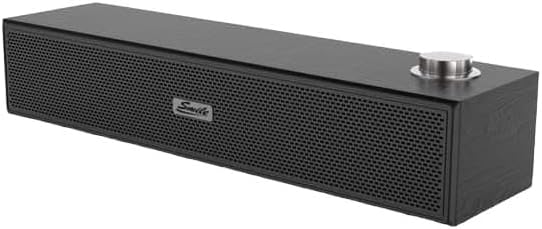
รูปที่ 4.1: ด้านหน้าและด้านบน view of the Smile S666 Multimedia Speaker, showing the speaker grille and volume knob. The speaker is available in different finishes, including wood grain and black.
5. การตั้งค่า
Follow these steps to set up your Smile S666 Multimedia Speaker:
- การจัดวาง: Place the speaker on a stable, flat surface near your computer or audio source. Ensure there is adequate ventilation around the speaker.
- เชื่อมต่อพลังงาน: Insert the USB power cable into the speaker's USB power port. Connect the other end of the USB cable to a powered USB port on your computer or a USB wall adapter (5V/1A recommended).
- เชื่อมต่อเสียง: Insert one end of the 3.5mm audio cable into the audio input port on the speaker. Connect the other end of the 3.5mm audio cable to the headphone jack or audio output port of your computer, laptop, or other audio device.
- เปิดเครื่อง: The speaker will typically power on automatically once connected to a power source. Some models may have a power switch integrated with the volume knob; turn the knob clockwise until you hear a click to power on.
6. คู่มือการใช้งาน
6.1 การปรับระดับเสียง
Rotate the volume knob on the top of the speaker clockwise to increase the volume and counter-clockwise to decrease it. You can also adjust the volume from your connected device.
6.2 การเล่นเสียง
Once connected, play audio from your computer or device. The sound will be output through the Smile S666 speaker.
7. การบำรุงรักษา
เพื่อให้ลำโพงของคุณอยู่ในสภาพที่ดีที่สุด:
- การทำความสะอาด: ใช้ผ้าแห้งนุ่มเช็ดทำความสะอาดภายนอกลำโพง ห้ามใช้น้ำยาทำความสะอาดหรือสารเคมีที่มีฤทธิ์กัดกร่อน
- พื้นที่จัดเก็บ: เมื่อไม่ได้ใช้งานเป็นเวลานาน ควรเก็บลำโพงไว้ในที่แห้งและเย็น หลีกเลี่ยงแสงแดดโดยตรงและอุณหภูมิที่สูงหรือต่ำเกินไป
- การดูแลสายเคเบิล: Avoid bending or crimping the power and audio cables excessively.
8 การแก้ไขปัญหา
| ปัญหา | สาเหตุที่เป็นไปได้ | สารละลาย |
|---|---|---|
| ไม่มีเสียง | Speaker not powered on; Cables not connected properly; Volume too low; Incorrect audio output selected on device. | Ensure speaker is powered on; Check all cable connections; Increase speaker and device volume; Select the correct audio output on your computer/device. |
| เสียงเพี้ยน | Volume too high; Poor audio source quality; Damaged cable. | Lower the volume; Try a different audio source; Replace the audio cable. |
| Speaker not recognized by computer | Driver issue (rare for plug-and-play speakers); USB port issue. | ลองใช้พอร์ต USB อื่นดู หรือลองรีสตาร์ทคอมพิวเตอร์ดู |
9. ข้อมูลจำเพาะ
| คุณสมบัติ | รายละเอียด |
|---|---|
| ขนาดสินค้า | 40 x 5 x 5 ซม. |
| วันที่พร้อมใช้งานครั้งแรก | วันที่ 7 สิงหาคม 2023 |
| ผู้ผลิต | smail |
| ASIN | B0CDZBFRQ5 |
| ชื่อแบรนด์ (ตามที่ระบุไว้) | ทั่วไป |
| เทคโนโลยีการเชื่อมต่อ | Wired (3.5mm Audio Jack), Bluetooth |
| ประเภทการติดตั้ง | ที่วางบนโต๊ะ |
| ชื่อรุ่น | S666 |
| ประเภทลำโพง | มัลติมีเดีย |
| อุปกรณ์ที่รองรับ | เครื่องคอมพิวเตอร์ส่วนบุคคล |
| เส้นผ่านศูนย์กลางซับวูฟเฟอร์ | 12 นิ้ว |
| สี | สีสันสดใส |
| ความต้านทานต่อน้ำ | เลขที่ |
10. การรับประกันและการสนับสนุน
This product comes with a standard manufacturer's warranty. For specific warranty terms and conditions, please refer to the warranty card included in the package or contact your point of purchase. For technical support or service inquiries, please contact the retailer or manufacturer directly.
หากต้องการความช่วยเหลือเพิ่มเติม คุณสามารถเยี่ยมชมเว็บไซต์ของผู้ผลิตได้ webหรือติดต่อฝ่ายบริการลูกค้า เก็บใบเสร็จรับเงินไว้เป็นหลักฐานการซื้อสำหรับการเคลมประกัน