
Jxrev J53
คู่มือการใช้งานหูฟังไร้สาย Jxrev J53
Model: J53 | Brand: Jxrev
การแนะนำ
The Jxrev J53 Wireless Earbuds offer a high-fidelity audio experience with advanced features designed for convenience and durability. Equipped with Bluetooth 5.4 technology, an LED power display, and IP7 waterproofing, these earbuds are suitable for various activities, from daily commutes to sports. This manual provides detailed instructions for setup, operation, and maintenance to ensure optimal performance.

Image: Jxrev J53 Wireless Earbuds in their rose gold charging case, displaying 100% battery on the LED screen.
มีอะไรอยู่ในกล่อง
- Wireless earbuds *2 (L/R)
- Super portable charging case with LED power display *1
- USB C fast charging cable *1
- คู่มือการใช้งาน
สินค้าเกินview
The Jxrev J53 earbuds feature a semi-in-ear design for comfortable wear and sensitive touch controls for easy management of audio and calls. The charging case includes an LED display to show battery levels.

Image: A woman holding a single Jxrev J53 earbud and the compact charging case, highlighting their small size and LED display.
การชาร์จไฟ
ก่อนใช้งานครั้งแรก ควรชาร์จหูฟังและเคสชาร์จให้เต็ม
- การชาร์จเคส: Connect the provided USB-C cable to the charging port on the case and to a compatible USB power source. The LED display on the case will show the charging progress. A full charge takes approximately 1 hour.
- การชาร์จหูฟัง: Place the earbuds into their respective slots in the charging case. They will automatically begin charging. The LED display on the case will indicate the battery level of each earbud.
A fully charged case can provide approximately 4 recharges for the earbuds, offering up to 40 hours of total playback time. Each earbud provides up to 8 hours of continuous use on a single charge.

Image: Jxrev J53 Wireless Earbuds in their charging case, illustrating the 8 hours of earbud playback, 40 hours with the case, and 1 hour charging time.
การจับคู่
- การจับคู่เริ่มต้น: เปิดฝากล่องชาร์จ หูฟังจะเข้าสู่โหมดจับคู่โดยอัตโนมัติ
- เปิดใช้งานบลูทูธ: On your iOS or Android device (smartphone, tablet, computer, laptop, TV), go to the Bluetooth settings and turn on Bluetooth.
- เลือกอุปกรณ์: Look for "J53" in the list of available devices and select it to connect.
- การเชื่อมต่อใหม่อัตโนมัติ: After the first successful pairing, the earbuds will automatically reconnect to your device when you open the charging case lid, provided Bluetooth is enabled on your device.

Image: Jxrev J53 Wireless Earbuds demonstrating advanced Bluetooth 5.4 connectivity, showing a quick and stable connection to various devices.
การควบคุมการทำงาน
The Jxrev J53 earbuds feature sensitive touch controls on each earbud, allowing you to manage music, calls, and voice assistance without needing to access your device.
- เล่น/หยุดชั่วคราว: แตะหูฟังข้างใดข้างหนึ่งสองครั้ง
- เพลงถัดไป: กดหูฟังเอียร์บัดด้านขวาค้างไว้ 2 วินาที
- แทร็กก่อนหน้า: กดหูฟังข้างซ้ายค้างไว้ 2 วินาที
- เพิ่ม/ลดระดับเสียง: Tap either earbud once (specific earbud for up/down may vary, refer to quick guide for precise assignment).
- รับ/วางสาย: แตะหูฟังข้างใดข้างหนึ่งสองครั้ง
- ปฏิเสธสาย: กดเอียร์บัดข้างใดข้างหนึ่งค้างไว้ 2 วินาที
- เปิดใช้งาน Voice Assistant: แตะหูฟังข้างใดข้างหนึ่งสามครั้ง

Image: Visual guide to the touch controls on the Jxrev J53 Wireless Earbuds, detailing actions for music, calls, and voice assistant.
คุณภาพเสียง
Experience Hi-Fi stereo sound with crisp, clear high notes and deep, rich bass, delivered by 13mm dynamic speakers. The built-in microphones feature ENC noise reduction, reducing environmental noise by up to 35dB for clearer calls.

Image: Jxrev J53 Wireless Earbuds shown with sound waves, emphasizing Hi-Fi stereo sound and clear calls.

ภาพ: รายละเอียด view of the 13mm dynamic driver within the Jxrev J53 earbud, responsible for deep bass.
ความต้านทานต่อน้ำ
The Jxrev J53 Wireless Earbuds are IP7 waterproof. The internal components are coated with a nano-coating to prevent sweat immersion and protect against damage. This makes them suitable for sports and use in light rain.
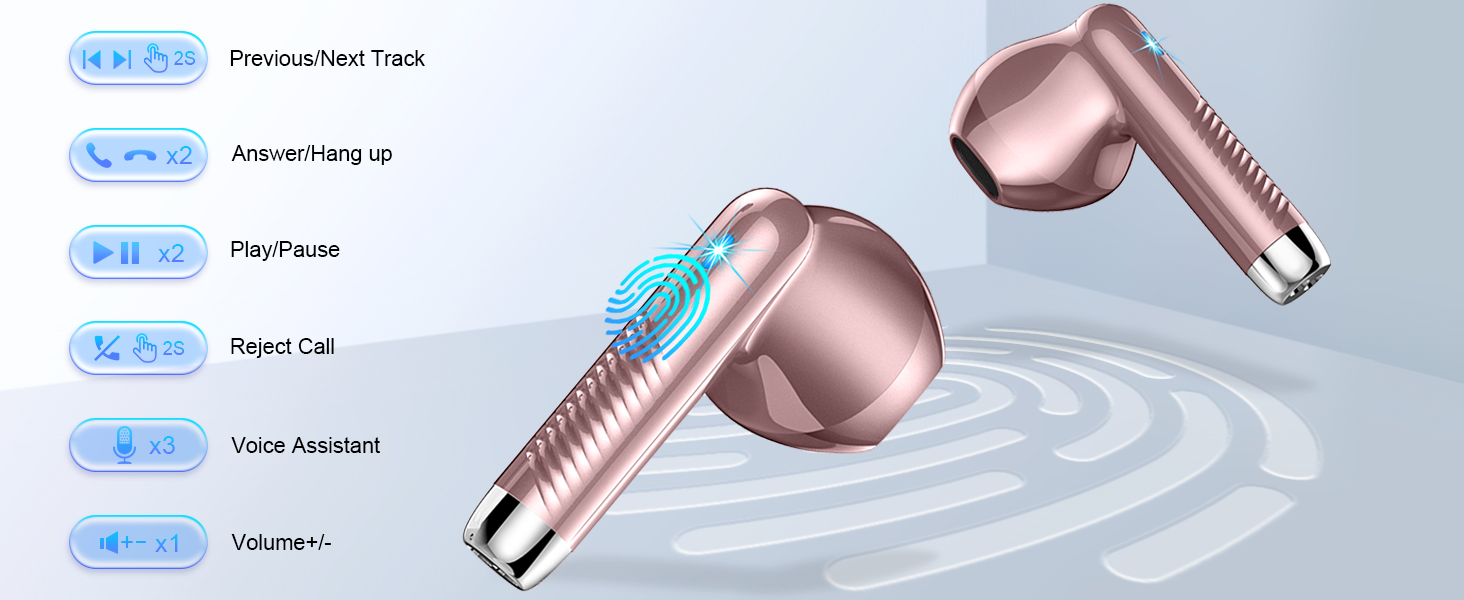
Image: Jxrev J53 Wireless Earbuds shown underwater, demonstrating their IP7 waterproof capability.
การซ่อมบำรุง
- การทำความสะอาด: ใช้ผ้าแห้งนุ่มเช็ดทำความสะอาดหูฟังและกล่องชาร์จ หลีกเลี่ยงการใช้สารเคมีรุนแรงหรือวัสดุที่มีฤทธิ์กัดกร่อน
- พื้นที่จัดเก็บ: ควรเก็บหูฟังไว้ในกล่องชาร์จเมื่อไม่ได้ใช้งาน เพื่อป้องกันความเสียหายและเพื่อให้มั่นใจว่าหูฟังมีประจุไฟอยู่เสมอ
- หลีกเลี่ยงเงื่อนไขที่รุนแรง: Do not expose the earbuds or case to extreme temperatures, humidity, or direct sunlight for prolonged periods.
การแก้ไขปัญหา
| ปัญหา | สารละลาย |
|---|---|
| หูฟังเอียร์บัดไม่จับคู่ | Ensure earbuds are charged. Turn off and on Bluetooth on your device. Delete "J53" from your device's Bluetooth list and re-pair. |
| ไม่มีเสียง/เสียงเบา | ตรวจสอบระดับเสียงของอุปกรณ์และระดับเสียงของหูฟัง ตรวจสอบให้แน่ใจว่าหูฟังอยู่ในหูอย่างถูกต้อง เชื่อมต่อบลูทูธอีกครั้ง |
| หูฟังเอียร์บัดไม่ชาร์จ | Ensure charging case is charged. Check USB-C cable connection. Ensure earbuds are correctly placed in the case. |
| การเชื่อมต่อเป็นระยะ | Ensure no obstacles between earbuds and device. Move closer to your device. Avoid strong electromagnetic interference. |
ข้อมูลจำเพาะ
- ชื่อรุ่น : เจ 53
- เทคโนโลยีการเชื่อมต่อ: ไร้สาย (บลูทูธ 5.4)
- ประเภทไดรเวอร์เสียง: ไดร์เวอร์แบบไดนามิก
- ขนาดไดร์เวอร์เสียง: 13 มิลลิเมตร
- อายุการใช้งานแบตเตอรี่ (เอียร์บัด): 8 ชั่วโมง
- Total Playback Time (with Case): 40 ชั่วโมง
- เวลาในการชาร์จ: 1 ชั่วโมง
- ระดับการต้านทานน้ำ: กันน้ำระดับ IP7
- วิธีการควบคุม: สัมผัส
- Item Weight (single earbud): 3 กรัม
- การควบคุมเสียงรบกวน: Sound Isolation (ENC Noise Cancelling Mic)
- อุปกรณ์ที่รองรับ: Cellphones (Android, iOS)
การรับประกันและการสนับสนุน
For warranty information, technical support, or customer service inquiries, please refer to the contact details provided on the product packaging or visit the official Jxrev webไซต์นี้ โปรดเก็บใบเสร็จรับเงินที่ซื้อไว้เพื่อใช้เรียกร้องการรับประกัน
Ask a question about this manual
Ask about setup, troubleshooting, compatibility, parts, safety, or missing instructions. Manuals+ will review the question and use this page’s manual context to help answer it.