
1. บทนำ
The UNI-T UT526 is a multifunction electrical installation tester designed for comprehensive electrical system analysis. It accurately measures insulation resistance, RCD (Residual Current Device) status, low resistance continuity, and AC/DC voltage. This device is suitable for testing power distribution systems, lightning protection systems, and wiring systems to ensure safe operation and compliance with electrical standards.

รูปที่ 1 : ด้านหน้า view of the UNI-T UT526 Multifunction Electrical Installation Tester.
2. ข้อมูลด้านความปลอดภัย
Before operating the UT526, read and understand all safety warnings and operating instructions. Failure to follow these instructions may result in electric shock, fire, or serious injury. Keep this manual for future reference.
- ตรวจสอบให้แน่ใจเสมอว่าอุปกรณ์อยู่ในสภาพใช้งานได้ดีก่อนใช้งาน
- Do not use the tester if it appears damaged or if the test leads are compromised.
- Verify the correct function of the tester on a known voltage source ก่อนและหลังใช้งาน
- ปฏิบัติตามกฎระเบียบด้านความปลอดภัยทั้งในระดับท้องถิ่นและระดับประเทศ
- สวมใส่อุปกรณ์ป้องกันส่วนบุคคล (PPE) ที่เหมาะสม รวมถึงแว่นตานิรภัยและถุงมือกันความร้อน
- Avoid working alone when performing electrical tests.
- ห้ามใช้ค่ากำลังไฟฟ้าขาเข้าเกินค่าสูงสุดที่กำหนดไว้สำหรับฟังก์ชันใดๆ
- Ensure the circuit under test is de-energized and locked out before making connections for resistance or continuity measurements.
3. เนื้อหาบรรจุภัณฑ์
Carefully unpack the box and ensure all items listed below are present and undamaged. If any item is missing or damaged, contact your supplier immediately.
- 1 x UT526 Earth Resistance Tester
- 1 x Test Lead Set
- 1 x Alligator Clip Set
- คู่มือภาษาอังกฤษ 1 เล่ม
- 1 x สายคล้องไหล่
- 1 x กระเป๋าใส่ของ
- 1 x กล่องสี
Note: Batteries are not included and must be purchased separately (1.5V AA batteries x 6).
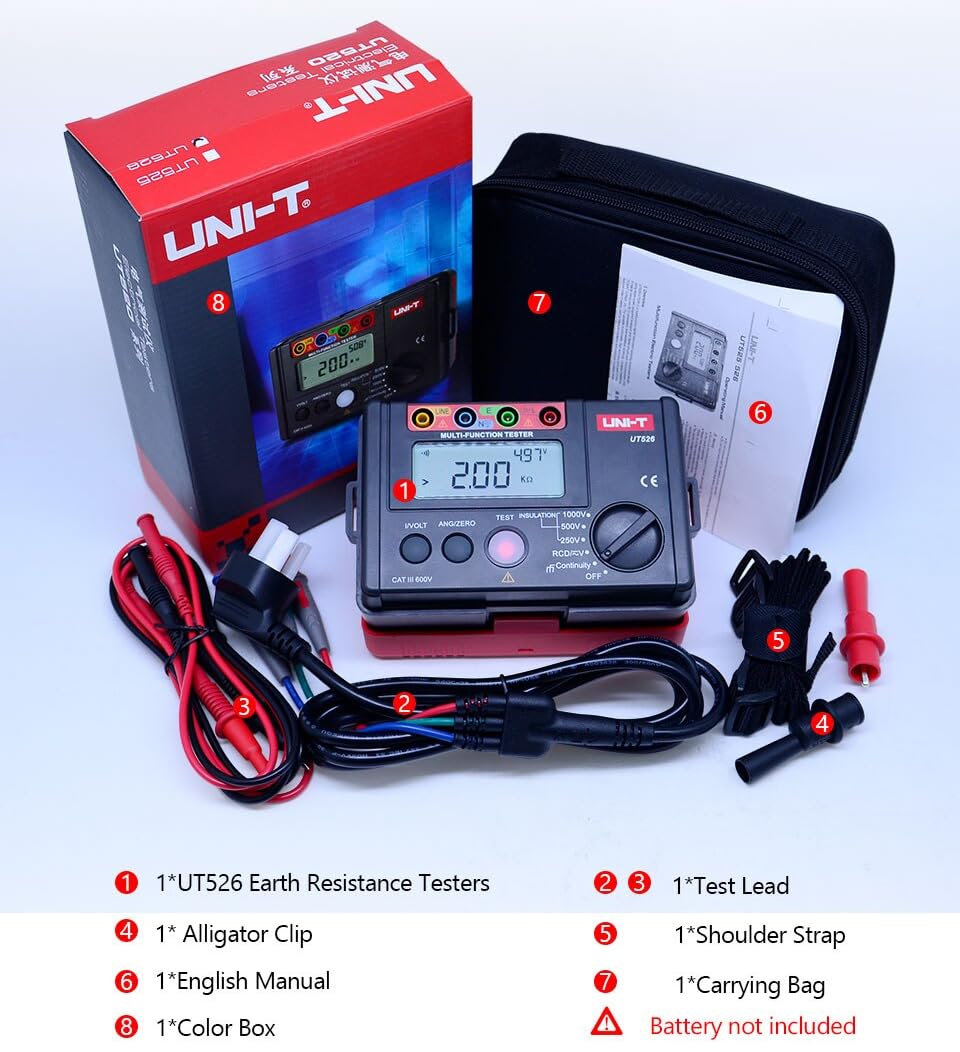
Figure 2: Included components of the UT526 package.
4. คุณสมบัติของผลิตภัณฑ์
The UNI-T UT526 offers a range of features for reliable electrical installation testing:
- จำนวนการแสดงผล: 10000 for precise readings.
- ช่วงคู่มือ: Allows for specific range selection.
- Phase Switch (RCD): Supports 0° and 180° phase testing.
- สัญญาณเตือนแบตเตอรี่ต่ำ: แจ้งเตือนเมื่อแบตเตอรี่ถึงเวลาเปลี่ยน
- ปรับระดับเสียง AC/DC อัตโนมัติtage บัตรประจำตัว: Simplifies voltagการวัดอี
- Red Warning Lights: Visual alert for hazardous conditions.
- ใบรับรอง: ผ่านมาตรฐาน CE และ UKCA
5. การตั้งค่า
Before first use, install the batteries and prepare the test leads.
5.1 การติดตั้งแบตเตอรี่
- หาช่องใส่แบตเตอรี่ที่ด้านหลังของอุปกรณ์
- ใช้ไขควงเปิดฝาครอบแบตเตอรี่
- Insert 6 x 1.5V AA batteries, observing the correct polarity.
- ใส่ฝาครอบแบตเตอรี่และขันให้แน่นด้วยสกรู
5.2 การเชื่อมต่อสายทดสอบ
Connect the test leads to the appropriate input terminals on the UT526. The terminals are color-coded and labeled for clarity (e.g., LINE, N, E, L).
6. คู่มือการใช้งาน
The UT526 offers various measurement functions. Select the desired function using the rotary switch.
6.1 Measuring Insulation Resistance
This function measures the insulation resistance of electrical circuits and equipment.
- Turn the rotary switch to one of the insulation test voltage settings: 100V, 250V, 500V, or 1000V.
- Insert test leads into the input terminals (Red to LINE, Black to N) and connect them to the circuit under test. High voltage ออกจากเทอร์มินัล LINE
- สำหรับการวัดอย่างต่อเนื่อง ให้กดปุ่ม ทดสอบ button. The tester will self-lock, output the test voltage, and emit a warning light simultaneously.
- Once the measurement is finished, press ทดสอบ again to unlock and stop the continuous measurement.
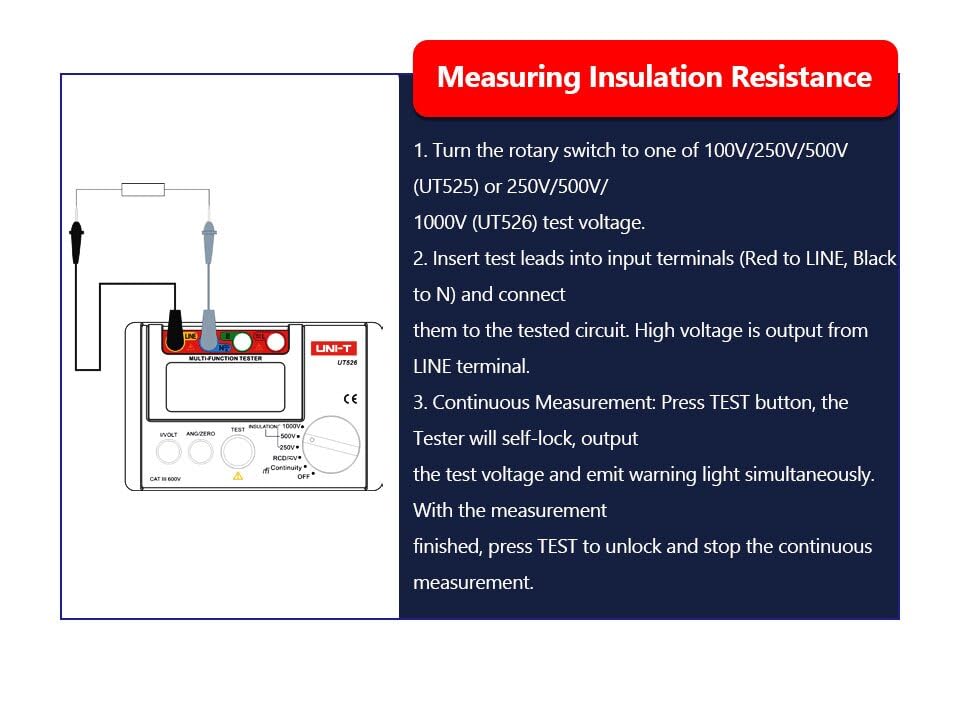
Figure 3: Setup for measuring insulation resistance.
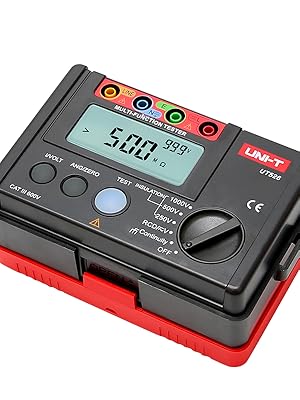
Figure 4: UT526 performing an insulation resistance test with warning light activated.
6.2 RCD Test (Residual Current Device)
The RCD test function verifies the proper operation of Residual Current Devices, ensuring they trip within specified parameters.
- Turn the rotary switch to the RCD function.
- Connect the test leads to the appropriate terminals of the RCD or circuit.
- Select the desired test current and phase (0° or 180°) using the function buttons.
- Initiate the test. The device will measure the trip time and display the result.
Video 1: Demonstration of the RCD test function using the UNI-T UT526. This video shows the connection and operation of the RCD test, illustrating how the device measures the trip time of a residual current device.

Figure 5: UT526 connected for an RCD test.
6.3 Low Resistance Continuity Measurement
This function checks for continuity in circuits and measures low resistance values.
- Turn the rotary switch to the Continuity function.
- Connect the test leads across the component or circuit to be tested.
- The display will show the resistance value. An audible beep indicates continuity (typically below a certain resistance threshold).

Figure 6: UT526 performing a low resistance continuity test on a motor.
6.4 โวลต์ AC/DCtagอีการวัด
The UT526 can measure both AC and DC voltagใช่
- หมุนสวิตช์แบบหมุนไปที่ตำแหน่ง V (ระดับเสียง)tage) function. The device will automatically identify AC or DC voltage.
- Connect the test leads in parallel with the circuit or component where voltage จะต้องถูกวัด
- หน้าจอจะแสดงปริมาตรที่วัดได้tagมูลค่าอี
6.5 Ground Resistance Measurement
While the UT526 is primarily a multifunction electrical installation tester, it also supports ground resistance measurements.
- Turn the rotary switch to the appropriate ground resistance setting (if available, or use continuity for basic checks).
- Connect the test leads according to the specific ground resistance testing method (e.g., 3-pole or 4-pole method, if supported by the model).
- Initiate the measurement and read the ground resistance value from the display.

Figure 7: UT526 connected for ground resistance testing.
7. การบำรุงรักษา
Proper maintenance ensures the longevity and accuracy of your UT526 tester.
- การทำความสะอาด: เช็ดอุปกรณ์ด้วยโฆษณาamp cloth and mild detergent. Do not use abrasive cleaners or solvents. Ensure the device is dry before storage.
- การเปลี่ยนแบตเตอรี่: เปลี่ยนแบตเตอรี่ทันทีเมื่อไฟแสดงสถานะแบตเตอรี่ต่ำปรากฏขึ้น ถอดแบตเตอรี่ออกหากไม่ได้ใช้งานอุปกรณ์เป็นเวลานานเพื่อป้องกันการรั่วไหล
- พื้นที่จัดเก็บ: Store the tester in a cool, dry place, away from direct sunlight and extreme temperatures. Use the provided carrying bag for protection.
- การสอบเทียบ: For professional use, periodic calibration by an authorized service center is recommended to maintain measurement accuracy.
8 การแก้ไขปัญหา
If you encounter issues with your UT526, refer to the following common problems and solutions:
| ปัญหา | สาเหตุที่เป็นไปได้ | สารละลาย |
|---|---|---|
| อุปกรณ์ไม่เปิดเครื่อง | แบตเตอรี่หมดหรือติดตั้งไม่ถูกต้อง | เปลี่ยนแบตเตอรี่โดยตรวจสอบให้แน่ใจว่าใส่ขั้วถูกต้อง |
| การอ่านที่ไม่ถูกต้อง | Poor test lead connection, out of calibration, environmental interference | Ensure secure connections. Check against a known source. Consider professional calibration. |
| RCD test fails to trip | Faulty RCD, incorrect test parameters, wiring issue | Verify RCD functionality independently. Check test current and phase settings. Inspect circuit wiring. |
| หน้าจอแสดง "OL" (โอเวอร์โหลด) | Measurement exceeds selected range or device capability | Select a higher range or ensure the measurement is within the device's specifications. |
9. ข้อมูลจำเพาะ
Detailed technical specifications for the UNI-T UT526 Multifunction Electrical Installation Tester are provided below.

Figure 8: Comprehensive specifications for the UT526.
| ข้อมูลจำเพาะ | ค่า |
|---|---|
| ยี่ห้อ | หน่วย |
| แบบอย่าง | HY-UT526 |
| แหล่งพลังงาน | Battery Powered (6 x 1.5V AA) |
| น้ำหนักสินค้า | 0.6 กก. |
| ขนาดรายการ | 6.5 x 4.33 x 4.72 นิ้ว |
| ตรงตามข้อกำหนด | CE, ISO 9001, RoHS, UKCA |
| จำนวนการแสดงผล | 10000 |
| การทดสอบความต้านทานฉนวนฉบับtages | 100 โวลต์ 250 โวลต์ 500 โวลต์ 1000 โวลต์ |
| RCD Phase Switch | 0° และ 180° |
| การบ่งชี้แบตเตอรี่ต่ำ | ใช่ |
| ปรับระดับเสียง AC/DC อัตโนมัติtage Identification | ใช่ |
| ไฟเตือนสีแดง | ใช่ |
10. การรับประกัน
The UNI-T UT526 Multifunction Electrical Installation Tester comes with a รับประกัน 1 ปี from the date of purchase. This warranty covers defects in materials and workmanship under normal use. It does not cover damage caused by misuse, accident, unauthorized modification, or neglect. Please retain your proof of purchase for warranty claims.
11. การสนับสนุน
For technical assistance, troubleshooting beyond this manual, or warranty inquiries, please contact UNI-T customer support. Refer to the official UNI-T webไซต์หรือบรรจุภัณฑ์ผลิตภัณฑ์ของคุณเพื่อรับข้อมูลติดต่อล่าสุด
เจ้าหน้าที่ UNI-T Webเว็บไซต์: www.uni-trend.com


