
1. บทนำ
Thank you for choosing the EBERTH Inverter Generator 2000W. This manual provides essential information for the safe and effective use of your generator. Please read it thoroughly before operating the device and keep it for future reference. This generator is designed to provide reliable power for various applications, including camping, job sites, and as an emergency power source.
2. ข้อมูลด้านความปลอดภัย
Always prioritize safety when operating the generator. Failure to follow these instructions can result in serious injury or property damage.
- อันตรายจากคาร์บอนมอนอกไซด์: Never operate the generator indoors or in enclosed spaces. Exhaust fumes contain carbon monoxide, a colorless, odorless, and deadly gas.
- อันตรายจากไฟไหม้: น้ำมันเบนซินไวไฟสูง ควรเติมน้ำมันในบริเวณที่มีอากาศถ่ายเทสะดวก โดยดับเครื่องยนต์และรอให้เครื่องเย็นลงก่อน ห้ามสูบบุหรี่หรือจุดไฟใกล้เครื่องกำเนิดไฟฟ้า
- อันตรายจากไฟฟ้าช็อต: Do not operate the generator in wet conditions. Ensure all connections are secure and dry. Never touch electrical components with wet hands.
- พื้นผิวที่ร้อน: เครื่องยนต์และท่อไอเสียของเครื่องกำเนิดไฟฟ้าจะร้อนจัดขณะใช้งาน และจะยังคงร้อนอยู่ระยะหนึ่งหลังจากปิดเครื่องแล้ว โปรดหลีกเลี่ยงการสัมผัสเพื่อป้องกันการไหม้
- เด็กและสัตว์เลี้ยง: ให้เด็กและสัตว์เลี้ยงอยู่ห่างจากเครื่องปั่นไฟในระหว่างการทำงาน
- ระบบตัดการทำงานเมื่อระดับน้ำมันต่ำ: The generator is equipped with a low oil shutdown system to protect the engine. Do not bypass this safety feature.
3. สินค้าหมดview
The EBERTH Inverter Generator 2000W is a compact and powerful unit designed for portability and clean power delivery.
คุณสมบัติหลัก:
- เครื่องยนต์: 3 HP / 2.2 kW, air-cooled, 1-cylinder, 4-stroke gasoline engine with 79.8 cc displacement.
- กำลังขับ: 2000 watts continuous, 2050 watts maximum.
- เทคโนโลยีอินเวอร์เตอร์: Provides stable, clean power suitable for sensitive electronics.
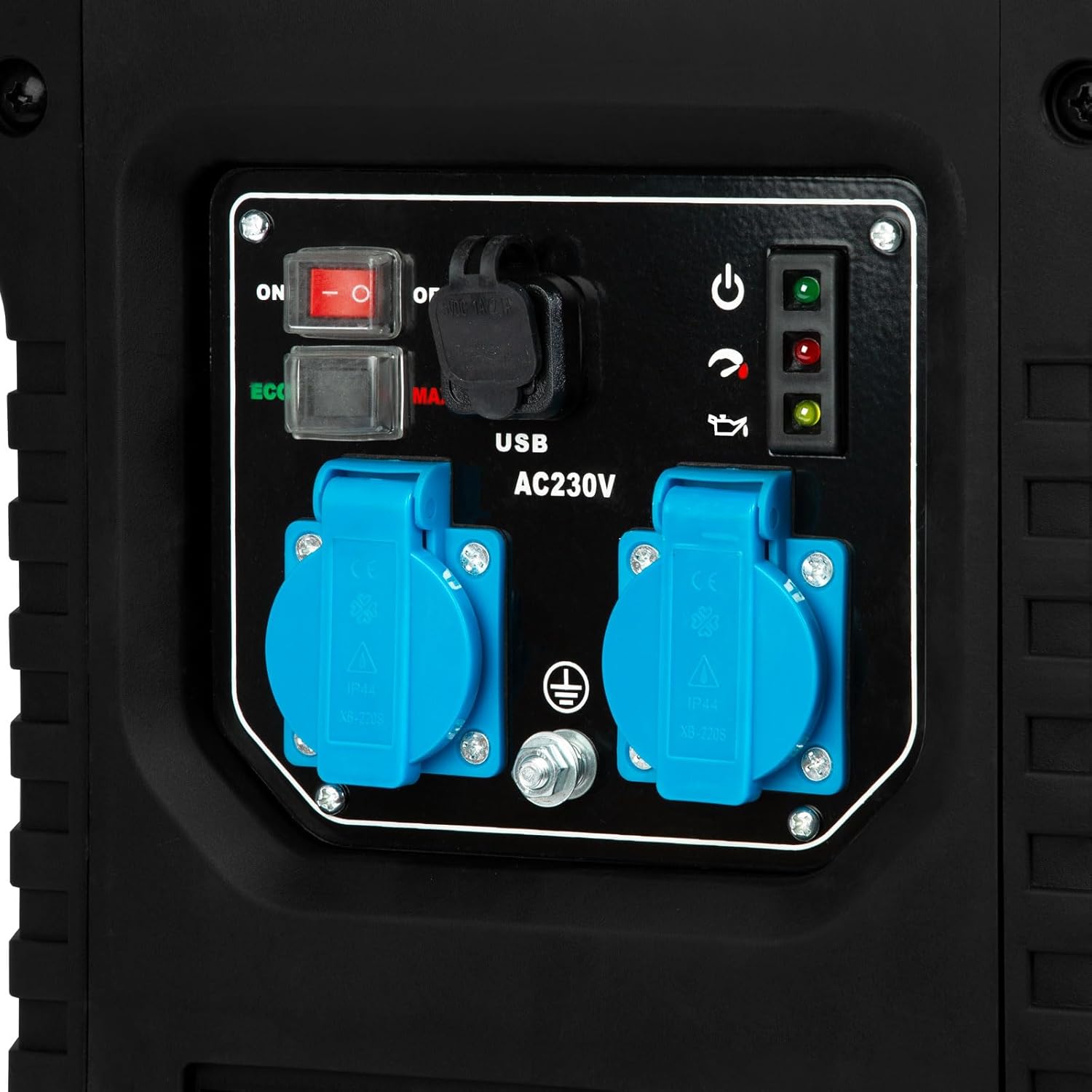
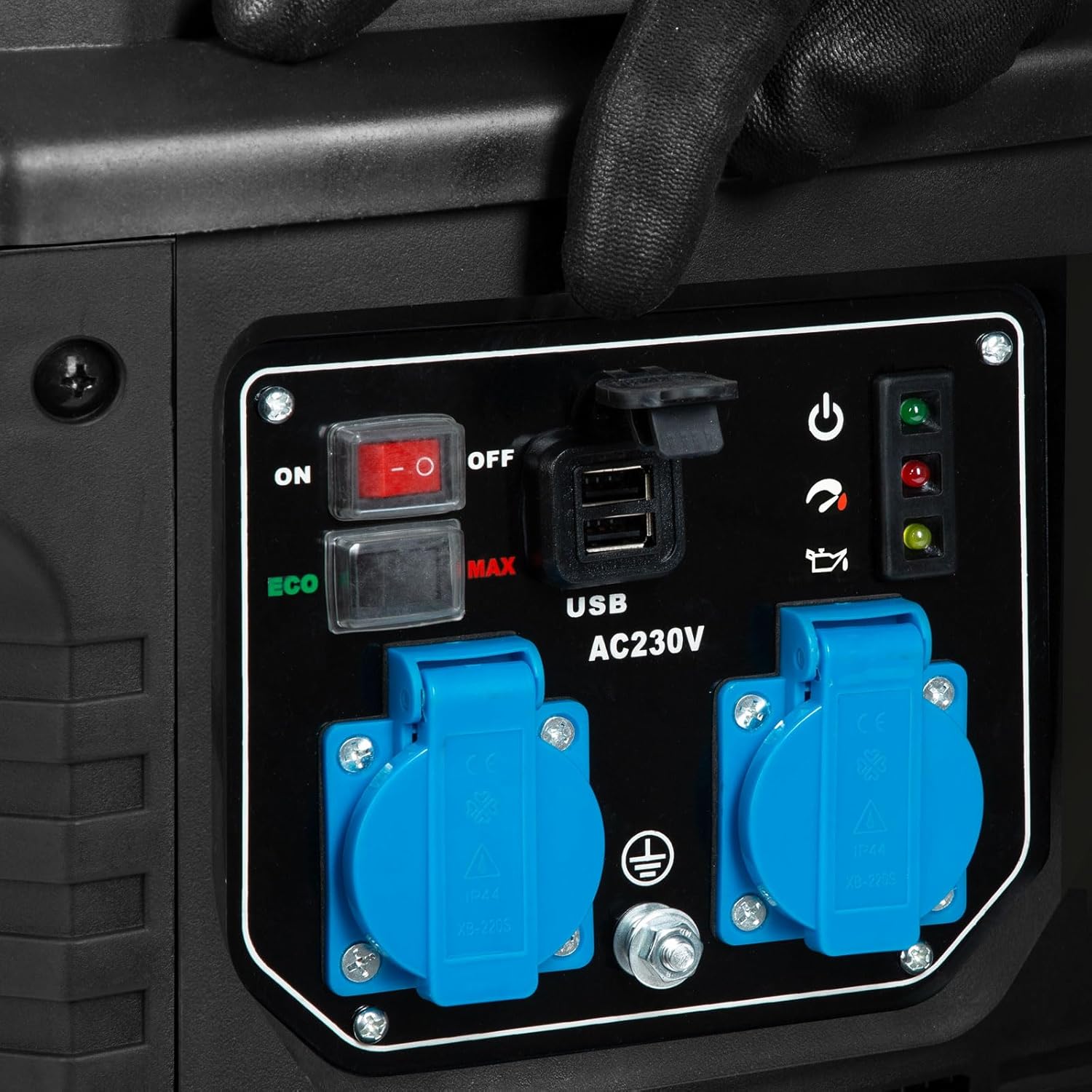
- ช่องทางการจำหน่าย: Two 230V AC outlets and two 12V USB ports.
- โหมด: ECO mode for fuel efficiency and MAX mode for full power.
- ความปลอดภัย: Overload switch and low oil shutdown protection.
- ความสามารถในการพกพา: Robust casing with an integrated carrying handle.
ส่วนประกอบ:

4. การตั้งค่า
ก่อนใช้งานเครื่องกำเนิดไฟฟ้าครั้งแรก ต้องมีการตั้งค่าเบื้องต้น รวมถึงการเติมน้ำมันเครื่องและเชื้อเพลิง
4.1 เติมน้ำมันเครื่อง
The generator is shipped without engine oil. Fill the crankcase with the recommended oil type (e.g., SAE 10W-30) to the appropriate level. Refer to the oil cap/dipstick for markings.

4.2 เติมน้ำมัน
Fill the fuel tank with Super or Super Plus gasoline. The fuel tank capacity is 4 liters. Do not overfill. Ensure the fuel cap is securely tightened after refueling.

4.3 การจัดวาง
Place the generator on a firm, level surface outdoors, away from windows, doors, and vents to prevent carbon monoxide from entering occupied areas. Ensure adequate clearance around the generator for ventilation.
5. การดำเนินการ
Follow these steps to start and operate your EBERTH Inverter Generator.
5.1 การสตาร์ทเครื่องกำเนิดไฟฟ้า
- ตรวจสอบให้แน่ใจว่าเครื่องกำเนิดไฟฟ้าตั้งอยู่บนพื้นราบ และมีน้ำมันและเชื้อเพลิงเพียงพอ
- หมุนวาล์วเชื้อเพลิงไปที่ตำแหน่ง 'เปิด'
- เลื่อนคันโยกช็อกไปที่ตำแหน่ง 'CHOKE' (ถ้าเครื่องยนต์เย็น)
- หมุนสวิตช์เครื่องยนต์ไปที่ตำแหน่ง 'เปิด'
- ดึงคันสตาร์ทให้แน่นจนกว่าเครื่องยนต์จะสตาร์ท
- เมื่อเครื่องยนต์สตาร์ท ให้ค่อยๆ เลื่อนคันโยกโช้กไปที่ตำแหน่ง 'RUN'

5.2 การเชื่อมต่ออุปกรณ์ไฟฟ้า
Once the generator is running, you can connect your electrical devices.
- Plug your 230V devices into the AC outlets.
- Plug your USB devices into the 12V USB ports.
- ตรวจสอบให้แน่ใจว่าวัตต์รวมtage of connected devices does not exceed the generator's continuous output of 2000W. The overload indicator will illuminate if overloaded.


5.3 โหมด ECO และ MAX
- โหมด ECO: Reduces engine speed when the load is low, improving fuel efficiency and reducing noise. Ideal for light loads.
- โหมดสูงสุด: Operates the engine at full speed to provide maximum power output. Use for heavy loads or when starting high-demand appliances.
5.4 การปิดเครื่องกำเนิดไฟฟ้า
- ถอดอุปกรณ์ไฟฟ้าทั้งหมดออกจากเครื่องปั่นไฟ
- หมุนสวิตช์เครื่องยนต์ไปที่ตำแหน่ง 'ปิด'
- หมุนวาล์วเชื้อเพลิงไปที่ตำแหน่ง 'ปิด'
6. การบำรุงรักษา
การบำรุงรักษาอย่างสม่ำเสมอจะช่วยให้เครื่องกำเนิดไฟฟ้าของคุณมีอายุการใช้งานยาวนานและทำงานได้อย่างน่าเชื่อถือ
6.1 การเติมน้ำมัน
The generator operates for approximately 5 to 6 hours on a full 4-liter tank, depending on the load. Always use fresh Super or Super Plus gasoline.
6.2 Oil Check and Change
Check the engine oil level before each use. Change the oil after the first 20 hours of operation, and then every 50-100 hours or annually, whichever comes first.
6.3 การบำรุงรักษาตัวกรองอากาศ
Inspect the air filter regularly. Clean or replace the air filter element as needed, especially when operating in dusty conditions. A dirty air filter can reduce engine performance and increase fuel consumption.

6.4 หัวเทียน
Inspect the spark plug annually or every 100 hours. Clean or replace if necessary to ensure easy starting and efficient engine operation.
7 การแก้ไขปัญหา
This section provides solutions to common operational issues. For problems not listed here, please contact customer support.
| ปัญหา | สาเหตุที่เป็นไปได้ | สารละลาย |
|---|---|---|
| เครื่องยนต์ไม่ติด | No fuel, low oil, choke incorrect, engine switch off, spark plug issue | Add fuel, check oil level, adjust choke, turn engine switch ON, inspect/clean spark plug |
| ไม่มีกำลังขับออก | Overload switch tripped, device faulty, generator not running correctly | Reduce load, reset overload switch, check device, ensure stable engine operation |
| เครื่องยนต์ทำงานไม่เรียบ | Dirty air filter, stale fuel, spark plug issue | Clean/replace air filter, drain old fuel and add fresh, inspect/clean spark plug |
| ไฟแสดงสถานะโอเวอร์โหลดติด | Too many devices connected, short circuit in connected device | Reduce electrical load, check connected devices for faults, restart generator |
8. ข้อมูลจำเพาะ
Detailed technical specifications for the EBERTH Inverter Generator 2000W.
| คุณสมบัติ | ข้อมูลจำเพาะ |
|---|---|
| หมายเลขรุ่น | GG1-IS2000 |
| ชนิดเครื่องยนต์ | 4-stroke, 1-cylinder, air-cooled gasoline engine |
| กำลังเครื่องยนต์ | 3 แรงม้า / 2.2 กิโลวัตต์ |
| การเคลื่อนย้าย | 79.8 ซีซี |
| กำลังไฟออกต่อเนื่อง | 2000 วัตต์ |
| กำลังขับสูงสุด | 2050 วัตต์ |
| เล่มที่tage | 230 โวลต์ |
| ความถี่ | 50 เฮิรตซ์ |
| AC Outlets AC | 2 x 230V |
| พอร์ต USB | 2 x 12V |
| ชนิดเชื้อเพลิง | Super or Super Plus Gasoline |
| ความจุถังเชื้อเพลิง | 4 ลิตร |
| Run Time (full tank) | 5-6 hours (load dependent) |
| ระบบจุดระเบิด | Mechanical (recoil start) |
| ระดับเสียง (ที่ 7m) | ประมาณ 69 เดซิเบล |
| ขนาด (กว้าง x ยาว x สูง) | 42 ซม. x 31 ซม. x 46 ซม. |
| Weight (without consumables) | 20 กก. |

9. การรับประกันและการสนับสนุน
EBERTH is committed to providing quality products and support.
บริการซ่อม: EBERTH offers repair services in Germany. Defective devices are repaired quickly and reliably at our return warehouse with a workshop, then returned to the customer free of charge. For service inquiries, please contact your retailer or EBERTH customer support directly.
โปรดเก็บหลักฐานการซื้อของคุณไว้เพื่อเรียกร้องการรับประกัน