
ฉลามโจมตี M71
คู่มือผู้ใช้คีย์บอร์ดไร้สาย ATTACK SHARK M71
รุ่น : M71
การแนะนำ
This manual provides detailed instructions for the setup, operation, and maintenance of your ATTACK SHARK M71 75% TKL Wireless Mechanical Keyboard. Please read this guide thoroughly to ensure proper use and to maximize your keyboard's performance and lifespan.

Image: The ATTACK SHARK M71 keyboard showcasing its 68% layout and key features like aluminum alloy body, three-mode connection, and RGB backlight.
เนื้อหาแพ็คเกจ
ตรวจสอบว่ามีรายการทั้งหมดอยู่ในแพ็คเกจ:
- ATTACK SHARK M71 Wireless Mechanical Keyboard
- สายเคเบิล Type-C
- ตัวรับสัญญาณไร้สาย 2.4G
- Keycap Puller / Switch Puller (Two-in-one tool)
- Complimentary 61 additional PBT OEM keycaps (different color layout)
- คู่มือการใช้งาน

Image: A visual representation of the items included in the ATTACK SHARK M71 keyboard package, including the keyboard, cables, and extra keycaps.
Video: Unboxing the Blueberry version of the M71 keyboard, showing the package contents and a demonstration of its typing sound.
สินค้าเกินview
The ATTACK SHARK M71 is a 75% TKL wireless mechanical keyboard featuring a full aluminum CNC chassis, multi-mode connectivity, hot-swappable switches, and RGB lighting. Its compact design and robust construction are engineered for both gaming and productivity.
คุณสมบัติหลัก:
- Full Aluminum CNC Body: Constructed from international standard 6063 aluminum alloy for durability and a premium feel.
- การเชื่อมต่อสามโหมด: Supports Bluetooth 5.0/3.0, 2.4G wireless, and wired USB-C connections.
- สวิตช์แบบ Hot-Swappable: Compatible with 3/5-pin switches, allowing for easy customization without soldering.
- โครงสร้างการติดตั้งแบบใช้ปะเก็น: Incorporates anti-static IPEX switch pads, PORON sound-absorbing cotton, and PET acoustic switch pads to enhance typing feel and reduce noise.
- แสงไฟ LED RGB: Features customizable RGB backlighting and a side LED light strip.
- แบตเตอรี่ 4600mAh: ช่วยให้ใช้งานระบบไร้สายได้นานขึ้น
- PBT OEM Keycaps: Durable keycaps with GMK-like characters.
ส่วนประกอบ:
Familiarize yourself with the main components of your keyboard:
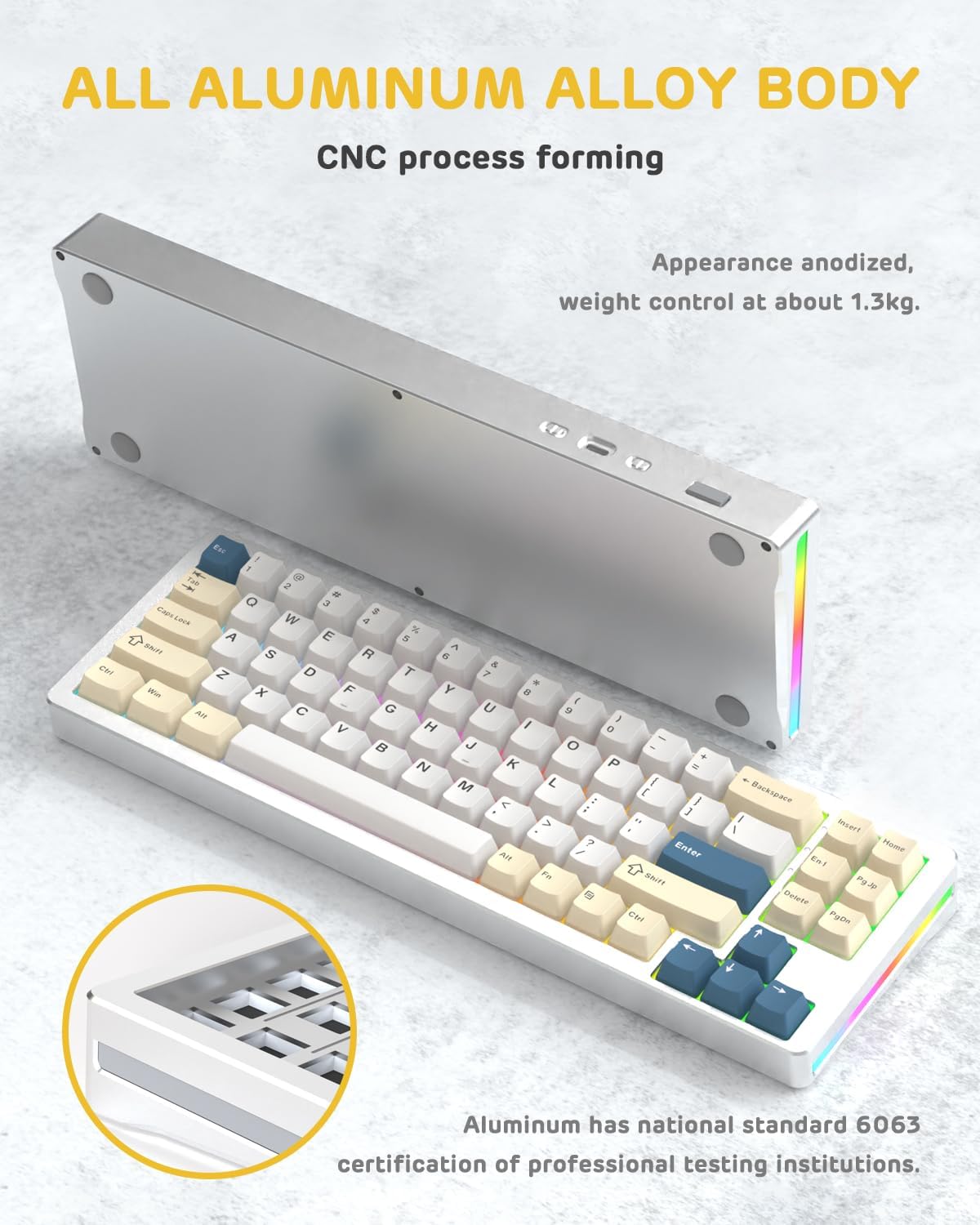
ภาพ: ด้านหนึ่ง view of the M71 keyboard highlighting its full aluminum alloy body and CNC process forming.

ภาพ: ระเบิด view illustrating the multi-layered gasket mount structure, including the PBT keycaps, aluminum alloy upper cover, customized switch body, PC positioning board, PORON filled cotton, anti-static IPEX switch underpad, PET singing pad, PCB board, PORON shaft seat cushion, PET sound backing pad, wing light strip, and aluminum alloy base.
การตั้งค่า
1. Connectivity Modes:
The M71 keyboard supports three connection modes: Bluetooth, 2.4G wireless, and wired USB-C.
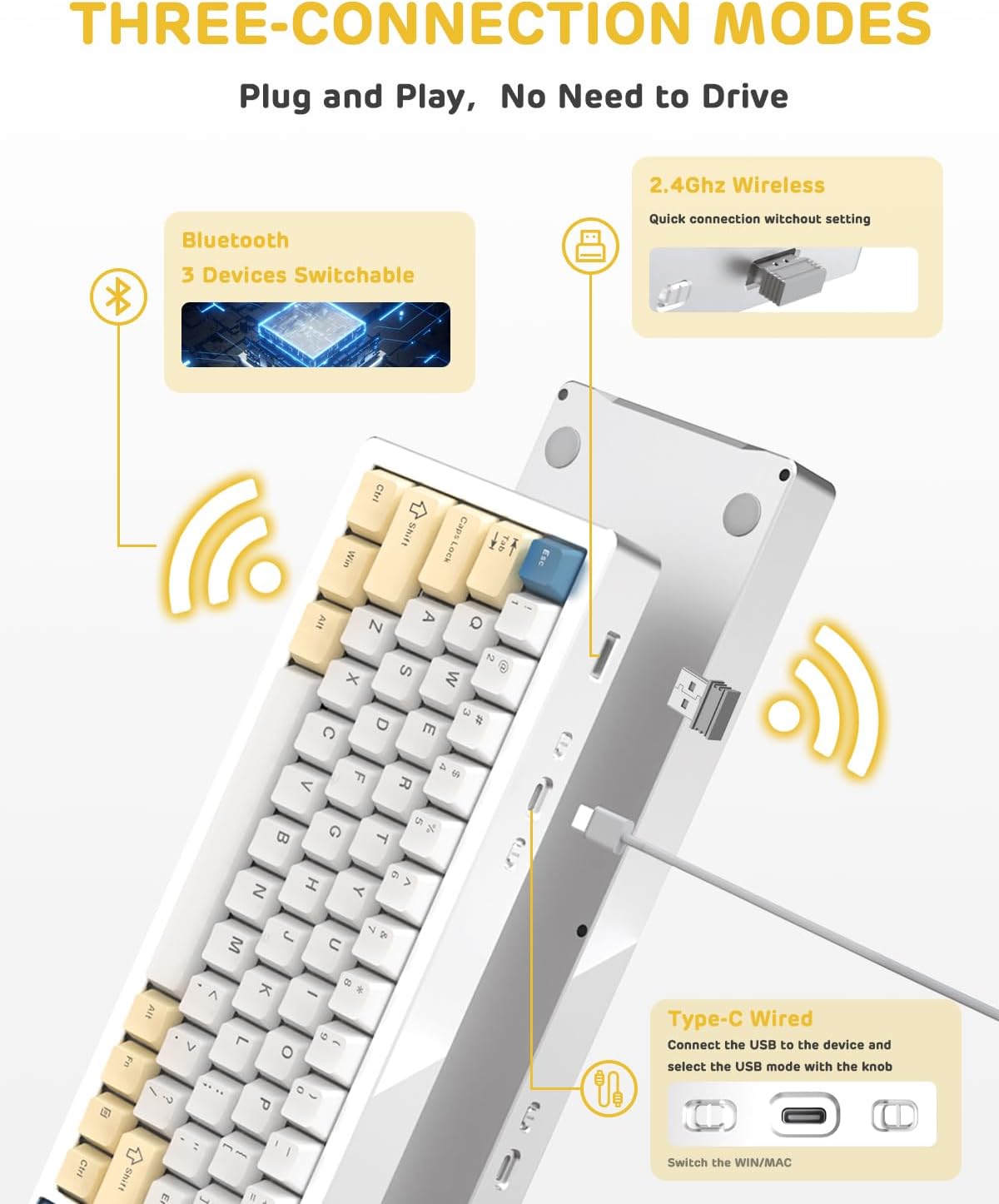
Image: A visual guide to the three connectivity options: Bluetooth for up to 3 devices, 2.4GHz wireless with a receiver, and wired Type-C connection.
การเชื่อมต่อแบบมีสาย:
- Connect the provided Type-C cable to the keyboard's USB-C port and to your computer's USB port.
- Ensure the mode switch on the keyboard is set to the wired (USB-C) position.
- ระบบของคุณจะจดจำแป้นพิมพ์โดยอัตโนมัติ
การเชื่อมต่อไร้สาย 2.4G:
- ค้นหาตัวรับสัญญาณไร้สาย 2.4G (ดองเกิล) ในกล่องบรรจุภัณฑ์
- เสียบตัวรับสัญญาณ 2.4G เข้ากับพอร์ต USB ที่ว่างอยู่บนคอมพิวเตอร์ของคุณ
- ตั้งสวิตช์โหมดบนแป้นพิมพ์ไปที่ตำแหน่งไร้สาย 2.4G
- แป้นพิมพ์ควรเชื่อมต่อโดยอัตโนมัติ
การเชื่อมต่อบลูทู ธ :
- ตั้งสวิตช์โหมดบนแป้นพิมพ์ไปที่ตำแหน่งบลูทูธ
- บนคอมพิวเตอร์หรืออุปกรณ์ของคุณ เปิดการตั้งค่าบลูทูธและค้นหาอุปกรณ์ใหม่
- The keyboard should appear as "ATTACK SHARK M71" or similar. Select it to pair.
- The keyboard can connect to up to 3 Bluetooth devices. Use Fn + 1/2/3 เพื่อสลับระหว่างอุปกรณ์ที่จับคู่
2. Battery Charging and Status:
The M71 keyboard is equipped with a 4600mAh battery. To charge, connect the keyboard via the USB-C cable to a power source (e.g., computer USB port, USB wall adapter).

Image: A diagram showing how to check the battery level using Fn+ALT(R) and the visual indicators on the keyboard's side LED strip.
- หากต้องการตรวจสอบระดับแบตเตอรี่ในโหมดไร้สาย ให้กดปุ่ม Fn + ALT (Right). The side LED strip will indicate the charge level.
- Battery life is approximately 1-2 weeks with lighting enabled and up to 4 weeks with lighting disabled.
คำแนะนำการใช้งาน
1. Multimedia Keys:
The keyboard features 12 multimedia keys accessible via the Fn คีย์ผสม:
- Fn + F1-F12: Access various multimedia functions (e.g., volume control, play/pause, calculator, email).
- Fn + 1/2: ควบคุมความสว่างหน้าจอ
2. การควบคุมแสง RGB:
Customize the keyboard's RGB backlight and side LED strip:

Image: The M71 keyboard displaying its RGB backlight and side LED strip, along with a close-up of the PBT keycaps.
- Fn + Ctrl (Right): Switch between different side LED light strip modes.
- Fn + แท็บ: Toggle white light mode.
- Refer to the full user manual for additional lighting effect controls and customization options via the programmable software.
3. Programmable Software:
The keyboard supports a dedicated driver program for advanced customization. You can download the software from the official ATTACK SHARK website to personalize lighting effects, key assignments, and macros. The keyboard is compatible with Windows 2000/XP/Vista/7/8/10/11, Android, and iOS.
การซ่อมบำรุง
1. การทำความสะอาด:
- ใช้ผ้าแห้งนุ่มเช็ดทำความสะอาดพื้นผิวแป้นพิมพ์
- For deeper cleaning, remove keycaps using the provided keycap puller and use compressed air to clear debris from between switches.
- หลีกเลี่ยงการใช้สารเคมีรุนแรงหรือวัสดุที่มีฤทธิ์กัดกร่อน
2. Hot-Swapping Switches:
The M71 keyboard features hot-swappable sockets, allowing you to change switches without soldering.

ภาพ: ภาพระยะใกล้ view of the hot-swappable White Jade linear switches on the M71 keyboard, demonstrating how they can be easily removed and replaced.
- ปิดแป้นพิมพ์หรือตัดการเชื่อมต่อจากอุปกรณ์ของคุณ
- ใช้เครื่องมือถอดสวิตช์จับสวิตช์อย่างระมัดระวังแล้วดึงขึ้นตรงๆ
- จัดตำแหน่งขาของสวิตช์ใหม่ให้ตรงกับรูบนแผงวงจรพิมพ์ (PCB) แล้วกดลงเบาๆ จนกว่าจะมีเสียงคลิกเข้าที่ ตรวจสอบให้แน่ใจว่าขาของสวิตช์ไม่บิดงอ
- The PCB supports both 3-pin and 5-pin switches.
Video: A demonstration of the disassembly process for the M71 keyboard, showing how to remove keycaps and switches, revealing the gasket mount structure.
การแก้ไขปัญหา
| ปัญหา | วิธีแก้ปัญหาที่เป็นไปได้ |
|---|---|
| แป้นพิมพ์ไม่ตอบสนองในโหมดไร้สาย |
|
| กุญแจไม่ลงทะเบียนหรือพิมพ์ซ้ำ |
|
| ไฟ RGB ไม่ทำงานหรือทำงานผิดปกติ |
|
| ปัญหาการจับคู่บลูทูธ |
|
ข้อมูลจำเพาะ
| คุณสมบัติ | รายละเอียด |
|---|---|
| แบบอย่าง | M71 |
| เค้าโครง | 75% TKL (71 keys) |
| การเชื่อมต่อ | Bluetooth 5.0/3.0, 2.4G Wireless, USB-C Wired |
| สวิตซ์ | Hot-swappable (3/5-pin compatible), Pre-lubed Linear White Jade Switch |
| ปุ่มกด | คีย์แคป PBT OEM |
| รูปแบบการติดตั้ง | ปะเก็นยึด |
| วัสดุตัวถัง | Full Aluminum CNC (6063 alloy) |
| ความจุของแบตเตอรี่ | 4600mAh |
| แสงสว่าง | RGB Backlight, RGB LED Side Light Strip |
| ความเข้ากันได้ | Windows 2000/XP/Vista/7/8/10/11, Android, iOS, Mac |
| ขนาดสินค้า | ยาว 13.78 นิ้ว x กว้าง 4.53 นิ้ว x สูง 1.22 นิ้ว |
| น้ำหนักสินค้า | 2.86 ปอนด์ |
การรับประกันและการสนับสนุน
สำหรับข้อมูลการรับประกันและการสนับสนุนทางเทคนิค โปรดดูที่เว็บไซต์อย่างเป็นทางการของ ATTACK SHARK webหรือติดต่อฝ่ายบริการลูกค้าโดยตรง โปรดเก็บใบเสร็จรับเงินไว้เป็นหลักฐานการซื้อสำหรับการเรียกร้องการรับประกันใดๆ
ผู้ผลิต: โจมตีฉลาม
ผู้ขาย: Ajazz US
วันที่เข้าใช้งานครั้งแรก: วันที่ 4 สิงหาคม 2023
Ask a question about this manual
Ask about setup, troubleshooting, compatibility, parts, safety, or missing instructions. Manuals+ will review the question and use this page’s manual context to help answer it.