
การแนะนำ
The Liectroux G7 is an advanced 4-in-1 robot vacuum cleaner designed to simplify your home cleaning routine. It features vacuuming, sweeping, mopping, and an automatic self-emptying base. Equipped with intelligent laser navigation, app control, and compatibility with voice assistants like Alexa and Google Assistant, the G7 offers a comprehensive and hands-free cleaning experience. This manual provides detailed instructions for setup, operation, maintenance, and troubleshooting to ensure optimal performance of your device.
คำแนะนำเพื่อความปลอดภัย
โปรดอ่านคำแนะนำด้านความปลอดภัยทั้งหมดอย่างละเอียดก่อนใช้งานเครื่องใช้ไฟฟ้า และเก็บคู่มือนี้ไว้เพื่อใช้อ้างอิงในอนาคต
- ห้ามให้เด็กหรือสัตว์เลี้ยงเล่นกับหุ่นยนต์ ควรดูแลเด็กขณะหุ่นยนต์ทำงาน
- Use only the original power adapter and charging base provided by the manufacturer.
- ห้ามใช้หุ่นยนต์ในสภาพแวดล้อมที่มีเปลวไฟ วัสดุไวไฟ หรือวัตถุระเบิด
- Ensure the robot is not exposed to water or other liquids. Do not use it in wet environments.
- ก่อนทำความสะอาด ให้ถอดสายไฟที่หลวม วัตถุขนาดเล็ก หรือสิ่งของเปราะบางออกจากพื้น เพื่อป้องกันไม่ให้พันกันหรือเสียหาย
- Do not use the robot to clean sharp objects, large debris, or liquids.
- Turn off the robot and unplug the charging base before performing any maintenance or cleaning.
- Do not attempt to repair or modify the robot yourself. Contact authorized service personnel for assistance.
เนื้อหาแพ็คเกจ
ตรวจสอบว่าสินค้าทั้งหมดมีอยู่และอยู่ในสภาพดีเมื่อแกะกล่อง:
- Liectroux G7 Robot Vacuum Cleaner
- Self-Emptying Charging Base
- สายไฟ
- แปรงด้านข้าง (2 คู่)
- Mop Cloth (2 units)
- Disposable Dust Bags (2 units, 1 pre-installed in base)
- เครื่องมือทำความสะอาด
- รีโมทคอนโทรล
- คู่มือการใช้งาน (เอกสารนี้)
ส่วนประกอบของผลิตภัณฑ์
หุ่นยนต์ดูดฝุ่น
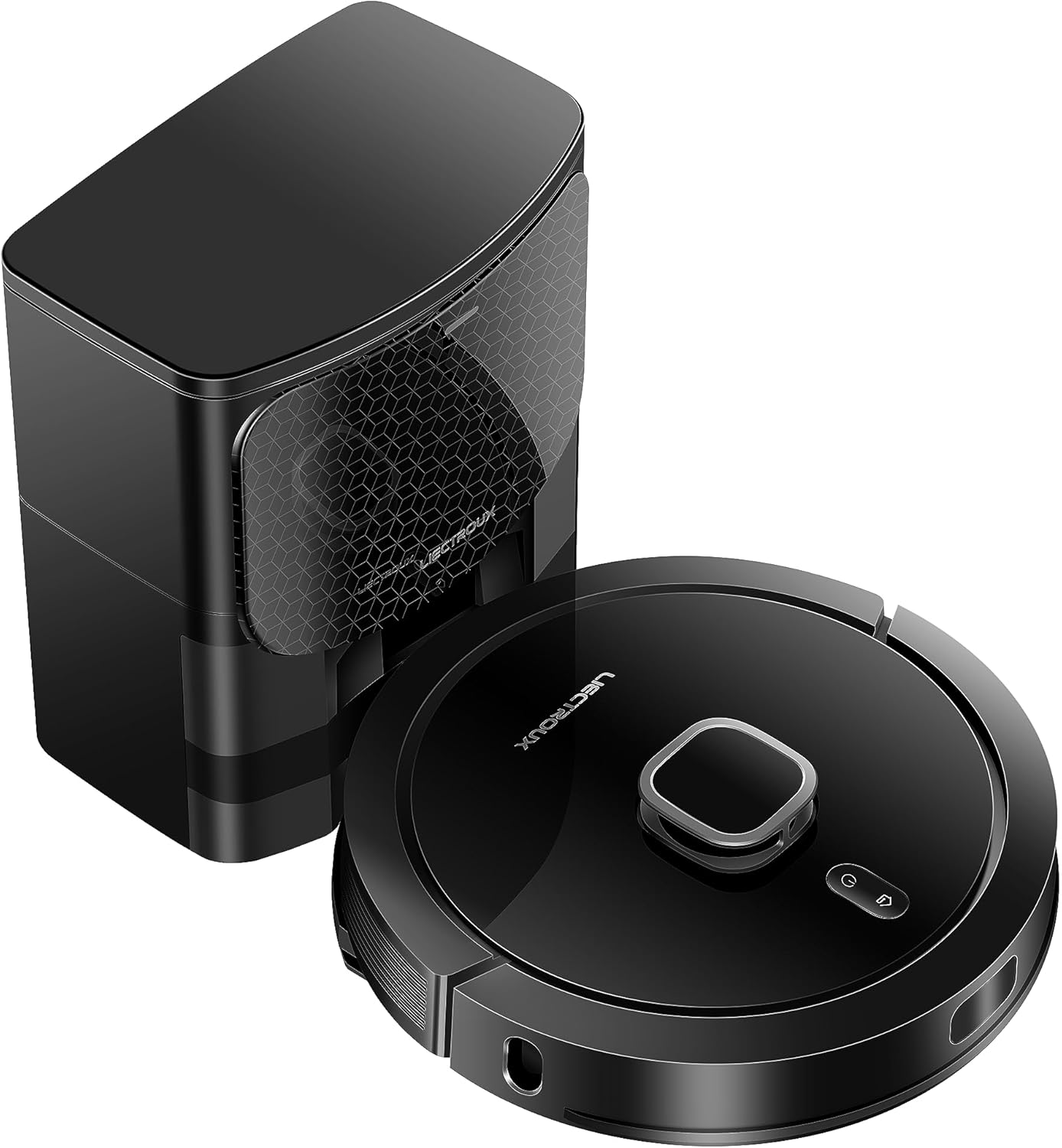
The Liectroux G7 robot vacuum features a sleek, round design with a top-mounted LiDAR sensor for precise navigation. It includes a main brush underneath for deep cleaning, two side brushes for edge and corner cleaning, and a water tank for mopping. Various sensors around its perimeter help detect obstacles and prevent falls. The charging contacts on the bottom allow it to connect with the self-emptying base.
ฐานที่ว่างเปล่า

The self-emptying base serves as both a charging station and an automatic dust collection unit. After each cleaning cycle, the robot returns to the base, and the collected dust and debris are automatically transferred from the robot's internal dustbin into a high-capacity disposable dust bag located within the base. This significantly reduces the frequency of manual dustbin emptying.
การตั้งค่า
1. การแกะกล่อง
Carefully remove all components from the packaging. Remove any protective films or packing materials from the robot and the charging base.
2. การจัดวางฐานชาร์จ
Place the self-emptying charging base against a wall in an open area, ensuring there is at least 0.5 meters of clear space on both sides and 1.5 meters in front. Avoid placing it near stairs or in areas with direct sunlight. Plug the power cord into the base and then into a wall outlet.
3. ค่าธรรมเนียมเริ่มต้น
Place the robot onto the charging base, ensuring the charging contacts align. The robot will begin charging automatically. For the first use, allow the robot to fully charge, which may take several hours.
4. Installing Side Brushes and Mop Cloth
- Turn the robot over. Snap the side brushes into their designated slots.
- Fill the water tank with clean water. Attach the mop cloth securely to the water tank. Slide the water tank into the back of the robot until it clicks into place.
5 การเชื่อมต่อแอป (Wi-Fi)
Download the Liectroux app from your smartphone's app store. Follow the in-app instructions to connect your robot to your home Wi-Fi network. This will enable smart features like mapping, remote control, and scheduling.
คำแนะนำการใช้งาน
โหมดการทำความสะอาด
- ทำความสะอาดอัตโนมัติ: The robot intelligently maps your home and cleans systematically.
- ทำความสะอาดเฉพาะจุด: สั่งการให้หุ่นยนต์ทำความสะอาดพื้นที่เล็กๆ เฉพาะจุดอย่างเข้มข้น
- โซนสะอาด: ช่วยให้คุณกำหนดพื้นที่เฉพาะบนแผนที่ให้หุ่นยนต์ทำความสะอาดได้
- บริการทำความสะอาดตามกำหนด: Set specific times and days for the robot to automatically start cleaning.
การใช้งานแอป

The Liectroux app provides full control over your G7 robot. You can view real-time cleaning maps, set virtual walls or no-go zones, select specific rooms or areas to clean, adjust suction power (4 levels), and control water flow for mopping (3 levels). The app also allows you to schedule cleaning tasks and monitor the robot's status and maintenance alerts.
การควบคุมด้วยเสียง (Alexa/Google Assistant)
The Liectroux G7 is compatible with Amazon Alexa and Google Assistant. Once connected through the app, you can use voice commands to start, stop, or send the robot back to its charging base. Refer to the app's integration guide for specific voice commands.
Carpet Boost Feature

The G7 is equipped with an ultrasonic carpet recognition system. When the robot detects a carpet, it automatically increases its suction power to a maximum level (turbo mode) to ensure a deeper clean. Once it moves off the carpet, the suction power returns to its previous setting.
การซ่อมบำรุง
Regular maintenance ensures the longevity and optimal performance of your Liectroux G7.
1. Emptying the Dustbin/Self-Emptying Base

The self-emptying base automatically transfers dust from the robot's internal bin to a disposable dust bag. These bags have a capacity of up to 60 days of debris. Replace the dust bag in the base when indicated by the app or when full. The robot's internal dustbin should also be checked and cleaned periodically, especially if the self-emptying function is not used or if large debris is collected.
2. Cleaning Main Brush

Remove the main brush cover and the main brush. Use the provided cleaning tool to remove hair and debris tangled around the brush. Clean the brush bearings. Reinstall the main brush and cover.
3. ทำความสะอาดแปรงข้าง
Periodically check the side brushes for wear or entanglement. Remove any hair or debris. If brushes are worn, replace them with new ones.
4. การทำความสะอาดตัวกรอง
Remove the dustbin from the robot and separate the filter assembly. Tap the HEPA filter gently to remove dust. The primary filter can be rinsed with water, but ensure it is completely dry before reinstallation.
5. การทำความสะอาดเซ็นเซอร์และหน้าสัมผัสการชาร์จ
Wipe all sensors (cliff sensors, wall sensor, LiDAR sensor window) and the charging contacts on both the robot and the base with a clean, dry cloth. Dust and debris can interfere with navigation and charging.
6. Mop Cloth Care
After each mopping session, remove the mop cloth and rinse it thoroughly with water. Allow it to air dry completely before reattaching. Do not use strong detergents or bleach on the mop cloth.
การแก้ไขปัญหา
If you encounter issues with your Liectroux G7, refer to the table below for common problems and solutions.
| ปัญหา | สาเหตุที่เป็นไปได้ | สารละลาย |
|---|---|---|
| หุ่นยนต์ไม่เปิด | แบตเตอรี่ต่ำ สวิตช์ไฟปิด | Place robot on charging base; Ensure power switch is ON. |
| หุ่นยนต์ไม่สามารถค้นหาฐานชาร์จได้ | Base obstructed; Base unplugged; Robot too far. | Clear area around base; Plug in base; Manually place robot closer. |
| ประสิทธิภาพการทำความสะอาดไม่ดี | ถังขยะเต็ม; แปรงพันกัน; ตัวกรองอุดตัน. | Empty dustbin/replace dust bag; Clean main/side brushes; Clean/replace filter. |
| หุ่นยนต์ติดขัดบ่อยครั้ง | มีสิ่งกีดขวางบนพื้น เซ็นเซอร์สกปรก | Clear floor of cables/small items; Clean all sensors. |
| ปัญหาการเชื่อมต่อแอป | Incorrect Wi-Fi password; Router too far; 5GHz Wi-Fi. | Verify password; Move robot closer to router; Ensure 2.4GHz Wi-Fi is used. |
| การถูพื้นทิ้งรอยด่างหรือไม่ได้ผล | Mop cloth dirty/dry; Water tank empty; Incorrect water flow setting. | Clean/wet mop cloth; Refill water tank; Adjust water flow in app. |
ข้อมูลจำเพาะ
| คุณสมบัติ | รายละเอียด |
|---|---|
| แบบอย่าง | G7 |
| ยี่ห้อ | ลิเอคทรูซ์ |
| มิติ (หุ่นยนต์) | Approx. 36.5 x 36.5 x 9.8 cm (Diameter x Height) |
| น้ำหนัก | Approx. 9.93 kg (Robot + Base) |
| ประเภทแบตเตอรี่ | ลิเธียมไอออน |
| ระยะเวลาใช้งานแบตเตอรี่โดยเฉลี่ย | 2 ชั่วโมง |
| เล่มที่tage | 220V (This specific model) |
| ประเภทการนำทาง | การนำทางด้วยเลเซอร์ |
| ความสามารถในการทำแผนที่ | Saves up to 5 maps |
| Dust Bag Capacity (Base) | Approx. 3L (up to 60 days) |
| คุณสมบัติพิเศษ | 4-in-1 (Vacuum, Sweep, Mop, Self-Empty), Smart Mapping, Carpet Recognition, App Control, Voice Control (Alexa, Google Assistant) |
การรับประกันและการสนับสนุน
The Liectroux G7 Robot Vacuum Cleaner comes with a standard manufacturer's warranty. Please refer to your purchase documentation for specific warranty terms and duration. Typically, a 1-year warranty against manufacturing defects is provided.
For technical support, troubleshooting assistance beyond this manual, or to inquire about replacement parts, please contact the official Liectroux Brasil seller or visit their authorized service channels. Keep your purchase receipt as proof of purchase for warranty claims.