
1. สินค้าหมดview
The Gemini GMU-M200 is a dual-person handheld UHF wireless microphone system designed for various audio applications. It features two handheld microphones and a compact plug-in receiver, providing wireless audio transmission up to 164 feet (50 meters). This system is suitable for performances, karaoke, weddings, conferences, meetings, and lectures.
Each microphone is equipped with a dynamic mic capsule and a cardioid pickup pattern, which helps to focus on the speaker's voice and minimize background noise and feedback. The dual-channel receiver connects to audio equipment via a standard 1/4" TS plug. Both microphones and the receiver are powered by rechargeable lithium batteries, with convenient USB charging capability.
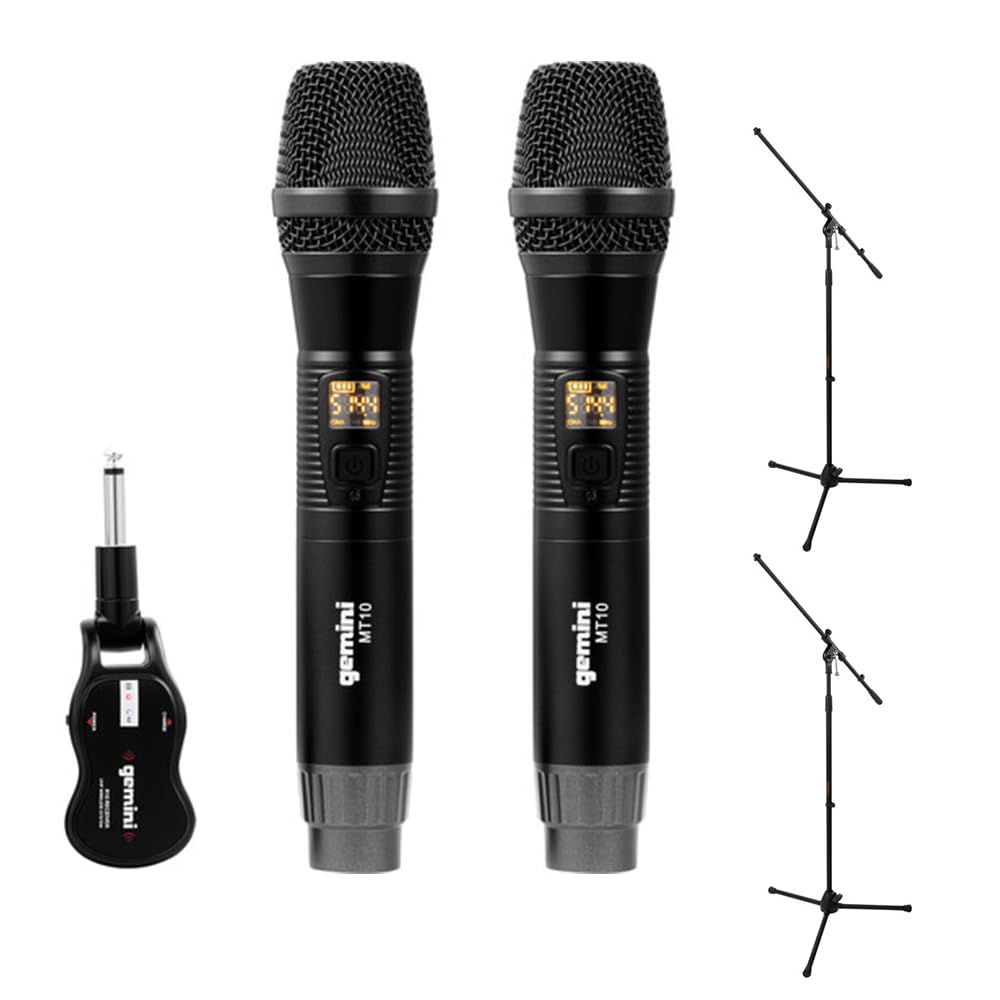
Image 1.1: Gemini GMU-M200 Wireless Microphone System components, including two handheld microphones and a plug-in receiver.
2. อะไรอยู่ในกล่อง
Verify that all components are present before setup.
- 2x Handheld Wireless Microphones (Gemini MT10)
- 1x Plug-in Wireless Receiver (Gemini R10)
- 2x Rechargeable 18650 1200mAh Lithium Batteries (pre-installed in microphones)
- 1x สายชาร์จ Micro-USB
- 2x Auray MS-5230F Tripod Microphone Stands with Fixed Boom (Note: These are included as part of the bundle.)
- คู่มือการใช้งาน (เอกสารนี้)

Image 2.1: Included Micro-USB charging cable.

Image 2.2: Two Auray MS-5230F Tripod Microphone Stands included in the bundle.
3. คำแนะนำในการตั้งค่า
3.1. Microphone Battery Installation and Charging
- Unscrew the bottom cap of each handheld microphone.
- Ensure the 18650 1200mAh rechargeable lithium battery is correctly inserted according to polarity markings. The batteries are typically pre-installed.
- To charge the microphones, connect the micro-USB charging cable to the DC-5V port located at the bottom of each microphone. Connect the other end to a USB power source (e.g., computer USB port, USB wall adapter).
- The LED display on the microphone will indicate charging status. A full charge provides several hours of use.

Image 3.1: Handheld microphone with the battery compartment open, showing the rechargeable 18650 battery.

ภาพที่ 3.2: ภาพระยะใกล้ view of the micro-USB charging port (DC-5V) at the base of the microphone.
3.2. Receiver Charging and Connection
- The plug-in receiver also contains a rechargeable lithium battery. Charge it using the provided micro-USB cable and a USB power source.
- Once charged, plug the receiver's 1/4" TS connector directly into the microphone input of your audio device (e.g., PA speaker, amplifier, mixer, karaoke machine).
- Ensure the audio device's input volume is set to a low level before powering on the receiver.
4. คู่มือการใช้งาน
4.1. การเปิดเครื่องและการจับคู่โดยอัตโนมัติ
- Press and hold the power button on each handheld microphone to turn them on. The LED display will illuminate.
- Press and hold the power button on the plug-in receiver to turn it on.
- The microphones and receiver will automatically pair. A successful connection is indicated by a stable signal indicator on the microphone's LED display.
4.2. ปรับระดับเสียง
- Volume can be controlled directly from the handheld microphones. Refer to the microphone's controls for volume adjustment buttons.
- Additionally, adjust the input volume on your connected audio device (PA speaker, amplifier, mixer) to achieve the desired sound level.
4.3. การเปลี่ยนแปลงความถี่
If you experience interference or signal dropouts, you can change the operating frequency:
- On the handheld microphone, locate the "SET" button.
- Press the "SET" button to cycle through available UHF frequencies. The LED display will show the current frequency.
- The receiver will automatically sync to the new frequency selected on the microphone.
- Select a frequency that provides clear, interference-free audio. The system operates within the 512-541.7 MHz range in the United States.

Image 4.1: Two Gemini MT10 handheld microphones, showing their LED displays and control buttons.
5. การบำรุงรักษา
5.1. การทำความสะอาด
- เช็ดไมโครโฟนและตัวรับสัญญาณด้วยผ้าแห้งนุ่มๆ
- ห้ามใช้น้ำยาทำความสะอาดที่มีฤทธิ์กัดกร่อน ตัวทำละลาย หรือสารเคมีรุนแรง
- หลีกเลี่ยงการสัมผัสความชื้นกับชิ้นส่วนอิเล็กทรอนิกส์
5.2. การดูแลแบตเตอรี่
- Recharge batteries regularly, even if the system is not in frequent use, to maintain battery health.
- If storing the system for an extended period, charge the batteries to approximately 50% before storage.
- Replace batteries if their performance significantly degrades. Use only approved 18650 rechargeable lithium batteries for the microphones.
6 การแก้ไขปัญหา
- ไม่มีเสียง:
- Ensure microphones and receiver are powered on.
- Check battery levels on both microphones and receiver. Recharge if necessary.
- Verify the receiver is securely plugged into the audio device's input.
- Increase the volume on the microphones and the connected audio device.
- Confirm that the microphones and receiver are paired (stable signal indicator).
- สัญญาณรบกวน/สัญญาณรบกวนคงที่:
- Press the "SET" button on the microphone to change to a different operating frequency.
- ตรวจสอบให้แน่ใจว่าไม่มีอุปกรณ์ไร้สายอื่นๆ ที่ใช้งานความถี่ใกล้เคียงกันอยู่
- ลดระยะห่างระหว่างไมโครโฟนกับตัวรับสัญญาณ
- หลีกเลี่ยงสิ่งกีดขวางทางกายภาพระหว่างตัวส่งและตัวรับ
- ระยะไร้สายสั้น:
- Ensure line of sight between microphones and receiver for optimal performance.
- ควรหลีกเลี่ยงการวางเครื่องรับสัญญาณไว้ใกล้กับวัตถุโลหะขนาดใหญ่หรืออุปกรณ์อิเล็กทรอนิกส์อื่นๆ ที่อาจก่อให้เกิดการรบกวน
- Check battery levels. Low batteries can affect range.
7. ข้อมูลจำเพาะ
| คุณสมบัติ | ข้อมูลจำเพาะ |
|---|---|
| ชื่อรุ่น | GEGMUM200 |
| ปัจจัยรูปแบบไมโครโฟน | Microphone System (Handheld) |
| เทคโนโลยีการเชื่อมต่อ | UHF ไร้สาย |
| ช่วงความถี่ (สหรัฐอเมริกา) | 512 - 541.7 เมกะเฮิรตซ์ |
| จำนวนช่องสัญญาณ | 2 (ช่องสัญญาณคู่) |
| ช่วงสาย | สูงกว่า 164 ฟุต (50 เมตร) |
| แหล่งพลังงาน | ใช้พลังงานจากแบตเตอรี่ (แบตเตอรี่ลิเธียมแบบชาร์จได้) |
| Microphone Battery Type | 18650 1200mAh (User-replaceable) |
| พอร์ตชาร์จ | Micro-USB (DC-5V) |
| ประเภทขั้วต่อตัวรับ | ปลั๊ก TS ขนาด 1/4 นิ้ว |
| รูปแบบขั้ว | ทิศทางเดียว (Cardioid) |
| วัสดุ | โลหะ |
| สี | สีดำ |
| น้ำหนักสินค้า | 2 pounds (system) |
| อุปกรณ์ที่รองรับ | Ampลิฟายเออร์, เครื่องคาราโอเกะ, ลำโพง |
8. การรับประกันและการสนับสนุน
For warranty information or technical support, please refer to the official Gemini webหรือติดต่อฝ่ายบริการลูกค้า โปรดเก็บใบเสร็จรับเงินไว้เป็นหลักฐานการซื้อสำหรับการเรียกร้องการรับประกันใดๆ
Gemini Official Webเว็บไซต์: www.geminisound.com (หมายเหตุ: นี่เป็นเพียงตัวอย่างชั่วคราว URLโปรดตรวจสอบการสนับสนุนที่แท้จริง webเว็บไซต์.)