
1. บทนำ
The eppfun AK8675B Pro is a versatile Bluetooth 5.2 audio adapter designed to function as both a transmitter (TX) and a receiver (RX). It features advanced Qualcomm QCC3040 chip technology, supporting various aptX codecs including aptX-Adaptive, aptX HD, and aptX Low Latency, ensuring high-quality audio with minimal delay. This device allows you to wirelessly stream audio from non-Bluetooth devices (like TVs or PCs) to Bluetooth headphones/speakers, or from Bluetooth-enabled devices (like smartphones) to wired audio systems.
2. เนื้อหาบรรจุภัณฑ์
ตรวจสอบว่ารายการทั้งหมดที่ระบุไว้ด้านล่างนี้รวมอยู่ในแพ็คเกจของคุณ:
- eppfun AK8675B Pro Bluetooth Transmitter/Receiver
- สายชาร์จ USB-C
- สายสัญญาณเสียง AUX 3.5 มม.
- Optical Fiber Audio Cable
- คู่มือการใช้งาน (เอกสารนี้)

Image: Contents of the eppfun AK8675B Pro package, including the device, various cables, and the user manual.
3. สินค้าหมดview และการควบคุม
ทำความคุ้นเคยกับส่วนประกอบและปุ่มควบคุมของอุปกรณ์:

Image: Diagram of the eppfun AK8675B Pro device with key interfaces and buttons labeled.
- A: ปุ่มเปิดปิด - Press and hold to turn the device on or off.
- B: RX/TX Mode Switching - Slide switch to select Transmitter (TX) or Receiver (RX) mode.
- C: Pairing Button - Press to initiate Bluetooth pairing mode.
- D: AUX 3.5mm Interface - For connecting audio devices via a 3.5mm audio cable.
- E: Volume Adjusting - Buttons to increase or decrease audio volume.
- F: One Click Mute, Double Click Audio Decoding Switch - Single press for mute/unmute; double press to cycle through audio decoding options.
- G: USB Charging - USB-C port for charging the device.
- H: Optical Interface - For connecting audio devices via an optical fiber cable.
4. Setup and Operation Modes
The AK8675B Pro operates in two primary modes: Transmitter (TX) and Receiver (RX). Select the appropriate mode using the RX/TX mode switching slider (B).

Image: Comparison of Transmitter and Receiver modes, showing usage time, compatible codecs, and simultaneous linking capabilities.
4.1. โหมดส่งสัญญาณ (TX)
In TX mode, the device transmits audio from a non-Bluetooth source (e.g., TV, PC) to Bluetooth-enabled headphones or speakers.
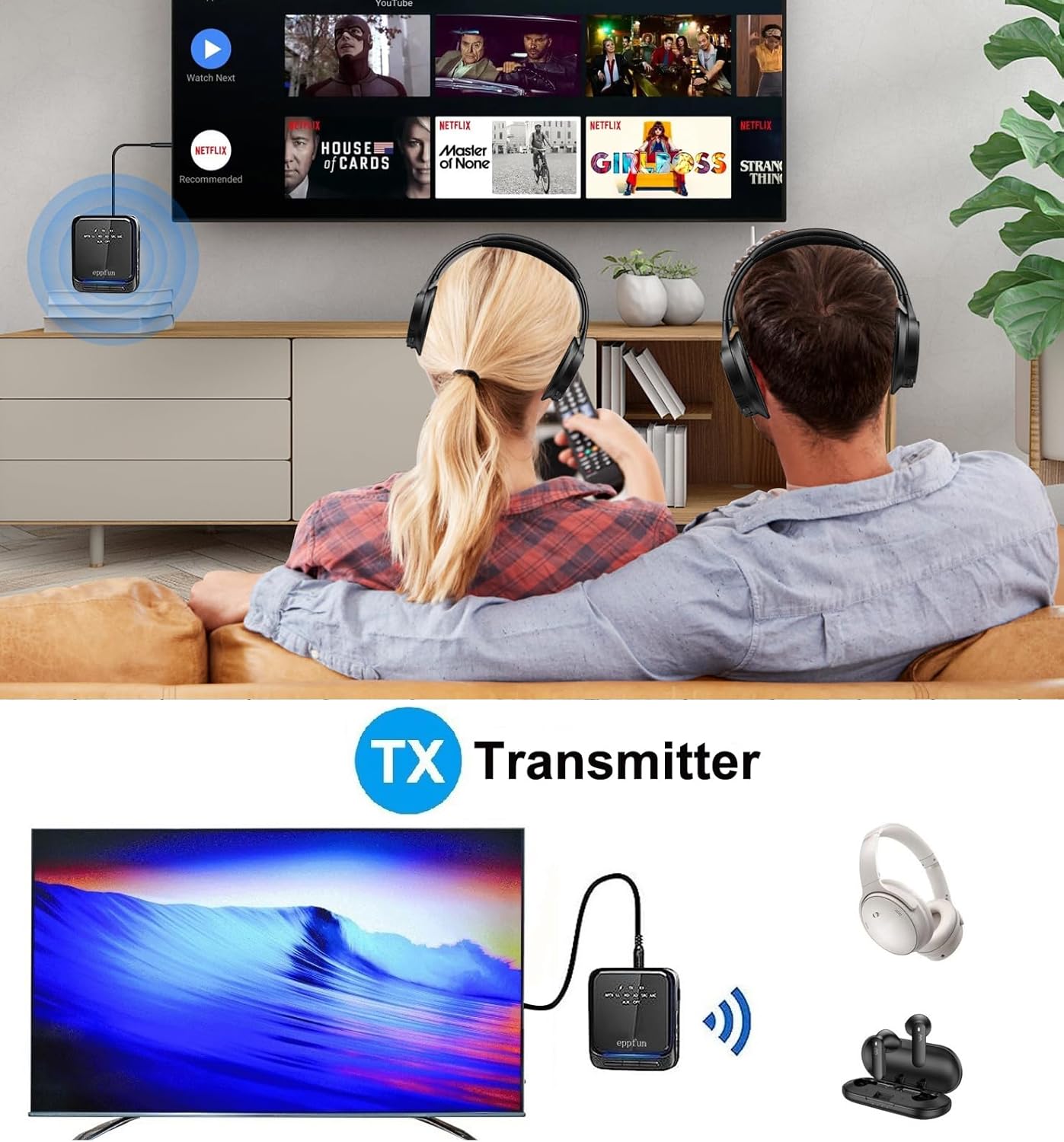
Image: An illustration of the eppfun AK8675B Pro connected to a TV, transmitting audio wirelessly to two pairs of Bluetooth headphones.
- Slide the mode switch (B) to TX.
- Connect the AK8675B Pro to your audio source (e.g., TV, PC) using either the 3.5mm AUX cable (D) or the Optical Fiber cable (H).
- Turn on the AK8675B Pro by pressing and holding the Power Button (A).
- ใส่หูฟังหรือลำโพง Bluetooth ของคุณเข้าสู่โหมดจับคู่
- Press the Pairing Button (C) on the AK8675B Pro to initiate pairing. The LED indicator will show pairing status.
- Once connected, audio from your source will stream wirelessly to your Bluetooth device(s).
TX Mode Features:
- ตัวแปลงสัญญาณที่เข้ากันได้: aptX, aptX-Adaptive, aptX LL (Low Latency), aptX HD, SBC.
- เวลาทำการ : ประมาณ 12 ชั่วโมงเมื่อชาร์จเต็ม
- การเชื่อมต่อแบบคู่: Supports connecting two Bluetooth headphones/earbuds simultaneously with aptX LL technology.
4.2. โหมดตัวรับ (RX)
In RX mode, the device receives audio wirelessly from a Bluetooth-enabled source (e.g., smartphone, tablet) and outputs it to a wired audio system (e.g., wired headphones, speakers).

Image: An illustration of the eppfun AK8675B Pro connected to wired speakers, receiving audio wirelessly from a smartphone.
- Slide the mode switch (B) to RX.
- Connect the AK8675B Pro to your wired audio output device (e.g., speakers, wired headphones) using the 3.5mm AUX cable (D).
- Turn on the AK8675B Pro by pressing and holding the Power Button (A).
- Enable Bluetooth on your smartphone or other Bluetooth audio source and search for available devices.
- Select "eppfun AK8675B Pro" from the list of available Bluetooth devices to pair. The LED indicator will confirm connection.
- Once connected, audio from your Bluetooth source will play through your wired audio system.
RX Mode Features:
- ตัวแปลงสัญญาณที่เข้ากันได้: aptX, aptX-Adaptive, aptX HD, SBC, AAC.
- เวลาทำการ : ประมาณ 20 ชั่วโมงเมื่อชาร์จเต็ม
5. การชาร์จอุปกรณ์
To charge the eppfun AK8675B Pro:
- Connect the supplied USB-C cable to the USB Charging port (G) on the device.
- ต่อปลายอีกด้านของสาย USB-C เข้ากับอะแดปเตอร์แปลงไฟ USB มาตรฐาน (ไม่ได้รวมอยู่ในชุด) หรือพอร์ต USB ของคอมพิวเตอร์
- The LED indicator will show the charging status. A full charge typically takes about 2 hours.
Note: The device cannot be used while it is charging.
6. การบำรุงรักษา
To ensure the longevity and optimal performance of your eppfun AK8675B Pro:
- เก็บอุปกรณ์ให้แห้ง หลีกเลี่ยงการสัมผัสกับความชื้น ฝน หรือของเหลว
- ทำความสะอาดอุปกรณ์ด้วยผ้านุ่มและแห้ง ห้ามใช้สารเคมีรุนแรงหรือน้ำยาทำความสะอาดที่มีฤทธิ์กัดกร่อน
- เก็บอุปกรณ์ไว้ในที่แห้งและเย็นเมื่อไม่ใช้งาน
- หลีกเลี่ยงอุณหภูมิที่สูงหรือต่ำเกินไป
- ห้ามถอดประกอบหรือดัดแปลงอุปกรณ์ เนื่องจากจะทำให้การรับประกันเป็นโมฆะและอาจทำให้เกิดความเสียหายได้
7 การแก้ไขปัญหา
If you encounter issues with your AK8675B Pro, refer to the following common solutions:
- อุปกรณ์ไม่เปิดใช้งาน:
- ตรวจสอบให้แน่ใจว่าอุปกรณ์ชาร์จแบตเตอรี่เต็มแล้ว เชื่อมต่อกับแหล่งจ่ายไฟโดยใช้สาย USB-C
- Press and hold the Power Button (A) for a few seconds.
- ไม่สามารถจับคู่กับอุปกรณ์บลูทูธได้:
- Ensure the AK8675B Pro is in the correct mode (TX for transmitting, RX for receiving).
- Make sure both devices are in pairing mode and within the 10-meter communication range.
- Clear previous pairing records on both the AK8675B Pro and your Bluetooth device, then attempt to pair again.
- Restart both the AK8675B Pro and your Bluetooth device.
- ไม่มีช่องต่อสัญญาณเสียงเข้า/ออก:
- Check all cable connections (3.5mm AUX or Optical Fiber) to ensure they are secure and in the correct ports.
- Verify that the volume on both the AK8675B Pro (E) and the connected audio device is not muted or set too low.
- Ensure the correct audio input/output is selected on your source device (e.g., TV audio settings).
- Confirm that the AK8675B Pro is successfully paired and connected to the desired Bluetooth device.
- Audio delay or poor quality:
- Ensure both the AK8675B Pro and your connected Bluetooth device support aptX Low Latency (aptX LL) for minimal delay, especially in TX mode.
- Reduce the distance between the AK8675B Pro and the connected Bluetooth device, and remove any obstacles.
- ตรวจสอบสัญญาณรบกวนที่อาจเกิดขึ้นจากอุปกรณ์ไร้สายอื่นๆ
8. ข้อมูลจำเพาะ
| คุณสมบัติ | ข้อมูลจำเพาะ |
|---|---|
| ชื่อรุ่น | AK8675B Pro |
| เวอร์ชันบลูทูธ | 5.2 |
| บลูทู ธ ชิปเซ็ต | วอลคอมม์ QCC3040 |
| Supported Codecs (TX) | aptX, aptX-Adaptive, aptX LL, aptX HD, SBC |
| Supported Codecs (RX) | aptX, aptX-Adaptive, aptX HD, SBC, AAC |
| ย่านความถี่ | 2.402GHz - 2.480GHz |
| ระยะห่างการสื่อสาร | สูงถึง 10 เมตร (33 ฟุต) |
| เวลาทำงานของโหมด TX | ประมาณ 12 ชั่วโมง |
| เวลาทำงานของโหมด RX | ประมาณ 20 ชั่วโมง |
| เวลาในการชาร์จ | ประมาณ 2 ชั่วโมง |
| พอร์ตชาร์จ | ยูเอสบี-ซี |
| อินพุต/เอาท์พุตเสียง | 3.5mm AUX, Optical TOSLINK |
| ประเภทแบตเตอรี่ | ลิเธียมไออน (รวมอยู่ด้วย) |
| ขนาดสินค้า | 75 มม. x 66 มม. x 18 มม. (โดยประมาณ) |
| น้ำหนักผลิตภัณฑ์ | 60.5 ก. (โดยประมาณ) |
9. การรับประกันและการสนับสนุน
eppfun products are designed for reliability and performance. For warranty information and technical support, please refer to the official eppfun webหรือติดต่อผู้ค้าปลีกของคุณ เก็บใบเสร็จรับเงินไว้เป็นหลักฐานการซื้อสำหรับการเรียกร้องการรับประกัน