
1. บทนำ
This manual provides detailed instructions for the setup, operation, and maintenance of your SINGCALL Tuya WiFi SOS Wireless Caregiver Pager System. This system is designed to provide a reliable calling alert for patients, seniors, elderly, and disabled individuals, ensuring timely assistance. It includes one plugin receiver and one smart emergency call button, supporting 2.4GHz Wi-Fi networks.

รูปที่ 1: เกินview of the SINGCALL Caregiver Pager System components.
2. อะไรอยู่ในกล่อง
- 1 x Plugin Receiver
- 1 x Smart Emergency SOS Call Button
- 1 x Lanyard for SOS Button
- 1 x Micro USB Charging Cable for SOS Button
- Mounting Accessories (e.g., double-sided adhesive, screws)
- คู่มือการใช้งาน
3. สินค้าหมดview
The SINGCALL Caregiver Pager System consists of two main units: the plug-in receiver and the portable SOS button. The receiver plugs into a standard wall outlet and emits an audible alert when the SOS button is pressed. The SOS button is designed for easy access and portability.
3.1 ส่วนประกอบของเครื่องรับสัญญาณ

Figure 2: Receiver components including AC Power Plug, Speaker, Music Select Button, and Volume Control.
- AC Power Plug: For connecting to a standard electrical outlet.
- ผู้บรรยาย: Emits the alert sound.
- Music Select Button: Used to cycle through 32 available ringtones.
- การควบคุมระดับเสียง: Adjusts the alert volume across 5 levels (0-110dB), including mute.
- ไฟแสดงสถานะ LED: Provides visual feedback for status and alerts.
3.2 SOS Button Components

Figure 3: The SOS button with its prominent call button and lanyard attachment.
- ปุ่ม SOS: The main button to press for emergency alerts.
- ฝาครอบกันน้ำ: Protects the charging port and internal components.
- เชือกเส้นเล็ก: For wearing the button around the neck or attaching it to a convenient location.
- พอร์ตชาร์จ Micro USB: สำหรับชาร์จแบตเตอรี่ภายใน
- ปุ่มรีเซ็ต: ใช้สำหรับจับคู่และรีเซ็ตอุปกรณ์
4. การตั้งค่า
4.1 Initial Charging of SOS Button
Before first use, ensure the SOS button is fully charged. Remove the waterproof cover to access the Micro USB charging port and connect the provided cable to a power source. The LED indicator will show charging status.
4.2 การจัดวางเครื่องรับสัญญาณ
Plug the receiver into a standard electrical outlet in a central location where the alert can be easily heard by caregivers. The receiver has a wireless range of up to 100m (328ft) in an open environment, though actual range may vary due to obstructions.
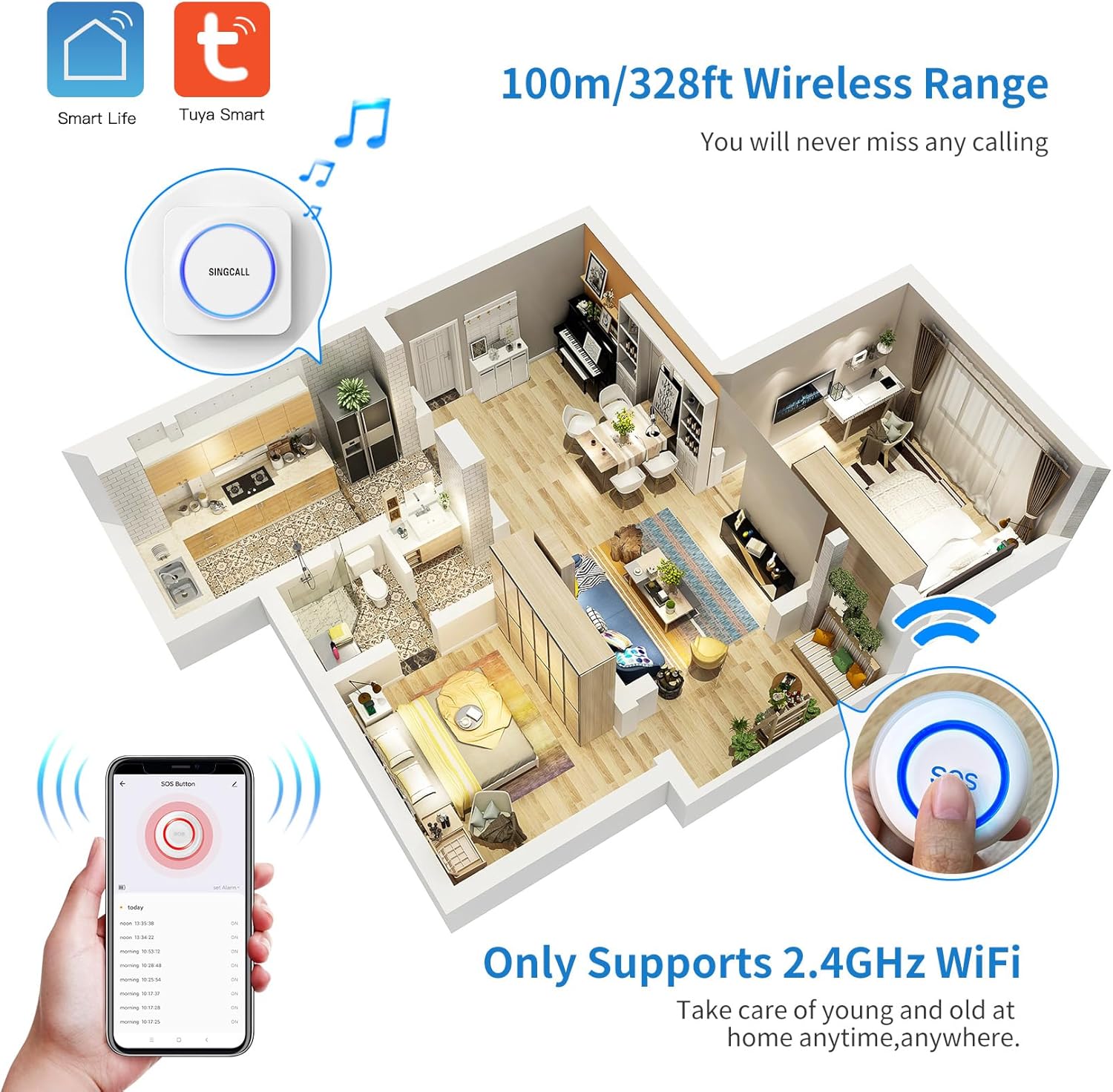
Figure 4: Illustration of the wireless range within a typical home environment.
4.3 Connecting the SOS Button to the Receiver
The SOS button is pre-paired with the receiver from the factory. If re-pairing is needed:
- Long press the Music Select Button on the receiver until the LED indicator blinks.
- Press the SOS button once. The receiver's LED will stop blinking, indicating successful pairing.
Video 1: Demonstrates how to connect the caregiver call button to the receiver.
4.4 App Connection (Tuya Smart)
To receive remote notifications on your smartphone, connect the SOS button to the Tuya Smart app. This requires a 2.4GHz Wi-Fi network.
- ดาวน์โหลดและติดตั้ง ตุยย่า สมาร์ท ดาวน์โหลดแอปจากแอปสโตร์ของอุปกรณ์ของคุณ (iOS หรือ Android)
- ลงทะเบียนหรือเข้าสู่ระบบบัญชี Tuya Smart ของคุณ
- ตรวจสอบให้แน่ใจว่าสมาร์ทโฟนของคุณเชื่อมต่อกับเครือข่าย Wi-Fi 2.4GHz
- Reset the SOS Button: Long press the [RESET] button on the back of the SOS button using a phone SIM card needle. The LED indicator will rapidly blink, signifying it's in Wi-Fi configuration status.
- In the Tuya Smart app, tap 'Add Device' or the '+' icon. The app should automatically discover the SOS button. If not, select 'Add Manually' and choose the appropriate device type (e.g., 'SOS Button').
- Follow the on-screen prompts to enter your Wi-Fi network details and complete the pairing process.
Video 2: Guide on how to connect the caregiver call button to your phone via the Tuya Smart app.
4.5 Enabling App Notifications
To ensure you receive timely alerts, enable notifications for the Tuya Smart app on your smartphone:
- ไปที่โทรศัพท์ของคุณ การตั้งค่า.
- นำทางไปที่ การแจ้งเตือน (iOS) หรือ แอปและการแจ้งเตือน (แอนดรอยด์).
- ค้นหาและเลือก ตุยย่า สมาร์ท แอป.
- ทำให้มั่นใจ อนุญาตการแจ้งเตือน (or similar) is toggled ON.
- Enable all relevant notification types, such as การแจ้งเตือน, เสียง, และ ป้าย, for optimal alert visibility.
Video 3: Instructions on how to open all notifications for the Tuya Smart app on your smartphone.
5. คู่มือการใช้งาน
5.1 การใช้ปุ่ม SOS
When assistance is needed, simply press the large SOS button. This will trigger the receiver to sound an alarm and send a notification to all connected smartphones via the Tuya Smart app.

Figure 5: The SOS button provides immediate alerts to caregivers.
5.2 Adjusting Ringtone
The receiver offers 32 different music tones. To change the ringtone:
- กดปุ่ม Music Select Button on the side of the receiver to cycle through the available tones.
- Once you find your preferred tone, it will be saved automatically.
Video 4: Demonstrates how to change the ringtone on the receiver.
5.3 การปรับระดับเสียง
The receiver has 5 levels of volume adjustment, from mute (0dB) to a maximum of 110dB. To adjust the volume:
- กดปุ่ม ปุ่มควบคุมระดับเสียง on the side of the receiver to cycle through the volume levels.
- The selected volume level will be saved automatically.
Video 5: Instructions on how to adjust the volume of the receiver.
6. Sharing Function
The Tuya Smart app allows you to share the SOS button's alerts with multiple family members or caregivers. This ensures that everyone who needs to be notified receives alerts when the button is pressed.
Video 6: Demonstrates how to share the call button's alerts with other users.
6.1 Method 1: Share Button
- Open the Tuya Smart app and select the SOS Button device.
- Tap the pencil icon (or settings icon) in the top right corner.
- Select 'Share Device'.
- Choose 'Add Sharing' and select the method to share (e.g., message, email).
- The recipient will receive an invitation to accept the shared device in their Tuya Smart app.
6.2 Method 2: Create Group (Home Management)
- Open the Tuya Smart app and go to 'Home Management'.
- Select 'Add Member' and choose a sharing method (e.g., message, email) to send an invitation code.
- The recipient uses this code to join your home group in their Tuya Smart app, gaining access to all devices, including the SOS button.
7. การบำรุงรักษา
7.1 SOS Button Battery
The SOS button is powered by a CR2 battery (included). When the battery is low, the LED indicator may show a specific pattern or the app may notify you. Replace the battery as needed.
7.2 การทำความสะอาด
Wipe the receiver and SOS button with a soft, dry cloth. Do not use abrasive cleaners or immerse the devices in water.
8 การแก้ไขปัญหา
- ไม่มีการแจ้งเตือนจากเครื่องรับ: Ensure the receiver is plugged in and powered on. Check the volume setting (it might be muted). Re-pair the SOS button with the receiver if necessary.
- ไม่มีการแจ้งเตือนจากแอป: Verify your smartphone is connected to a 2.4GHz Wi-Fi network. Check app notification settings on your phone and within the Tuya Smart app. Ensure the SOS button is successfully paired with the app.
- SOS Button Not Responding: Check the battery level of the SOS button and replace if necessary. Ensure the button is within the wireless range of the receiver.
- Difficulty with Wi-Fi Connection: Confirm your Wi-Fi network is 2.4GHz. 5GHz networks are not supported. Ensure your phone is close to the SOS button and router during pairing.
9. ข้อมูลจำเพาะ
| คุณสมบัติ | ข้อมูลจำเพาะ |
|---|---|
| หมายเลขรุ่น | SC-T190 SC-E57 1-1 |
| ยี่ห้อ | ซิงคอล |
| จำนวนแบตเตอรี่ | ต้องใช้แบตเตอรี่ CR1 จำนวน 2 ก้อน (รวมมาด้วย) |
| เล่มที่tage | 3 โวลต์ (กระแสตรง) |
| วิธีการควบคุม | แอปสัมผัส |
| ระดับเสียง | 100 เดซิเบล |
| ประเภทการติดตั้ง | ติดผนัง |
| ระยะสูงสุด | 100 เมตร |
| เทคโนโลยีเซ็นเซอร์ | การส่งสัญญาณแบบไร้สาย |
| น้ำหนักสินค้า | 6.7 ออนซ์ |
| ขนาดสินค้า | 4.53 x 3.54 x 2.87 นิ้ว |
| แหล่งพลังงาน | ใช้พลังงานจากแบตเตอรี่ |
| อุปกรณ์ที่รองรับ | สมาร์ทโฟน |
10. ข้อมูลด้านความปลอดภัย
- Keep devices away from extreme temperatures and direct sunlight.
- ห้ามถอดประกอบหรือซ่อมแซมอุปกรณ์ด้วยตนเอง โปรดติดต่อฝ่ายบริการลูกค้าเพื่อขอความช่วยเหลือ
- Ensure the waterproof cover on the SOS button is securely closed to maintain water resistance.
- ทิ้งแบตเตอรี่ตามระเบียบข้อบังคับในท้องถิ่น
11. การรับประกันและการสนับสนุน
For warranty information and customer support, please refer to the official SINGCALL webหรือติดต่อผู้ขายโดยตรง เก็บใบเสร็จรับเงินไว้เพื่อใช้ในการเคลมประกัน


