
JTEMAN JT-L36
JTEMAN Cell Phone Stand with Wireless Bluetooth Speaker and Alarm Clock - User Manual
Model: JT-L36
การแนะนำ
ขอบคุณสำหรับการซื้อasing the JTEMAN Cell Phone Stand with Wireless Bluetooth Speaker and Alarm Clock. This multi-functional device is designed to enhance your daily routine by combining essential features into one compact and stylish unit. It serves as a high-quality Bluetooth speaker, a reliable alarm clock with a clear display, and a stable, adjustable stand for your mobile devices. Please read this manual carefully to ensure proper use and optimal performance.
ข้อมูลด้านความปลอดภัย
- อย่าให้เครื่องสัมผัสกับอุณหภูมิที่สูงหรือต่ำเกินไป แสงแดดโดยตรง หรือความชื้นสูง
- หลีกเลี่ยงการทำอุปกรณ์หล่นหรือกระแทกอย่างรุนแรง
- Keep away from water and other liquids. If the device comes into contact with liquid, disconnect it immediately and allow it to dry completely before reuse.
- ห้ามถอดประกอบ ซ่อมแซม หรือดัดแปลงอุปกรณ์ด้วยตนเอง โปรดส่งต่ออุปกรณ์ดังกล่าวให้ช่างผู้ชำนาญการเป็นผู้ดำเนินการซ่อมแซม
- ใช้เฉพาะสายชาร์จที่ให้มาหรือที่เทียบเท่าที่ได้รับการรับรองเท่านั้น
- เก็บให้พ้นจากมือเด็ก
เนื้อหาแพ็คเกจ
- JTEMAN Cell Phone Stand with Wireless Bluetooth Speaker and Alarm Clock (Model: JT-L36)
- สายชาร์จ Type-C
- คู่มือการใช้งาน
สินค้าเกินview
Familiarize yourself with the components and controls of your JTEMAN device:
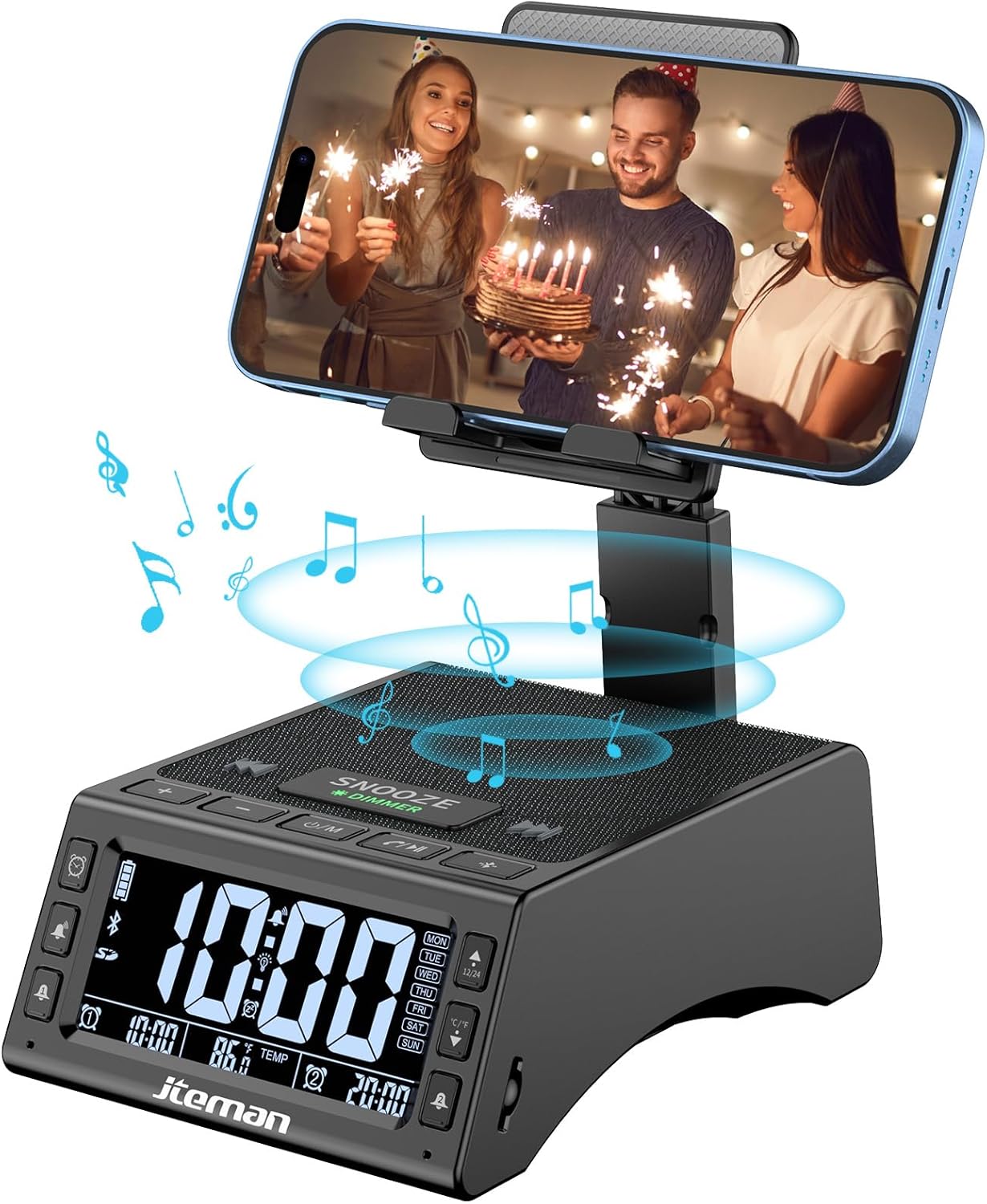
รูปที่ 1 : ด้านหน้า view of the JTEMAN device with a smartphone on the adjustable stand, displaying the time and temperature.

รูปที่ 2: เกินview highlighting the multi-functional aspects including Bluetooth speaker, 12/24H time display, temperature display, foldable phone stand, TF card support, microphone, charging station, dual alarm clocks, and 9 ringtones.
การควบคุมและพอร์ต:
- หน้าจอแสดงผล: Shows time, temperature, day of the week, and alarm indicators.
- ปุ่มเลื่อนปลุก/หรี่ไฟ: Press to snooze an active alarm (5 minutes); long press to adjust display brightness (4 levels).
- Power On/Off/Mode Button: Long press to power on/off; short press to cycle through modes (Bluetooth, TF Card).
- Play/Pause/Answer Button: Controls music playback; answers/ends calls.
- ปุ่มเพิ่มเสียง/ปุ่มเปลี่ยนเพลงถัดไป: Increases volume; short press for next track.
- ปุ่มลดเสียง/ปุ่มเล่นเพลงก่อนหน้า: Decreases volume; short press for previous track.
- ปุ่มจับคู่บลูทูธ: เริ่มโหมดการจับคู่บลูทูธ
- Alarm 1 & Alarm 2 Buttons: For setting and managing dual alarms.
- ไมโครโฟน: สำหรับการโทรแบบแฮนด์ฟรี
- พอร์ตอินพุต Type-C: สำหรับการชาร์จอุปกรณ์
- พอร์ตเอาต์พุต Type-C: สำหรับชาร์จอุปกรณ์ภายนอก
- ช่องเสียบการ์ด TF: สำหรับเล่นเพลงโดยตรงจาก TF card
- ขาตั้งโทรศัพท์แบบปรับได้: Foldable and extendable for various viewing angles. Features anti-slip pads and base for stability.
การตั้งค่า
1. การชาร์จครั้งแรก
- เชื่อมต่อสายชาร์จ Type-C ที่ให้มากับ... พอร์ตอินพุต Type-C บนอุปกรณ์
- เชื่อมต่อปลายสายอีกด้านหนึ่งเข้ากับอะแดปเตอร์ไฟ USB ที่ใช้งานร่วมกันได้ (ไม่รวมอยู่ด้วย) และเสียบเข้ากับเต้ารับที่ผนัง
- หน้าจอจะแสดงสถานะการชาร์จ โปรดชาร์จอุปกรณ์ให้เต็มก่อนใช้งานครั้งแรก

Figure 3: The device connected via Type-C for charging itself and an external phone.
2. การตั้งเวลาและวันที่
- Upon powering on, the device should automatically synchronize the current time.
- If manual adjustment is needed, refer to the detailed instructions in the full user manual (included in the package).
- To switch between 12/24 hour format or °F/°C temperature display, use the dedicated buttons or refer to the full manual.

Figure 4: The HD display showing time, temperature, and alarm settings with brightness adjustment levels.
คำแนะนำการใช้งาน
1. Using the Phone Stand
- The integrated phone stand can be pulled up from the back of the unit.
- ปรับความสูงและมุมของขาตั้งได้ตามความต้องการ viewing position. The stand is designed to be stable and strong, accommodating devices from 4.0 to 13 inches.
- When not in use, the stand can be folded back into the unit for a compact form factor.

Figure 5: Demonstrates the adjustable height and angle of the phone stand, along with its anti-slip features and foldable design.
2. ฟังก์ชันลำโพงบลูทูธ
- เปิดเครื่อง: Long press the Power On/Off/Mode button. The device will enter Bluetooth pairing mode, indicated by a flashing Bluetooth icon on the display.
- การจับคู่: On your smartphone or other Bluetooth-enabled device, search for “JT-L36” in the Bluetooth settings and select it to pair. A confirmation sound will indicate successful pairing.
- การเล่นเพลง: Once paired, you can play audio from your device through the JTEMAN speaker. Use the Play/Pause, Volume Up/Next Track, and Volume Down/Previous Track buttons to control playback.
3. การเล่นการ์ด TF
- Insert a TF card (not included) with audio files into the TF Card Slot.
- The device will automatically switch to TF Card mode and begin playing music. If not, short press the Mode button to select TF Card mode.
4. Alarm Clock Features
- การตั้งค่าการเตือน: Use the Alarm 1 and Alarm 2 buttons to set up to two independent alarms. Follow the on-screen prompts to set the time and alarm frequency (e.g., Mon-Fri, Sat-Sun, Mon-Sun).
- ฟังก์ชั่นเลื่อน: When an alarm sounds, press the large SNOOZE button on top to activate a 5-minute snooze.
- การปรับความสว่าง: Long press the SNOOZE/DIMMER button to cycle through four levels of display brightness, including an off setting for minimal light disturbance.
5. การโทรแบบแฮนด์ฟรี
- When a call comes in while your phone is connected via Bluetooth, press the Play/Pause/Answer button to answer the call.
- ใช้ไมโครโฟนในตัวเพื่อการสื่อสารที่ชัดเจน
- Press the Play/Pause/Answer button again to end the call.
6. การชาร์จอุปกรณ์ภายนอก
- Connect your external device (e.g., smartphone, tablet) to the พอร์ตเอาต์พุต Type-C on the JTEMAN unit using a compatible charging cable.
- The JTEMAN device will provide power to charge your external device.
การซ่อมบำรุง
- ทำความสะอาดอุปกรณ์ด้วยผ้านุ่มและแห้ง ห้ามใช้น้ำยาทำความสะอาดหรือสารละลายที่มีฤทธิ์กัดกร่อน
- ตรวจสอบให้แน่ใจว่าพอร์ตทั้งหมดไม่มีฝุ่นและเศษขยะ
- เก็บอุปกรณ์ไว้ในที่แห้งและเย็นเมื่อไม่ได้ใช้งานเป็นเวลานาน
การแก้ไขปัญหา
| ปัญหา | สาเหตุที่เป็นไปได้ | สารละลาย |
|---|---|---|
| อุปกรณ์ไม่เปิดเครื่อง | Low battery; power adapter/cable issue. | Charge the device fully. Check power adapter and cable connections. |
| ไม่มีเสียงจากลำโพง | Volume too low; not paired correctly; wrong mode. | Increase volume on both device and connected phone. Re-pair Bluetooth. Ensure correct mode (Bluetooth/TF Card). |
| การจับคู่บลูทูธล้มเหลว | อุปกรณ์อยู่ไกลเกินไป; โหมดจับคู่ไม่ทำงาน; มีสัญญาณรบกวน | Ensure device is in pairing mode and within 10 meters. Turn off other Bluetooth devices. Try restarting both devices. |
| สัญญาณเตือนภัยไม่ดัง | Alarm not set; alarm volume too low; alarm disabled. | Verify alarm settings and ensure it's enabled. Increase alarm volume. |
| Phone not charging via output port. | Cable issue; device battery low; incompatible device. | Ensure the JTEMAN device is charged. Try a different charging cable. Confirm your phone is compatible with Type-C charging. |
ข้อมูลจำเพาะ
| ยี่ห้อ | เจเทมาน |
| หมายเลขรุ่น | JT-L36 |
| ขนาดสินค้า | 6.1 x 4.3 x 2.1 นิ้ว |
| น้ำหนักสินค้า | 1.26 ปอนด์ |
| สี | สีดำ |
| ฮาร์ดแวร์อินเตอร์เฟซ | ยูเอสบี 2.0 |
| พอร์ต USB รวม | 2 (Type-C Input, Type-C Output) |
| ความเข้ากันได้ | 4.0-13 inch devices |
การรับประกันและการสนับสนุน
JTEMAN products are manufactured with high standards of quality. For specific warranty information, please refer to the warranty card included in your product packaging or visit the official JTEMAN website. If you encounter any issues or have questions not covered in this manual, please contact JTEMAN customer support through the contact information provided on the product packaging or webเว็บไซต์.
โปรดเก็บหลักฐานการซื้อของคุณไว้เพื่อเรียกร้องการรับประกัน
Ask a question about this manual
Ask about setup, troubleshooting, compatibility, parts, safety, or missing instructions. Manuals+ will review the question and use this page’s manual context to help answer it.