
1. สินค้าหมดview
The EAGLEND EH01 USB Headset with Microphone is designed for clear communication and comfortable use with PCs and laptops. It features an on-ear design, a noise-cancelling microphone, and versatile connectivity options.

Figure 1: EAGLEND EH01 USB Headset with Microphone
This headset is engineered for all-day comfort, featuring soft protein memory foam earpads made from high-level breathable materials. The adjustable headband ensures a secure fit for various head sizes. The unidirectional boom microphone rotates 270 degrees, allowing for placement on either the left or right ear, and is designed to pick up your voice while minimizing background noise.
วิดีโอ 1: จบview of the EAGLEND EH01 USB Headset with Microphone features and design.
2. อะไรอยู่ในกล่อง
เมื่อเปิดบรรจุภัณฑ์ ให้แน่ใจว่ามีสิ่งของทั้งหมดต่อไปนี้อยู่:
- EAGLEND EH01 USB Headset with Microphone
- USB Cable with In-line Control
- 3.5mm Audio Cable (detachable from in-line control)

รูปที่ 2: สิ่งของในบรรจุภัณฑ์
3. การตั้งค่าและการติดตั้ง
The EH01 headset offers dual connectivity for broad compatibility.
3.1. USB Connection (for PC/Mac/Laptop)
- Ensure the 3.5mm audio cable is connected to the in-line control unit.
- Plug the USB connector of the in-line control unit into an available USB port on your computer.
- ระบบปฏิบัติการของคุณควรตรวจจับและติดตั้งไดรเวอร์ที่จำเป็นโดยอัตโนมัติ
- Verify the headset is selected as the default audio input and output device in your computer's sound settings.

Figure 3: Dual Connection Options
3.2. 3.5mm Jack Connection (for Tablets/Smartphones/Gaming Consoles)
- Detach the 3.5mm audio cable from the USB in-line control unit.
- Plug the 3.5mm jack directly into the audio port of your device (e.g., tablet, smartphone, PS5, PS4, Xbox One).
- Adjust volume and microphone settings directly on your device, as the in-line controls are active only with the USB connection.
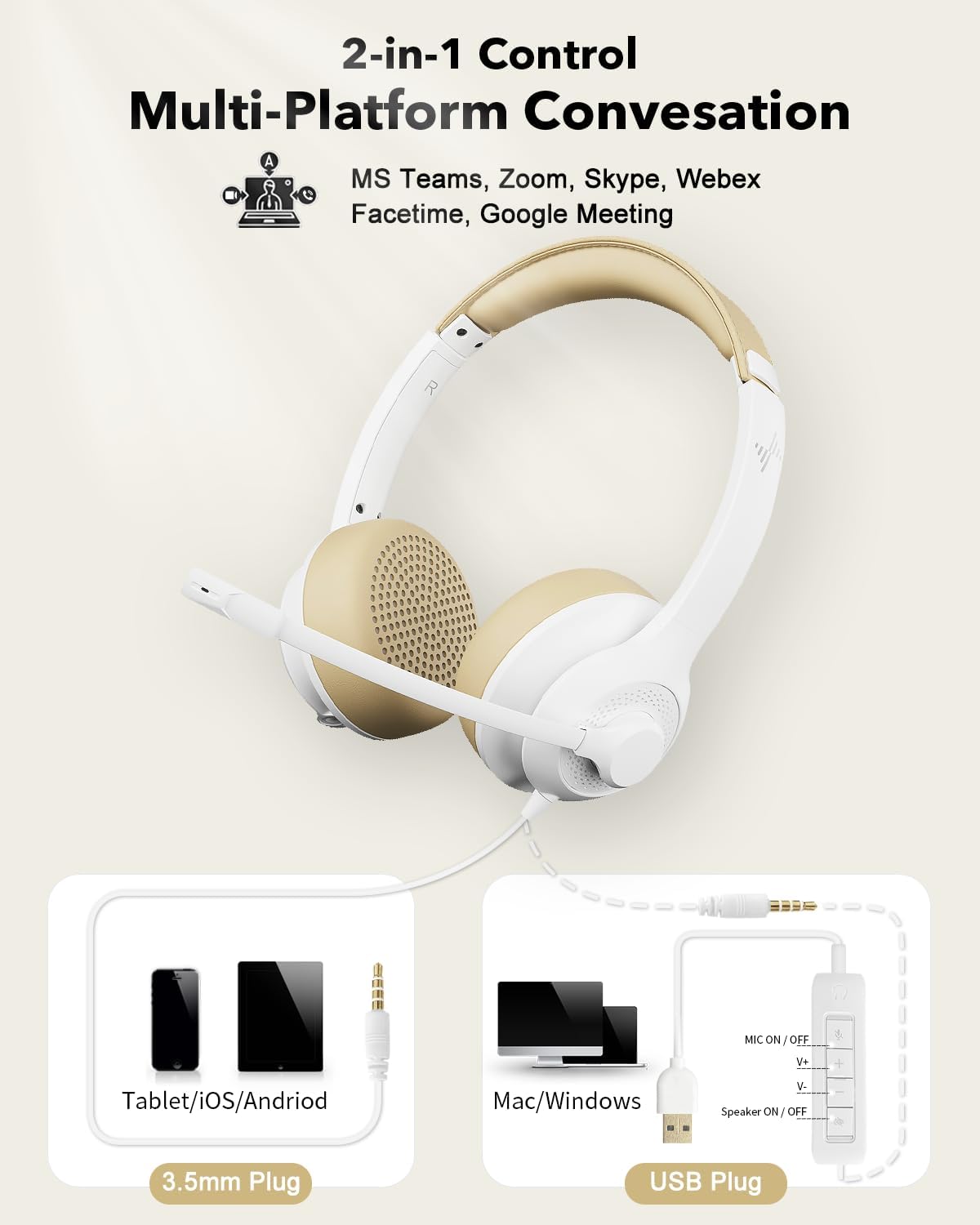
Figure 4: USB and 3.5mm Connection
4. คู่มือการใช้งาน
4.1. การใช้ไมโครโฟน
- การปรับไมโครโฟน: The unidirectional boom microphone can be rotated 270° to position it on either your left or right ear. Adjust its position so it is close to your mouth for optimal voice pickup.
- การตัดเสียงรบกวน: The microphone features noise-cancelling technology to reduce ambient background sounds, ensuring your voice is heard clearly during calls.

Figure 5: Noise-Cancelling Microphone in action

Figure 6: Flexible Microphone Adjustment
4.2. In-line Control (USB Connection Only)
The in-line control unit provides convenient access to audio functions when connected via USB:
- ปุ่มเปิด/ปิดไมโครโฟน: Press to mute or unmute the microphone. An indicator light will show the microphone status.
- เพิ่มระดับเสียง (V+): กดเพื่อเพิ่มระดับเสียงของลำโพง
- ลดระดับเสียง (V-): กดเพื่อลดระดับเสียงของลำโพง
- ปุ่มเปิด/ปิดลำโพง: กดเพื่อปิดหรือเปิดเสียงลำโพงหูฟัง
- ไฟแสดงสถานะเพาเวอร์: Illuminates to indicate the headset is powered and connected.

รูปที่ 7: หน่วยควบคุมแบบอินไลน์
5. การบำรุงรักษา
การดูแลอย่างเหมาะสมจะช่วยยืดอายุการใช้งานและประสิทธิภาพของชุดหูฟังของคุณ
- การทำความสะอาด: ใช้ผ้านุ่มและแห้งเช็ดทำความสะอาดชุดหูฟัง ห้ามใช้น้ำยาทำความสะอาดหรือสเปรย์
- แผ่นรองหูฟัง: The soft protein memory foam earpads are designed for breathability. Avoid exposing them to excessive moisture or harsh chemicals.
- พื้นที่จัดเก็บ: When not in use, store the headset in a clean, dry place, away from extreme temperatures and direct sunlight.
- การดูแลสายเคเบิล: หลีกเลี่ยงการดัดงอหรือดึงสายเคเบิลอย่างรุนแรงเพื่อป้องกันความเสียหาย

Figure 8: Breathable Earpads for Comfort and Hygiene
6 การแก้ไขปัญหา
หากคุณพบปัญหาเกี่ยวกับชุดหูฟัง โปรดดูวิธีแก้ไขทั่วไปต่อไปนี้:
| ปัญหา | สาเหตุที่เป็นไปได้ | สารละลาย |
|---|---|---|
| ไม่มีเสียงจากหูฟัง |
|
|
| ไมโครโฟนไม่ทำงาน |
|
|
| คุณภาพเสียงไม่ดี |
|
|
7. ข้อมูลจำเพาะ
| คุณสมบัติ | รายละเอียด |
|---|---|
| ชื่อรุ่น | EH01 |
| เทคโนโลยีการเชื่อมต่อ | USB, AUX (3.5mm Jack) |
| แจ็คหูฟัง | แจ็ค 3.5 มม. |
| การวางตำแหน่งหู | บนหู |
| ฟอร์มแฟกเตอร์ | บนหู |
| การควบคุมเสียงรบกวน | ระบบตัดเสียงรบกวนแบบแอคทีฟ (ไมโครโฟน) |
| ประเภทการควบคุม | Volume Control, Inline Remote |
| ไมโครโฟน | Unidirectional Boom, 270° Rotatable |
| ประเภทไดร์เวอร์เสียง | ไดร์เวอร์แบบไดนามิก |
| อุปกรณ์ที่รองรับ | PC, Mac, Chromebook, Tablet, Smartphones, MP3 Players, PS5, PS4, Xbox One, Gaming Systems |
| วัสดุ | พลาสติก |
| สี | สีขาว |
| น้ำหนักสินค้า | 9.6 ออนซ์ |
| ขนาดแพ็คเกจ | 7.44 x 6.18 x 2.13 นิ้ว |
8. การรับประกันและการสนับสนุน
The EAGLEND EH01 USB Headset comes with a รับประกัน 24 เดือน provided by EAGLEND.
For technical support, warranty claims, or further assistance, please refer to the contact information provided on the product packaging or the official EAGLEND webเว็บไซต์.