
การแนะนำ
The CCEI Zelia ZLT Electrolyser is designed to purify swimming pool water efficiently. This compact, intuitive, and economical system provides effective water treatment for pools up to 50 m³.
This manual provides essential information for the safe and effective installation, operation, and maintenance of your Zelia ZLT Electrolyser. Please read it thoroughly before use.
ข้อมูลด้านความปลอดภัย
ปฏิบัติตามข้อควรระวังด้านความปลอดภัยต่อไปนี้เสมอเพื่อป้องกันการบาดเจ็บหรือความเสียหายต่ออุปกรณ์:
- โปรดตรวจสอบให้แน่ใจว่าได้ตัดการเชื่อมต่อแหล่งจ่ายไฟแล้วก่อนทำการติดตั้ง บำรุงรักษา หรือแก้ไขปัญหาใดๆ
- การติดตั้งต้องดำเนินการโดยช่างผู้ชำนาญการที่มีคุณสมบัติเหมาะสม และเป็นไปตามข้อกำหนดด้านไฟฟ้าและประปาของท้องถิ่น
- Do not operate the electrolyser if any part is damaged or if water is present where it shouldn't be.
- Keep children and unauthorized persons away from the equipment.
- Use only genuine CCEI replacement parts.
สินค้าเกินview และส่วนประกอบ
The Zelia ZLT Electrolyser consists of a main control unit and an electrolysis cell. Understanding its components is key to proper installation and operation.

Figure 1: Main unit of the CCEI Zelia ZLT Electrolyser.
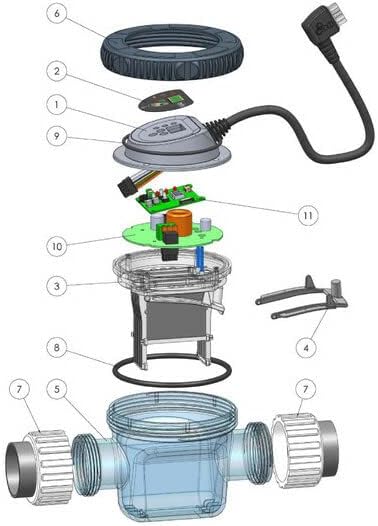
รูปที่ 2: ระเบิด view of the Zelia ZLT electrolysis cell and its components.
Key components include (referencing Figure 2):
- แผงควบคุม/จอแสดงผล
- Electrolysis Cell Body
- Electrode Plates (Titanium, Ruthenium treated)
- Flow Sensor (Integrated)
- Union Nuts for Pipe Connection
- ปะเก็น/ซีล
- การเชื่อมต่อสายไฟ
คุณสมบัติหลัก
The Zelia ZLT Electrolyser incorporates several advanced features for optimal pool water purification:
- ✓ User-Friendly Interface: Intuitive controls integrated directly into the cell for easy operation.
- ✓ High-Performance Cell: Titanium plates treated with ruthenium for enhanced efficiency and durability.
- ✓ Simple Installation: Easy connections with included fittings, allowing for in-line or bypass mounting.
- ✓ Production Optimization: Features thermoregulation, selectable production modes, and adjustable settings.
- ✓ Flexible Adaptability: Suitable for 50 mm pipes, accommodating flow rates up to 15 m³/h.
- ✓ Self-Cleaning Cell: Reduces maintenance needs.
- ✓ Integrated Flow Detector: Ensures safe and efficient operation.
- ✓ Backlit Display: For clear visibility of settings and status.
- ✓ Low-Temperature Production Stop: Protects the system in cold conditions.
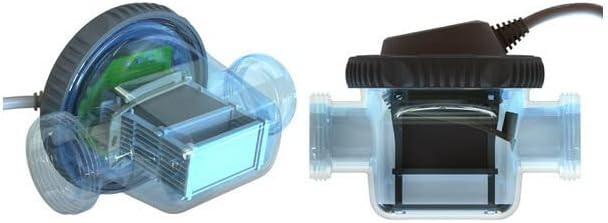
Figure 3: Visual representation of key features of the Zelia ZLT Electrolyser.
การติดตั้ง
Proper installation is crucial for the performance and longevity of your Zelia ZLT Electrolyser. It is recommended that installation be carried out by a qualified pool professional.
1 การวาง
Install the electrolysis cell in the pool's filtration circuit, after the filter and heater (if applicable), and before any chemical injection points. Ensure easy access for maintenance.
2. การเชื่อมต่อระบบประปา
- The Zelia ZLT is designed for 50 mm diameter pipes.
- The cell can be mounted in-line or via a bypass configuration. A bypass is recommended for easier maintenance and flow control.
- Use the included union fittings to connect the cell to your existing plumbing. Ensure all connections are watertight.
- Verify that the water flow direction through the cell matches the arrows indicated on the unit.
3. การเชื่อมต่อไฟฟ้า
- Connect the main control unit to a dedicated, properly grounded electrical outlet.
- Ensure the power supply matches the requirements specified on the unit's label.
- The unit should be protected by a Residual Current Device (RCD) for safety.
Note: For detailed wiring diagrams and specific installation steps, refer to the full installation guide provided with your product.
คำแนะนำการใช้งาน
The Zelia ZLT Electrolyser features an intuitive interface for easy control of your pool's water treatment.
1. การเริ่มต้นเริ่มต้น
- Before starting, ensure the pool water chemistry is balanced (pH, alkalinity, calcium hardness).
- Add the recommended amount of salt to the pool water. Consult your pool professional for the ideal salt level (typically 3-5 g/L).
- Turn on the pool pump to ensure water flow through the electrolyser cell.
- Connect the Zelia ZLT to the power supply. The backlit display will illuminate.
2. Adjusting Production Settings
Use the integrated controls on the cell to adjust the chlorine production level. The display will show the current production percentage or mode.
- Production Modes: The unit offers various production modes (e.g., P1-P5 for timed operation, P6-P8 for combined timed and external control). Refer to the main unit image for examples (P1 1h, P2 2h, P3 4h, P4 8h, P5 12h, P6 1h+4h, P7 2h+12h, P8 4h+8h, PA Ext).
- Thermoregulation: The system can automatically adjust production based on water temperature, optimizing efficiency and protecting the cell in cold conditions.
- Cover Detection: If connected to a pool cover sensor, the unit can reduce production when the cover is closed to prevent over-chlorination.
3. การติดตาม
Regularly check the display for status indicators and error messages. The integrated flow detector will stop production if there is insufficient water flow, protecting the cell.
การซ่อมบำรุง
Regular maintenance ensures the longevity and optimal performance of your Zelia ZLT Electrolyser.
1. Cell Cleaning
- The Zelia ZLT features a self-cleaning cell, which reverses polarity to shed scale buildup. This significantly reduces manual cleaning frequency.
- Despite self-cleaning, periodic visual inspection of the cell plates is recommended. If significant scale buildup is observed, manual cleaning may be necessary.
- To manually clean, disconnect power, remove the cell, and soak it in a diluted acid solution (e.g., muriatic acid diluted 1:10 with water) until scale dissolves. Rinse thoroughly with fresh water before reinstallation.
2. เคมีของน้ำ
Maintain proper pool water chemistry, especially salt levels, pH, and alkalinity, as per manufacturer recommendations. Incorrect water chemistry can reduce cell lifespan and efficiency.
3. การเตรียมพร้อมสำหรับฤดูหนาว
Before winter, disconnect the electrolyser from power, drain the cell, and store it in a dry, frost-free location. Do not allow water to freeze inside the cell.
การแก้ไขปัญหา
ส่วนนี้รวบรวมวิธีแก้ปัญหาทั่วไปที่คุณอาจพบเจอ สำหรับปัญหาที่ซับซ้อนกว่านี้ โปรดติดต่อช่างเทคนิคผู้เชี่ยวชาญ
| ปัญหา | สาเหตุที่เป็นไปได้ | สารละลาย |
|---|---|---|
| ไม่มีการผลิตคลอรีน | Low salt level, insufficient water flow, dirty cell, power off, low water temperature. | Check salt level and add salt if necessary. Ensure pump is running and filter is clean. Clean the cell. Verify power connection. Check water temperature (production stops below certain temp). |
| "Low Flow" error | Insufficient water flow through the cell. | Check pool pump operation, clean skimmer and pump baskets, backwash filter, ensure valves are open. |
| จอแสดงผลไม่ทำงาน | No power, internal fault. | Check power supply and circuit breaker. If power is present, contact technical support. |
ข้อมูลจำเพาะ
Key technical specifications for the CCEI Zelia ZLT Electrolyser:
- ยี่ห้อ: ซีซีอีไอ
- ประเภทสินค้า : Electrolyser for swimming pools
- ปริมาณสระสูงสุด: สูงสุด 50 ม³
- ความเข้ากันได้ของท่อ: เส้นผ่านศูนย์กลาง 50 มม.
- อัตราการไหลสูงสุด: สูงสุด 15 ลบ.ม./ชม.
- วัสดุเซลล์: Titanium plates treated with ruthenium
- คุณสมบัติ: Thermoregulation, Production modes, Integrated flow detector, Self-cleaning cell, Backlit display, Low-temperature production stop.
- ASIN: B0CCKLHGRS
- มีจำหน่ายครั้งแรก: วันที่ 9 มิถุนายน 2022
การรับประกันและการสนับสนุน
For detailed warranty information, please refer to the warranty card included with your product or visit the official CCEI webไซต์นี้ โปรดเก็บหลักฐานการซื้อไว้เพื่อใช้ยืนยันการรับประกัน
For technical support, spare parts, or service, please contact your authorized CCEI dealer or the manufacturer's customer service department. Contact information can typically be found on the manufacturer's webเว็บไซต์หรือในบรรจุภัณฑ์ของผลิตภัณฑ์