
1. บทนำ
Welcome to the user manual for your Canon PowerShot IXUS 285 HS Digital Camera. This guide provides essential information on setting up, operating, and maintaining your camera to help you capture high-quality photos and videos. The IXUS 285 HS combines a 20.2MP 1/2.3" CMOS sensor with a DIGIC 4+ image processor, offering 12x optical zoom and Full HD 1080p video recording capabilities.
2. เนื้อหาบรรจุภัณฑ์
โปรดตรวจสอบให้แน่ใจว่าสิ่งของต่อไปนี้ทั้งหมดรวมอยู่ในพัสดุของคุณแล้ว:
- Canon PowerShot IXUS 285 HS Digital Camera (Black)
- NB11L Replacement Battery
- Sandisk 64GB Ultra Memory Card
- Small Camera Case
- เครื่องชาร์จแบตเตอรี่ภายนอก
- เครื่องอ่านการ์ดหน่วยความจำ
- ขาตั้งกล้องแบบยืดหยุ่นขนาด 12 นิ้ว
- ชุดทำความสะอาด
- กระเป๋าใส่การ์ดหน่วยความจำ

Image: Canon PowerShot IXUS 285 HS camera with included accessories: NB11L battery, external charger, and wrist strap.
3. ส่วนประกอบและปุ่มควบคุมของกล้อง
Familiarize yourself with the main components and controls of your camera.
3.1 ด้านหน้า View

ภาพ: ด้านหน้า view of the Canon PowerShot IXUS 285 HS camera, showing the lens, flash, and Canon branding.
- เลนส์: เลนส์ซูมแบบออปติคอล 12 เท่า
- แฟลช: มีแฟลชในตัวสำหรับใช้งานในสภาพแสงน้อย
- AF-assist Beam/Self-timer Lamp: Assists autofocus and indicates self-timer operation.
- ไมโครโฟน: บันทึกเสียงระหว่างการบันทึกวิดีโอ
3.2 ด้านหลัง View
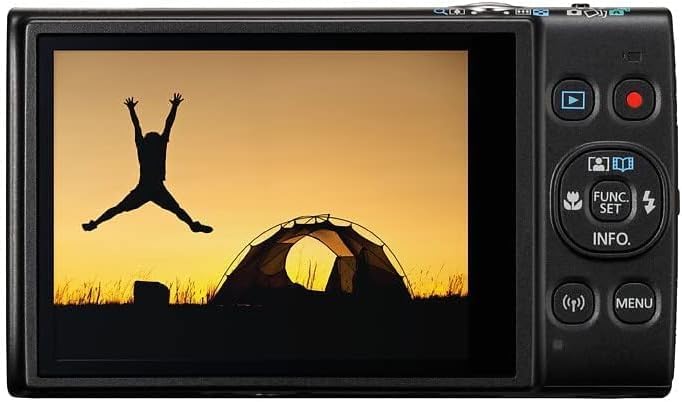
ภาพ: ด้านหลัง view of the Canon PowerShot IXUS 285 HS camera, displaying the 3.0-inch LCD monitor and various control buttons.
- จอแอลซีดี: 3.0-inch 461k-dot display for composing and reviewไอเอ็นจีภาพ
- ปุ่มเล่น: เข้าสู่โหมดการเล่นเพื่อ view ภาพถ่ายและวีดีโอ
- ปุ่มภาพยนตร์: เริ่มและหยุดการบันทึกวิดีโอ
- FUNC./SET Button: Accesses shooting functions and confirms selections.
- ปุ่มทิศทาง (ขึ้น/ลง/ซ้าย/ขวา): นำทางไปยังเมนูต่างๆ และปรับการตั้งค่า
- ปุ่มเมนู: Opens the camera's main menu.
- Wi-Fi/NFC Button: Activates wireless connectivity features.
4. การตั้งค่า
4.1 การติดตั้งแบตเตอรี่
- Open the battery cover on the bottom of the camera.
- Insert the NB11L battery pack with the contacts facing the correct direction, as indicated inside the compartment.
- Gently push the battery until it locks into place.
- ปิดฝาครอบแบตเตอรี่ให้แน่น
4.2 การใส่การ์ดหน่วยความจำ
- เปิดฝาครอบแบตเตอรี่/การ์ดหน่วยความจำที่ด้านล่างของกล้อง
- Insert the Sandisk 64GB Ultra Memory Card into the card slot with the label facing the correct direction.
- ค่อยๆ ดันการ์ดเข้าไปจนกระทั่งล็อคเข้าที่
- ปิดฝาให้แน่น
4.3 การชาร์จแบตเตอรี่
- Remove the NB11L battery from the camera.
- Insert the battery into the external charger (CB-2LF).
- เสียบที่ชาร์จเข้ากับเต้ารับไฟฟ้า ไฟแสดงสถานะการชาร์จจะสว่างขึ้น
- Once charging is complete, the indicator light will change or turn off. Remove the battery from the charger.
5. การใช้งานกล้อง
5.1 การเปิด/ปิดเครื่อง
- ในการเปิดเครื่อง ให้กด เปิด/ปิด ปุ่มที่อยู่ด้านบนของกล้อง
- หากต้องการปิด ให้กดปุ่ม เปิด/ปิด ปุ่มอีกครั้ง
5.2 การถ่ายภาพพื้นฐาน (โหมดอัตโนมัติ)
- Turn on the camera. It will typically start in Smart Auto mode.
- ใช้จอ LCD จัดองค์ประกอบภาพของคุณ
- Use the zoom lever (around the shutter button) to adjust the optical zoom.
- กดปุ่มชัตเตอร์ลงครึ่งหนึ่งเพื่อปรับโฟกัส กรอบโฟกัสจะเปลี่ยนเป็นสีเขียวเมื่อโฟกัสได้แล้ว
- กดปุ่มชัตเตอร์ลงจนสุดเพื่อถ่ายภาพ
5.3 การบันทึกวิดีโอ
- With the camera powered on, press the dedicated ปุ่มภาพยนตร์ on the rear of the camera to start recording.
- กดปุ่ม ปุ่มภาพยนตร์ อีกครั้งเพื่อหยุดการบันทึก
- The camera records Full HD 1080p video at 30 frames per second.
5.4 การเล่นซ้ำ
- กดปุ่ม ปุ่มเล่น (often indicated by a triangle icon) on the rear of the camera.
- ใช้ปุ่มทิศทางเพื่อนำทางไปยังรูปภาพและวิดีโอของคุณ
- หากต้องการออกจากโหมดการเล่น ให้กดปุ่ม ปุ่มเล่น again or the shutter button to return to shooting mode.
5.5 การเชื่อมต่อ Wi-Fi และ NFC
The camera features built-in Wi-Fi with NFC for wireless sharing of images and videos to a linked smartphone or tablet. Refer to the camera's on-screen menu for detailed instructions on connecting to a device and using the Canon Camera Connect app.
6. การบำรุงรักษา
6.1 การทำความสะอาดกล้อง
- ตัวกล้อง: ใช้ผ้านุ่มและแห้งเช็ดตัวกล้อง สำหรับคราบสกปรกฝังแน่น ให้เช็ดเบาๆampเทน้ำลงบนผ้า
- เลนส์: Use a lens brush or a blower to remove dust. For smudges, use a lens cleaning cloth and lens cleaning fluid. Avoid touching the lens surface with your fingers.
- จอแอลซีดี: เช็ดเบาๆ ด้วยผ้าแห้งเนื้อนุ่ม หลีกเลี่ยงการกดหน้าจอแรงๆ
6.2 พื้นที่จัดเก็บ
- When not in use, store the camera in a cool, dry, well-ventilated area, away from direct sunlight and high humidity.
- ถอดแบตเตอรี่ออกหากจะไม่ได้ใช้งานกล้องเป็นเวลานาน
- Use the provided camera case for protection during transport.
7 การแก้ไขปัญหา
หากคุณพบปัญหาเกี่ยวกับกล้อง โปรดลองทำตามขั้นตอนการแก้ไขปัญหาเบื้องต้นต่อไปนี้:
- กล้องไม่สามารถเปิดได้: ตรวจสอบให้แน่ใจว่าแบตเตอรี่ชาร์จเต็มและใส่เข้าไปอย่างถูกต้อง
- ไม่สามารถถ่ายรูปได้: ตรวจสอบว่าได้เสียบการ์ดหน่วยความจำแล้วและมีพื้นที่ว่างเพียงพอ ตรวจสอบให้แน่ใจว่าได้ถอดฝาปิดเลนส์ออกแล้ว
- ภาพเบลอ: Ensure the lens is clean. Check if the camera is focusing correctly (press the shutter button halfway). Use Intelligent IS for sharper handheld shots.
- แฟลชไม่ทำงาน: Check flash settings to ensure it's not set to 'Off' or 'Flash Off'.
- ปัญหาการเชื่อมต่อ Wi-Fi: Ensure Wi-Fi is enabled on both the camera and your smart device. Refer to the Canon Camera Connect app instructions.
For more detailed troubleshooting, please refer to the official Canon support webเว็บไซต์.
8. ข้อมูลจำเพาะ
| คุณสมบัติ | ข้อมูลจำเพาะ |
|---|---|
| หมายเลขรุ่น | 1076C001 |
| เซ็นเซอร์รับภาพ | 20.2MP 1/2.3" CMOS |
| หน่วยประมวลผลภาพ | DIGIC 4+ |
| ซูมออปติคอล | 12 เท่า |
| Focal Length (35mm Equiv.) | 25-300มม. |
| ระบบป้องกันภาพสั่นไหว | Intelligent IS (Optical) |
| การบันทึกวิดีโอ | Full HD 1080p ที่ 30 fps |
| จอแอลซีดี | 3.0" 461k-dot |
| การเชื่อมต่อ | Built-in Wi-Fi with NFC |
| ความไวแสง ISO | สูงถึง 3200 |
| การถ่ายภาพต่อเนื่อง | 7.2 เฟรมต่อวินาที |
| ขนาด (กว้าง x สูง x ลึก) | 3.9 x 2.3 x 0.9 นิ้ว (โดยประมาณ) |
| น้ำหนัก | 2.4 ออนซ์ (ประมาณ) |
| ผู้ผลิต | แคนนอน |
9. การรับประกันและการสนับสนุน
For information regarding your product's warranty, please refer to the warranty card included in your original packaging or visit the official Canon website. For technical support, product registration, or service inquiries, please contact Canon customer support directly or visit their support portal online.
Official Canon Support Webเว็บไซต์: https://www.usa.canon.com/support


