
1. บทนำ
The AOPUTTRIVER AP-189A is a high-precision digital manometer designed for measuring differential, positive, and negative pressure. It is widely used in various applications including flow measurement, air quality monitoring, level measurement, gas temperature measurement, and HVAC system control. This manual provides detailed instructions for the safe and effective use of your device.
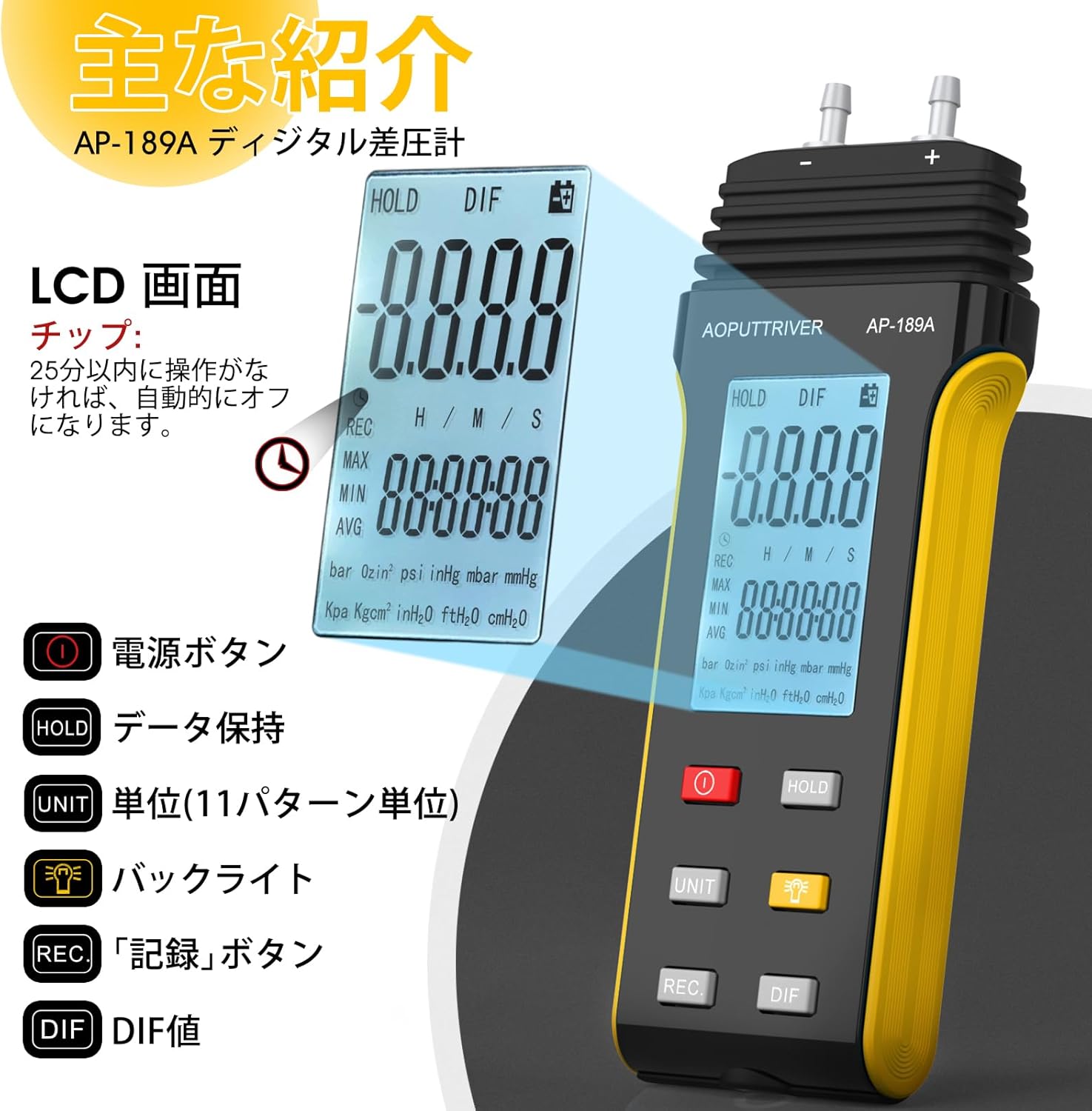
The device features a large LCD with backlight, data hold function, automatic power-off, and the ability to record maximum, minimum, and average values, as well as differential pressure (DIF). It supports 11 selectable pressure units for versatility in professional applications.
2. คุณสมบัติของผลิตภัณฑ์
- ความแม่นยำสูง: Measurement range of ±2.000psi with an accuracy of ±0.3%FSO (at 25°C).
- หลายหน่วย: Easily switch between 11 pressure units: Psi, kPa, Kgfcm2, ozin2, Bar, mbar, inHg, mmHg, inH2O, ftH2O, cmH2O.
- การบันทึกข้อมูล: Records MAX/MIN/AVG values for easy data analysis.
- การตั้งค่าเป็นศูนย์: Allows for precise zero calibration before measurements.
- จอแสดงผลมัลติฟังก์ชัน: จอ LCD ขนาดใหญ่พร้อมไฟแบ็คไลท์เพื่อการอ่านที่ชัดเจน
- การจัดการพลังงาน: Low battery indicator and automatic power-off after 25 minutes of inactivity to conserve battery life.
- DIF Function: Measures differential pressure.

ภาพ: เหนือview of the AP-189A Digital Manometer's key features and specifications, including accuracy, repeatability, maximum pressure, and various functions like data hold, auto-off, and unit selection.
3. เนื้อหาบรรจุภัณฑ์
ตรวจสอบว่าสินค้าทั้งหมดมีอยู่และอยู่ในสภาพดีเมื่อเปิดบรรจุภัณฑ์:
- 1 x AP-189A Digital Manometer
- 1 x ถุงป้องกัน
- ไขควงขนาดเล็ก 1 อัน
- แบตเตอรี่ AAA 2 ก้อน 1.5V
- 1 x User Manual (Japanese)

Image: The complete package contents of the AP-189A Digital Manometer, showing the device, a protective carrying bag, a small screwdriver, two AAA batteries, and the user manual.
4. การตั้งค่า
4.1 การติดตั้งแบตเตอรี่
- ค้นหาฝาครอบช่องใส่แบตเตอรี่ที่ด้านหลังของอุปกรณ์
- Use the provided small screwdriver to open the battery compartment.
- ใส่แบตเตอรี่ AAA ขนาด 1.5 โวลต์ สองก้อน โดยตรวจสอบให้แน่ใจว่าขั้วถูกต้อง (+/-)
- ใส่ฝาปิดช่องใส่แบตเตอรี่และขันให้แน่นด้วยสกรู
4.2 การเชื่อมต่อท่อ
The AP-189A features dual ports for differential pressure measurement. Connect the hoses to the appropriate ports (+ and -) based on your measurement requirements. Ensure a secure connection to prevent leaks.

ภาพ: รายละเอียด view of the AP-189A Digital Manometer, highlighting its dimensions and the dual port connections at the top for pressure hoses.
5. คู่มือการใช้งาน
5.1 เปิด/ปิดเครื่อง
- กดปุ่ม ปุ่มเปิดปิด (
 ) to turn the device ON.
 - กดปุ่มค้างไว้ ปุ่มเปิดปิด for a few seconds to turn the device OFF.
5.2 การตั้งค่าศูนย์
Before taking any measurements, it is crucial to perform a zero setting to ensure accuracy. Disconnect all pressure hoses from the device before performing this step.
- Ensure the device is powered on and no pressure is applied to the ports.
- กดปุ่มค้างไว้ ถือ กดปุ่มนี้ประมาณ 5 วินาที
- The display will show "----" indicating that the zero setting is complete.

Image: Visual guide demonstrating how to perform a zero setting on the manometer by long-pressing the HOLD button until the display shows dashes.
5.3 การเลือกหน่วย
กดปุ่ม หน่วย button to cycle through the 11 available pressure units (Psi, kPa, Kgfcm2, ozin2, Bar, mbar, inHg, mmHg, inH2O, ftH2O, cmH2O) until your desired unit is displayed.
5.4 ฟังก์ชันไฟแบ็คไลท์
กดปุ่ม ปุ่มไฟแบ็คไลท์ () to turn the LCD backlight ON or OFF for improved visibility in low-light conditions.
5.5 การเก็บข้อมูล
กดปุ่ม ถือ button briefly to freeze the current reading on the display. Press it again to release the hold function and resume live readings.
5.6 MAX/MIN/AVG/DIF Recording
กดปุ่ม บันทึก button to enter recording mode. In this mode, the device will track the maximum, minimum, and average pressure values. Press บันทึก repeatedly to cycle through MAX, MIN, AVG, and DIF displays. To exit recording mode, press and hold the บันทึก ปุ่ม.
5.7 การปิดเครื่องอัตโนมัติ
The device will automatically power off after 25 minutes of inactivity to save battery life. This feature can typically be disabled or adjusted by pressing and holding specific buttons during power-on, as detailed in the full manual.
Image: A close-up of the AP-189A's LCD screen and control buttons, illustrating the functions of the Power, Hold, Unit, Backlight, Record, and DIF buttons.
6. การบำรุงรักษา
- การทำความสะอาด: เช็ดอุปกรณ์ด้วยผ้านุ่มและแห้ง ห้ามใช้น้ำยาทำความสะอาดที่มีฤทธิ์กัดกร่อนหรือตัวทำละลาย
- พื้นที่จัดเก็บ: Store the manometer in its protective bag in a cool, dry place when not in use. Remove batteries if storing for extended periods to prevent leakage.
- การสอบเทียบ: Regular calibration by a qualified technician is recommended to maintain measurement accuracy, especially for critical applications.
- การเปลี่ยนแบตเตอรี่: ควรเปลี่ยนแบตเตอรี่ทันทีเมื่อไฟแสดงสถานะแบตเตอรี่เหลือน้อยปรากฏขึ้น เพื่อให้สามารถใช้งานได้อย่างต่อเนื่องและป้องกันการสูญหายของข้อมูล
7 การแก้ไขปัญหา
| ปัญหา | สาเหตุที่เป็นไปได้ | สารละลาย |
|---|---|---|
| อุปกรณ์ไม่เปิดเครื่อง | แบตเตอรี่หมดหรือติดตั้งไม่ถูกต้อง | ตรวจสอบขั้วแบตเตอรี่ เปลี่ยนแบตเตอรี่ |
| การอ่านที่ไม่ถูกต้อง | No zero setting performed; sensor obstruction; device not calibrated | Perform zero setting; ensure ports are clear; consider professional calibration. |
| Display shows "OL" or "Err" | Overload (pressure exceeds maximum limit) | Remove pressure immediately. Ensure pressure does not exceed 6 Psi. |
| แสงไฟไม่ทำงาน | Backlight function off; low battery | Press the backlight button; replace batteries. |
8. ข้อมูลจำเพาะ
- ช่วงการวัด: ±2.000psi
- ความแม่นยำ: ±0.3%FSO (at 25°C)
- ความสามารถในการทำซ้ำ: ±0.25%FSO
- Linearity/Hysteresis: ±0.1%FSO
- Limited Maximum Pressure: 6 ปอนด์/ตารางนิ้ว
- หน่วย: Psi, kPa, Kgfcm2, ozin2, Bar, mbar, inHg, mmHg, inH2O, ftH2O, cmH2O
- ฟังก์ชั่น: Backlight, Data Hold, Auto Power Off (25 min), MAX/MIN/AVG/DIF, Zero Setting
- แหล่งจ่ายไฟ: แบตเตอรี่ AAA 2 ก้อน 1.5V
- ขนาด : ขนาดโดยประมาณ 166 มม. x 62 มม. x 31 มม. (6.29 นิ้ว x 2.44 นิ้ว x 1.22 นิ้ว)
- น้ำหนัก: ประมาณ 250กรัม
Image: A diagram illustrating the physical dimensions of the AP-189A Digital Manometer, including length, width, and thickness.
9. การรับประกันและการสนับสนุน
The AOPUTTRIVER AP-189A Digital Manometer comes with a 365-day warranty and lifetime technical support. If you encounter any quality issues with the product, please contact our customer support team. We are committed to resolving any problems as quickly as possible.
For support, please refer to the contact information provided in your product packaging or visit the official AOPUTTRIVER webเว็บไซต์.