
1. สินค้าหมดview
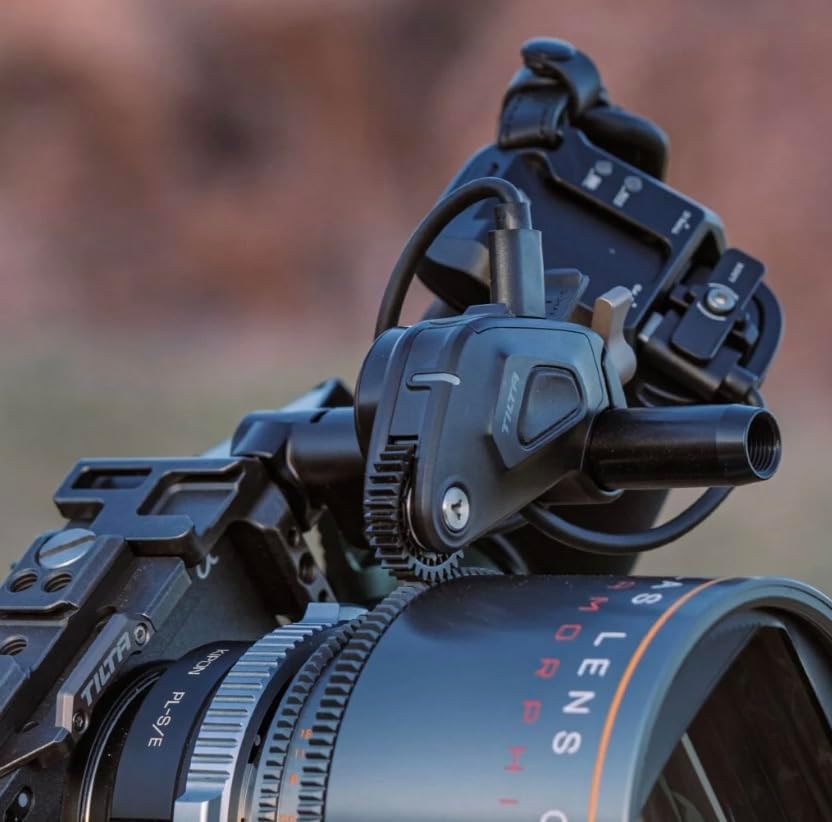
The Tilta Nucleus Nano II Motor Kit is a high-performance wireless lens control system designed for precise adjustments of camera and lens settings. It features USB-C for power and camera communication, compatibility with 15mm rod systems and 0.8M pitch gear lenses, and a color-coded LED status indicator for intuitive operation.
This system offers enhanced torque compared to its predecessor, providing robust control for various lens types. It supports external control for both cameras and gimbals, making it a versatile tool for professional and aspiring filmmakers.
คุณสมบัติหลัก:
- การสื่อสารด้วยกล้อง: Adjust settings like ISO, shutter speed, and frame rate via USB-C.
- High Torque Performance: Delivers five times the torque of previous models for reliable operation.
- พอร์ต USB-C: Flexible power input/output for multiple motors.
- ความเข้ากันได้: Works with 15mm rods and lenses featuring 0.8M pitch gears.
- Color Coded LED: Provides clear status indication for assigned motor functions.
2. การแกะกล่องและส่วนประกอบ
Upon opening the kit, you will find the following components:
- Nucleus Nano II Motor (12009.00001.00.00) x1
- Photographic Lens Follow Focus Gear Ring (FR-T03) x1
- USB-C Power Cable (30cm) (21114.00061.00.00) x1
- 15mm Rod x1
- 15mm Rod Holder x1
- อัลเลน คีย์ x1
ส่วนประกอบมากกว่าview:
The kit includes the main motor unit, a photographic lens gear ring for attachment to lenses, a USB-C cable for power, and mounting accessories for 15mm rod systems.


3. User Interface (Handwheel)
The Nucleus Nano II Handwheel features a 1.6-inch touchscreen display for intuitive control and monitoring. Key elements include:
- จอแสดงผลแบบสัมผัส: Used to select most options and view พารามิเตอร์
- ปุ่มบันทึก: Initiates/stops recording and can power the unit.
- Zoom Toggle: Controls zoom, focus, or iris depending on assignment.
- ปุ่มฟังก์ชั่น: Calibrates motors and sets marks.
- TF/DF Switch: Toggles between Tilta Focus (TF) and DJI Focus (DF) modes for sensitivity adjustment or accessory use.
- NATO Rail Mount: Located on the inside, with contact pins for power with compatible accessories.
- พอร์ต USB-C: For charging the internal battery and firmware updates. Operating temperature: 14°F to 140°F.
4. การติดตั้งและการประกอบ
Follow these steps to set up your Tilta Nucleus Nano II Motor Kit:
4.1 Mounting the Motor:
- Attach the Nucleus Nano II Motor to your 15mm rod system using the provided 15mm rod holder and allen key.
- Align the motor's 0.8M pitch gear with the gear ring on your lens.
- Secure the motor in place using the tie-down screw.
4.2 Powering the Motor:
The motor can be powered via the included USB-C to USB-C cable. The motor has two USB-C ports (Port 1 and Port 2). Both ports are inputs, but only Port 1 is an output for daisy-chaining multiple motors.
- พาวเวอร์แบงค์ภายนอก: Connect the USB-C cable from a universal power bank holder (mounted via 1/4"-20 to your camera cage) to either Port 1 or Port 2 on the motor.
- F970 Battery Plate: Connect the USB-C cable from an F970 battery plate (with USB-C output) to the motor. This provides increased torque.
- PD Power Handle: Connect the USB-C cable from a PD power handle (with internal battery and USB-C PD output) to the motor.
When the motor is powered, a red and white light will blink, indicating it needs calibration.
4.3 Pairing the Handwheel to the Motor:
- On the Handwheel, swipe up from the main screen and select the 'Connect' option.
- Select '2.4G' and then 'Channels'.
- The Handwheel will display a list of available channels. It will automatically connect to the cleanest channel.
- Press 'Search' on the Handwheel.
- Double-tap the pairing button on the motor. The motor's LED will change color to indicate its assigned function (Green for Iris, Blue for Zoom, Yellow for Other/Unassigned, Purple for Focus).
- On the Handwheel, select the cleanest option from the device list and press 'Confirm'.
- The Handwheel and motor are now connected.
4.4 Calibrating the Motor:
After pairing, calibrate the motor to ensure accurate lens control.
- Auto Calibration (Recommended): Hold down the 'Function' button on the Handwheel for 3 seconds. The motor will automatically calibrate.
- Manual Calibration (for lenses without hard stops):
- On the Handwheel, swipe up from the home screen and select 'Motor'.
- Select 'Focus' and then 'Manual Cal'.
- Press 'Calibrate'.
- Manually rotate the lens to its minimum focus position using the Handwheel's main dial. Press 'Confirm'.
- Manually rotate the lens to its infinity focus position. Press 'Confirm'.
- Press 'Confirm' again to complete setup.
5. Operating the Nucleus Nano II
5.1 Setting Marks:
Setting marks is useful for precise focus pulls to specific focal distances.
- Single Mark: Rotate the Handwheel to the desired focal distance and single-press the 'Function' button. A mark will appear on the UI, and you'll feel haptic feedback. Double-tap the 'Function' button to delete the mark.
- A/B Range: Hold the 'A/B' button on the UI, rotate the Handwheel to select the desired range, and single-tap to lock it. This limits the motor's travel within that range. Hold the 'A/B' button again to delete the range.
5.2 Menu Navigation:
The Handwheel's menu provides access to various settings:
- เมนูการตั้งค่า: Swipe up from the main screen and select 'Settings'.
- Calibrate Knob: Calibrates the Handwheel's physical limits to align with firmware.
- ความสว่าง: Adjusts screen brightness (Manual or Auto).
- ลูกบิด: Assigns motor function (Focus, Iris, Zoom, Other) to the main dial and allows resetting to default.
- โยก: Assigns motor function (Focus, Iris, Zoom, Other) to the rocker switch.
- การสั่นสะเทือน: Enables/disables haptic feedback and adjusts strength.
- สแตนด์บาย: Sets the idle time before the unit enters sleep mode.
- Motor Menu: Swipe up from the main screen and select 'Motor'.
- Focus/Iris/Zoom: Accesses Auto Cal, Manual Cal, Torque, Sync, Direction, and Sensitivity settings for each motor.
- Connect Menu: Swipe up from the main screen and select 'Connect'.
- 2.4จี: Adjusts channels and transmission power for the Handwheel.
- บลูทูธ: Connects to camera systems (e.g., DJI Ronin series).
- ไวไฟ: Connects to the internet for firmware updates.
- กล้อง: Connects to various camera systems for control.
6. ข้อมูลจำเพาะ
| คุณสมบัติ | ข้อมูลจำเพาะ |
|---|---|
| ยี่ห้อ | ทิลต้า |
| ชื่อรุ่น | Nucleus Nano II Motor Kit |
| สี | ชัดเจน |
| อุปกรณ์ที่รองรับ | Camera, Tilta Nucleus Nano II |
| น้ำหนักสินค้า | 152 กรัม |
| ขนาดเมื่อพับ | 6 x 5 x 4 นิ้ว |
| ยูพีซี | 810076276472 |
| โหมดการถ่ายภาพ | คู่มือ (ม) |
| ประเภทการควบคุมการรับแสง | คู่มือ (ม) |
| ระดับความต้านทานต่อน้ำ | ไม่ทนน้ำ |
| การบันทึกเสียง | เลขที่ |
7. การบำรุงรักษา
To ensure the longevity and optimal performance of your Tilta Nucleus Nano II Motor Kit, follow these maintenance guidelines:
- การทำความสะอาด: Regularly wipe down the motor and handwheel with a soft, dry cloth. Avoid using harsh chemicals or abrasive materials.
- พื้นที่จัดเก็บ: ควรเก็บชุดอุปกรณ์ไว้ในที่แห้งและปราศจากฝุ่นเมื่อไม่ได้ใช้งาน
- อัพเดตเฟิร์มแวร์: Keep your device's firmware updated to the latest version for improved performance and new features. Updates can be performed via WiFi or USB-C.
- การดูแลแบตเตอรี่ The internal battery has an operating temperature range of 14°F to 140°F (-10°C to 60°C). Avoid exposing the device to extreme temperatures outside this range.
8 การแก้ไขปัญหา
If you encounter issues with your Nucleus Nano II Motor Kit, refer to the following common troubleshooting steps:
- มอเตอร์ไม่ตอบสนอง:
- Ensure the motor is properly powered via USB-C.
- Verify the Handwheel and motor are paired to the same 2.4G channel.
- Perform a motor calibration (Auto or Manual) as described in Section 4.4.
- Handwheel Knob/Rocker Not Aligned:
- If the physical limits of the Handwheel's knob do not align with the firmware limitations (e.g., hitting 999 on display but knob can still turn), go to 'Settings' > 'Calibrate Knob' and follow the on-screen prompts to re-calibrate the knob's range.
- การอัปเดตเฟิร์มแวร์ล้มเหลว:
- If a motor firmware update fails to pass 2%, power cycle the motor (unplug/replug power) and restart the update process.
- Ensure a stable internet connection for WiFi updates.
- USB-C Port Damage:
- Avoid sliding the Handwheel onto a NATO rail if it has contact pins, as this can damage the pins.
9. การรับประกันและการสนับสนุน
The Tilta Nucleus Nano II Motor Kit comes with the following warranty:
- การรับประกันเครื่องกล: 2 ปี
- Electronic Warranty: 1 ปี
For further support, please visit the official Tilta webเว็บไซต์หรือติดต่อฝ่ายบริการลูกค้าของพวกเขา