
1. บทนำ
เครื่องมือวินิจฉัยรถจักรยานยนต์ FXTUL M6 เป็นเครื่องสแกน OBD2 ที่ครอบคลุม ออกแบบมาเพื่อวินิจฉัยและบำรุงรักษารถจักรยานยนต์ มีหน้าจอแสดงผล RGB ขนาด 5 นิ้ว และครอบคลุมระบบทั้งหมด บันทึกข้อมูลแบบเรียลไทม์ และสามารถพิมพ์รายงานได้ คู่มือนี้ให้คำแนะนำโดยละเอียดสำหรับการใช้งานและการบำรุงรักษาเครื่องมือวินิจฉัย M6 อย่างถูกต้อง

รูปที่ 1: เครื่องมือวินิจฉัย FXTUL M6, สายเคเบิล และกล่องพกพาป้องกัน
2. สินค้าหมดview
2.1 คุณสมบัติหลัก
- การวินิจฉัยระบบ: รองรับระบบต่างๆ เช่น เครื่องยนต์, ABS, แรงดันลมยาง, ระบบกันขโมย และอื่นๆ อ่านและล้างรหัสข้อผิดพลาดในการวินิจฉัย (DTCs) viewสามารถหยุดภาพข้อมูล แสดงสตรีมข้อมูล และทำการทดสอบแบบแอคทีฟได้
- 104 ฟังก์ชันการบริการ: รวมถึงการรีเซ็ต ECU และการบำรุงรักษาน้ำมันเครื่องamp รีเซ็ต, ปรับแต่ง CO Trimmer, ปรับแต่ง TPS, รีเซ็ตพารามิเตอร์แบบปรับอัตโนมัติ, รีเซ็ตไฟแสดงสถานะการบริการ และปรับแต่งรอบเดินเบา
- การทดสอบแบตเตอรี่: ประกอบด้วยฟังก์ชันทดสอบการสตาร์ทเครื่องยนต์ ทดสอบมาตรฐาน ทดสอบด่วน และทดสอบการชาร์จ
- การบันทึกและเล่นข้อมูล: บันทึกข้อมูลการวินิจฉัยเพื่อใช้ในภายหลังview และการวิเคราะห์
- การพิมพ์ข้อมูล: สร้างรายงานที่สามารถพิมพ์ได้สำหรับผลการวินิจฉัย ข้อมูลโมดูล รหัสข้อผิดพลาด และกระแสข้อมูล
- ภาพ Viewเอ่อ: จับภาพและบันทึกviewภาพหน้าจอของหน้าจออุปกรณ์ระหว่างการวินิจฉัย
- จอแสดงผล RGB ขนาด 5 นิ้ว: หน้าจอความละเอียดสูง (800x480 พิกเซล) พร้อมธีมสีเข้มและสีอ่อนที่ปรับแต่งได้
- ครอบคลุมรถจักรยานยนต์หลากหลายรุ่น: ใช้ได้กับรถจักรยานยนต์กว่า 70 ยี่ห้อและรุ่นทั่วโลก
- อัปเกรดซอฟต์แวร์ฟรีตลอดอายุการใช้งาน: เชื่อมต่อกับคอมพิวเตอร์ผ่าน USB เพื่ออัปเดตซอฟต์แวร์
- รองรับหลายภาษา: มีตัวเลือกภาษาต่างๆ สำหรับส่วนติดต่อผู้ใช้
2.2 ส่วนประกอบและการควบคุม
อุปกรณ์ FXTUL M6 มีอินเทอร์เฟซที่ใช้งานง่าย พร้อมจอแสดงผลที่ชัดเจนและปุ่มควบคุมที่ใช้งานง่าย
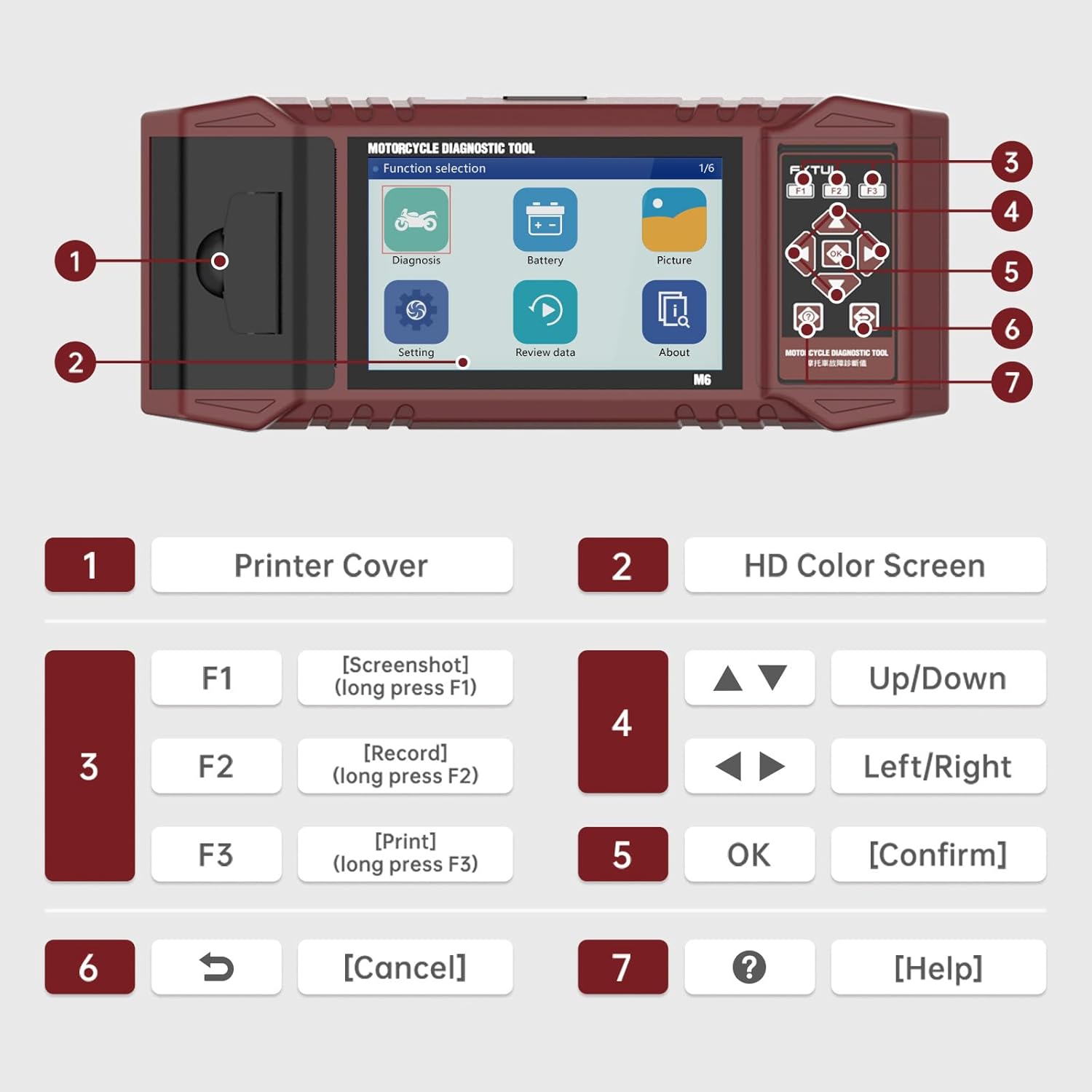
รูปที่ 2: ส่วนประกอบและปุ่มควบคุมต่างๆ ของเครื่องมือวินิจฉัย FXTUL M6 พร้อมป้ายกำกับ
| เลขที่ | ส่วนประกอบ | การทำงาน |
|---|---|---|
| 1 | ฝาครอบเครื่องพิมพ์ | ปิดบังเครื่องพิมพ์ความร้อนในตัว |
| 2 | หน้าจอสีความละเอียดสูง | จอแสดงผล RGB ขนาด 5 นิ้ว สำหรับเชื่อมต่อและแสดงข้อมูล |
| 3 | ปุ่มฟังก์ชัน (F1, F2, F3) | F1: จับภาพหน้าจอ (กดค้าง), F2: บันทึก (กดค้าง), F3: พิมพ์ (กดค้าง) |
| 4 | ปุ่มนำทาง | เลื่อนขึ้น/ลง และ เลื่อนซ้าย/ขวา เพื่อไปยังเมนูต่างๆ |
| 5 | คีย์ตกลง | ยืนยันการเลือก |
| 6 | คีย์ยกเลิก | กลับไปยังหน้าจอก่อนหน้าหรือยกเลิกการทำงาน |
| 7 | คีย์ช่วยเหลือ | ให้ความช่วยเหลือตามบริบท |
3. การตั้งค่า
- การแกะกล่อง: นำเครื่องมือวินิจฉัย M6 และอุปกรณ์เสริมทั้งหมดออกจากบรรจุภัณฑ์อย่างระมัดระวัง ตรวจสอบว่าส่วนประกอบทั้งหมดที่ระบุไว้ในส่วน "สิ่งที่มีอยู่ในกล่อง" นั้นครบถ้วน
- การเชื่อมต่อไฟฟ้า: โดยปกติแล้วอุปกรณ์นี้จะได้รับพลังงานผ่านพอร์ตวินิจฉัยของรถจักรยานยนต์ โปรดตรวจสอบให้แน่ใจว่าได้ปิดสวิตช์กุญแจของรถจักรยานยนต์แล้วก่อนเชื่อมต่ออุปกรณ์
- การเชื่อมต่อกับรถจักรยานยนต์: ค้นหาพอร์ตวินิจฉัยบนรถจักรยานยนต์ของคุณ เชื่อมต่อสายเคเบิลวินิจฉัยที่เหมาะสมจากเครื่องมือ M6 เข้ากับพอร์ตของรถจักรยานยนต์
- เปิดเครื่อง: หมุนกุญแจสตาร์ทรถจักรยานยนต์ไปที่ตำแหน่งเปิด (ON) เครื่องมือ M6 ควรจะเปิดใช้งานโดยอัตโนมัติ หากไม่เป็นเช่นนั้น ให้ตรวจสอบการเชื่อมต่อ
- เลือกภาษา: ในการใช้งานครั้งแรก คุณอาจได้รับแจ้งให้เลือกภาษาที่ต้องการ ใช้ปุ่มลูกศรเพื่อเลื่อนไปยังภาษาที่ต้องการ และยืนยันด้วยปุ่ม OK
4. คู่มือการใช้งาน
4.1 การวินิจฉัยระบบ
ฟังก์ชันนี้ช่วยให้สามารถสแกนระบบต่างๆ ของรถจักรยานยนต์ได้อย่างครอบคลุม เพื่อระบุและแก้ไขปัญหาต่างๆ
- จากเมนูหลัก เลือก "การวินิจฉัย"
- เครื่องมือนี้จะระบุรุ่นรถโดยอัตโนมัติและสแกนระบบที่มีอยู่ทั้งหมด
- Review สถานะการประกอบและรหัสข้อผิดพลาดสำหรับแต่ละระบบ
- หากต้องการอ่านรหัสข้อผิดพลาด ให้เลือกตัวเลือก "อ่านรหัสข้อผิดพลาด"
- หากต้องการล้างรหัสข้อผิดพลาดทั้งหมด ให้เลือกตัวเลือก "ล้างรหัสข้อผิดพลาด" ยืนยันการดำเนินการเมื่อได้รับแจ้ง

รูปที่ 3: หน้าจอแสดงข้อมูลการวินิจฉัยระบบยานยนต์ สำหรับอ่านและล้างรหัสข้อผิดพลาด
4.2 ฟังก์ชันการให้บริการ
M6 รองรับฟังก์ชันการบริการมากกว่า 100 ฟังก์ชันสำหรับขั้นตอนการบำรุงรักษาต่างๆ
- จากเมนูหลัก ให้ไปที่ "ฟังก์ชันบริการ" หรือตัวเลือกที่คล้ายกัน (อาจอยู่ภายใต้ "การวินิจฉัย" ขึ้นอยู่กับเวอร์ชันซอฟต์แวร์)
- เลือกฟังก์ชันบริการที่ต้องการจากรายการ (เช่น รีเซ็ต ECU, รีเซ็ตไฟเตือนเปลี่ยนถ่ายน้ำมันเครื่อง, ปรับค่า CO)
- ทำตามคำแนะนำบนหน้าจอเพื่อดำเนินการให้เสร็จสมบูรณ์

รูปที่ 4: อดีตampฟังก์ชันบริการ 104 ฟังก์ชันที่เครื่องมือนี้รองรับ
4.3 อ่านสตรีมข้อมูล
View พารามิเตอร์ข้อมูลแบบเรียลไทม์จาก ECU ของรถจักรยานยนต์ กราฟรูปคลื่นของกระแสข้อมูลจะปรับเปลี่ยนโดยอัตโนมัติเพื่อให้ง่ายต่อการใช้งาน viewการไอเอ็นจี
- จากเมนู "การวินิจฉัย" ให้เลือก "สตรีมข้อมูล" หรือ "ข้อมูลสด"
- เลือกพารามิเตอร์ข้อมูลเฉพาะที่คุณต้องการตรวจสอบ
- ข้อมูลจะแสดงผลในรูปแบบตัวเลข และยังสามารถแสดงผลในรูปแบบอื่นๆ ได้อีกด้วย viewใช้เป็นกราฟรูปคลื่นสำหรับการวิเคราะห์แนวโน้ม

รูปที่ 5: การแสดงผลข้อมูลแบบสตรีมและการวิเคราะห์รูปคลื่น
4.4 การทดสอบแบตเตอรี่
ทำการทดสอบต่างๆ กับแบตเตอรี่ของรถจักรยานยนต์
- จากเมนูหลัก เลือก "แบตเตอรี่"
- เลือกการทดสอบที่ต้องการ: "การทดสอบการสตาร์ทเครื่องยนต์", "การทดสอบมาตรฐาน", "การทดสอบแบบรวดเร็ว" หรือ "การทดสอบการชาร์จ"
- ทำตามคำแนะนำบนหน้าจอเพื่อทำการทดสอบ และ view ผลลัพธ์.

รูปที่ 6: อินเทอร์เฟซฟังก์ชันการทดสอบแบตเตอรี่
4.5 การบันทึกและการเล่นข้อมูล
บันทึกขั้นตอนการวินิจฉัยเพื่อนำไปใช้ในภายหลังview และการวิเคราะห์
- ระหว่างกระบวนการวินิจฉัย ให้กดปุ่ม F2 ค้างไว้เพื่อเริ่มบันทึกข้อมูล
- ในการเล่นข้อมูลที่บันทึกไว้ ให้เลือก "เล่นซ้ำ"view จากเมนูหลัก เลือกดู "ข้อมูล"
- นำทางผ่านรายการที่บันทึกไว้ fileและเลือกไฟล์ที่คุณต้องการเล่น
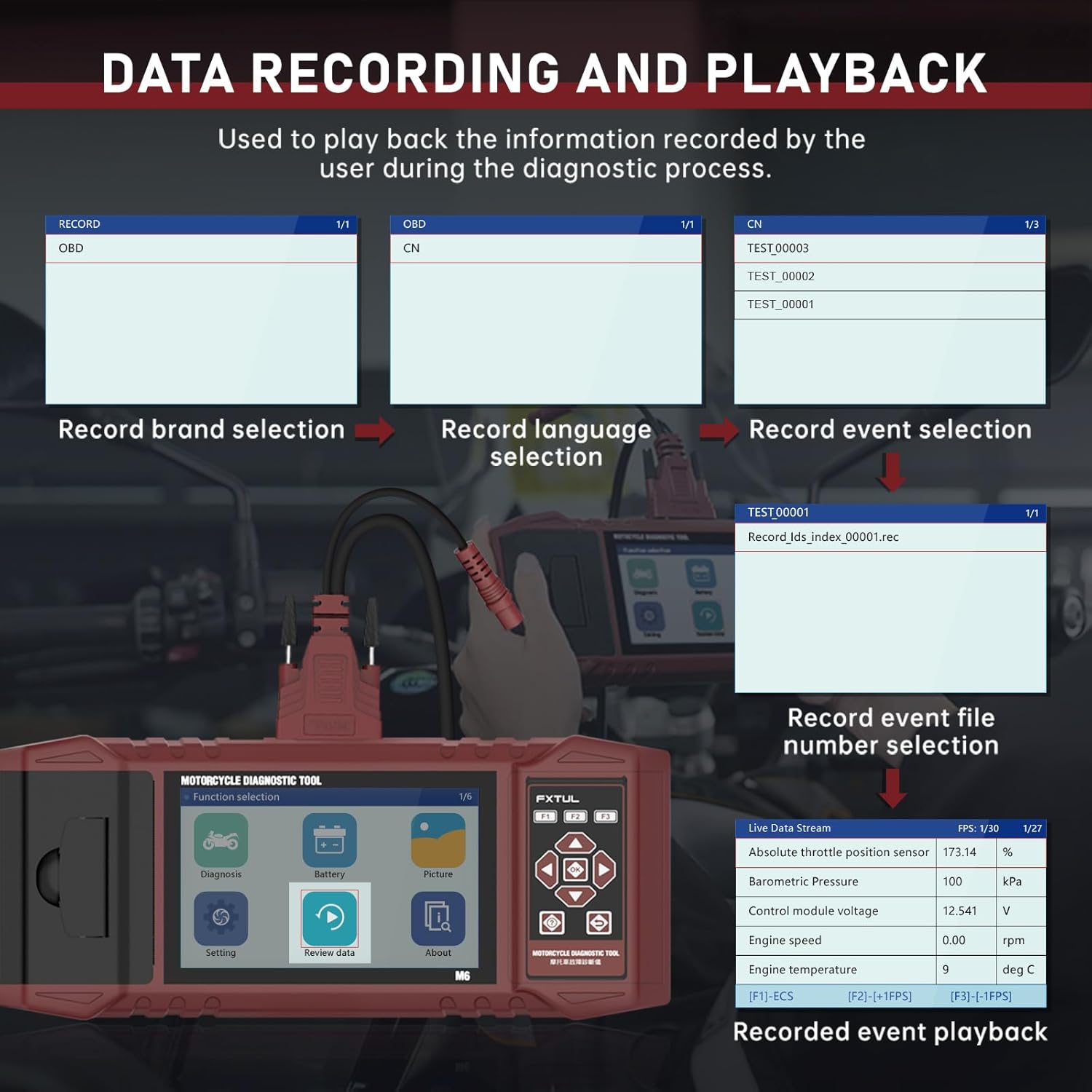
รูปที่ 7: กระบวนการบันทึกและเล่นข้อมูล
4.6 การพิมพ์ข้อมูล
พิมพ์รายงานการวินิจฉัยได้โดยตรงจากอุปกรณ์โดยใช้เครื่องพิมพ์ในตัว
- บนหน้าจอใดก็ตามที่แสดงข้อมูลที่คุณต้องการพิมพ์ (เช่น รายงานการวินิจฉัย รหัสข้อผิดพลาด) ให้กดปุ่ม F3 ค้างไว้
- ป้อนข้อมูลผู้ใช้หรือข้อมูลยานพาหนะที่จำเป็นโดยใช้แป้นพิมพ์บนหน้าจอ
- อุปกรณ์จะพิมพ์ข้อมูลออกมา

รูปที่ 8: ฟังก์ชันการพิมพ์ข้อมูล
4.7 รูปภาพ Viewer
บันทึกภาพหน้าจอของอินเทอร์เฟซอุปกรณ์และ...view พวกเขาในภายหลัง
- ในการจับภาพหน้าจอ ให้กดปุ่ม F1 ค้างไว้บนอินเทอร์เฟซใดก็ได้
- ถึง view ภาพที่บันทึกไว้ ให้เลือก "รูปภาพ" จากเมนูหลัก
- คุณสามารถเรียกดูภาพที่บันทึกไว้และลบได้ตามต้องการ

รูปที่ 9: ภาพ Viewอินเทอร์เฟซสำหรับเรียกดูและลบภาพหน้าจอ
5. การอัพเกรดซอฟต์แวร์
FXTUL M6 มาพร้อมการอัปเกรดซอฟต์แวร์ฟรีตลอดอายุการใช้งาน เพื่อให้มั่นใจได้ว่าสามารถใช้งานร่วมกับรถจักรยานยนต์รุ่นใหม่และฟีเจอร์ต่างๆ ได้
- ดาวน์โหลดอัพเดต: ดาวน์โหลดซอฟต์แวร์เวอร์ชั่นล่าสุด fileจาก FXTUL อย่างเป็นทางการ webเว็บไซต์หรือติดต่อฝ่ายสนับสนุนลูกค้า
- เชื่อมต่อกับคอมพิวเตอร์: เชื่อมต่ออุปกรณ์ M6 เข้ากับคอมพิวเตอร์ของคุณโดยใช้สาย USB
- การรับรู้อุปกรณ์: รอจนกว่าคอมพิวเตอร์จะตรวจพบอุปกรณ์ สัญลักษณ์ไดรฟ์ใหม่ควรปรากฏขึ้น
- เปลี่ยนโฟลเดอร์: เปิดไดรฟ์ใหม่ ค้นหาโฟลเดอร์ "DIAGNOSE" แล้วแทนที่โฟลเดอร์นี้ด้วยโฟลเดอร์อัปเกรด "DIAGNOSE" ที่ดาวน์โหลดมา
- รีบูต: ถอดอุปกรณ์ออกจากคอมพิวเตอร์แล้วเปิดเครื่องใหม่อีกครั้ง ซอฟต์แวร์ที่อัปเดตแล้วจะถูกโหลด

รูปที่ 10: ขั้นตอนการอัปเกรดซอฟต์แวร์ผ่านการเชื่อมต่อ USB
6 การแก้ไขปัญหา
- อุปกรณ์ไม่เปิดเครื่อง:
- ตรวจสอบให้แน่ใจว่าสายเคเบิลวินิจฉัยเชื่อมต่อเข้ากับเครื่องมือ M6 และพอร์ตวินิจฉัยของรถจักรยานยนต์อย่างแน่นหนาแล้ว
- ตรวจสอบให้แน่ใจว่าสวิตช์กุญแจของรถจักรยานยนต์อยู่ในตำแหน่งเปิด (ON)
- ตรวจสอบระดับแบตเตอรี่ของรถจักรยานยนต์tage.
- ไม่สามารถเชื่อมต่อกับ ECU ของรถจักรยานยนต์ได้:
- ตรวจสอบให้แน่ใจว่าได้ใช้สายเคเบิลวินิจฉัยที่ถูกต้องสำหรับรถจักรยานยนต์รุ่นของคุณแล้ว
- ตรวจสอบให้แน่ใจว่าสวิตช์กุญแจของรถจักรยานยนต์เปิดอยู่ และเครื่องยนต์ดับอยู่ (เว้นแต่การทดสอบเฉพาะบางอย่างจำเป็นต้องให้เครื่องยนต์ทำงาน)
- ตรวจสอบดูว่ามีฟิวส์ขาดในวงจรวินิจฉัยของรถจักรยานยนต์หรือไม่
- ตรวจสอบให้แน่ใจว่าซอฟต์แวร์ M6 เป็นเวอร์ชันล่าสุด รถจักรยานยนต์รุ่นใหม่บางรุ่นอาจต้องการซอฟต์แวร์เวอร์ชันล่าสุด
- รุ่นรถจักรยานยนต์เฉพาะที่ไม่ได้ระบุไว้:
- แม้ว่าเครื่องมือนี้จะรองรับมากกว่า 70 แบรนด์ แต่บางรุ่นในแต่ละแบรนด์อาจต้องการการอัปเดตซอฟต์แวร์เวอร์ชันล่าสุด โปรดทำการอัปเกรดซอฟต์แวร์ตามที่อธิบายไว้ในหัวข้อที่ 5
- โปรดติดต่อฝ่ายบริการลูกค้าของ FXTUL พร้อมแจ้งยี่ห้อ รุ่น และปีของรถจักรยานยนต์ของคุณ เพื่อขอความช่วยเหลือเกี่ยวกับความเข้ากันได้
- เครื่องพิมพ์ใช้งานไม่ได้:
- ตรวจสอบว่าฝาครอบเครื่องพิมพ์ปิดสนิทดีแล้วหรือไม่
- ตรวจสอบให้แน่ใจว่าได้ใส่กระดาษความร้อนในเครื่องพิมพ์เพียงพอแล้ว
- โปรดตรวจสอบให้แน่ใจว่าคุณกดปุ่ม F3 ค้างไว้เพื่อเริ่มการพิมพ์
7. ข้อมูลจำเพาะ
| ข้อมูลจำเพาะ | รายละเอียด |
|---|---|
| แบบอย่าง | FXTUL-M6 |
| หน้าจอแสดงผล | จอแสดงผล RGB ขนาด 5 นิ้ว (ความละเอียด 800x480 พิกเซล) |
| น้ำหนักสินค้า | 8.48 ปอนด์ |
| ขนาดแพ็คเกจ | 15 x 12 x 5 นิ้ว |
| แบรนด์รถจักรยานยนต์ที่รองรับ | รถจักรยานยนต์อายุ 70 ปีขึ้นไป (เช่น Ducati, Harley Davidson, BMW, Kawasaki, Yamaha, Honda, Suzuki เป็นต้น) |
| การเชื่อมต่อ | OBD2, USB สำหรับการอัปเดต |
| แหล่งพลังงาน | พอร์ตวินิจฉัยของรถยนต์ |
| การอัพเดตซอฟต์แวร์ | อัปเกรดฟรีตลอดอายุการใช้งาน |

รูปที่ 11: รายชื่อบางส่วนของยี่ห้อและรุ่นรถจักรยานยนต์ที่รองรับ
8. การรับประกันและการสนับสนุน
FXTUL มุ่งมั่นที่จะส่งมอบผลิตภัณฑ์คุณภาพสูงและความพึงพอใจของลูกค้า เครื่องมือวินิจฉัยรถจักรยานยนต์ M6 ได้รับการออกแบบมาเพื่อความทนทานและความน่าเชื่อถือ
- การรับรองคุณภาพ: ผลิตภัณฑ์นี้ผลิตภายใต้มาตรฐานการควบคุมคุณภาพที่เข้มงวด
- อัปเกรดซอฟต์แวร์ฟรีตลอดอายุการใช้งาน: ดังที่กล่าวไว้ในหัวข้อที่ 5 การอัปเดตซอฟต์แวร์นั้นให้บริการฟรีตลอดอายุการใช้งานของผลิตภัณฑ์
- การสนับสนุนด้านเทคนิค: หากต้องการความช่วยเหลือด้านเทคนิค การแก้ไขปัญหา หรือสอบถามข้อมูลเกี่ยวกับฟังก์ชันการทำงานและความเข้ากันได้ของผลิตภัณฑ์ โปรดติดต่อฝ่ายบริการลูกค้าของ FXTUL โดยอ้างอิงจากบรรจุภัณฑ์ของผลิตภัณฑ์หรือเอกสารอย่างเป็นทางการ webเว็บไซต์สำหรับรายละเอียดการติดต่อ