
1. บทนำ
This instruction manual provides essential information for the safe and efficient installation, operation, and maintenance of your Steinel L 40 SC Outdoor LED Wall Light. Please read this manual thoroughly before beginning installation or use, and retain it for future reference.
The Steinel L 40 SC is an intelligent outdoor LED wall light featuring a 180° passive infrared motion sensor and Bluetooth Mesh connectivity. It allows for convenient control and customization via the Steinel Connect App on your smartphone or tablet.
2. ข้อมูลด้านความปลอดภัย
- การติดตั้งระบบไฟฟ้า: การติดตั้งต้องดำเนินการโดยช่างไฟฟ้าที่มีคุณสมบัติเหมาะสม โดยเป็นไปตามข้อบังคับด้านการเดินสายไฟของประเทศและข้อกำหนดด้านไฟฟ้าของท้องถิ่น
- การตัดการเชื่อมต่อไฟฟ้า: Always disconnect power at the main circuit breaker before performing any installation, maintenance, or repair work.
- ความสมบูรณ์ของผลิตภัณฑ์: Do not modify or alter the product. Use only genuine Steinel replacement parts if necessary.
- สภาพแวดล้อมการทำงาน: This product is designed for outdoor use and is waterproof. Ensure proper sealing during installation to maintain its IP rating.
- แหล่งกำเนิดแสง LED: The LED light source is not user-replaceable. Do not attempt to open the light housing.
3. เนื้อหาบรรจุภัณฑ์
ตรวจสอบว่าส่วนประกอบทั้งหมดมีอยู่ก่อนเริ่มการติดตั้ง:
- โคมไฟติดผนัง LED กลางแจ้ง Steinel L 40 SC
- Mounting material (3x wall plugs, 3x screws, 3x spacers)
- คู่มือการใช้งาน
4. สินค้าหมดview
The Steinel L 40 SC is an advanced outdoor lighting solution designed for efficiency and convenience.

รูปที่ 4.1 : ด้านหน้า view of the Steinel L 40 SC outdoor LED wall light.
คุณสมบัติหลัก:
- Precise Motion Detection: Passive infrared sensor with a 180° detection angle and a maximum range of 10 meters. Includes a colored sensor lens matching the housing and masking covers to define the detection zone.
- Steinel Connect App Control: Adjust settings such as range, duration (10 seconds to 60 minutes), twilight sensor (2-2000 lux), and create lighting groups via Bluetooth Mesh using a smartphone or tablet.
- แสงสว่างที่เหมาะสมที่สุด: 12.9 W LED wall light providing 930 lumens of pleasant warm white light (3000K). Features a soft light start for gentle illumination.
- ฟังก์ชั่นขั้นสูง: Includes a timer, learning twilight setting (lux and time learning), switchable permanent light, dimmable main and night light, and creep guard protection.
- การออกแบบที่ทนทาน: Constructed from aluminum and plastic, designed for outdoor use with a waterproof rating.
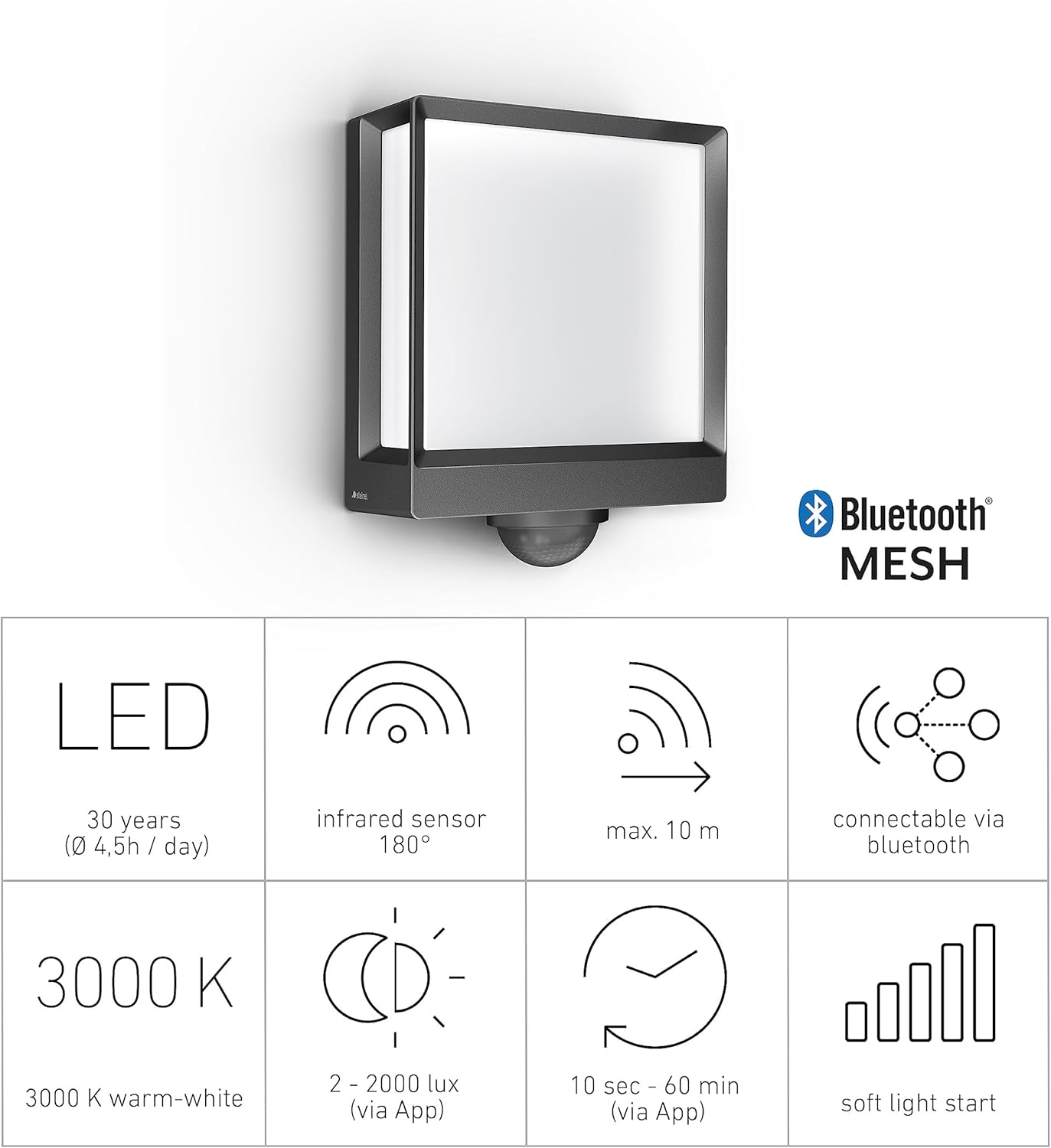
รูปที่ 4.2: คุณสมบัติหลักและข้อมูลจำเพาะโดยสรุป
5. การตั้งค่าและการติดตั้ง
Follow these steps for proper installation of your L 40 SC wall light.
5.1 ตำแหน่งการติดตั้ง
Choose a suitable wall-mounting location for optimal motion detection and light distribution. Consider areas such as building facades, house entrances, garden paths, or patios.

รูปที่ 5.1: อดีตample installation on a house exterior.
5.2 การเชื่อมต่อไฟฟ้า
- ตัดการเชื่อมต่อไฟฟ้า: ตรวจสอบให้แน่ใจว่าได้ปิดสวิตช์ไฟหลักของพื้นที่ติดตั้งที่ตัวตัดวงจรแล้ว
- เตรียมเดินสายไฟ: Route the electrical cable (240 Volts) to the mounting point.
- เชื่อมต่อสายไฟ: Connect the live, neutral, and earth wires to the corresponding terminals inside the light fixture. Ensure all connections are secure.
- การแข่งขันที่ปลอดภัย: Mount the light fixture securely to the wall using the provided mounting material (plugs, screws, spacers). Ensure a flush installation and proper sealing to maintain the waterproof rating.
5.3 Initial Configuration (via Steinel Connect App)
The L 40 SC is configured using the Steinel Connect App. Download the app from your device's app store (available for Android).
- คืนค่าพลัง: Once installation is complete and secure, restore power at the circuit breaker. The light will enter pairing mode.
- เปิดแอป: Launch the Steinel Connect App on your smartphone or tablet.
- จับคู่อุปกรณ์: Follow the in-app instructions to discover and pair your L 40 SC light via Bluetooth Mesh.
- ปรับการตั้งค่า: Use the app to customize the following:
- ระยะการตรวจจับ: Adjust the sensor's sensitivity and range (up to 10m). Use the included masking covers to precisely define the detection area.
- ระยะเวลา: Set how long the light stays on after motion detection (10 seconds to 60 minutes).
- เซ็นเซอร์แสงสนธยา: Configure the ambient light level (2-2000 lux) at which the motion sensor becomes active.
- Light Groups: If you have multiple Steinel Connect devices, group them for synchronized control.

Figure 5.2: Steinel Connect App interface for light configuration.

Figure 5.3: Controlling the L 40 SC via the Steinel Connect App.
6. คู่มือการใช้งาน
The L 40 SC operates automatically based on its sensor settings and app configurations.
6.1 การทำงานของเซ็นเซอร์ตรวจจับความเคลื่อนไหว
The integrated passive infrared sensor detects heat emitted by moving objects (e.g., people, animals) within its detection zone. When motion is detected and the ambient light level is below the set twilight threshold, the light will activate.

Figure 6.1: Motion sensor detection range.

Figure 6.2: Infrared sensor detection principle.
6.2 App-Controlled Functions
Through the Steinel Connect App, you can access and modify various lighting behaviors:
- Dimmable Main Light: Adjust the brightness of the main light output.
- ไฟกลางคืนหรี่แสงได้: Set a low-level continuous light for orientation during darkness.
- แสงถาวร: Activate continuous illumination for a set period, overriding sensor control.
- ฟังก์ชั่นจับเวลา: Schedule specific on/off times or lighting scenarios.
- Learning Twilight: The sensor can learn the natural twilight levels of its environment for more accurate activation.
- Creep Guard: Provides additional detection directly below the sensor to prevent undetected approach.
7. การบำรุงรักษา
The Steinel L 40 SC requires minimal maintenance.
- การทำความสะอาด: ทำความสะอาดโคมไฟเป็นประจำด้วยน้ำยาทำความสะอาดอ่อนๆamp ใช้ผ้าเช็ดทำความสะอาด ห้ามใช้สารทำความสะอาดที่มีฤทธิ์กัดกร่อนหรือตัวทำละลาย เพราะอาจทำให้พื้นผิวเสียหายได้
- อายุการใช้งาน LED: The integrated LED light source has a long operational life, estimated at 30 years based on an average usage of 4.5 hours per day. It is not designed to be replaced by the user.
- การอัปเดตซอฟต์แวร์: Periodically check the Steinel Connect App for available firmware updates for your device to ensure optimal performance and access to new features.
8 การแก้ไขปัญหา
If you encounter issues with your L 40 SC, refer to the following common problems and solutions:
| ปัญหา | สาเหตุที่เป็นไปได้ | สารละลาย |
|---|---|---|
| ไฟไม่เปิดตามการเคลื่อนไหว |
|
|
| ไฟติดสว่างต่อเนื่อง |
|
|
| Cannot connect to the light via app. |
|
|
| ไฟกระพริบหรือกระพริบ |
|
|
9. ข้อมูลจำเพาะ
Detailed technical specifications for the Steinel L 40 SC:
| คุณสมบัติ | ข้อมูลจำเพาะ |
|---|---|
| หมายเลขรุ่น | 085247 |
| ขนาด (กว้าง x ยาว x สูง) | 20.1 x 10.5 x 26.1 ซม. |
| น้ำหนัก | 1.22 กิโลกรัม |
| วัสดุ | อลูมิเนียม, พลาสติก |
| สี | แอนทราไซต์ |
| แหล่งพลังงาน | สายไฟ |
| เล่มที่tage | 240 โวลต์ |
| วัดtage | 12.9 วัตต์ |
| ฟลักซ์ส่องสว่าง | 930 ลูเมน |
| สีอ่อน | สีขาวอุ่น (3000 เคลวิน) |
| ประเภทหลอดไฟ | นำ |
| มุมเซ็นเซอร์ตรวจจับการเคลื่อนไหว | 180° |
| ช่วงเซนเซอร์จับความเคลื่อนไหว | สูงสุด 10 เมตร |
| ฉากพลบค่ำ | 2-2000 lux (adjustable via app) |
| การตั้งเวลา | 10 seconds - 60 minutes (adjustable via app) |
| การเชื่อมต่อ | บลูทูธ เมช |
| วิธีการควบคุม | Steinel Connect App (Android compatible) |
| ระดับการกันน้ำ | กันน้ำ |
| การรับรอง | CE, RoHS, UKCA |
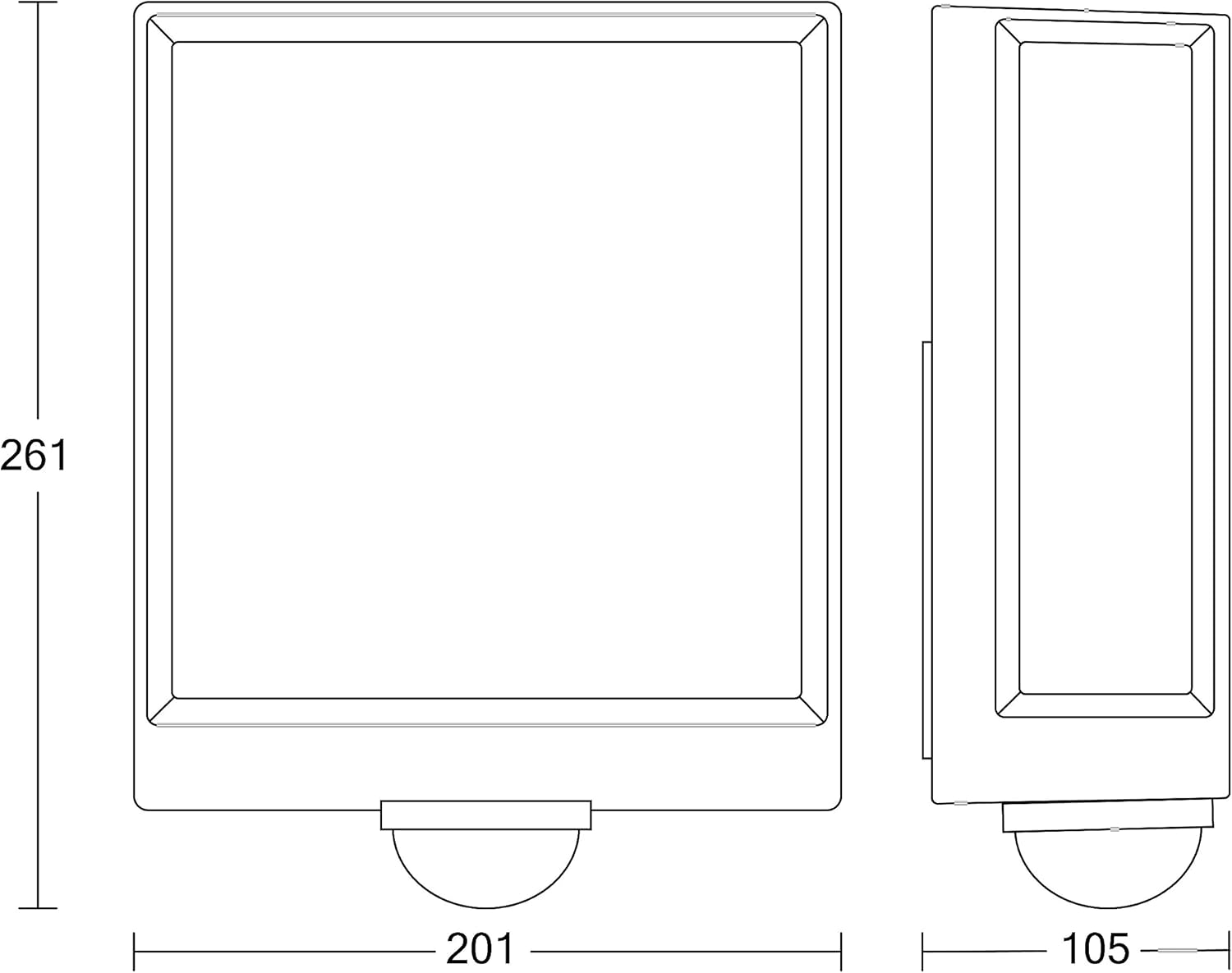
Figure 9.1: Dimensions of the Steinel L 40 SC.
10. การรับประกันและการสนับสนุน
For warranty information, please refer to the documentation provided with your purchase or visit the official Steinel website. In case of technical issues or questions not covered in this manual, please contact Steinel customer support or your authorized dealer.
ผู้ผลิต: สไตเนล
ประเทศต้นกำเนิด: จีน


