
PARKSIDE PHET 15 C2
PARKSIDE PHET 15 C2 Electric Stapler Instruction Manual
รุ่น : PHET 15 C2
การแนะนำ
Thank you for choosing the PARKSIDE PHET 15 C2 Electric Stapler. This manual provides important information regarding the safe operation, setup, maintenance, and troubleshooting of your new tool. Please read this manual thoroughly before first use and keep it for future reference.
คำแนะนำเพื่อความปลอดภัย
โปรดปฏิบัติตามข้อควรระวังด้านความปลอดภัยต่อไปนี้เสมอ เพื่อลดความเสี่ยงจากไฟฟ้าช็อต ไฟไหม้ และการบาดเจ็บร้ายแรง
- ความปลอดภัยในพื้นที่ทำงาน: รักษาพื้นที่ทำงานให้สะอาดและมีแสงสว่างเพียงพอ พื้นที่ที่รกหรือมืดอาจเกิดอุบัติเหตุได้ ห้ามใช้เครื่องมือไฟฟ้าในสภาพแวดล้อมที่อาจเกิดการระเบิด เช่น ในบริเวณที่มีของเหลวไวไฟ ก๊าซ หรือฝุ่น
- ความปลอดภัยทางไฟฟ้า: ปลั๊กไฟของเครื่องมือไฟฟ้าต้องตรงกับเต้ารับ ห้ามดัดแปลงปลั๊กไฟโดยเด็ดขาด ห้ามใช้สายไฟอย่างผิดวิธี ห้ามใช้สายไฟในการขนย้าย ดึง หรือถอดปลั๊กเครื่องมือไฟฟ้า เก็บสายไฟให้ห่างจากความร้อน น้ำมัน ขอบคม หรือชิ้นส่วนที่เคลื่อนไหว
- ความปลอดภัยส่วนบุคคล: สวมอุปกรณ์ป้องกันดวงตาทุกครั้ง ใช้อุปกรณ์ป้องกันหูเมื่อต้องปฏิบัติงานเป็นเวลานาน แต่งกายให้เหมาะสม หลีกเลี่ยงการสวมเสื้อผ้าหลวมๆ หรือเครื่องประดับ ระวังอย่าให้เส้นผม เสื้อผ้า และถุงมือสัมผัสถูกชิ้นส่วนที่กำลังเคลื่อนที่
- การใช้และการดูแลเครื่องมือ: อย่าฝืนใช้เครื่องมือไฟฟ้า ใช้เครื่องมือไฟฟ้าที่ถูกต้องตามการใช้งาน ถอดปลั๊กออกจากแหล่งจ่ายไฟก่อนทำการปรับแต่ง เปลี่ยนอุปกรณ์เสริม หรือจัดเก็บเครื่องมือไฟฟ้า
- ความปลอดภัยเฉพาะของเครื่องเย็บกระดาษ: Always assume the tool contains fasteners. Do not point the tool at yourself or others. Keep hands and body parts away from the discharge area. Ensure the workpiece is stable before fastening.
สินค้าเกินview
The PARKSIDE PHET 15 C2 is a lightweight and compact electric stapler designed for quick and comfortable fastening tasks. It features a non-slip soft grip for comfortable one-handed operation.

รูปที่ 1: ด้านข้าง view of the PARKSIDE PHET 15 C2 Electric Stapler, highlighting its compact design and ergonomic grip. The power cord is visible at the rear.

Figure 2: The PARKSIDE PHET 15 C2 Electric Stapler displayed with a selection of compatible staples and nails, ready for use.
ส่วนประกอบหลัก:
- สิ่งกระตุ้น: Activates the stapling mechanism.
- นิตยสาร: Holds staples or nails. Features a level indicator.
- Nose/Discharge Area: Where fasteners exit the tool.
- ด้ามจับแบบนุ่ม: ช่วยให้รู้สึกสบายและควบคุมได้ดีระหว่างการใช้งาน
- สายไฟ: Connects the tool to an electrical outlet.
การตั้งค่า
1. การโหลดตัวยึด
Ensure the tool is unplugged from the power source before loading fasteners.
- Locate the magazine release mechanism, typically at the bottom or rear of the tool.
- Slide open the magazine.
- Insert the appropriate staples (6-14 mm) or nails (14-15 mm) into the magazine. Ensure they are oriented correctly, with the points facing forward.
- Close the magazine securely until it clicks into place. The level indicator on both sides of the magazine will show the remaining fastener quantity.
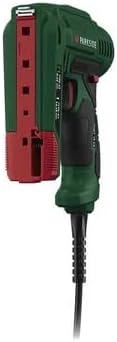
รูปที่ 3: ด้านหลัง view of the stapler with the magazine open, illustrating how to load staples or nails. The red tab indicates the magazine release.
2. การเชื่อมต่อพลังงาน
Once fasteners are loaded, plug the power cord into a suitable electrical outlet (230V AC, 50Hz).
คำแนะนำการใช้งาน
The PARKSIDE PHET 15 C2 is designed for comfortable one-handed operation with its soft grip.
- เตรียมชิ้นงาน: Ensure the material you are fastening is clean, dry, and free from obstructions.
- เครื่องมือจัดตำแหน่ง: Place the nose of the stapler firmly against the workpiece at the desired fastening point. Ensure the tool is held perpendicular to the surface for optimal penetration.
- เปิดใช้งาน: Press the trigger to drive a fastener into the material. Release the trigger to stop.
- ตรวจสอบการยึดติด: Inspect the driven fastener to ensure it is properly seated. Adjust pressure or position if necessary for subsequent fastenings.
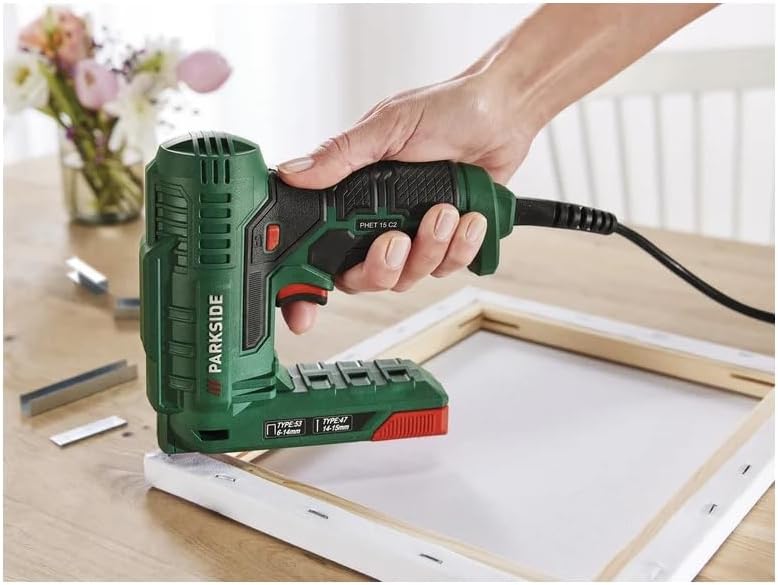
Figure 4: The electric stapler in action, securing fabric to a canvas frame. This illustrates the tool's ease of use for upholstery and crafting projects.
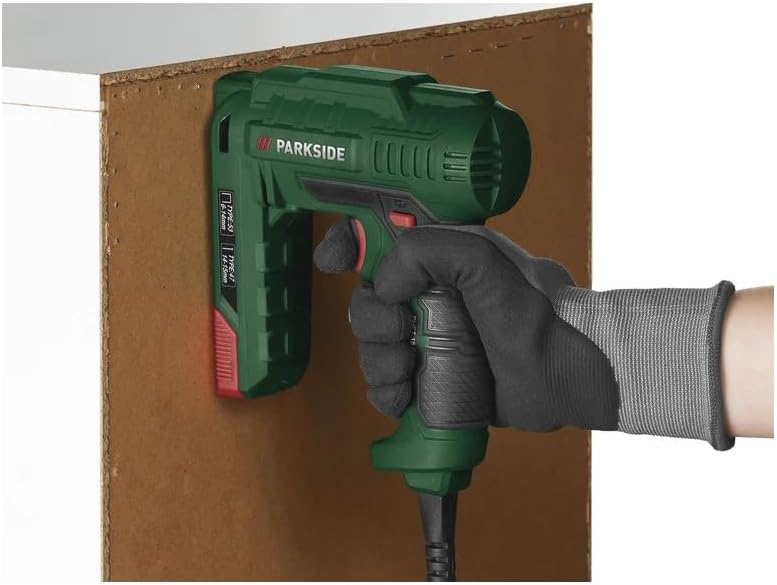
Figure 5: The stapler being used to attach a board, showcasing its application in general DIY and construction tasks.
การใช้งาน:
This electric stapler is suitable for various tasks including:
- Decoration projects
- DIY crafts
- เบาะเบา
- Home repairs and fastening tasks

Figure 6: Detail of fabric securely fastened to a wooden chair frame using staples, demonstrating a typical upholstery application.
การซ่อมบำรุง
Regular maintenance ensures the longevity and safe operation of your electric stapler.
- การทำความสะอาด: Disconnect the tool from the power supply. Use a dry cloth to wipe down the exterior. Do not use harsh chemicals or abrasive cleaners. Periodically clear any dust or debris from the magazine and discharge area.
- พื้นที่จัดเก็บ: Store the tool in a dry, secure location out of reach of children. Ensure the power cord is neatly coiled and not kinked.
- การตรวจสอบ: Before each use, inspect the power cord for damage. Check the tool for any loose parts or signs of wear. Do not use a damaged tool.
การแก้ไขปัญหา
โปรดดูตารางต่อไปนี้สำหรับปัญหาที่พบบ่อยและวิธีแก้ไข
| ปัญหา | สาเหตุที่เป็นไปได้ | สารละลาย |
|---|---|---|
| เครื่องมือไม่ทำงาน | ไม่มีแหล่งจ่ายไฟ | ตรวจสอบว่าสายไฟเสียบเข้ากับเต้ารับที่ใช้งานได้แน่นหนาหรือไม่ |
| Fasteners do not drive properly. | ขนาดหรือประเภทของตัวยึดไม่ถูกต้อง นิตยสารว่างเปล่า Tool not pressed firmly against workpiece. | Ensure correct staples/nails (6-14mm staples, 14-15mm nails) are used. Reload magazine. Apply firm, even pressure to the tool. |
| แยมสปริง | Debris in magazine or discharge area. รัดงอ | ถอดปลั๊กเครื่องมือ Open the magazine and carefully remove any jammed fasteners or debris. Use only undamaged fasteners. |
หากปัญหายังคงมีอยู่หลังจากพยายามแก้ไขปัญหาเหล่านี้แล้ว โปรดติดต่อฝ่ายสนับสนุนลูกค้า
ข้อมูลจำเพาะ
- แบบอย่าง: เฟท 15 ซี 2
- พลัง: 70 วัตต์
- อินพุต Voltage: 230V AC, 50Hz,
- ลวดเย็บกระดาษที่ใช้ได้: Type 53, 6-14 mm
- Compatible Nails: Type 47, 14-15 mm
- โหมดการทำงาน: อัตโนมัติ
- คุณสมบัติ: Lightweight, compact, soft grip, double-sided level indicator.
- อุปกรณ์เสริมที่รวมอยู่: 400 x 10 mm staples, 100 x 14 mm nails.
การรับประกันและการสนับสนุน
สำหรับข้อมูลการรับประกันหรือการสนับสนุนทางเทคนิค โปรดดูเอกสารที่แนบมาพร้อมกับสินค้าที่ซื้อ หรือติดต่อผู้ผลิตโดยตรง โปรดเก็บหลักฐานการซื้อไว้เพื่อใช้ในการเรียกร้องการรับประกัน
Ask a question about this manual
Ask about setup, troubleshooting, compatibility, parts, safety, or missing instructions. Manuals+ will review the question and use this page’s manual context to help answer it.