
การแนะนำ
Thank you for choosing the PETLIBRO 5L Automatic Pet Feeder with 1080P Camera. This device is designed to provide convenient and reliable feeding for your pets, ensuring they receive their meals on schedule while allowing you to monitor and interact with them remotely. This manual provides essential information for setting up, operating, and maintaining your feeder.

The PETLIBRO 5L Automatic Pet Feeder offers a range of features including a 1080p HD camera, night vision, two-way audio, remote feeding, in-app monitoring, and easy cleanup.
คำแนะนำเพื่อความปลอดภัย
- Read all instructions carefully before using the feeder.
- เครื่องใช้ไฟฟ้าตัวนี้มีไว้สำหรับใช้ภายในอาคารเท่านั้น
- ห้ามจุ่มตัวเครื่องลงในน้ำหรือของเหลวอื่นๆ
- ควรวางที่ให้อาหารนกให้ห่างจากแสงแดดโดยตรงและแหล่งความร้อน
- Ensure the power cord is not damaged and is placed where pets cannot chew on it.
- Use only the original power adapter provided with the feeder.
- Always supervise children around the feeder.
- Only use dry pet food with a diameter between 2-15mm.
เนื้อหาแพ็คเกจ
ตรวจสอบว่ามีส่วนประกอบทั้งหมดอยู่ในแพ็คเกจ:
- PETLIBRO Automatic Pet Feeder (Main Unit)
- ชามอาหารสแตนเลส
- อะแดปเตอร์แปลงไฟ
- คู่มือการใช้งาน
- Desiccant Bag (may be pre-installed)
สินค้าเกินview
Familiarize yourself with the different parts of your PETLIBRO Automatic Pet Feeder.

The main unit of the feeder, featuring the food hopper, dispensing mechanism, 1080P camera, and control panel. A cat is shown eating from the stainless steel bowl, with a smartphone displaying the live camera feed.
- ถังใส่อาหาร: ร้านจำหน่ายอาหารสัตว์เลี้ยงแบบแห้ง
- Lid with Twist-Lock: Secures the food hopper and keeps food fresh.
- แผงควบคุม: Buttons for manual feeding and settings.
- กล้อง HD 1080P: สำหรับการติดตามและบันทึกสด
- เซ็นเซอร์อินฟราเรด: Detects low food levels and blockages.
- ลำโพงและไมโครโฟน: สำหรับการสื่อสารด้วยเสียงสองทาง
- ร้านอาหาร: บริเวณที่ตักอาหารใส่ชาม
- ชามสแตนเลส: ถอดทำความสะอาดง่าย
- พอร์ตไฟ: สำหรับเชื่อมต่ออะแดปเตอร์ AC
- ช่องใส่แบตเตอรี่: For backup batteries (not included).
การตั้งค่า
1. การแกะกล่องและการประกอบ
- ถอดส่วนประกอบทั้งหมดออกจากบรรจุภัณฑ์
- วางชุดป้อนอาหารหลักบนพื้นผิวเรียบและมั่นคง
- Insert the stainless steel bowl into the designated slot at the base of the feeder.
2. แหล่งจ่ายไฟ
- เชื่อมต่ออะแดปเตอร์แปลงไฟเข้ากับพอร์ตจ่ายไฟของเครื่องให้อาหารสัตว์ แล้วเสียบเข้ากับเต้ารับที่ผนัง
- เพื่ออำนาจ outage protection, install 3 D-cell alkaline batteries (not included) into the battery compartment at the bottom of the feeder. This ensures continuous operation during power interruptions.
3. Filling the Food Hopper
- Open the Twist-Lock lid on top of the feeder.
- Pour dry pet food into the hopper. Ensure the food size is between 2-15mm.
- Close the lid securely by twisting it until it locks.
4 การติดตั้งแอปและการเชื่อมต่อ Wi-Fi
- ดาวน์โหลดแอป PETLIBRO จาก App Store (iOS) หรือ Google Play Store (Android)
- สร้างบัญชีและเข้าสู่ระบบ
- Follow the in-app instructions to add your feeder. Ensure your smartphone is connected to a 2.4GHz or 5GHz Wi-Fi network. The feeder supports both for a more stable connection.
- The app will guide you through connecting the feeder to your home Wi-Fi network.
5. การตั้งค่ากล้อง
- Once connected to Wi-Fi, the 1080P camera will automatically activate.
- For video recording, insert a Micro SD card (up to 256GB, not included) into the designated slot, usually located near the camera or at the bottom of the unit.
คำแนะนำการใช้งาน
1. การให้อาหารด้วยตนเอง
- Press the manual feed button on the feeder's control panel to dispense one portion of food instantly.
- Alternatively, use the 'Feed Now' option in the PETLIBRO app for immediate dispensing.
2. Scheduling Meals via App
The PETLIBRO app allows you to customize your pet's feeding schedule.

The PETLIBRO app provides an intuitive interface to set custom feeding times and amounts, and to review feeding logs.
- Open the PETLIBRO app and select your feeder.
- Navigate to the 'Feeding Schedule' section.
- Set up to 10 meals per day. For each meal, specify the time and the number of portions (1-50 portions per meal).
- บันทึกตารางเวลาของคุณ เครื่องให้อาหารจะจ่ายอาหารโดยอัตโนมัติตามเวลาที่ตั้งโปรแกรมไว้
- คุณสามารถทำได้ view feeding logs within the app to track your pet's meal history.
3. Two-Way Audio & Voice Recording
Communicate with your pet remotely using the two-way audio feature.

The feeder allows two-way audio communication, enabling you to speak to your pet and hear their responses through the app.
- Live Communication: In the app's live view, tap the microphone icon to speak to your pet. Your voice will be played through the feeder's speaker.
- การบันทึกเสียง: Record a personalized voice message (up to 10 seconds) in the app. This message can be set to play at meal times (0-5 times per meal). A new recording will overwrite any previous one.
4. Monitoring with 1080P Camera and Night Vision
The integrated camera allows you to keep an eye on your pet at all times.

The 1080P camera provides clear vision, even at night, allowing you to monitor your pet's meals with high-definition infrared night vision.
- Access the live camera feed through the PETLIBRO app to view สัตว์เลี้ยงของคุณแบบเรียลไทม์
- The 145° wide-angle lens provides a broad view of the feeding area.
- Infrared night vision ensures clear visibility even in dark conditions.
- Videos can be stored on a Micro SD card (up to 256GB, not included).
5. การแจ้งเตือนอัจฉริยะ
- การตรวจจับการเคลื่อนไหวและเสียง: The feeder automatically records pet activity and saves video clips (SD card required). You will receive notifications on your phone for detected motion or sounds.
- Low Food Level Alert: The infrared sensor monitors the food level in the hopper. You will receive an alert on your phone when the food supply is low, prompting you to refill.
- Blockage Detection: The sensor also detects potential food blockages in the dispensing mechanism and will send an alert if an issue occurs.
- Wi-Fi Disconnection Alert: If the feeder loses its Wi-Fi connection, you will be notified via the app.
การซ่อมบำรุง
1. การทำความสะอาดเครื่องให้อาหาร
การทำความสะอาดอย่างสม่ำเสมอช่วยให้มั่นใจได้ถึงสุขอนามัยและการทำงานที่เหมาะสมของเครื่องให้อาหารสัตว์
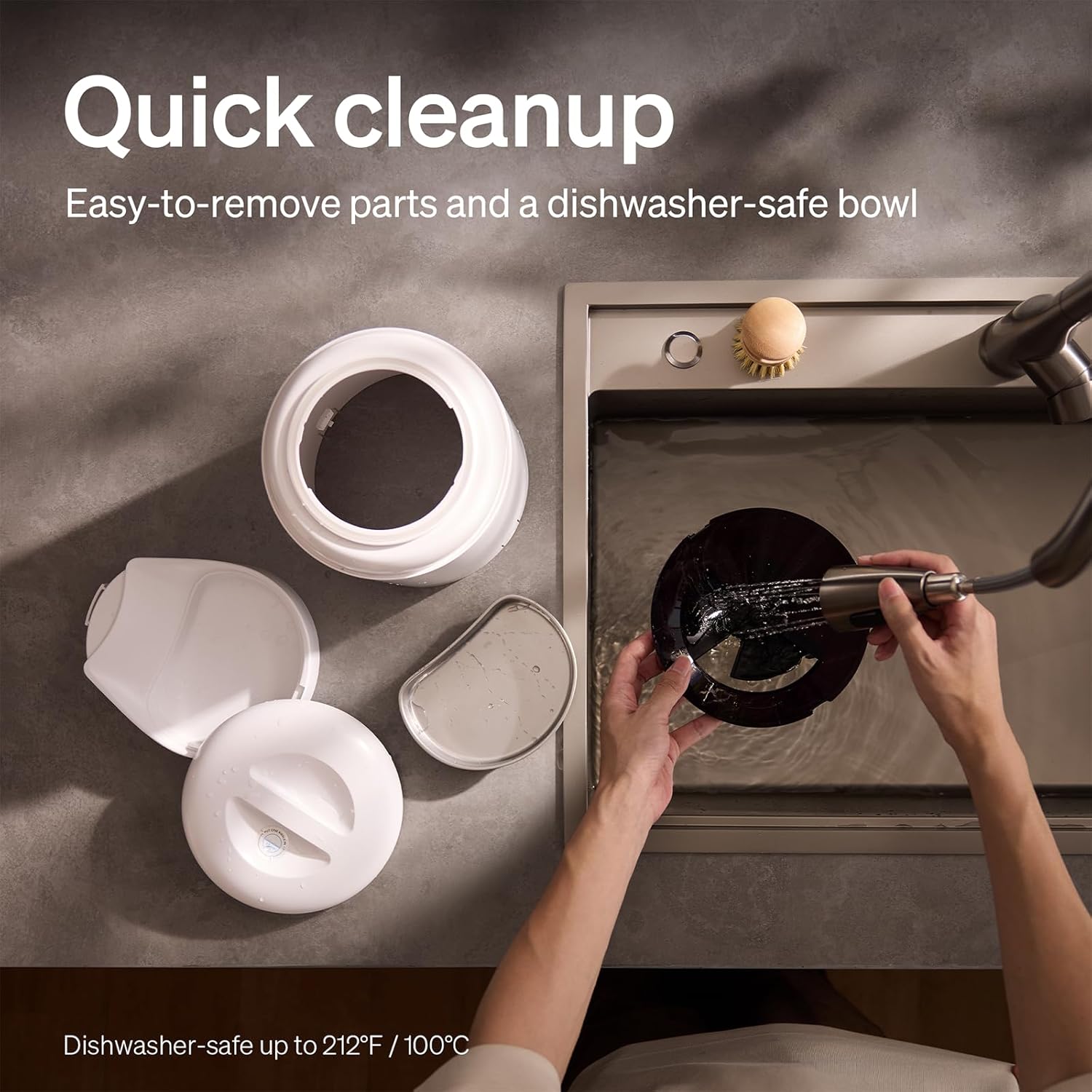
The feeder is designed for quick cleanup with easy-to-remove parts and a dishwasher-safe bowl.
- ตัดการเชื่อมต่อไฟฟ้า: ถอดปลั๊กเครื่องป้อนอาหารทุกครั้งก่อนทำความสะอาด
- เอาอาหารออก: Empty any remaining food from the hopper.
- ถอดแยกชิ้นส่วน: Remove the food bowl, lid, and food hopper.
- ชิ้นส่วนที่สามารถล้างทำความสะอาดได้: The stainless steel bowl and food hopper are dishwasher-safe (up to 100°C / 212°F) or can be hand-washed with mild soap and water.
- หน่วยหลัก: เช็ดตัวเครื่องหลักด้วยผ้านุ่ม damp ผ้า. ห้ามจุ่มลงในน้ำ
- แห้งสนิท: ตรวจสอบให้แน่ใจว่าชิ้นส่วนทั้งหมดแห้งสนิทก่อนประกอบกลับและเติมอาหารลงไป
2. การทดแทนสารดูดความชื้น
- The desiccant bag helps keep the food fresh. It is recommended to replace it every 15 days.
- Locate the desiccant compartment, usually under the lid.
- Remove the old desiccant bag and insert a new one.
การแก้ไขปัญหา
| ปัญหา | สาเหตุที่เป็นไปได้ | สารละลาย |
|---|---|---|
| เครื่องป้อนอาหารไม่จ่ายอาหารออกมา | Food blockage; empty hopper; dispensing mechanism issue. | Check for food blockages and clear them. Refill hopper if empty. Ensure food size is appropriate (2-15mm). |
| การตัดการเชื่อมต่อ Wi-Fi | Weak Wi-Fi signal; router issues; incorrect password. | Ensure feeder is within Wi-Fi range. Restart your router. Reconnect the feeder to Wi-Fi via the app, verifying the password. |
| Camera not working or frequently disconnecting. | Poor Wi-Fi connection; app glitch; SD card issue. | Check Wi-Fi stability. Restart the feeder and the app. Ensure the SD card is properly inserted and not full. Consider a system reset if issues persist. |
| App shows "status unknown" or feeding errors. | Wi-Fi disconnection; app synchronization issue. | Verify Wi-Fi connection. Close and reopen the app. Restart the feeder. |
| ไม่สามารถเล่นไฟล์บันทึกเสียงได้ | No recording saved; volume too low; incorrect schedule. | Ensure a voice message is recorded and saved in the app. Check the playback settings for meal times. |
ข้อมูลจำเพาะ
| คุณสมบัติ | รายละเอียด |
|---|---|
| หมายเลขรุ่น | เอเอฟ203 |
| ขนาด (กว้าง x ยาว x สูง) | 12 x 10 x 27 ซม. |
| น้ำหนัก | 2.15 กก. |
| วัสดุ | ชามสแตนเลส |
| ความจุ | 5 ลิตร |
| สายพันธุ์เป้าหมาย | หมาแมว |
| การใช้ที่แนะนำ | Automatic indoor dog/cat feeding |
| คุณสมบัติพิเศษ | 1080P Camera, Smart App, Two-way Audio |
| สี | สีขาว |
| เทคโนโลยีการเชื่อมต่อ | Wi-Fi (2.4GHz และ 5GHz) |
| โหมดการทำงาน | อัตโนมัติ |
| คำแนะนำในการดูแล | Dishwasher safe (bowl) |
| แบตเตอรี่ที่จำเป็น | No (for primary operation), Yes (for backup, 3 D-cell, not included) |
การรับประกันและการสนับสนุน
PETLIBRO products come with a standard manufacturer's warranty. For detailed warranty information, please refer to the warranty card included in your package or visit the official PETLIBRO webเว็บไซต์.
If you encounter any issues or have questions regarding your PETLIBRO Automatic Pet Feeder, please contact PETLIBRO customer support through the following channels:
- อีเมล: Refer to your product packaging or the PETLIBRO website for the latest support email address.
- Webเว็บไซต์: Visit the official PETLIBRO webไซต์สำหรับคำถามที่พบบ่อย คำแนะนำในการแก้ไขปัญหา และแบบฟอร์มติดต่อ
- การสนับสนุนภายในแอป: The PETLIBRO app may offer a support section for direct assistance.
Please have your model number (AF203) and purchase information ready when contacting support.