
Acekool PAC-M09
Acekool 9000 BTU Portable Air Conditioner
คู่มือการใช้งาน
1. ข้อมูลด้านความปลอดภัย
Please read this manual carefully before operating your Acekool Portable Air Conditioner. Keep it for future reference. Failure to follow these instructions may result in electric shock, fire, or serious injury.
ข้อควรระวังด้านความปลอดภัยทั่วไป
- เครื่องใช้ไฟฟ้าตัวนี้มีไว้สำหรับใช้ภายในอาคารเท่านั้น
- อย่าใช้งานเครื่องด้วยสายไฟหรือปลั๊กที่ชำรุด
- ตรวจสอบให้แน่ใจว่าแหล่งจ่ายไฟตรงกับปริมาตรtage ระบุไว้บนฉลากการจัดอันดับของหน่วย
- ห้ามปิดกั้นช่องลมเข้าหรือออก ควรเว้นระยะห่างจากผนังและสิ่งของอื่นๆ อย่างน้อย 20 ซม.
- ห้ามสอดนิ้วหรือวัตถุเข้าไปในช่องลม
- ถอดปลั๊กเครื่องทุกครั้งก่อนทำความสะอาดหรือซ่อมบำรุง
- Do not use chemical solvents (e.g., benzene, alcohol, gasoline) to clean the unit.
- เก็บเครื่องให้ห่างจากแหล่งความร้อนและแสงแดดโดยตรง
- ห้ามวางของหนักทับตัวเครื่อง
- เครื่องใช้ไฟฟ้าตัวนี้ไม่ได้มีวัตถุประสงค์เพื่อให้บุคคล (รวมทั้งเด็ก) ที่มีความบกพร่องทางร่างกาย ทางประสาทสัมผัส หรือทางจิตใจ หรือขาดประสบการณ์และความรู้ ใช้งาน เว้นแต่จะมีการดูแลหรือคำแนะนำเกี่ยวกับการใช้เครื่องใช้ไฟฟ้าโดยบุคคลที่รับผิดชอบด้านความปลอดภัยของบุคคลดังกล่าว
2. สินค้าหมดview
The Acekool 9000 BTU Portable Air Conditioner is a versatile 3-in-1 unit designed to provide cooling, fan, and dehumidification functions for your home or office. Its compact design and mobility make it ideal for various room sizes.

Image: Acekool 9000 BTU Portable Air Conditioner with its remote control, showing cool air flowing from the unit.
เนื้อหาแพ็คเกจ
ตรวจสอบว่ามีรายการทั้งหมดอยู่ในแพ็คเกจ:
- Portable Air Conditioner × 1
- รีโมทคอนโทรล× 1
- คู่มือการใช้งาน× 1
- Exhaust Hose × 1
- Window Sealing Plate Kit × 1
- ขั้วต่อท่อ × 1
- ท่อระบายน้ำ × 1

Image: All components included in the Acekool Portable Air Conditioner package, laid out next to the main unit.
จอแสดงผลแผงควบคุม

Image: Close-up of the control panel on top of the Acekool portable air conditioner, showing buttons for Timer, Speed, Swing, Sleep, Mode, and Power, along with indicator lights.
- ปุ่มตั้งเวลา: Sets the auto-on/off time.
- ปุ่มความเร็ว: Adjusts fan speed (Low/High).
- ปุ่มสวิง: เปิด/ปิดการสวิงบานเกล็ดอัตโนมัติ
- ลูกศรขึ้น/ลง: ปรับอุณหภูมิหรือตั้งค่าตัวจับเวลา
- ปุ่มสลีป: เปิดใช้งานโหมดสลีปเพื่อการทำงานที่เงียบสงบ
- ปุ่มโหมด: Selects operation mode (Cool, Fan, Dry).
- ปุ่มเพาเวอร์: เปิดหรือปิดเครื่อง
3. การตั้งค่า
Proper installation is crucial for the efficient operation of your portable air conditioner. Follow these steps to set up the unit.
การติดตั้งท่อไอเสีย
- ติดขั้วต่อท่อเข้ากับปลายด้านหนึ่งของท่อร่วมไอเสีย
- ต่ออะแดปเตอร์ชุดหน้าต่างเข้ากับปลายอีกด้านหนึ่งของท่อไอเสีย
- Insert the hose connector into the exhaust outlet on the back of the air conditioner unit.
- ปรับชุดแผ่นปิดขอบหน้าต่างให้พอดีกับช่องหน้าต่างของคุณ
- Connect the window kit adapter to the opening in the window sealing plate.
- ตรวจสอบให้แน่ใจว่าการเชื่อมต่อทั้งหมดแน่นหนาเพื่อป้องกันการรั่วไหลของอากาศ

Image: Visual guide showing the dimensions of the unit and the five steps for installing the exhaust hose and window kit.
การจัดวาง
- วางเครื่องบนพื้นผิวเรียบและมั่นคง
- Ensure there is sufficient space around the unit for proper airflow (at least 20 cm from walls).
- วางเครื่องไว้ใกล้หน้าต่างหรือช่องสำหรับท่อระบายอากาศ
4. คู่มือการใช้งาน
Your Acekool Portable Air Conditioner offers multiple modes and settings for optimal comfort. You can operate the unit using the control panel on top or the included remote control.

Image: Split image showing the remote control being used with the unit on the left, and the unit operating with swing mode on the right.
การเปิด/ปิด
- กดปุ่ม พลัง ปุ่มบนแผงควบคุมหรือรีโมทคอนโทรลเพื่อเปิดหรือปิดเครื่อง
การเลือกโหมด
กดปุ่ม โหมด กดปุ่มซ้ำๆ เพื่อสลับไปมาระหว่างโหมดต่างๆ ที่มีให้เลือก:
- โหมดทำความเย็น: For powerful cooling. Adjust temperature using the UP/DOWN arrows (16-31°C).
- โหมดพัดลม: Circulates air without cooling. Choose between Low and High fan speeds.
- โหมดลดความชื้น: Removes excess moisture from the air (up to 42L/day).

Image: Three panels illustrating the cooling mode (lowest 16°C), dehumidifying mode (42L/day), and fan mode (2 speeds).
การปรับความเร็วพัดลม
- ในโหมดทำความเย็นหรือพัดลม ให้กดปุ่ม ความเร็ว button to select Low or High fan speed.
ฟังก์ชั่นจับเวลา
- กดปุ่ม ตัวจับเวลา button to set the desired auto-on or auto-off time (up to 24 hours). Use the UP/DOWN arrows to adjust the time.
โหมดสลีป
- กดปุ่ม นอน button to activate sleep mode, which provides quieter operation and gradually adjusts the temperature for comfortable sleep.

Image: An illustration showing a child sleeping peacefully, with icons indicating Automatic Shut-off, Sleep Mode, 24H Smart Timer, and Ultra Quiet operation, along with a noise level comparison chart.
5. การบำรุงรักษา
การบำรุงรักษาอย่างสม่ำเสมอจะช่วยให้เครื่องปรับอากาศแบบพกพาของคุณมีอายุการใช้งานยาวนานและทำงานได้อย่างมีประสิทธิภาพ
การทำความสะอาดตัวกรองอากาศ
The unit has a removable and reusable air filter that should be cleaned regularly (every two weeks or more often depending on usage) to maintain optimal performance and air quality.
- ถอดปลั๊กเครื่องปรับอากาศออกจากเต้าเสียบไฟฟ้า
- Locate the air filter panel, usually on the side or back of the unit.
- ดึงตัวกรองอากาศออกอย่างระมัดระวัง
- Clean the filter with a vacuum cleaner to remove dust and debris. For heavy dirt, wash it with lukewarm water and a mild detergent.
- ปล่อยให้แผ่นกรองแห้งสนิทก่อนใส่กลับเข้าไป อย่าให้โดนแสงแดดโดยตรง
- Slide the dry filter back into its slot until it clicks into place.

Image: A hand demonstrating the removal of the washable air filter from the side of the air conditioner unit.
ระบายน้ำ
This air conditioner features an advanced auto-evaporation technology, which automatically evaporates condensed water through the condenser and discharges it outdoors, significantly reducing the need for manual drainage. However, in very humid conditions, the water tank may fill up. When the 'FULL' indicator light illuminates, the unit will stop operating, and you will need to drain the water manually.
- ปิดเครื่องและถอดปลั๊กออกจากแหล่งจ่ายไฟ
- Place a shallow pan or container under the drain port at the bottom rear of the unit.
- ถอดปลั๊กท่อระบายน้ำออก น้ำจะเริ่มไหลออกมา
- เมื่อน้ำระบายออกหมดแล้ว ให้ใส่ปลั๊กท่อระบายน้ำกลับเข้าที่อย่างแน่นหนา
พื้นที่จัดเก็บ
หากจะไม่ใช้เครื่องเป็นระยะเวลานาน:
- ระบายน้ำควบแน่นทั้งหมดออกจากเครื่อง
- ทำความสะอาดตัวกรองอากาศ
- ถอดปลั๊กสายไฟและม้วนให้เรียบร้อย
- เก็บอุปกรณ์ไว้ในที่แห้งและเย็น หลีกเลี่ยงแสงแดดโดยตรงและอุณหภูมิที่สูงหรือต่ำเกินไป
6 การแก้ไขปัญหา
ก่อนติดต่อฝ่ายบริการลูกค้า โปรดดูปัญหาและวิธีแก้ไขที่พบบ่อยต่อไปนี้
| ปัญหา | สาเหตุที่เป็นไปได้ | สารละลาย |
|---|---|---|
| เครื่องไม่เปิด | ไม่มีแหล่งจ่ายไฟ สายไฟไม่ได้เสียบอยู่ ถังน้ำเต็ม | ตรวจสอบเต้ารับไฟฟ้า ตรวจสอบให้แน่ใจว่าเสียบปลั๊กอย่างแน่นหนา ระบายน้ำออกจากถังเก็บน้ำ |
| หน่วยไม่เย็นอย่างมีประสิทธิภาพ | ไส้กรองอากาศอุดตัน ท่อไอเสียไม่ได้ติดตั้งอย่างถูกต้อง ห้องใหญ่เกินไป ประตู/หน้าต่างเปิด ตั้งอุณหภูมิไว้สูงเกินไป | ทำความสะอาดตัวกรองอากาศ Check exhaust hose connection and window kit ตรวจสอบให้แน่ใจว่าเครื่องมีขนาดเหมาะสมกับขนาดห้อง ปิดประตูและหน้าต่างทั้งหมด ลดอุณหภูมิที่ตั้งไว้ |
| หน่วยมีเสียงดัง | หน่วยไม่อยู่บนพื้นผิวเรียบ ไส้กรองอากาศอุดตัน ส่วนประกอบภายในสั่นสะเทือน | วางหน่วยบนพื้นผิวที่เรียบและมั่นคง ทำความสะอาดตัวกรองอากาศ This unit operates at 55 dB, which is normal. If noise is excessive, contact support. |
| การรั่วซึมของน้ำ | ปลั๊กท่อระบายน้ำหลวม หน่วยเอียง ท่อระบายน้ำอุดตัน | ตรวจสอบให้แน่ใจว่าจุกระบายน้ำแน่นสนิทดีแล้ว วางหน่วยบนพื้นผิวเรียบ Check drain hose for blockages |
7. ข้อมูลจำเพาะ
| คุณสมบัติ | ข้อมูลจำเพาะ |
|---|---|
| ยี่ห้อ | เอซคูล |
| หมายเลขรุ่น | PAC-M09 |
| ความสามารถในการทำความเย็น | 9000 บีทียู |
| ลดความชื้นความจุ | 42 ลิตร/วัน |
| ช่วงการควบคุมอุณหภูมิ | 16-31 องศาเซลเซียส |
| เล่มที่tage | 220 โวลต์ |
| ระดับเสียง | 55 เดซิเบล |
| สารทำความเย็น | R290 (เป็นมิตรต่อสิ่งแวดล้อม) |
| ขนาดสินค้า (กว้าง x ยาว x สูง) | 36 x 39 x 89 ซม. |
| น้ำหนัก | 26 กก. |
| คุณสมบัติพิเศษ | การระบายความร้อนอย่างรวดเร็ว |
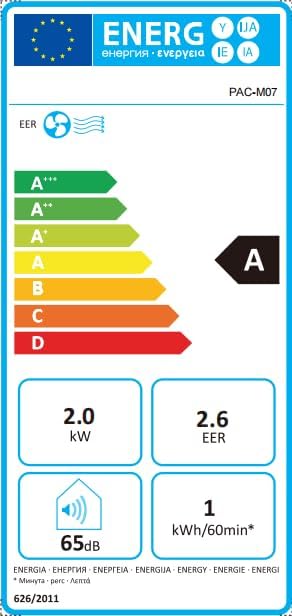
Image: Energy efficiency label showing an 'A' rating for cooling, 2.0 kW power, 2.6 EER, 65dB noise, and 1 kWh/60min energy consumption.
8. การรับประกันและการสนับสนุน
For information regarding warranty and returns, please refer to the purchase platform's policies. If you have received a defective or damaged product, consult the specific help page on the platform where you made the purchase.
For technical support or further assistance, please contact Acekool customer service through the contact information provided on your purchase receipt or the official Acekool webเว็บไซต์.
Ask a question about this manual
Ask about setup, troubleshooting, compatibility, parts, safety, or missing instructions. Manuals+ will review the question and use this page’s manual context to help answer it.