
การแนะนำ
Thank you for choosing the GAN XIN DC12-8000 12V 8000mAh Lithium Battery. This portable power solution is designed to provide reliable and extended power for compatible GAN XIN products, such as scoreboards and race clocks, as well as other devices requiring 12V DC power or USB charging. Please read this manual carefully before use to ensure proper operation and longevity of your battery.
ข้อควรระวังเพื่อความปลอดภัย
- Improper Disposal: Improper disposal of batteries may result in a fire or explosion hazard. Always dispose of used batteries according to local regulations.
- อย่าเปิด: Do not attempt to open or service the battery pack yourself.
- หลีกเลี่ยงความเสียหาย: Do not disassemble, crush, puncture, short-circuit, or throw batteries into fire.
- อุณหภูมิ: Do not expose the battery to temperatures above 140°F (60°C).
เนื้อหาแพ็คเกจ
Upon opening your GAN XIN DC12-8000 Lithium Battery package, you should find the following items:
- 1 x GAN XIN DC12-8000 12V 8000mAh Lithium Battery
- 1 x Battery Charger Adapter
- 1 x DC Output Cable (for connecting to devices)
- 1 x คู่มือผู้ใช้

Video: Unboxing the GAN XIN DC12-8000 Lithium Battery. This video demonstrates the contents of the package, including the battery, charger, cables, and user manual.
การตั้งค่าและการชาร์จ
ค่าธรรมเนียมเริ่มต้น
Before first use, it is recommended to fully charge your GAN XIN DC12-8000 Lithium Battery.
- Connect the battery charger adapter to a power outlet.
- เสียบปลั๊กเอาต์พุตของเครื่องชาร์จเข้ากับพอร์ตชาร์จแบตเตอรี่
- The charging indicator light on the charger will show a สีแดง light during charging.
- เมื่อชาร์จเต็มแล้ว ไฟแสดงสถานะจะติด สีเหลือง. This timely reminder helps save charging time.
Note: If the charger is connected to the battery but not plugged into a wall socket, the indicator may also show yellow.

Image: The battery charger showing its indicator lights. A red light indicates active charging, while a yellow light indicates a full charge or no power input.
ตัวระบุระดับแบตเตอรี่
The battery features LED indicator lights to show the remaining power level. Press the small button next to the lights to check the current charge status.

Image: The GAN XIN DC12-8000 battery unit displaying its LED power indicator lights, which show the remaining charge.
คำแนะนำการใช้งาน
การเชื่อมต่อกับอุปกรณ์
The DC12-8000 battery is compatible with most GAN XIN products (e.g., scoreboards, clocks) and other devices requiring 12V DC input.
- ตรวจสอบให้แน่ใจว่าแบตเตอรี่มีประจุเพียงพอ
- Connect one end of the provided DC output cable to the DC output port on the battery.
- Connect the other end of the DC output cable to the power input port of your compatible device.
- Turn on the battery using the ON/OFF switch.
- Power on your device as usual.
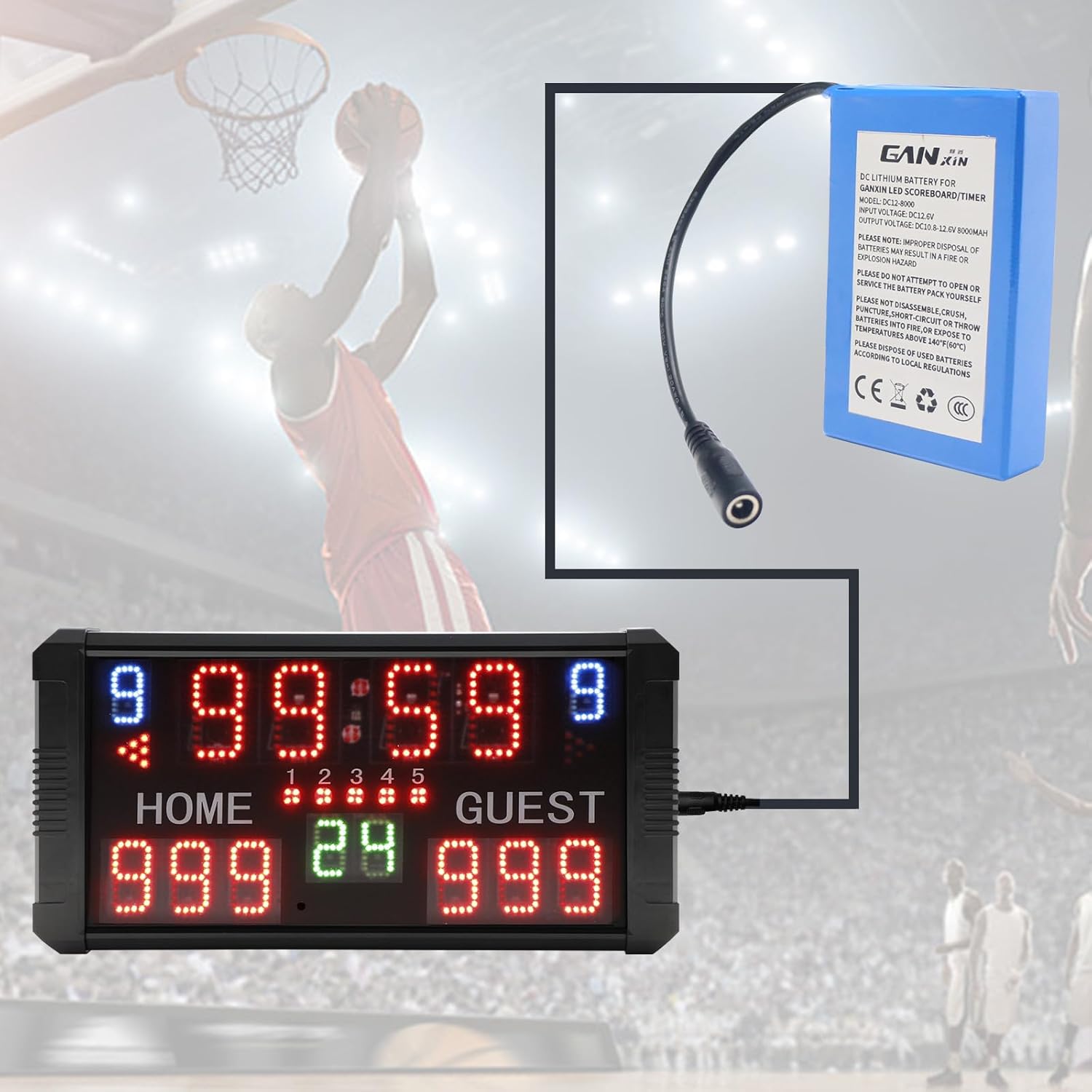
Image: The GAN XIN DC12-8000 battery providing power to a digital scoreboard, illustrating a typical use case.
เอาท์พุต USB
The battery also features a USB output port, allowing you to charge other USB-powered devices simultaneously with your main device or independently.
- Connect your USB device's charging cable to the USB output port on the battery.
- Ensure the battery is turned on.
เปิด/ปิดเครื่อง
Use the dedicated ON/OFF switch on the battery to conserve power when not in use. This prevents unnecessary battery drain.

ภาพ: ภาพระยะใกล้ view of the GAN XIN DC12-8000 battery, highlighting the ON/OFF switch, DC input/output, and USB port.
Compatible Devices and Features
This battery is ideal for powering various devices, including:
- GAN XIN Scoreboards and Race Clocks
- Other 12V DC powered electronics
- USB-chargeable devices (e.g., smartphones)
Video: Professional Digital Race Clock. This video showcases a compatible digital race clock in various timing modes (count up, count down, stopwatch), demonstrating the type of device this battery can power.
Video: Race Timer with Tripod. This video displays a race timer mounted on a tripod, illustrating another application for the portable battery.
Video: How to customize the time period. This video demonstrates how to set custom time periods on a compatible timer, which can be powered by this battery.
การซ่อมบำรุง
- การชาร์จปกติ: To maintain optimal battery health, charge the battery regularly, even if not in frequent use.
- พื้นที่จัดเก็บ: เก็บแบตเตอรี่ไว้ในที่เย็นและแห้ง ห่างจากแสงแดดโดยตรงและอุณหภูมิที่สูงหรือต่ำเกินไป
- การทำความสะอาด: Use a soft, dry cloth to clean the exterior of the battery. Do not use harsh chemicals or abrasive materials.
การแก้ไขปัญหา
แบตเตอรี่ไม่ได้ชาร์จ
- ตรวจสอบให้แน่ใจว่าเครื่องชาร์จเชื่อมต่อกับเต้ารับไฟฟ้าและแบตเตอรี่อย่างถูกต้อง
- ตรวจสอบว่าเต้ารับไฟฟ้าใช้งานได้หรือไม่
- Verify that the charging indicator light on the charger is สีแดง during charging. If it's สีเหลือง and not connected to a power source, it indicates no power input.
อุปกรณ์ไม่เปิดเครื่อง
- Ensure the battery is sufficiently charged (check LED indicators).
- Verify that the battery's ON/OFF switch is in the 'ON' position.
- Check all cable connections between the battery and your device.
- Confirm that your device is compatible with 12V DC power.
ข้อมูลจำเพาะ
| คุณสมบัติ | ข้อมูลจำเพาะ |
|---|---|
| ขนาดสินค้า | 3.94 x 2.48 x 0.79 นิ้ว |
| น้ำหนักสินค้า | 14.4 ออนซ์ |
| ประเภทแบตเตอรี่ | ลิเธียมไอออน |
| ส่วนประกอบของเซลล์แบตเตอรี่ | ลิเธียมโพลีเมอร์ |
| ความจุของแบตเตอรี่ | 8000 มิลลิวินาทีamp ชั่วโมง |
| ปริมาณการส่งออกtage | กระแสตรง 12 โวลต์ |
| อินพุต Voltage | กระแสตรง 12.6 โวลต์ |
| คุณสมบัติด้านความปลอดภัย | Overcharge, Over-discharge, Short-circuit Protection |
การรับประกันและการสนับสนุน
ข้อมูลการรับประกัน
This product is typically covered by a standard manufacturer's warranty. For specific details regarding warranty duration and terms, please refer to the documentation included with your purchase or contact GAN XIN customer service.
บริการลูกค้า
GAN XIN is committed to providing excellent customer support. If you have any questions, concerns, or require assistance with your DC12-8000 Lithium Battery, please do not hesitate to contact us. We value your feedback and continuously strive to improve our products.
หากต้องการความช่วยเหลือเพิ่มเติม โปรดไปที่ GAN XIN Store on Amazon.