
บีเอ็ม31
TROTEC BM31 Moisture Meter
คู่มือการใช้งาน
1. สินค้าหมดview
The TROTEC BM31 is a compact and user-friendly electronic moisture meter designed for quick, non-destructive indication of moisture distributions in near-surface areas of various materials. It utilizes a dielectric humidity sensor to provide indicative measurements, making it ideal for preliminary checks of building materials before more precise CM measurements.
คุณสมบัติหลัก
- Quick and non-destructive moisture indication.
- Suitable for various building materials.
- Max/Min function for measurement assessment.
- Selectable display illumination for improved readability.
- Automatic switch-off function to conserve battery life.

2. การเริ่มต้น
การติดตั้งแบตเตอรี่
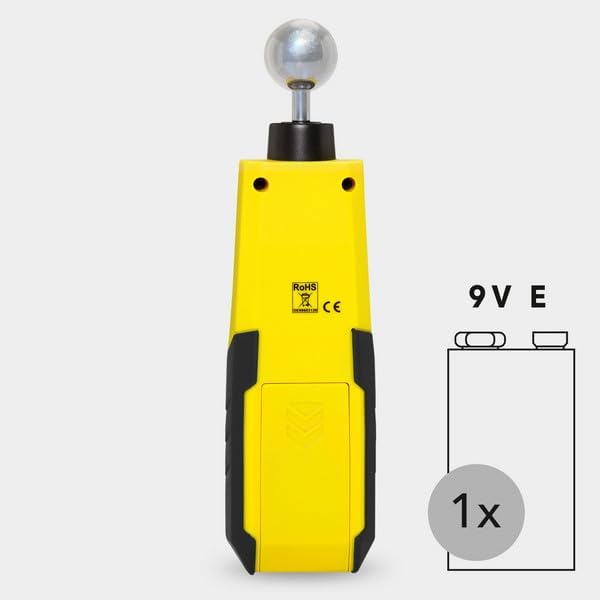
The TROTEC BM31 requires one 9V alkaline battery (included). To install or replace the battery:
- หาฝาปิดช่องใส่แบตเตอรี่ที่ด้านหลังของอุปกรณ์
- เลื่อนหรือปลดคลิปฝาครอบเพื่อเปิดช่อง
- ใส่แบตเตอรี่ 9V โดยตรวจสอบให้แน่ใจว่าขั้วถูกต้อง (+/-)
- ปิดฝาช่องใส่แบตเตอรี่ให้แน่น
3. การดำเนินการ
การวัดขั้นพื้นฐาน
The BM31 provides a quick and non-destructive indication of moisture. To perform a measurement:
- กดปุ่มเพาเวอร์ (⏻) เพื่อเปิดใช้งานอุปกรณ์
- Place the spherical sensor firmly against the surface of the material you wish to measure. Ensure full contact for accurate readings.
- The measurement value will be displayed on the LCD screen.
- หากต้องการคงค่าการอ่านปัจจุบัน ให้กดปุ่ม ถือ button (if available, or indicated by the manual).
- To assess maximum or minimum values during a measurement series, use the สูงสุด/ต่ำสุด ปุ่ม.


ทำความเข้าใจเกี่ยวกับหน้าจอแสดงผลและปุ่มควบคุม
The device features a clear LCD display and intuitive buttons for operation.

Based on the manual image, the key operating elements and display indications are:
| เลขที่ | การกำหนดชื่อ | คำอธิบาย |
|---|---|---|
| 5 | Lamp ปุ่ม | Activates display illumination. |
| 6 | ปุ่ม MEAS | เริ่มการวัด |
| 7 | ปุ่ม MAX/MIN | Toggles between maximum and minimum measured values. |
| 8 | ปุ่มเปิด/ปิด | เปิดหรือปิดอุปกรณ์ |
| 9 | ระบุค่าสูงสุด | Indicates that the displayed value is the maximum recorded. |
| 10 | บ่งชี้ขั้นต่ำ | Indicates that the displayed value is the minimum recorded. |
| 11 | ตัวบ่งชี้ HOLD | Indicates that the displayed value is held. |
| 12 | การบ่งชี้แบตเตอรี่ | แสดงระดับแบตเตอรี่ปัจจุบัน |
| 13 | ตัวบ่งชี้ค่าการวัด | Displays the current moisture measurement. |
Advanced Measurement Considerations
- Influence of Metallic Materials: If the material contains metal (e.g., nails, screws, pipes), the measured value may be significantly higher than the actual moisture content due to electrical reflections. Visual inspection is recommended to identify such interferences.
- Static Charge: Avoid static charge of the material to be measured, as it can falsify the measurement result. Ensure proper grounding or discharge if necessary.
- ความชื้นในไม้: For wood with less than 10% relative humidity, electrostatic forces may affect the measurement. This can lead to false readings.
- สภาพพื้นผิว: Before measuring, ensure the measuring point is clean and free of impurities (e.g., paint residues, dust). Rough surfaces can also result in lower measured values.
- ความลึกในการวัด: The device's penetration depth is approximately 5-40 mm, depending on the material's bulk density and degree of moisture. Readings beyond this depth may not be accurate.
- คุณสมบัติของวัสดุ: Increased occurrences of soluble salts in the material can distort the measurement. Material aggregates (e.g., in screed or concrete) can also influence the height of the measured value. The material should ideally be homogeneous and free of air pockets.
- Electrically Conducting Materials: If a construction material contains electrically conducting substances, the dielectric constant is increased, leading to higher displayed moisture values.
- Moisture Distribution: With material thicknesses of less than 2 cm, there is a danger of humidity values from adjacent material layers affecting the measured value. Ideally, the moisture should be evenly distributed within the material.
4. การดูแลรักษา
การทำความสะอาด
To ensure the longevity and accuracy of your TROTEC BM31, keep it clean. Wipe the device with a soft, damp ใช้ผ้าเช็ดทำความสะอาด ห้ามใช้สารทำความสะอาดที่มีฤทธิ์กัดกร่อนหรือตัวทำละลาย เพราะอาจทำให้ผ้าเสียหายได้asing or internal components. Ensure the spherical sensor is clean before each use.
การเปลี่ยนแบตเตอรี่
When the battery indicator on the display shows low power, replace the 9V battery as described in the "Battery Installation" section. Remove the battery if the device will not be used for an extended period to prevent leakage.
5 การแก้ไขปัญหา
This section addresses common issues you might encounter with your TROTEC BM31.
- อุปกรณ์ไม่เปิด:
- ตรวจสอบว่าติดตั้งแบตเตอรี่อย่างถูกต้องและมีประจุเพียงพอ เปลี่ยนแบตเตอรี่หากจำเป็น
- ค่าที่วัดได้ไม่แม่นยำหรือผันผวน:
- Ensure the spherical sensor is in full contact with the material surface.
- Verify that the material does not contain metallic objects or highly conductive substances near the measurement area.
- Check for static charge on the material or device.
- ตรวจสอบให้แน่ใจว่าพื้นผิวสะอาดและปราศจากเศษซาก
- Consider the measurement depth and material homogeneity as described in the "Advanced Measurement Considerations" section.
- หน้าจอแสดงผลมืดหรืออ่านไม่ออก:
- Activate the display illumination using the lamp ปุ่ม.
- Check battery level; a low battery can affect display brightness.
6. ข้อมูลจำเพาะทางเทคนิค
| ข้อมูลจำเพาะ | รายละเอียด |
|---|---|
| ผู้ผลิต | trotec |
| หมายเลขรุ่น | บีเอ็ม31 |
| น้ำหนักสินค้า | 6.2 ออนซ์ |
| ขนาดแพ็คเกจ | 7 x 1.77 x 1.37 นิ้ว |
| ประเทศต้นกำเนิด | ประเทศเยอรมนี |
| แหล่งพลังงาน | ใช้พลังงานจากแบตเตอรี่ |
| แบตเตอรี่ที่จำเป็น | แบตเตอรี่ 9V 1 ก้อน (รวมอยู่ด้วย) |
| ประเภทเซลล์แบตเตอรี่ | ด่าง |
| ส่วนประกอบที่รวมอยู่ | Moisture meter, batteries, extra pins |
7. ข้อมูลการรับประกัน
For detailed warranty information regarding your TROTEC BM31 Moisture Meter, please refer to the warranty card included with your product or visit the official website of the manufacturer, Trotec. Warranty terms and conditions may vary by region and purchase date.
8. การสนับสนุนลูกค้า
Should you require further assistance, technical support, or have questions not covered in this manual, please contact the manufacturer's customer service department. Contact details can typically be found on the product packaging, the manufacturer's official webไซต์หรือผ่านจุดซื้อของคุณ
Ask a question about this manual
Ask about setup, troubleshooting, compatibility, parts, safety, or missing instructions. Manuals+ will review the question and use this page’s manual context to help answer it.