
การแนะนำ
This manual provides comprehensive instructions for the Veho Kuzo Sports Smart Watch F1S. Please read this manual carefully before using your device to ensure proper operation and to maximize its features. Keep this manual for future reference.

ภาพ: ด้านหน้า view of the Veho Kuzo Sports Smart Watch F1S, showcasinด้วยจอแสดงผลแบบกลมและการออกแบบที่ทนทาน
ข้อมูลด้านความปลอดภัย
Always follow basic safety precautions when using this device to reduce the risk of injury, electric shock, fire, or damage to the product.
- อย่าพยายามถอดประกอบหรือดัดแปลงอุปกรณ์
- เก็บอุปกรณ์ให้ห่างจากอุณหภูมิที่สูงหรือต่ำเกินไปและถูกแสงแดดโดยตรง
- ควรหลีกเลี่ยงการกระแทกหรือการตกหล่นของอุปกรณ์อย่างรุนแรง
- ควรปรึกษาแพทย์หรือผู้เชี่ยวชาญทางการแพทย์ก่อนเริ่มโปรแกรมออกกำลังกายใหม่ใดๆ โดยเฉพาะอย่างยิ่งหากคุณมีปัญหาสุขภาพอยู่แล้ว
- The device is water-resistant (IP68) but not waterproof for diving or high-pressure water activities.
เนื้อหาแพ็คเกจ
ตรวจสอบให้แน่ใจว่ามีสิ่งของทั้งหมดอยู่ในกล่อง:
- Veho Kuzo Sports Smart Watch F1S (Black)
- Magnetic Charging Cradle (USB-A)
- คู่มือผู้ใช้หลายภาษา
การตั้งค่า
1. การชาร์จสมาร์ทวอทช์
Before first use, fully charge your Veho Kuzo F1S Smart Watch.
- Connect the magnetic charging cradle to a USB-A power source (e.g., computer USB port, wall adapter).
- Align the magnetic pins of the cradle with the charging contacts on the back of the watch. The watch will snap into place and display a charging indicator.
- Charge for approximately 2 hours for a full charge. A full charge provides up to 15 days of typical use.

Image: Graphic illustrating the 15-day battery life of the Veho Kuzo F1S Smart Watch.
2. การติดตั้งแอปพลิเคชัน Companion
To unlock all features and synchronize data, download the official companion app on your smartphone.
- The app is compatible with Apple iOS and Android devices.
- ค้นหา "Kuzo" or "Veho Kuzo" in your device's app store.
- ติดตั้งแอปพลิเคชันและทำตามคำแนะนำบนหน้าจอเพื่อสร้างบัญชี
3. การจับคู่กับสมาร์ทโฟนของคุณ
After installing the app, pair your watch with your phone via Bluetooth.
- ตรวจสอบให้แน่ใจว่าได้เปิดใช้งาน Bluetooth บนสมาร์ทโฟนของคุณแล้ว
- Open the companion app and navigate to the device pairing section.
- Turn on your Veho Kuzo F1S Smart Watch.
- Select your watch from the list of available devices in the app.
- ยืนยันคำขอจับคู่บนนาฬิกาและสมาร์ทโฟนของคุณทั้งสอง

Image: A smartphone displaying the Veho Kuzo companion app, showing health and activity data.
คำแนะนำการใช้งาน
การนำทางพื้นฐาน
The Veho Kuzo F1S features a 1.3-inch AMOLED touchscreen and physical buttons for navigation.
- หน้าจอสัมผัส: ปัดขึ้น ลง ซ้าย หรือขวา เพื่อเลื่อนดูเมนูและวิดเจ็ต แตะเพื่อเลือกรายการ
- ปุ่มด้านข้าง: Use the physical buttons on the side of the watch to return to the home screen, access sports modes, or other quick functions.
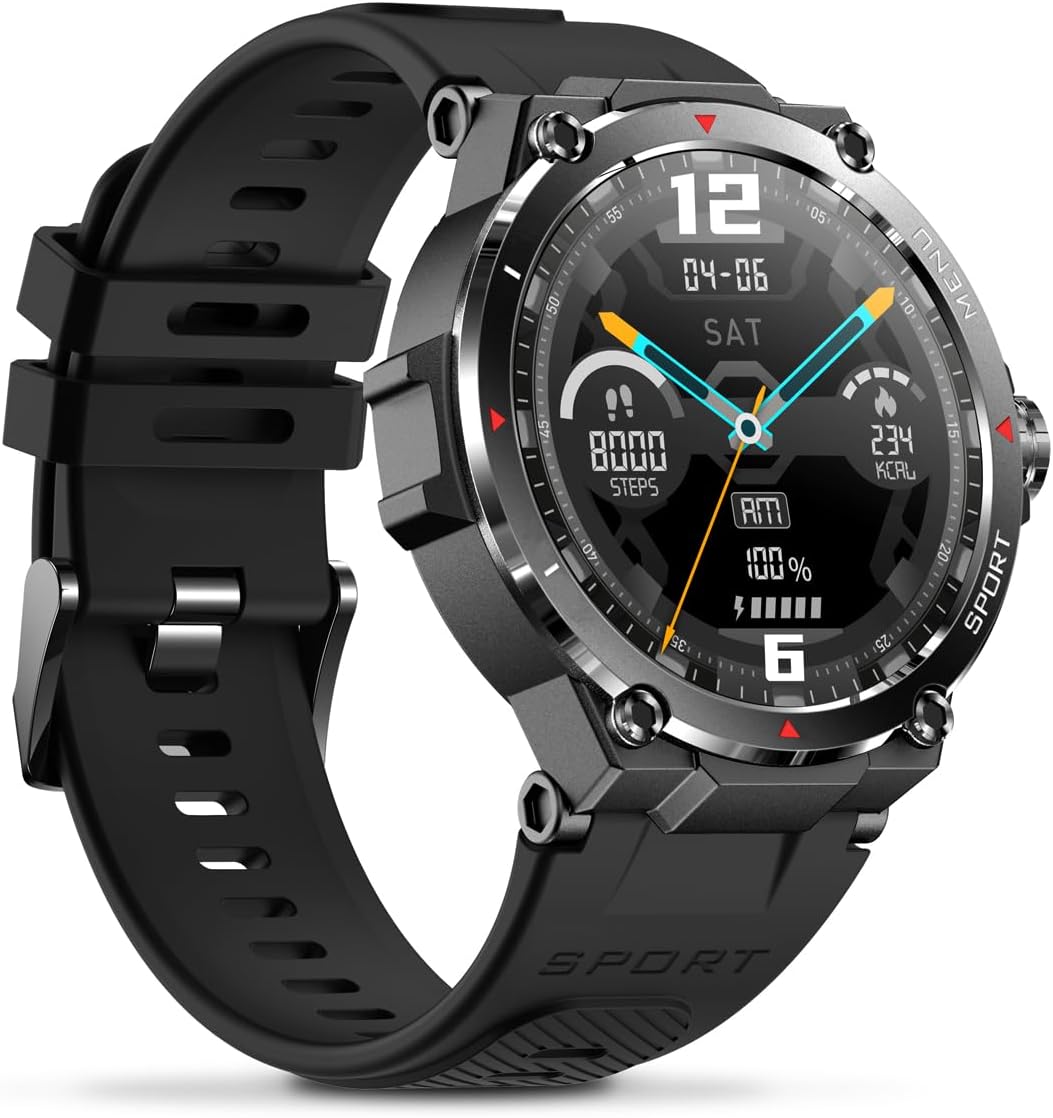
ภาพ: ด้านข้าง view of the Veho Kuzo F1S Smart Watch, highlighting the control buttons and rugged casing.
ติดตามสุขภาพและฟิตเนส
The watch continuously monitors various health and fitness metrics.
- อัตราการเต้นของหัวใจ: 24/7 heart rate monitoring. View ข้อมูลแบบเรียลไทม์บนนาฬิกาหรือแนวโน้มโดยละเอียดในแอป
- ออกซิเจนในเลือด: วัดระดับออกซิเจนในเลือดของคุณ
- ตัวติดตามกิจกรรม: Tracks steps, calories burned, and distance covered. Supports walking, running, and cycling.
- การติดตามการนอนหลับ: Monitors daily, weekly, and monthly sleep patterns, detailing deep sleep, light sleep, and awake times.
- จีพีเอส: Built-in 3-mode GPS (GPS+Beidou+Glonass) and Assisted GPS (AGPS) for accurate outdoor performance tracking and live map positioning. Compatible with STRAVA.

Image: The Veho Kuzo F1S Smart Watch displaying heart rate monitoring data.
คุณสมบัติอัจฉริยะ
- การแจ้งเตือน: Receive push notifications from apps like WhatsApp, Twitter, Facebook, LinkedIn, Skype, YouTube, Messenger, and Instagram directly on your watch.
- การควบคุมเพลง: Control music playback (volume, skip tracks, play/pause) on your paired smartphone directly from the watch.
- ฟังก์ชั่นเวลา: Access alarm, timer, intermittent timer, stopwatch, and countdown functions.
- ค้นหาหมายเลขโทรศัพท์: ใช้สมาร์ทวอทช์ของคุณเพื่อค้นหาสมาร์ทโฟนที่เชื่อมต่ออยู่
- News/Weather App: Integrated news and weather application functionality.
- หน้าปัดนาฬิกาที่ปรับแต่งได้: Choose from hundreds of different watch face designs through the companion app.
การซ่อมบำรุง
การทำความสะอาด
To maintain the watch's appearance and functionality:
- เช็ดนาฬิกาและสายเป็นประจำด้วยผ้านุ่มๆamp ผ้า.
- หลีกเลี่ยงการใช้สารเคมีรุนแรงหรือน้ำยาทำความสะอาดที่มีฤทธิ์กัดกร่อน
- ตรวจสอบให้แน่ใจว่าหน้าสัมผัสการชาร์จสะอาดและแห้งก่อนชาร์จ
ความต้านทานต่อน้ำ (IP68)
The Veho Kuzo F1S Smart Watch has an IP68 rating, meaning it is water-resistant in fresh water up to a maximum depth of 1.5 meters for up to 30 minutes, and is protected from dust.
- Do not use the watch for diving, snorkeling, or high-speed water sports.
- ควรหลีกเลี่ยงการนำนาฬิกาไปสัมผัสกับน้ำร้อน ไอน้ำ หรือผงซักฟอก
- เช็ดนาฬิกาให้แห้งสนิทหลังจากโดนน้ำ
การดูแลแบตเตอรี่
- ควรชาร์จนาฬิกาเป็นประจำเพื่อรักษาอายุการใช้งานของแบตเตอรี่
- หลีกเลี่ยงการระบายแบตเตอรี่จนหมดบ่อยครั้ง
- ควรเก็บนาฬิกาไว้ในที่แห้งและเย็นหากไม่ได้ใช้งานเป็นเวลานาน
การแก้ไขปัญหา
If you encounter issues with your Veho Kuzo F1S Smart Watch, refer to the following common solutions:
- นาฬิกาไม่เปิด: Ensure the watch is fully charged. Connect it to the charging cradle and check for the charging indicator.
- ไม่สามารถจับคู่กับโทรศัพท์ได้:
- ตรวจสอบให้แน่ใจว่าได้เปิดใช้งานบลูทูธบนโทรศัพท์และนาฬิกาของคุณแล้ว
- ตรวจสอบให้แน่ใจว่านาฬิกาอยู่ในระยะของโทรศัพท์ของคุณ
- รีสตาร์ททั้งนาฬิกาและโทรศัพท์ของคุณ
- ลองยกเลิกการจับคู่แล้วจับคู่อุปกรณ์ใหม่ผ่านแอป
- ข้อมูลสุขภาพที่ไม่ถูกต้อง:
- ตรวจสอบให้แน่ใจว่าสวมนาฬิกาให้พอดีกับข้อมือ แต่ไม่แน่นเกินไป
- ทำความสะอาดเซ็นเซอร์ที่ด้านหลังของนาฬิกา
- Environmental factors and skin conditions can affect accuracy.
- การแจ้งเตือนไม่ปรากฏ:
- Check app notification settings on your phone and within the companion app.
- ตรวจสอบให้แน่ใจว่านาฬิกาเชื่อมต่อกับโทรศัพท์ของคุณผ่านบลูทูธ
หากต้องการความช่วยเหลือเพิ่มเติม โปรดดูที่ส่วนการสนับสนุนหรือติดต่อฝ่ายบริการลูกค้า
ข้อมูลจำเพาะ
| ชื่อรุ่น | เอฟ1เอส |
| หมายเลขรุ่น | VSW-001-F1S-B (164426) |
| แสดง | หน้าจอสัมผัส AMOLED ขนาด 1.3 นิ้ว |
| ปณิธาน | 360 x 360 พิกเซล |
| ชิปเซ็ต | Dialogue14695, PPGHX3690 |
| หน่วยความจำ | ROM 128MB + RAM 2MB |
| บลูทูธ | v5.1 |
| ความจุของแบตเตอรี่ | แบตเตอรี่ลิเธียมโพลิเมอร์ 300 mAh |
| เวลาทำงาน | นานถึง 15 วัน |
| เวลาสแตนด์บาย | นานถึง 21 วัน |
| เวลาในการชาร์จ | ประมาณ 2 ชั่วโมง |
| ประเภทการชาร์จ | USB-A to Magnetic Charging Cradle |
| ความต้านทานต่อน้ำ | IP68 (up to 1.5 meters for 30 minutes in fresh water) |
| ระบบ GPS | 3-mode (GPS+Beidou+Glonass) |
| ขนาด | 46 มม. x 12.9 มม. |
| น้ำหนัก | 51กรัม |
| ความกว้างสายคล้อง | 22มม. |
| ความยาวสาย | 260มม. |
| ความเข้ากันได้ของระบบปฏิบัติการ | แอนดรอยด์, ไอโอเอส |
| ภาษาที่รองรับ | All major languages (replicates paired smartphone language) |
การรับประกันและการสนับสนุน
The Veho Kuzo Sports Smart Watch F1S comes with a limited warranty. Please refer to the warranty card included in your package or visit the official Veho webเว็บไซต์สำหรับข้อกำหนดและเงื่อนไขการรับประกันโดยละเอียด
การสนับสนุนลูกค้า
For technical support, troubleshooting, or warranty claims, please contact Veho customer service through their official webไซต์หรือข้อมูลการติดต่อที่ระบุไว้ในเอกสารผลิตภัณฑ์ของคุณ
- การสนับสนุนทางออนไลน์: www.veho-world.com/support (อดีตampลิงค์จริงอาจแตกต่างกัน)
- อีเมล: support@veho-world.com (Examp(อีเมลต้นฉบับอาจแตกต่างกันไป)