
Bmax B4 Plus
คู่มือผู้ใช้มินิพีซี Bmax B4 Plus
Model: B4 Plus
1. บทนำ
This manual provides essential information for setting up, operating, and maintaining your Bmax B4 Plus Mini PC. Please read this guide thoroughly before using the device to ensure optimal performance and longevity.
1.1 ผลิตภัณฑ์เกินview
The Bmax B4 Plus is a compact and powerful Mini PC designed for various applications, including office work, streaming, web browsing, and home entertainment. It features a 12th Generation Intel N100 Processor, 16GB DDR4 memory, and a 512GB SSD, providing fast boot times and efficient application performance. Its Intel UHD Graphics support 4K 60Hz triple-display output, making it versatile for multi-monitor setups.

Image: The Bmax B4 Plus Mini PC, showcasing its compact design and front ports. The device is dark grey with the BMAX logo prominently displayed.
1.2 อะไรอยู่ในกล่อง
- 1 x B4 Plus MINI PC
- อะแดปเตอร์ไฟฟ้า 1 ตัว
- 1 x คู่มือผู้ใช้
- 1 x สาย HDMI
- 1 x ตัวยึดโลหะ
2. การตั้งค่า
Follow these steps to set up your Bmax B4 Plus Mini PC for the first time.
2.1 การเชื่อมต่ออุปกรณ์ต่อพ่วง
- เชื่อมต่อจอแสดงผล: Connect your monitor(s) to the Mini PC using the HDMI ports or the Type-C port. The device supports up to three 4K displays simultaneously.
- เชื่อมต่อคีย์บอร์ดและเมาส์: เสียบคีย์บอร์ดและเมาส์ USB ของคุณเข้ากับพอร์ต USB 3.0 หรือ USB 2.0 ที่ว่างอยู่
- เชื่อมต่อเสียง: If using external speakers or headphones, connect them to the 3.5-mm Stereo Headset Jack.
- เชื่อมต่อเครือข่าย (ทางเลือก): For a wired internet connection, connect an Ethernet cable to the RJ45 port. Wireless connectivity (Wi-Fi) is also available.
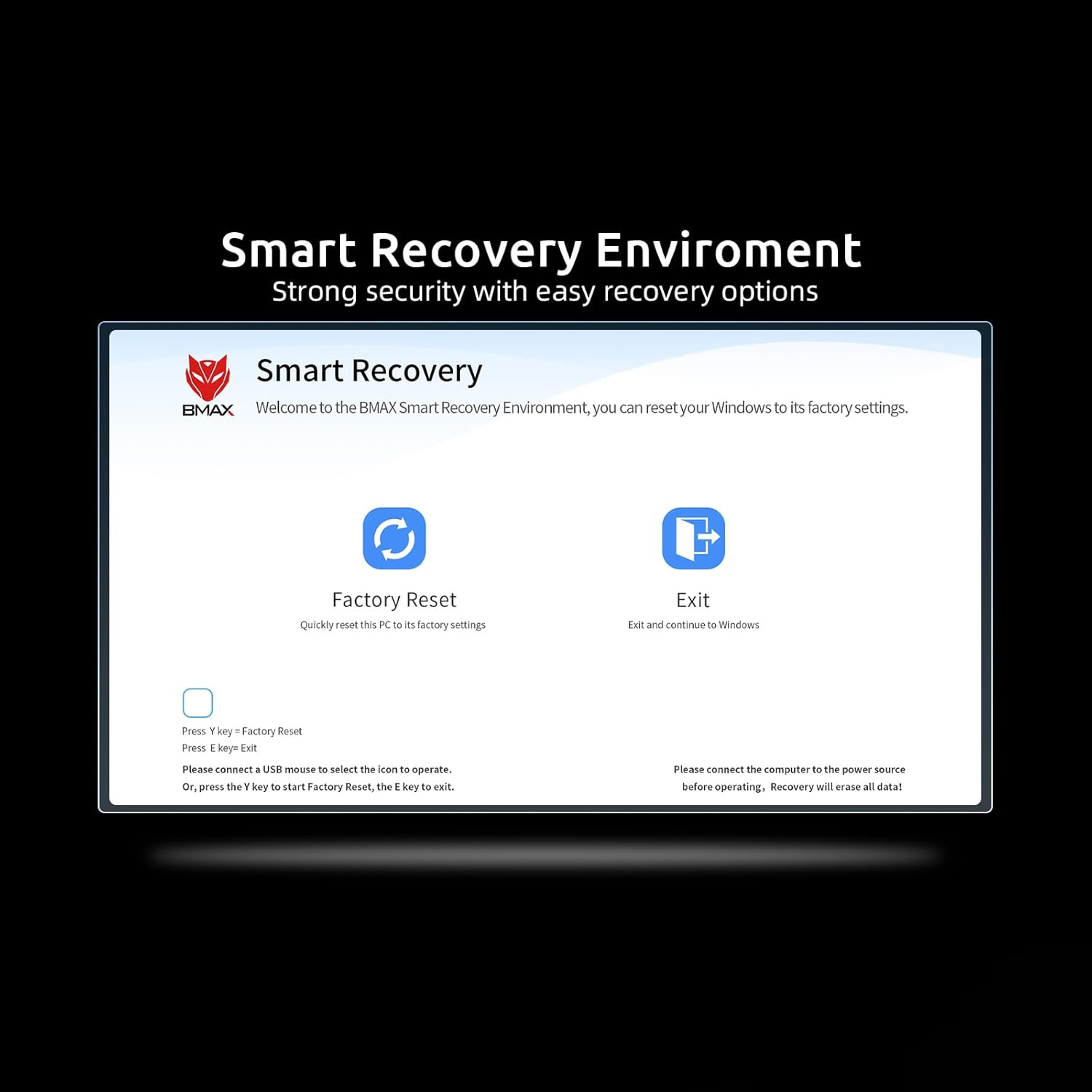
ภาพ: รายละเอียด view of the Bmax B4 Plus Mini PC's front and rear interfaces, including USB 3.0, USB 2.0, HDMI, Type-C, 3.5mm audio jack, Ethernet, and power input.
2.2 การเปิดเครื่อง
- เชื่อมต่ออะแดปเตอร์ไฟ: Plug the power adapter into the DC Jack on the Mini PC, then plug the other end into a power outlet.
- กดปุ่มเปิด/ปิด: Press the power button located on the front of the Mini PC. The power indicator light will illuminate, and the system will begin to boot.
3. คู่มือการใช้งาน
3.1 การกำหนดค่าการแสดงผล
The Bmax B4 Plus supports triple-display output at 4K 60Hz resolution, allowing for extended desktop or mirrored display configurations. You can connect displays via the two HDMI ports and one Type-C port.

Image: Illustration of the Bmax B4 Plus Mini PC's triple-display capability, demonstrating connection to multiple monitors via HDMI and Type-C for extended desktop use.
3.2 การเชื่อมต่อเครือข่ายและบลูทูธ
- ไวไฟ : The Mini PC features 802.11a/b/g/n/ac wireless connectivity, offering speeds up to 433Mbps. To connect to a Wi-Fi network, navigate to your operating system's network settings, select your desired network, and enter the password.
- บลูทูธ: Built-in Bluetooth 4.2 allows you to connect various wireless devices such as keyboards, mice, and audio peripherals. Enable Bluetooth in your operating system settings and pair with your devices.
3.3 ประสิทธิภาพและการจัดเก็บ
Equipped with an Intel N100 Processor, 16GB DDR4 RAM, and a 512GB SSD, the B4 Plus delivers efficient performance for daily computing tasks. The SSD ensures rapid boot times and quick application loading. The system also supports expansion with a 2.5-inch laptop hard drive slot for additional storage.

ภาพ: ภายใน view of the Bmax B4 Plus Mini PC, highlighting the 16GB DDR4 SO-DIMM memory and the 512GB M.2 SATA SSD, illustrating its high-speed storage and memory configuration.
4. การบำรุงรักษา
การบำรุงรักษาอย่างถูกวิธีจะช่วยให้มินิพีซีของคุณมีอายุการใช้งานยาวนานและทำงานได้อย่างมีประสิทธิภาพสูงสุด
- การทำความสะอาด: ควรทำความสะอาดภายนอกของมินิพีซีเป็นประจำด้วยผ้าแห้งเนื้อนุ่ม หลีกเลี่ยงการใช้น้ำยาทำความสะอาดโดยตรงกับตัวเครื่อง
- การระบายอากาศ : Ensure that the ventilation openings are not obstructed. Proper airflow is crucial to prevent overheating. Do not place the Mini PC in enclosed spaces without adequate air circulation.
- การอัปเดตซอฟต์แวร์: อัปเดตระบบปฏิบัติการและไดรเวอร์ของคุณอยู่เสมอเพื่อให้มั่นใจถึงความเสถียรและความปลอดภัยของระบบ
- การสำรองข้อมูล: สำรองข้อมูลสำคัญไปยังไดรฟ์ภายนอกหรือที่เก็บข้อมูลบนคลาวด์เป็นประจำเพื่อป้องกันการสูญหายของข้อมูล
5 การแก้ไขปัญหา
This section addresses common issues you might encounter with your Bmax B4 Plus Mini PC.
5.1 ปัญหาทั่วไปและแนวทางแก้ไข
- ไม่มีไฟฟ้า:
- ตรวจสอบให้แน่ใจว่าอะแดปเตอร์ไฟฟ้าเชื่อมต่อกับมินิพีซีและเต้ารับไฟฟ้าที่ใช้งานได้แน่นหนา
- ตรวจสอบว่าเต้ารับไฟฟ้าใช้งานได้โดยเสียบอุปกรณ์อื่น
- ไม่มีจอแสดงผล:
- Check that the HDMI or Type-C cable is firmly connected to both the Mini PC and the monitor.
- ตรวจสอบให้แน่ใจว่าจอภาพเปิดอยู่และตั้งค่าแหล่งอินพุตที่ถูกต้อง
- ลองเชื่อมต่อกับจอแสดงผลอื่น หรือใช้สายเคเบิลอื่นดู
- ประสิทธิภาพการทำงานช้า:
- ปิดแอปพลิเคชันที่ไม่จำเป็นซึ่งทำงานอยู่เบื้องหลัง
- ตรวจสอบพื้นที่ว่างบน SSD ให้เพียงพอ
- Ensure the Mini PC has adequate ventilation to prevent thermal throttling.
- Run system diagnostics or antivirus scans.
5.2 Smart Recovery Environment
The Bmax B4 Plus includes a Smart Recovery Environment, which can help resolve issues like OS crashes, slow response, or incorrect operation during OS upgrades. This feature allows you to reset the system to its factory settings, providing a thorough reinstall option.
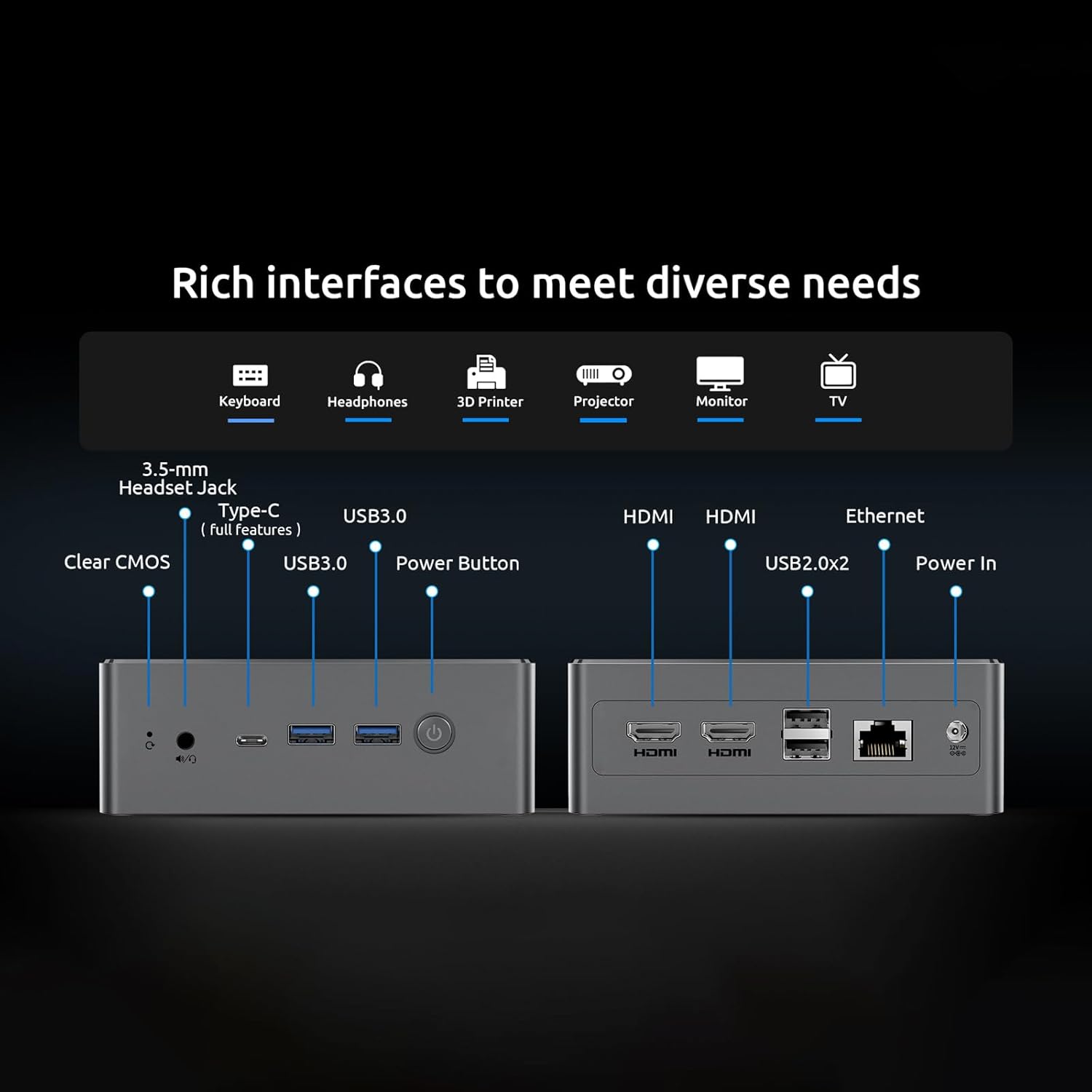
Image: Screenshot of the BMAX Smart Recovery Environment, showing options for Factory Reset and Exit. This utility helps restore the system to its original state.
To use Smart Recovery:
- Connect a USB mouse to select the icon to operate.
- Alternatively, press 'Y' key to start Factory Reset or 'E' key to exit.
- คำเตือน: Please connect the computer to the power source before operating. Recovery will erase all data on the system drive.
6. ข้อมูลจำเพาะ
| คุณสมบัติ | ข้อมูลจำเพาะ |
|---|---|
| โปรเซสเซอร์ | Intel 12th Gen Alder Lake N100 Processor (up to 3.4 GHz) |
| กราฟฟิก | Intel UHD Graphics (supports 4K 60Hz) |
| แรม | แรม 16GB DDR4 |
| พื้นที่จัดเก็บ | 512 GB SSD (M.2 SATA 2280) |
| ระบบปฏิบัติการ | ระบบปฏิบัติการ (ติดตั้งมาแล้ว) |
| การเชื่อมต่อแบบไร้สาย | Wi-Fi 802.11a/b/g/n/ac, Bluetooth 4.2 |
| พอร์ต | 2x USB 3.0, 2x USB 2.0, 2x HDMI 2.0, 1x Type-C (full features), 1x 3.5-mm Stereo Headset Jack, 1x DC Jack, 1x Ethernet (RJ45) |
| ความละเอียดหน้าจอสูงสุด | 3840 x 2160 พิกเซล |
| น้ำหนักสินค้า | 1.61 ปอนด์ (ประมาณ 0.73 กก.) |
| ขนาดสินค้า | 10.51 x 6.14 x 2.91 นิ้ว (ประมาณ 26.7 x 15.6 x 7.4 ซม.) |
7. การรับประกันและการสนับสนุน
For warranty information and technical support, please refer to the documentation provided with your purchase or visit the official Bmax website. You can also contact Bmax customer service for assistance with product inquiries, troubleshooting, and service requests.
หากต้องการข้อมูลเพิ่มเติม โปรดเยี่ยมชม Bmax Store on Amazon.
Ask a question about this manual
Ask about setup, troubleshooting, compatibility, parts, safety, or missing instructions. Manuals+ will review the question and use this page’s manual context to help answer it.