
1. บทนำ
ขอบคุณสำหรับการซื้อasing the TTArtisan 500mm F6.3 Telephoto Lens. This manual provides essential information for the safe and effective use of your new lens. Please read it thoroughly before use and keep it for future reference.

Figure 1: TTArtisan 500mm F6.3 Telephoto Lens. This image shows the full length of the black telephoto lens with its various rings and markings.
คุณสมบัติหลัก:
- ทางยาวโฟกัส 500 มม.: A powerful telephoto lens designed for capturing distant subjects.
- รูรับแสงกว้าง F6.3: Allows for good light gathering capabilities, suitable for various lighting conditions.
- Full Frame Compatibility: Designed for full-frame mirrorless cameras, compatible with Sony E-Mount.
- ED (Extra-low Dispersion) Glass: Incorporates two ED glass elements to reduce chromatic aberration and enhance image quality.
- โฟกัสแบบแมนนวล: Provides precise control over focusing.
- Tripod Mount Ring: Integrated for stable mounting on tripods, essential for a lens of this size and focal length.
- Multi-Layer Coatings: Features MC Multi-Layer Coatings for improved light transmission and reduced flares.
2. เนื้อหาบรรจุภัณฑ์
ก่อนใช้งาน โปรดตรวจสอบให้แน่ใจว่ามีอุปกรณ์ครบถ้วนในบรรจุภัณฑ์:
- TTArtisan 500mm F6.3 Telephoto Lens
- ฝาปิดหน้าเลนส์
- ฝาปิดเลนส์ด้านหลัง
- Lens Hood (Metal)
- คู่มือการใช้งาน

Figure 2: Package contents including the lens, caps, and hood. The image displays the lens, front and rear caps, a metal lens hood, and a small instruction booklet next to a grey product box.
3. การตั้งค่า
การติดตั้งเลนส์เข้ากับกล้องของคุณ:
- ตรวจสอบให้แน่ใจว่ากล้องของคุณปิดอยู่
- ถอดฝาปิดเลนส์ด้านหลังออกจากเลนส์ และถอดฝาปิดตัวกล้องออกจากกล้องของคุณ
- Align the mounting index on the lens with the corresponding index on your camera body.
- ค่อยๆ ใส่เลนส์เข้าไปในช่องยึดกล้อง แล้วหมุนตามเข็มนาฬิกาจนกระทั่งได้ยินเสียงคลิก อย่าฝืนใส่เลนส์
- Attach the lens hood by aligning it with the front of the lens and twisting until secure.
Using the Tripod Mount Ring:
The TTArtisan 500mm F6.3 lens is equipped with a tripod mount ring for enhanced stability, especially given its size and weight. This ring helps balance the camera and lens assembly on a tripod or monopod.
- Loosen the locking knob on the tripod mount ring to rotate the lens for optimal positioning.
- Attach your tripod or monopod quick-release plate to the tripod mount ring's screw hole.
- Securely fasten the quick-release plate.
- Tighten the locking knob on the tripod mount ring once the desired orientation is achieved.

Figure 3: The 500mm F6.3 lens attached to a camera body, resting on a tripod via its integrated tripod mount ring. This illustrates the proper way to support the lens for stability.
4. การใช้งานเลนส์
โฟกัสแบบแมนนวล:
This is a manual focus lens. To achieve sharp images:
- Set your camera to manual focus (MF) mode.
- มองผ่าน viewfinder or use your camera's live view หน้าจอ.
- Rotate the focus ring on the lens until your subject appears sharp. Utilize your camera's focus peaking or magnification features for precise focusing.
การควบคุมช่องรับแสง:
The lens features a manual aperture ring. Rotate the aperture ring to select your desired f-stop (from F6.3 to F32). A wider aperture (smaller f-number) allows more light and creates shallower depth of field, while a narrower aperture (larger f-number) allows less light and creates greater depth of field.
Photography Applications:
- Deep-Sky Astrophotography: The F6.3 aperture and ED glass elements are beneficial for capturing celestial objects.
- Distant Subjects: Ideal for photographing subjects that are far away, such as wildlife, sports, and airplanes.
- Humanist Photography: Allows photographers to maintain a comfortable distance from subjects while capturing candid moments.
- Simplified Composition: The telephoto compression helps isolate subjects and simplify backgrounds.

รูปที่ 4: เกินview of lens features including ED glass, multi-layer coatings, focus gear ring, and tripod mount ring. This collage highlights key optical and mechanical aspects of the lens.
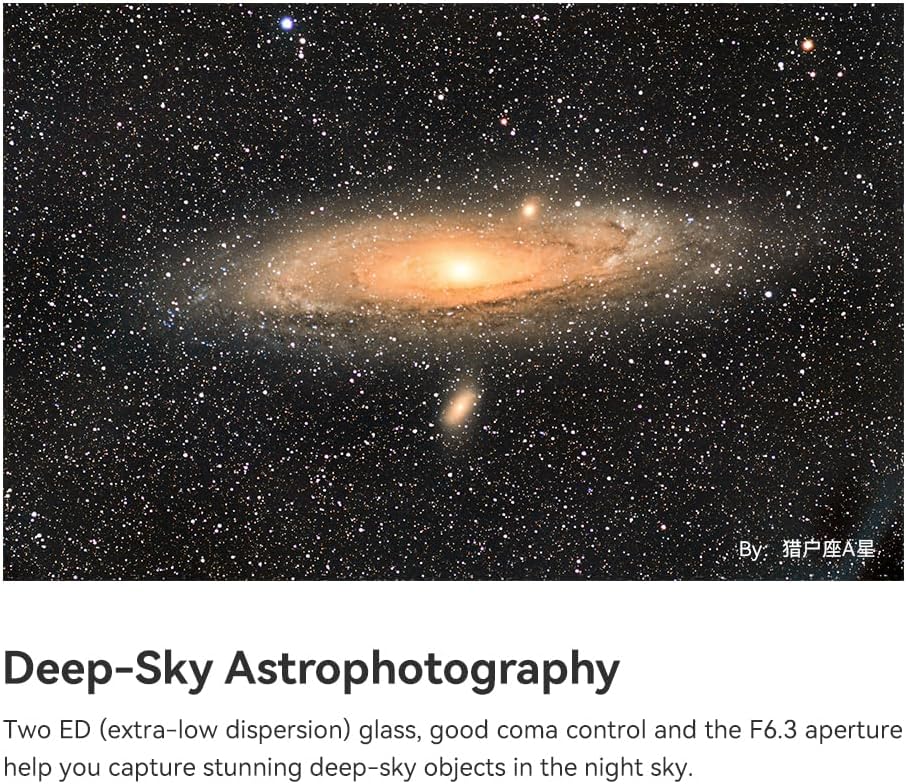
รูปที่ 5: ตัวอย่างample of deep-sky astrophotography, showcasing a galaxy captured with the 500mm F6.3 lens. The image demonstrates the lens's capability for capturing distant celestial objects.

Figure 6: A telephoto shot of an airplane taking off, illustrating the lens's ability to 'get closer' to distant subjects. This image highlights the lens's utility for capturing subjects from afar.

Figure 7: A photograph of a person riding a motorcycle on a winding road, demonstrating the lens's suitability for humanist photography by maintaining distance. This image shows how the lens can capture subjects without intrusion.

Figure 8: Two images demonstrating simplified composition: one of the sun behind a ferris wheel, and another of the sun behind a pagoda. These examples illustrate how the telephoto lens can isolate subjects and create impactful compositions.
ขอบมืด:
The E-mount version of this lens may exhibit slight vignetting on full-frame cameras at F6.3. Vignetting is typically reduced or eliminated at narrower apertures (e.g., F22). No vignetting is expected for Z, RF, and L-mount versions.

Figure 9: A comparison showing slight vignetting at F6.3 on an E-mount camera versus no vignetting at F22. The image displays two identical scenes, one with darker corners (vignetting) and one without, illustrating the effect of aperture on vignetting.
5. การบำรุงรักษา
Proper care and maintenance will ensure the longevity and performance of your lens.
- การทำความสะอาดเลนส์: Use a soft, lint-free cloth or a lens brush to remove dust. For smudges, use a specialized lens cleaning solution and a microfiber cloth. Avoid touching the lens elements directly with your fingers.
- พื้นที่จัดเก็บ: Store the lens in a cool, dry place away from direct sunlight and extreme temperatures. Use the front and rear lens caps when not in use to protect the elements.
- การจัดการ: ควรใช้งานเลนส์อย่างระมัดระวัง หลีกเลี่ยงการทำตกหรือการกระแทกอย่างแรง
- ความต้านทานน้ำ: This lens is ไม่กันน้ำ. Avoid exposure to rain, splashes, or high humidity.

รูปที่ 10: ภาพระยะใกล้ view of the lens's front element, highlighting the large ED glass. This image emphasizes the optical quality and the importance of keeping the lens elements clean.
6 การแก้ไขปัญหา
If you encounter issues with your lens, consider the following:
- Unsharp Images: Ensure your camera is set to manual focus (MF) mode and that you are carefully rotating the focus ring to achieve critical focus. Use focus peaking or magnification aids on your camera.
- Dark Corners (Vignetting): This is normal at wider apertures (F6.3) on full-frame E-mount cameras. Try stopping down the aperture (e.g., to F11 or F22) to reduce or eliminate vignetting.
- Lens Not Mounting: Ensure the lens is correctly aligned with the camera mount and rotated until it clicks. Do not force it. Check for any obstructions on the mount.
- Dust on Images: Clean the front and rear elements of the lens as described in the Maintenance section. If dust persists, it may be on your camera's sensor, which requires professional cleaning.
7. ข้อมูลจำเพาะ
| ยี่ห้อ | ตตตาร์ติสัน |
| ชื่อรุ่น | TTARTISAN 500mm F6.3 Full Frame Telephoto Manual Focus Lens |
| ระยะโฟกัส | 500มม. |
| รูรับแสงสูงสุด | เอฟ6.3 |
| รูรับแสงต่ำสุด | เอฟ32 |
| การออกแบบเลนส์ | ไพรม์ |
| การออกแบบออปติคอล | 8 Elements in 5 Groups (including 2 ED glass elements) |
| ใบมีดไดอะแฟรม | 12 |
| ประเภทโฟกัส | โฟกัสแบบแมนนวล |
| ระยะโฟกัสใกล้สุด | 3.3ม. |
| ขนาดตัวกรอง | 82มม. |
| การติดตั้งที่เข้ากันได้ | Sony E (also available for R/Z/L/XF/EF/F/GFX mounts) |
| มุมของ View | 5° |
| การเคลือบเลนส์ | Nano Crystal Coating |
| น้ำหนัก | น้ำหนักโดยประมาณ 1603-1617 กรัม |
| สี | สีดำ |
8. การรับประกันและการสนับสนุน
ข้อมูลการรับประกัน:
This TTArtisan lens comes with a รับประกัน 1 ปี นับจากวันที่ซื้อสินค้า การรับประกันนี้ครอบคลุมถึงข้อบกพร่องจากการผลิตและฝีมือการผลิตเท่านั้น ไม่ครอบคลุมถึงความเสียหายที่เกิดจากการใช้งานผิดวิธี อุบัติเหตุ การดัดแปลงโดยไม่ได้รับอนุญาต หรือการสึกหรอตามปกติ
โปรดเก็บหลักฐานการซื้อของคุณไว้เพื่อเรียกร้องการรับประกัน
การสนับสนุนลูกค้า:
For technical assistance, warranty service, or any questions regarding your TTArtisan 500mm F6.3 lens, please contact your retailer or visit the official TTArtisan webเว็บไซต์สำหรับข้อมูลสนับสนุน