
1. บทนำ
Thank you for choosing the Generic Replacement Remote Control. This remote is designed to be a direct replacement for your original Formuler (Z10 SE, Z+ Neo, Z Plus) 4K UHD IPTV Android HDTV Box remote. It operates using infrared (IR) technology and requires no complex setup or programming.
สำคัญ: Please ensure your original remote control matches the appearance of this replacement remote to guarantee compatibility. This remote is specifically designed for the models listed.
2. การตั้งค่า
2.1 การติดตั้งแบตเตอรี่
รีโมทคอนโทรลต้องใช้แบตเตอรี่ AAA สอง (2) ก้อน (ไม่ได้รวมมาให้) ในการใช้งาน โปรดทำตามขั้นตอนต่อไปนี้เพื่อใส่แบตเตอรี่:
- ค้นหาช่องใส่แบตเตอรี่ที่ด้านหลังของรีโมทคอนโทรล
- กดสลักลงแล้วเลื่อนฝาครอบแบตเตอรี่ลงด้านล่างเพื่อเปิดออก
- ใส่แบตเตอรี่ AAA สองก้อน โดยตรวจสอบให้แน่ใจว่าขั้วบวก (+) และขั้วลบ (-) ตรงกับเครื่องหมายภายในช่อง
- เลื่อนฝาครอบแบตเตอรี่กลับเข้าที่จนกระทั่งคลิกเข้าที่

รูปที่ 1: ช่องใส่แบตเตอรี่พร้อมฝาครอบที่ถูกถอดออก
2.2 การใช้งานเบื้องต้น
This replacement remote control is an infrared (IR) device and does not require any pairing, programming, or code setup. Once batteries are correctly installed, it is ready for immediate use with compatible Formuler devices.
3. คู่มือการใช้งาน
Point the remote control directly towards your Formuler 4K UHD IPTV Android HDTV Box. Ensure there are no obstructions between the remote and the device. The maximum effective range is approximately 10 meters (33 feet).

รูปที่ 2 : ด้านหน้า view ของรีโมทคอนโทรล
3.1 ฟังก์ชันปุ่ม
The remote control features standard buttons for navigating and controlling your Formuler device. Refer to your Formuler device's user manual for specific functions of each button, as their behavior may vary slightly depending on the device model and software version.
- Power (TV/STB): Turns the TV or Set-Top Box on/off.
- แป้นตัวเลข (0-9): For direct channel input or numerical selections.
- การนำทาง (ขึ้น, ลง, ซ้าย, ขวา, ตกลง): สำหรับการนำทางและเลือกเมนู
- ปริมาณ (+/-): ปรับระดับเสียง
- ช่องสัญญาณ (CH +/-): เปลี่ยนช่อง
- Menu/Info/Back/Exit: Accesses menus, displays information, goes back, or exits current screen.
- ปุ่มควบคุมการเล่นสื่อ (เล่น, หยุดชั่วคราว, หยุด, ย้อนกลับ, กรอไปข้างหน้า): ควบคุมการเล่นสื่อ
- ปุ่มสี (แดง, เขียว, เหลือง, น้ำเงิน): Often used for specific functions within applications or menus.
4. การบำรุงรักษา
4.1 การทำความสะอาด
To clean the remote control, wipe it gently with a soft, dry cloth. Do not use liquid cleaners, abrasive pads, or chemical solvents, as these can damage the remote's surface or internal components.
4.2 การเปลี่ยนแบตเตอรี่
เปลี่ยนแบตเตอรี่เมื่อรีโมทคอนโทรลตอบสนองช้าลงหรือหยุดทำงาน ควรเปลี่ยนแบตเตอรี่ทั้งสองก้อนพร้อมกันด้วยแบตเตอรี่ AAA ใหม่เสมอ ห้ามใช้แบตเตอรี่เก่าและใหม่ปะปนกัน หรือใช้แบตเตอรี่ต่างชนิดกัน
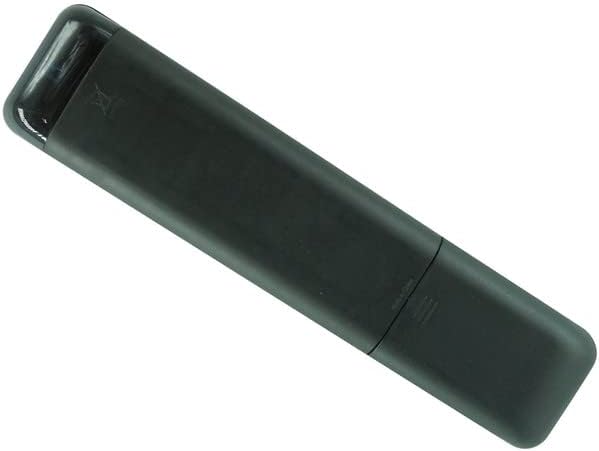
รูปที่ 3: ย้อนกลับ view ของรีโมทคอนโทรล
5 การแก้ไขปัญหา
- รีโมตไม่ตอบสนอง:
- ตรวจสอบให้แน่ใจว่าใส่แบตเตอรี่อย่างถูกต้องโดยมีขั้วที่ถูกต้อง (+/-)
- เปลี่ยนแบตเตอรี่เก่าด้วยแบตเตอรี่ AAA ใหม่
- Check for any obstructions between the remote control and your Formuler device.
- ตรวจสอบให้แน่ใจว่าคุณอยู่ในระยะการทำงานที่มีประสิทธิภาพ (สูงสุด 10 เมตร)
- ปุ่มบางปุ่มใช้งานไม่ได้:
- Verify that the remote control is indeed compatible with your specific Formuler model (Z10 SE, Z+ Neo, Z Plus). If your model is not listed, this remote may not be fully compatible.
- Some functions may be specific to the original remote or require specific software versions on your device.
- การทำงานจากระยะไกลเป็นไปแบบไม่ต่อเนื่อง:
- มักบ่งชี้ว่าแบตเตอรี่ใกล้หมด ควรเปลี่ยนแบตเตอรี่
- Ensure a clear line of sight to the device.
If issues persist after following these steps, please refer to the support section.
6. ข้อมูลจำเพาะ
| ยี่ห้อ | ทั่วไป |
| หมายเลขรุ่น | อีซี่ทรี20118 |
| เทคโนโลยีการเชื่อมต่อ | อินฟาเรด (IR) |
| อุปกรณ์ที่รองรับ | Formuler Z10 SE, Z+ Neo, Z Plus 4K UHD IPTV Android HDTV Box |
| จำนวนอุปกรณ์ที่รองรับสูงสุด | 1 |
| ประเภทตัวควบคุม | ปุ่มควบคุม |
| ระยะสูงสุด | 10 เมตร (ประมาณ 33 ฟุต) |
| แบตเตอรี่ที่จำเป็น | แบตเตอรี่ AAA 2 ก้อน |
7. การรับประกันและการสนับสนุน
7.1 ข้อมูลการรับประกัน
ผลิตภัณฑ์นี้มาพร้อมกับ รับประกัน 90 วัน นับจากวันที่ซื้อ การรับประกันนี้ครอบคลุมข้อบกพร่องจากการผลิต แต่ไม่ครอบคลุมความเสียหายที่เกิดจากการใช้งานผิดวิธี อุบัติเหตุ การดัดแปลงโดยไม่ได้รับอนุญาต หรือการสึกหรอตามปกติ
7.2 การสนับสนุนลูกค้า
For any questions, concerns, or troubleshooting assistance not covered in this manual, please contact the seller directly through the platform where the product was purchased. Please have your order number and product details ready for faster service.


