
การแนะนำ
This manual provides detailed instructions for the setup, operation, and maintenance of your PRORECK Concert Set PA Speaker System. Please read this manual thoroughly before operating the system to ensure proper use and to maximize its performance and longevity.

Image: The complete PRORECK Concert Set PA Speaker System, featuring two line array speaker towers mounted on tripod stands, positioned on either side of a central active subwoofer unit.
เนื้อหาแพ็คเกจ
Verify that all items listed below are included in your package. If any items are missing or damaged, please contact PRORECK customer support.
- 1 x Active Subwoofer
- 8 x Line Array Speakers (Dual 4-inch 2-way passive system)
- สายไฟ 1 เส้น ยาว 6 ฟุต
- 2 x Tripod Stands
- อะแดปเตอร์ 2 ชิ้น
- 2 x 8-inch 6.35mm Speaker Cables
- 4 x 14-inch 6.35mm Speaker Cables
- 2 x 10-feet Speakon to 6.35mm Cords
- 1 x คู่มือผู้ใช้ (เอกสารนี้)

Image: A visual representation of all components included in the PRORECK Concert Set, showing boxes for the subwoofer, line array speakers, tripod stands, cables, and adapters.
คำแนะนำการตั้งค่า
1. การแกะกล่องและการจัดวาง
Carefully unpack all components. Place the active subwoofer on a stable, flat surface. Position the tripod stands on either side of the subwoofer, ensuring they are stable and fully extended for optimal height.
2. Assembling the Line Array Speakers
Each line array speaker unit consists of multiple individual speakers. Connect these speakers together using the provided cables and mounting hardware. Ensure secure connections for both audio and structural integrity.
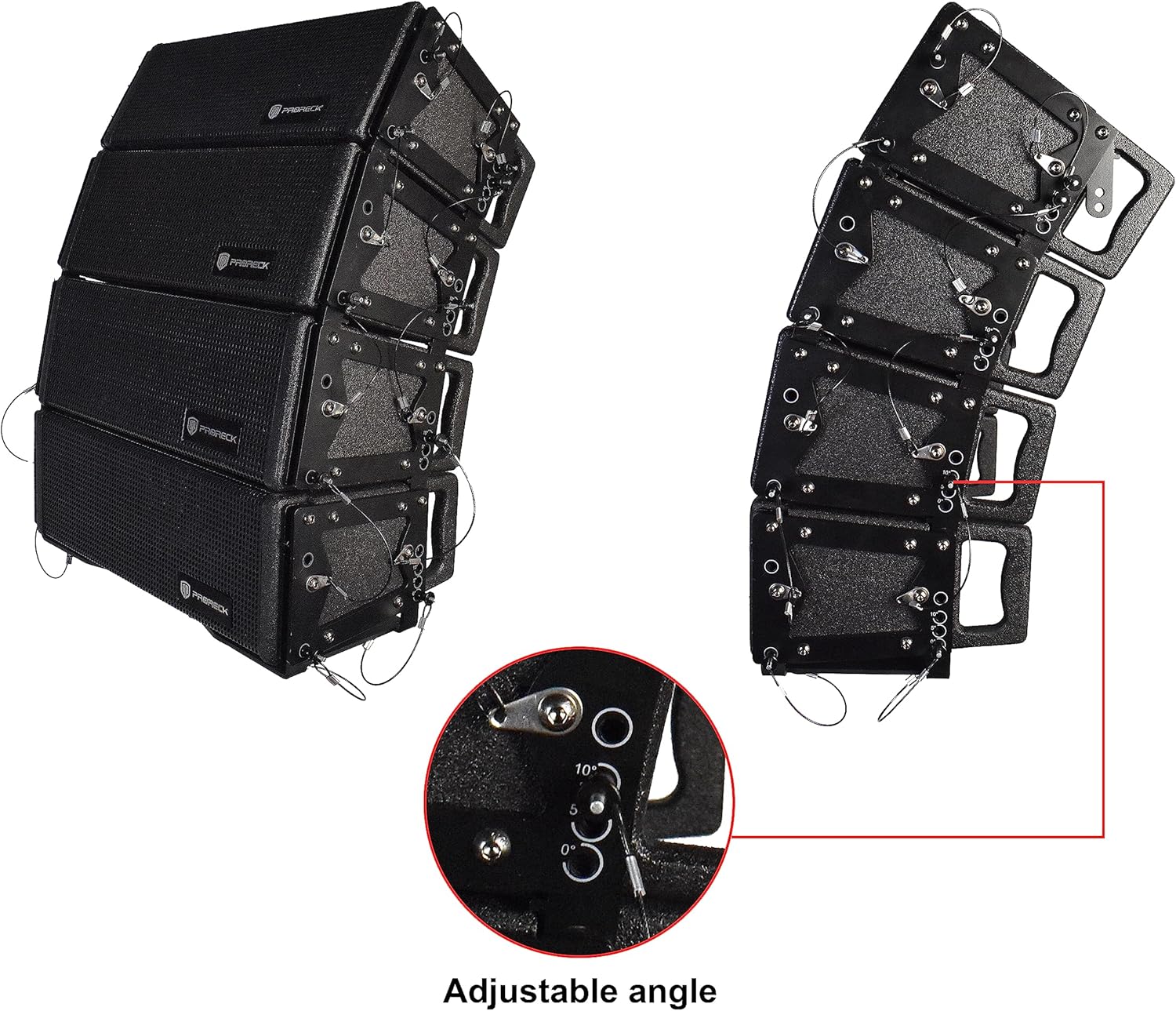
ภาพ: รายละเอียด view of the line array speakers, highlighting the adjustable angle mechanism with settings for 0°, 5°, and 10° splay.
3. Mounting the Line Array Speakers
Attach the assembled line array speakers to the tripod stands using the adapters. The system offers flexible mounting options with multiple flying points. Utilize the three different splay brackets to configure the angle (0°, 5°, 10°) to optimize sound coverage for your audience area.

ภาพ: ระเบิด view diagram illustrating the connection points and features of the PRORECK PA system, including array speakers, strong support, adjustable angle, connection details, subwoofer, and lifting handle.
4. Connecting Speakers to Subwoofer
Connect the line array speakers to the active subwoofer using the provided 6.35mm speaker cables and Speakon to 6.35mm cords. The array speakers support serial/parallel connection technology. Refer to the subwoofer's rear panel for input and output connections.

Image: The rear control panel of the PRORECK active subwoofer, displaying XLR/Jack combo inputs, power switch, AC input, and various output connections for the line array speakers.
5. ขนาดระบบ
Refer to the diagram below for the approximate dimensions of the assembled system components.
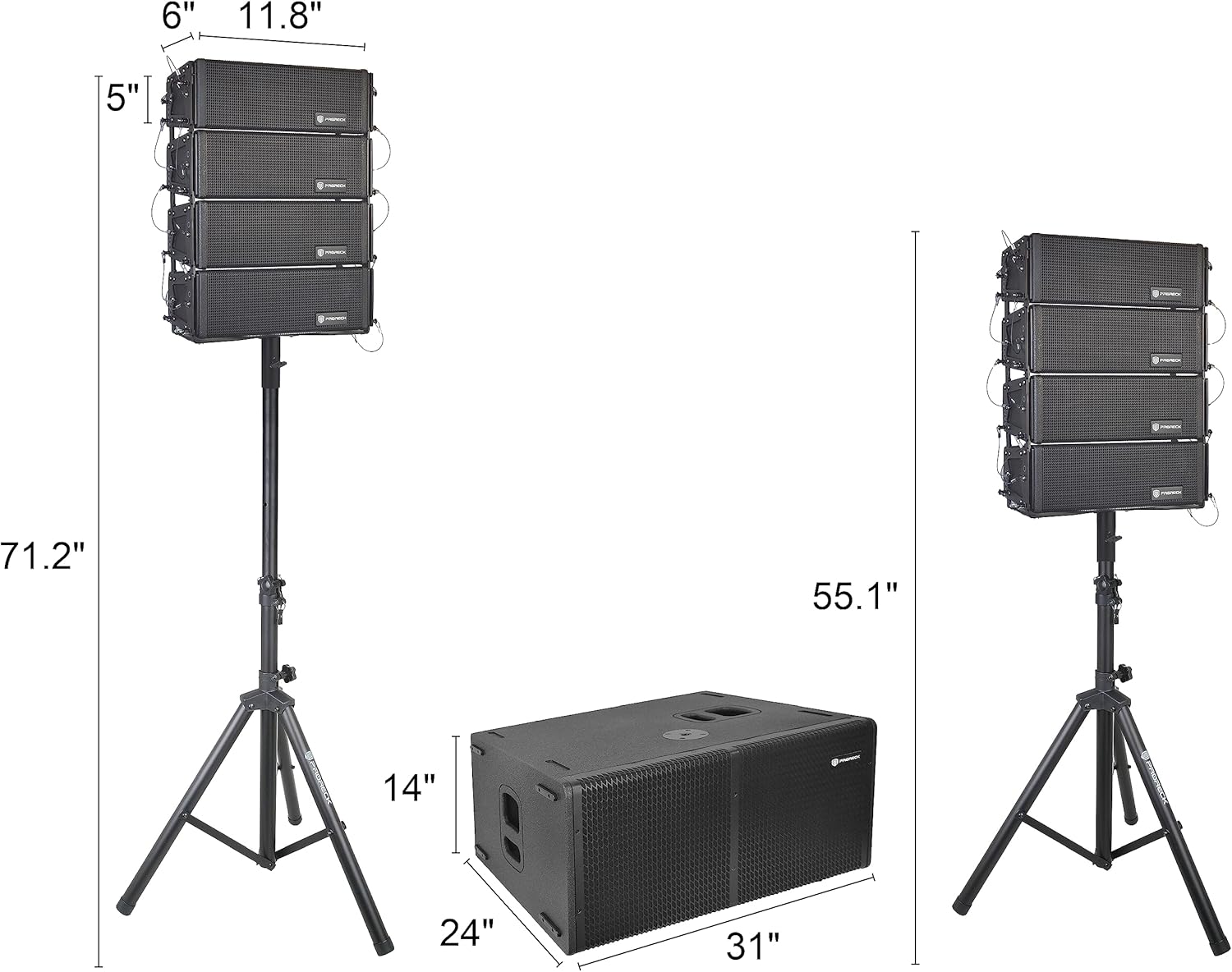
Image: A diagram illustrating the dimensions of the line array speakers, subwoofer, and the overall height when mounted on stands.
คำแนะนำการใช้งาน
1. การเชื่อมต่อไฟฟ้า
Connect the 6-feet power cord to the active subwoofer's AC input and then to a suitable power outlet. Ensure the power switch is in the OFF position before connecting to power.
2. การเชื่อมต่ออินพุตเสียง
The subwoofer includes two combo XLR/Jack inputs, allowing connection of various audio sources such as mixers, microphones, or instruments. Use appropriate cables for your devices.

Image: A diagram illustrating various connection methods for the PRORECK Concert Set, including wired connections for mixers, guitars, and microphones, as well as Bluetooth connectivity for smartphones and laptops.
3. การเชื่อมต่อบลูทูธ
To connect a Bluetooth-enabled device (e.g., smartphone, tablet, laptop):
- เปิดซับวูฟเฟอร์
- เปิดใช้งานบลูทูธบนอุปกรณ์ของคุณ
- ค้นหา available devices and select "PRORECK Concert Set" (or similar name).
- Once paired, audio from your device will stream to the PA system.
4. DSP Processor and Sound Modes
The subwoofer features a 96KHz, 48-BIT DSP processor with four preset frequency curves. These presets are designed for different usage scenarios:
- Family Theater: Optimized for home entertainment, providing balanced audio.
- คอนเสิร์ต: Enhanced for live music performances, emphasizing clarity and power.
- Wedding: Tailored for events requiring clear vocals and background music.
- คำพูด: Focused on vocal clarity, reducing background noise for presentations.
Select the appropriate DSP mode using the controls on the subwoofer's rear panel to match your specific needs.

Image: Visual representation of DSP settings for 'Family Theater' and 'Concert' modes, showing their respective frequency response curves.

Image: Visual representation of DSP settings for 'Wedding' and 'Speech' modes, showing their respective frequency response curves.
5. การควบคุมระดับเสียง
Independent satellite speaker and subwoofer volume controls are available to guarantee optimized sound reproduction. Adjust these controls to achieve the desired audio balance.
6. Mono/Stereo Playback
You can effortlessly switch between mono and stereo playback at the touch of a button on the subwoofer's control panel, depending on your audio source and setup requirements.
การซ่อมบำรุง
Regular maintenance ensures the longevity and optimal performance of your PRORECK Concert Set PA Speaker System.
- การทำความสะอาด: Use a soft, dry cloth to wipe down the speaker cabinets and subwoofer. Avoid using abrasive cleaners or solvents.
- พื้นที่จัดเก็บ: When not in use, store the system in a dry, cool environment, away from direct sunlight and extreme temperatures.
- การตรวจสอบสายเคเบิล: Periodically check all cables for signs of wear, fraying, or damage. Replace damaged cables immediately to prevent electrical hazards and ensure consistent audio quality.
- การระบายอากาศ : Ensure the subwoofer's ventilation ports are clear of obstructions to prevent overheating.
การแก้ไขปัญหา
If you encounter issues with your PRORECK Concert Set, refer to the following common troubleshooting steps:
- ไม่มีไฟฟ้า:
Ensure the power cord is securely connected to both the subwoofer and a working power outlet. Check the power switch on the subwoofer. Verify the power outlet is functional.
- ไม่มีเสียง:
Check all audio cable connections between the source, subwoofer, and line array speakers. Ensure the input source is active and sending an audio signal. Verify volume levels on both the source device and the PA system. Check the selected input on the subwoofer.
- เสียงผิดเพี้ยน:
Reduce the volume level on both the source and the PA system. Check for damaged cables. Ensure the input signal is not overdriven. Adjust DSP settings if necessary.
- ปัญหาการเชื่อมต่อบลูทูธ:
Ensure Bluetooth is enabled on your device and the subwoofer. Move your device closer to the subwoofer. Disconnect and re-pair the device. Ensure no other devices are currently paired with the subwoofer.
- การกระจายเสียงที่ไม่สม่ำเสมอ:
Verify the splay angles of the line array speakers are correctly set for your venue. Adjust speaker placement and angles as needed.
If problems persist after following these steps, please contact PRORECK customer support for further assistance.
ข้อมูลจำเพาะ
| คุณสมบัติ | ข้อมูลจำเพาะ |
|---|---|
| ยี่ห้อ | โปรเร็ค |
| แบบอย่าง | ชุดคอนเสิร์ต |
| การจัดการพลังงาน (RMS/พีค) | 700W RMS / 1000W พีค |
| ซับวูฟเฟอร์ | Dual 12-inch Bass Reflex Active Subwoofer |
| ลำโพง Line Array | Dual 4-inch 2-way Passive System (8 units total) |
| โปรเซสเซอร์ DSP | 96KHz, 48-BIT with four preset frequency curves |
| อินพุตเสียง | 2 x Combo XLR/Jack inputs |
| เทคโนโลยีการเชื่อมต่อ | Bluetooth, XLR, 6.35mm Jack |
| จำนวนช่องสัญญาณ | 4 |
| แหล่งพลังงาน | สายไฟ |
| ประเภทการติดตั้ง | ขั้วโลกเมา |
| พื้นที่ให้บริการ | Up to 500 persons and 1000 m² |
การรับประกันและการสนับสนุน
For warranty information, technical support, or service inquiries, please contact PRORECK customer service. Keep your purchase receipt as proof of purchase for warranty claims.
Visit the official PRORECK website or their Amazon store for the most up-to-date support information and contact details.