
VIRAN C21pro
VIRAN C21pro Military Smart Watch User Manual
Model: C21pro
1. บทนำ
This manual provides comprehensive instructions for the VIRAN C21pro Military Smart Watch. It covers setup, operation, maintenance, and troubleshooting to ensure optimal performance and user experience. Please read this manual thoroughly before using your device.

ภาพที่ 1: ด้านหน้า view of the VIRAN C21pro Military Smart Watch, displaying a digital watch face with health and activity metrics.
2. คู่มือการติดตั้ง
2.1 การแกะกล่องและการชาร์จครั้งแรก
Upon receiving your VIRAN C21pro Smart Watch, carefully unbox the device and its accessories. Before first use, ensure the watch is fully charged.
- เสียบสายชาร์จเข้ากับพอร์ตชาร์จที่ด้านหลังของนาฬิกา
- เสียบปลายสาย USB เข้ากับอะแดปเตอร์ไฟ USB มาตรฐาน (ไม่รวมอยู่ด้วย) หรือพอร์ต USB ของคอมพิวเตอร์
- หน้าจอของนาฬิกาจะแสดงสถานะการชาร์จ โดยปกติการชาร์จเต็มจะใช้เวลาประมาณ 2 ชั่วโมง

Image 2: The VIRAN C21pro Smart Watch displaying a charging icon, indicating its 410mAh battery capacity and long standby time.
2.2 การติดตั้งและการจับคู่แอป
To unlock the full functionality of your smart watch, download and install the companion application on your smartphone.
- Scan the QR code provided in the watch's packaging or search for the official VIRAN app in your smartphone's app store (compatible with Android 6.0/iOS 9.0 and above).
- เปิดแอปและทำตามคำแนะนำบนหน้าจอเพื่อสร้างบัญชีหรือเข้าสู่ระบบ
- เปิดใช้งานบลูทูธบนสมาร์ทโฟนของคุณ
- In the app, navigate to the device pairing section and select your VIRAN C21pro Smart Watch from the list of available devices.
- ยืนยันคำขอจับคู่บนนาฬิกาและสมาร์ทโฟนของคุณทั้งสอง

Image 3: The VIRAN C21pro Smart Watch screen showing various application icons, including a voice assistant, indicating its smart features.
3. คู่มือการใช้งาน
3.1 การนำทางพื้นฐาน
- หน้าจอสัมผัส: ปัดไปทางซ้าย ขวา ขึ้น หรือลง เพื่อเลื่อนดูเมนูและฟีเจอร์ต่างๆ แตะเพื่อเลือก
- ปุ่มด้านข้าง: The watch features multiple side buttons. Typically, one button serves as a power/home button, while others may be customizable for quick access to sports modes or other functions. Refer to the on-screen prompts for specific button assignments.
- มงกุฎ: หมุนเม็ดมะยมเพื่อเลื่อนดูรายการหรือปรับการตั้งค่า กดเม็ดมะยมเพื่อกลับไปยังหน้าปัดนาฬิกาหรือยืนยันการเลือก
Video 1: A demonstration of the VIRAN C21pro Smart Watch's user interface, showcasing touch screen navigation and various app icons. This video illustrates the ease of interaction with the device's features.
3.2 ฟังก์ชันการโทรผ่านบลูทูธ
The VIRAN C21pro supports Bluetooth calling, allowing you to answer or dial calls directly from your wrist.
- Ensure your watch is paired and connected to your smartphone via Bluetooth.
- เมื่อมีสายเรียกเข้า นาฬิกาจะแสดงหมายเลขผู้โทร แตะไอคอนสีเขียวเพื่อรับสาย หรือไอคอนสีแดงเพื่อปฏิเสธสาย
- To dial a call, navigate to the "Telephone" or "Dialpad" app on your watch and enter the number, or select a contact from your synced phonebook.

Image 4: The VIRAN C21pro Smart Watch displaying an incoming call interface, demonstrating its Bluetooth call feature.
3.3 การตรวจติดตามสุขภาพ
นาฬิกาเรือนนี้จะตรวจสอบตัวชี้วัดสุขภาพต่างๆ อย่างต่อเนื่อง
- อัตราการเต้นของหัวใจ: Access the heart rate monitor from the main menu to view ข้อมูลอัตราการเต้นของหัวใจแบบเรียลไทม์
- ความดันโลหิต: Use the blood pressure monitoring feature for periodic readings. For accurate results, remain still during measurement.
- ออกซิเจนในเลือด (SpO2): วัดระดับความอิ่มตัวของออกซิเจนในเลือดของคุณ
- การติดตามการนอนหลับ: The watch automatically tracks your sleep patterns, providing data on sleep duration and quality.

Image 5: A composite image showing the VIRAN C21pro Smart Watch displaying heart rate, blood pressure, and blood oxygen levels, highlighting its comprehensive health monitoring capabilities.
โหมดกีฬา 3.4 โหมด
The watch offers over 100 sport modes to track your physical activities.
- Navigate to the "Sport" menu to select your desired activity (e.g., walking, running, cycling, swimming).
- The watch will record data such as steps, distance, calories burned, and heart rate during your workout.
- Review your workout data in the companion app for detailed analysis.

Image 6: A visual representation of the VIRAN C21pro Smart Watch's multiple sport modes, including icons for various activities like running, cycling, and swimming, alongside tracked metrics.
4. การบำรุงรักษา
4.1 การทำความสะอาดนาฬิกาของคุณ
- Regularly clean your watch and strap to prevent skin irritation and maintain functionality.
- เช็ดนาฬิกาด้วยผ้านุ่มๆampใช้ผ้าที่ไม่เป็นขุย หลีกเลี่ยงสารเคมีรุนแรงหรือวัสดุที่มีฤทธิ์กัดกร่อน
- For the strap, use mild soap and water, then rinse thoroughly and dry completely before wearing.
4.2 ความต้านทานต่อน้ำ
The VIRAN C21pro has a 5ATM IP68 waterproof rating, allowing submersion up to 50 meters. It is suitable for swimming and showering. However, avoid hot water, steam, or prolonged exposure to high-velocity water.
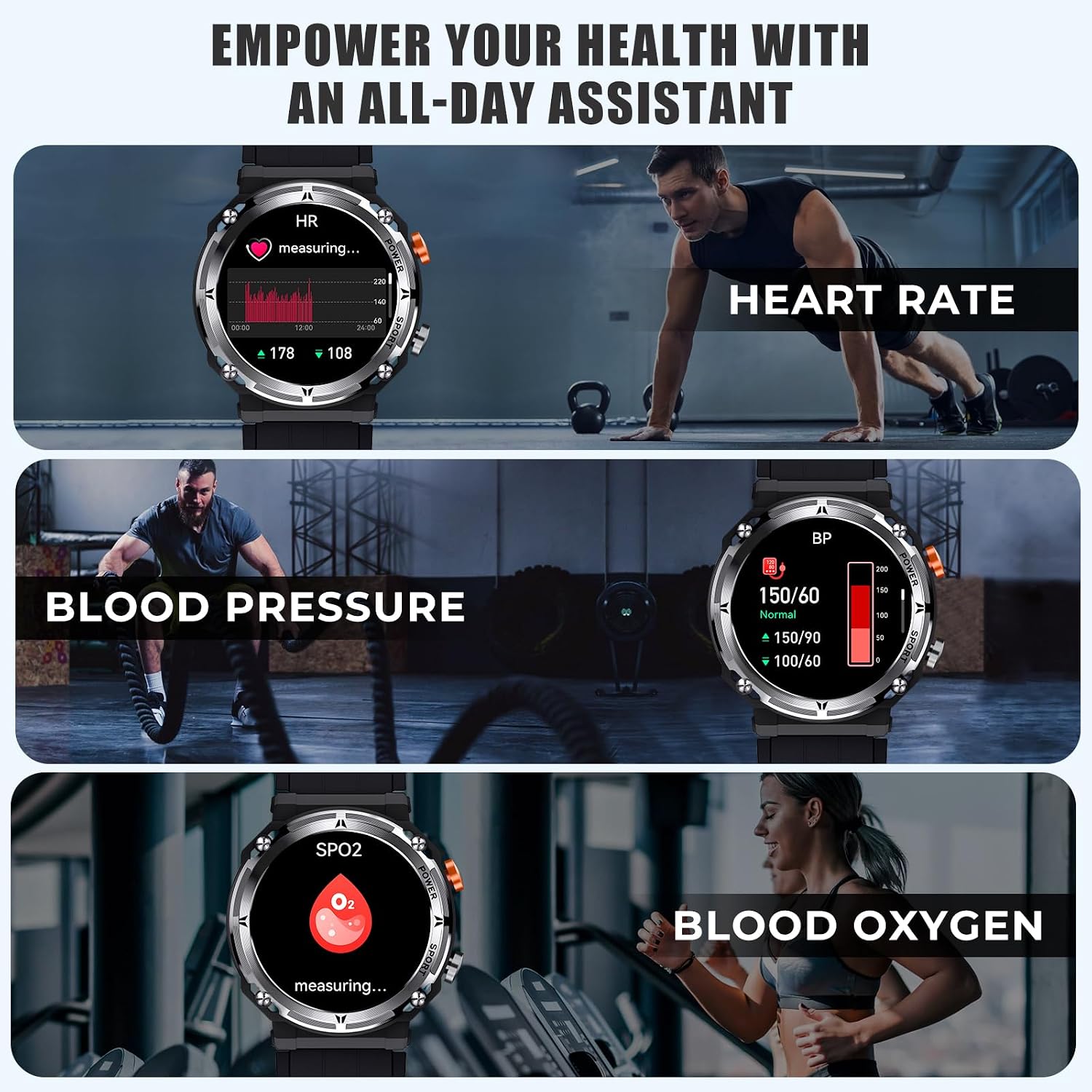
Image 7: The VIRAN C21pro Smart Watch being worn by a swimmer, illustrating its 5ATM IP68 waterproof rating and suitability for water activities.
Video 2: A demonstration of the VIRAN C21pro Smart Watch's durability, including water submersion and impact resistance tests. This video highlights the watch's military-grade toughness and waterproof capabilities.
5 การแก้ไขปัญหา
| ปัญหา | สาเหตุที่เป็นไปได้ | สารละลาย |
|---|---|---|
| นาฬิกาเปิดไม่ติด | แบตเตอรี่ต่ำ ซอฟต์แวร์มีปัญหา | Charge the watch for at least 30 minutes. If still unresponsive, perform a hard reset by pressing and holding the power button for 10-15 seconds. |
| ไม่สามารถจับคู่กับโทรศัพท์ได้ | บลูทูธปิดอยู่ แอปมีปัญหา นาฬิกาหาไม่เจอ | Ensure Bluetooth is enabled on your phone and the watch. Restart both devices. Reinstall the companion app. Make sure the watch is in pairing mode. |
| ข้อมูลสุขภาพที่ไม่ถูกต้อง | Improper fit, sensor obstruction, movement during measurement | Ensure the watch is worn snugly on your wrist, one finger-width above the wrist bone. Clean the sensor on the back of the watch. Remain still during measurements. |
| อายุการใช้งานแบตเตอรี่สั้น | Frequent use of power-intensive features, high screen brightness | Reduce screen brightness. Limit continuous heart rate monitoring. Turn off unnecessary notifications. Disable "Always-On Display" if active. |
6. ข้อมูลจำเพาะ
- แบบอย่าง: ซี21โปร
- แสดง: 1.39 Inches HD, 360*360 resolution
- ความจุแบตเตอรี่: ลิเธียมไอออน 410mAh
- อายุการใช้งานแบตเตอรี่: 5-7 days (daily use), 40 days (standby)
- ระดับการกันน้ำ: 5ATM IP68 (up to 50 meters)
- การเชื่อมต่อ: บลูทูธ 5.2
- ความเข้ากันได้: Android 6.0/iOS 9.0 ขึ้นไป
- ความจุหน่วยความจำ: 128MB
- คุณสมบัติพิเศษ: Activity Tracker, Blood Pressure Monitor, Heart Rate Monitor, Blood Oxygen Monitor, Sleep Monitor, 100+ Sport Modes, Bluetooth Call, AI Voice Assistant
- น้ำหนักสินค้า: 110 กรัม (3.88 ออนซ์)
- ผู้ผลิต: วีรัน
7. ข้อมูลการรับประกัน
The VIRAN C21pro Military Smart Watch comes with a รับประกัน 1 ปี นับจากวันที่ซื้อสินค้า การรับประกันนี้ครอบคลุมถึงข้อบกพร่องจากการผลิตและการทำงานผิดปกติภายใต้การใช้งานปกติ ไม่ครอบคลุมถึงความเสียหายที่เกิดจากการใช้งานผิดวิธี อุบัติเหตุ การดัดแปลงโดยไม่ได้รับอนุญาต หรือการสึกหรอตามปกติ
โปรดเก็บหลักฐานการซื้อของคุณไว้เพื่อเรียกร้องการรับประกัน
8. การสนับสนุนลูกค้า
For any inquiries, technical assistance, or warranty claims, please contact VIRAN customer support:
- การสนับสนุนทางออนไลน์: Visit the official VIRAN store on Amazon: VIRAN Amazon Store
- เวลาให้บริการ : 24/7 online customer service is available.
Ask a question about this manual
Ask about setup, troubleshooting, compatibility, parts, safety, or missing instructions. Manuals+ will review the question and use this page’s manual context to help answer it.