
1. บทนำ
This manual provides detailed instructions for setting up, operating, and maintaining your Bmax B7 Power Mini PC. Please read this manual thoroughly before using the device to ensure proper functionality and longevity. The Bmax B7 Power is a compact and powerful mini PC designed for various computing tasks, from everyday productivity to multimedia consumption and light gaming.
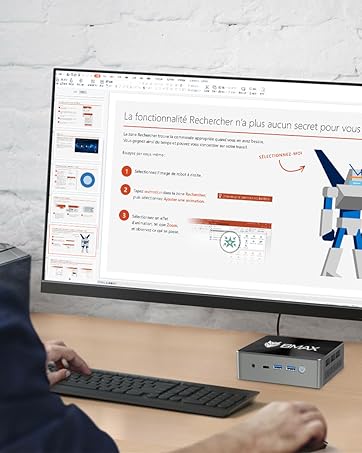
The Bmax B7 Power Mini PC in a typical desktop setup.
2. เนื้อหาบรรจุภัณฑ์
Upon opening the package, verify that all items listed below are present and in good condition. If any items are missing or damaged, please contact customer support.
- Bmax B7 Power Mini PC
- อะแดปเตอร์แปลงไฟ
- สาย HDMI
- ขายึด VESA และสกรู
- คู่มือการใช้งาน (เอกสารนี้)
Video: An unboxing demonstration of the Bmax B7 Power Mini PC, showing the contents of the retail package.
3. สินค้าหมดview
The Bmax B7 Power Mini PC features a compact design with essential ports for connectivity and expansion. Familiarize yourself with the port layout before connecting peripherals.
วิดีโอ: บทนำview of the Bmax B7 Power Mini PC, highlighting its design, features, and port configuration.
แผงด้านหน้า
- ปุ่มเปิด/ปิด: กดเพื่อเปิดหรือปิดเครื่องคอมพิวเตอร์
- พอร์ต USB 3.0 (x2): สำหรับเชื่อมต่ออุปกรณ์ USB ความเร็วสูง
- พอร์ต Type-C: สำหรับการถ่ายโอนข้อมูลและการแสดงผล
- แจ็คหูฟังขนาด 3.5 มม.: สำหรับเอาต์พุตเสียงและอินพุตไมโครโฟน
- ปุ่มล้าง CMOS: Used to reset BIOS settings (use with caution).
แผงด้านหลัง
- พอร์ต HDMI (x2): For connecting to displays.
- พอร์ต USB 2.0 (x2): สำหรับเชื่อมต่ออุปกรณ์ USB มาตรฐาน
- พอร์ตอีเธอร์เน็ต: สำหรับการเชื่อมต่อเครือข่ายแบบใช้สาย
- กำลังเข้า: เชื่อมต่ออะแดปเตอร์ไฟฟ้าที่ให้มาที่นี่
4. คำแนะนำในการตั้งค่า
Follow these steps to set up your Bmax B7 Power Mini PC:
- เชื่อมต่อกับจอแสดงผล: Use the provided HDMI cable to connect the Mini PC to your monitor or TV. The B7 Power supports up to three displays simultaneously.
- เชื่อมต่ออุปกรณ์ต่อพ่วง: เสียบแป้นพิมพ์และเมาส์ USB เข้ากับพอร์ต USB ที่ว่างอยู่
- เชื่อมต่อกับเครือข่าย (ทางเลือก): For a wired connection, plug an Ethernet cable into the Ethernet port. For wireless, ensure your Wi-Fi network is available during initial setup.
- เชื่อมต่อพลังงาน: Connect the power adapter to the "Power In" port on the Mini PC, then plug the adapter into a power outlet.
- เปิดเครื่อง: Press the power button on the front panel. The Mini PC will boot up.
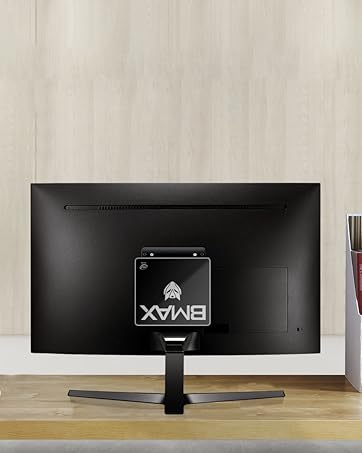
The Bmax B7 Power can be mounted behind a monitor for a clean setup.
5. คู่มือการใช้งาน
Initial Windows Setup
Upon first boot, you will be guided through the Windows operating system setup process. Follow the on-screen prompts to configure language, region, network settings, and user accounts. Ensure you have your Wi-Fi password ready if you choose a wireless connection.
การเชื่อมต่อกับ Wi-Fi
The Bmax B7 Power supports Wi-Fi 6 (802.11ax) for high-speed wireless networking. To connect:
- คลิกไอคอน Wi-Fi ในถาดระบบ (โดยปกติจะอยู่ด้านล่างขวาของหน้าจอ)
- เลือกเครือข่าย Wi-Fi ที่คุณต้องการจากรายการ
- Enter the network security key (password) and click "Connect".
การจัดการพลังงาน
- ปิดระบบ: คลิกปุ่มเริ่ม จากนั้นคลิกเปิด/ปิดเครื่อง > ปิดเครื่อง
- เริ่มต้นใหม่อีกครั้ง: คลิกปุ่มเริ่ม จากนั้นคลิกเปิด/ปิดเครื่อง > เริ่มระบบใหม่
- นอน: คลิกปุ่ม Start จากนั้นคลิกปุ่ม Power > Sleep
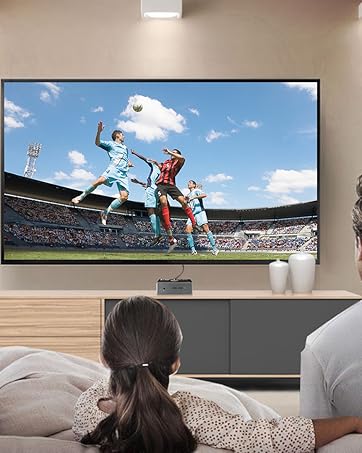
The Bmax B7 Power is suitable for home entertainment, including playing 4K UHD videos.
6. ข้อมูลจำเพาะ
| คุณสมบัติ | รายละเอียด |
|---|---|
| หมายเลขรุ่น | บี7 พาวเวอร์ |
| โปรเซสเซอร์ | Intel Core i7-11390H (up to 5.0GHz) |
| แรม | 16GB DDR4 (Supports up to 64GB) |
| พื้นที่จัดเก็บ | 1TB NVMe SSD |
| การเชื่อมต่อแบบไร้สาย | 802.11a/b/g/n/ac/ax WiFi 6 |
| ขนาด | 10.51 x 6.14 x 2.91 นิ้ว |
| น้ำหนัก | 1.87 ปอนด์ |
| ผู้ผลิต | บีแม็กซ์ |
| มีจำหน่ายครั้งแรก | วันที่ 14 มิถุนายน 2023 |
7. การบำรุงรักษา
Regular maintenance helps ensure the optimal performance and lifespan of your Mini PC.
- การทำความสะอาด: Use a soft, dry cloth to clean the exterior of the device. For dust accumulation in vents, use compressed air. Ensure the device is powered off and unplugged before cleaning.
- การอัปเดตซอฟต์แวร์: Regularly check for and install operating system updates (e.g., Windows Updates) and driver updates to maintain security and performance.
- การระบายอากาศ : Ensure the Mini PC is placed in a well-ventilated area and that its vents are not obstructed to prevent overheating.
8 การแก้ไขปัญหา
If you encounter issues with your Bmax B7 Power Mini PC, refer to the following common problems and solutions:
ไม่มีไฟฟ้า
- ตรวจสอบให้แน่ใจว่าอะแดปเตอร์ไฟฟ้าเชื่อมต่อกับมินิพีซีและเต้ารับไฟฟ้าที่ใช้งานได้แน่นหนา
- ทดสอบเต้ารับไฟฟ้าด้วยอุปกรณ์อื่นเพื่อยืนยันว่าใช้งานได้
- If using a power strip, ensure it is switched on.
ไม่มีเอาท์พุตการแสดงผล
- Verify that the HDMI cable is securely connected to both the Mini PC and the monitor.
- ตรวจสอบให้แน่ใจว่าจอภาพเปิดอยู่และตั้งค่าแหล่งสัญญาณเข้าถูกต้องแล้ว (เช่น HDMI 1, HDMI 2)
- ลองใช้สาย HDMI หรือจอภาพอื่นดู ถ้าเป็นไปได้
ปัญหาการเชื่อมต่อ Wi-Fi
- ตรวจสอบว่าอุปกรณ์อื่นๆ สามารถเชื่อมต่อกับเครือข่าย Wi-Fi ของคุณได้หรือไม่
- Restart your Wi-Fi router and the Mini PC.
- Ensure Wi-Fi drivers are up to date in Device Manager.
- If the issue persists, consider using a wired Ethernet connection as an alternative.
9. การรับประกันและการสนับสนุน
Your Bmax B7 Power Mini PC comes with a manufacturer's warranty. Please refer to the warranty card included in your package for specific terms and conditions. For technical support, product inquiries, or warranty claims, please contact Bmax customer service through their official webเว็บไซต์หรือข้อมูลการติดต่อที่ให้มาพร้อมกับการซื้อของคุณ
For additional resources and FAQs, visit the official Bmax webเว็บไซต์: Bmax Official Store