
1. สินค้าหมดview
The Wisecoco 6-inch 2K Flexible OLED Screen Display Module offers a high-resolution (2880x1440) bendable display solution. Utilizing OLED technology, it provides vivid images, deep blacks, and excellent color reproduction. This module is designed for various creative and DIY projects, offering versatility in application due to its flexible nature. It comes with an HDMI driver board for connectivity.

Figure 1: The Wisecoco 6-inch 2K Flexible OLED Screen, demonstrating its bendable form factor and high-resolution display capabilities.

Figure 2: Key features of the flexible OLED screen, including its bendable design, 2K resolution, high contrast ratio, and wide color gamut support.

Figure 3: Visual comparison highlighting the enhanced picture quality and color depth of the 2K OLED display compared to a standard LCD screen.
2. เนื้อหาบรรจุภัณฑ์
Please ensure all items listed below are present in your package before discarding any packaging materials.
- 1 x Flexible OLED Screen
- 1 x HDMI Driver Board
- 1 x สาย USB เป็น Type-C
- สายเคเบิล HD เป็น Mini HD จำนวน 1 เส้น
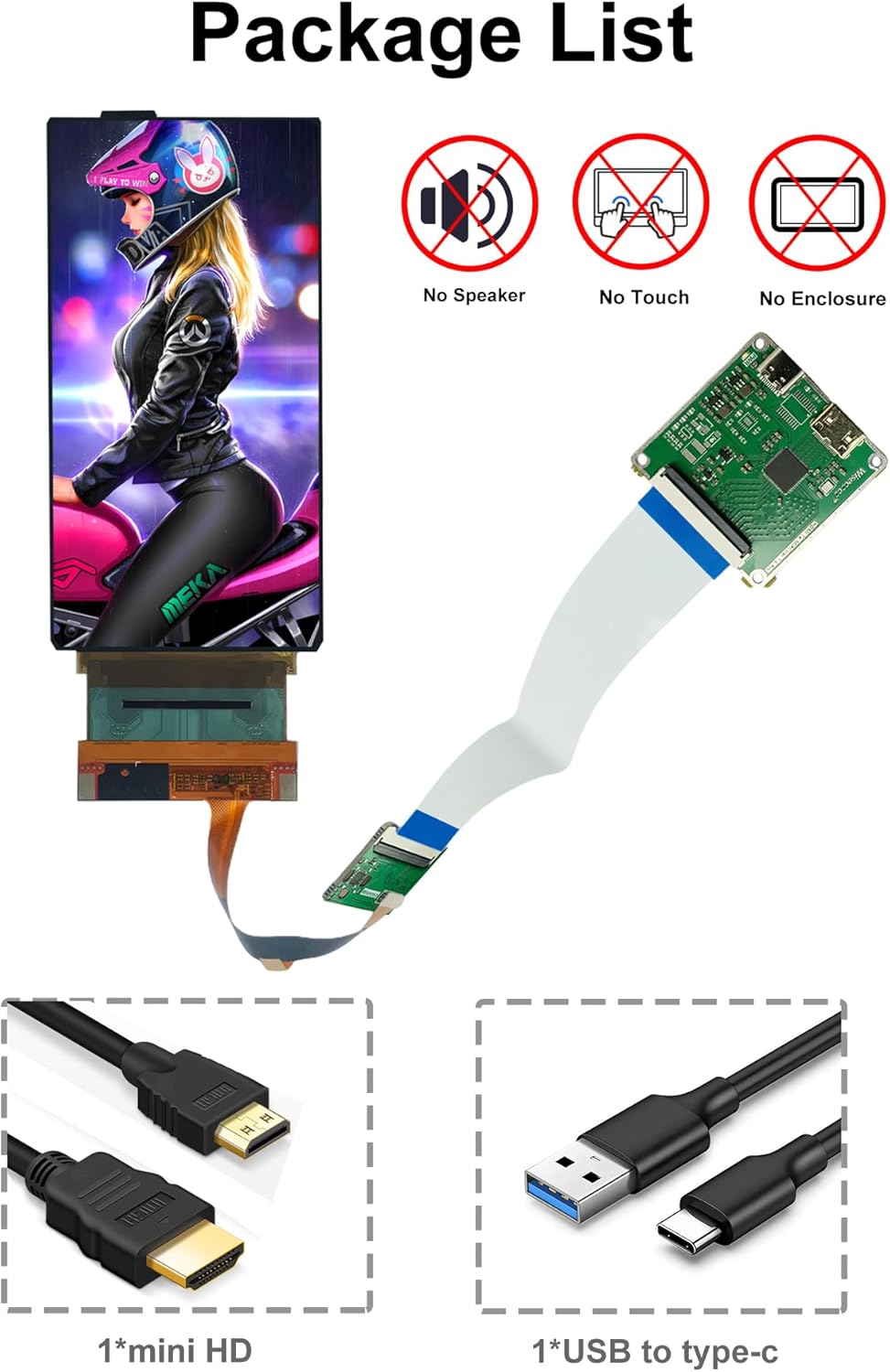
Figure 4: Visual representation of the items included in the product package. Note that this kit does not include a speaker, touch functionality, or an enclosure.
3. คำแนะนำในการตั้งค่า
Follow these steps to properly set up your flexible OLED screen module.
- Connect the Screen to the Driver Board: Carefully connect the flexible screen to the designated port on the HDMI driver board. Ensure the connection is secure and correctly oriented.
- Connect to a Signal Source: Use the provided HD to Mini HD cable to connect the driver board to a compatible HDMI signal source (e.g., a Windows PC).
- เปิดเครื่อง: Connect the USB to Type-C cable to the driver board and a power source (e.g., a USB port on your computer or a USB power adapter). The screen should power on and display content from your signal source.
หมายเหตุสำคัญ:
- ผลิตภัณฑ์นี้ได้รับการออกแบบมาเพื่อ Windows operating systems only and is not compatible with Mac iOS systems due to Apple's built-in GPU not supporting RGB format by default.
- The screen only supports portrait mode by default.
- A HDMI signal source is required to display images and play videos.

Figure 5: Connection diagram illustrating how to connect the flexible screen module to a Windows laptop. Mac iOS is not supported.
Video 1: Demonstration of connecting the 6-inch OLED Flexible Display with its Driver Board and showcasing its high-resolution output. This video also illustrates the screen's bendable nature.
4. คู่มือการใช้งาน
The flexible OLED screen is designed to be bendable, allowing for unique applications. However, proper handling is crucial to prevent damage.
Bending Guidelines:
- Hold the left and right sides of the screen carefully.
- Bend the screen slowly and gently, starting from a small angle and gradually increasing the bend.
- Avoid sharp creases, excessive force, or bending the screen in prohibited ways as shown in Figure 6.

Figure 6: Guidelines for safely bending the flexible screen. Always handle with care and avoid prohibited bending methods to prevent damage.
5. การบำรุงรักษา
To ensure the longevity and optimal performance of your flexible OLED screen, follow these maintenance tips:
- การทำความสะอาด: Use a soft, lint-free cloth to gently wipe the screen surface. Do not use harsh chemicals, abrasive cleaners, or excessive moisture.
- พื้นที่จัดเก็บ: When not in use, store the screen in a flat, protected environment to prevent accidental bending or pressure.
- การจัดการ: Always handle the screen by its edges and avoid touching the display area directly to prevent fingerprints or smudges.
- อุณหภูมิ: Operate and store the screen within recommended temperature ranges to avoid performance degradation or damage.
6 การแก้ไขปัญหา
If you encounter issues with your flexible OLED screen, refer to the following common problems and solutions:
| ปัญหา | สาเหตุที่เป็นไปได้ | สารละลาย |
|---|---|---|
| ไม่มีจอแสดงผล/หน้าจอสีดำ | Loose cable connection, no signal, insufficient power. | Check all cable connections (screen to board, HDMI, USB power). Ensure the signal source is active. Try a different USB power source. |
| Color defect/Incorrect colors (e.g., green tint) | Incorrect color format setting on the signal source (especially with Mac OS). | This product is in RGB mode. If using a Mac, try to change YCRBR to RGB format in your display settings. Mac OS is generally not supported. |
| Screen not bending properly or showing damage | Improper handling, excessive force, or sharp bends. | Review the bending guidelines in Section 4. Avoid prohibited bending methods. Damage from improper handling is not covered by warranty. |
| Screen recognized but no display output | Incorrect display settings (resolution, orientation). | Ensure your operating system's display settings are configured for the correct resolution (2880x1440) and that the display is enabled. Remember it supports portrait mode by default. |

รูปที่ 7: อดีตample of a color defect and its resolution by ensuring the correct RGB format. Mac iOS is not supported for this product.
7. ข้อมูลจำเพาะ
| คุณสมบัติ | ข้อมูลจำเพาะ |
|---|---|
| ขนาดหน้าจอ | 6 นิ้ว |
| ปณิธาน | 2K (1440 x 2880 พิกเซล) |
| เทคโนโลยีการแสดงผล | Flexible OLED |
| อัตราส่วนภาพ | 2:1 น. |
| ขนาดสินค้า | 0.01 x 2.7 x 5.5 นิ้ว (0.25 x 6.86 x 13.97 ซม.) |
| น้ำหนักสินค้า | 10.8 ออนซ์ (306 กรัม) |
| เล่มที่tage | 12 โวลต์ |
| พอร์ต USB รวม | 1 (Type-C for power) |
| ความเข้ากันได้ | Windows (Portrait Mode by Default) |
| พื้นผิวหน้าจอ | มันเงา |
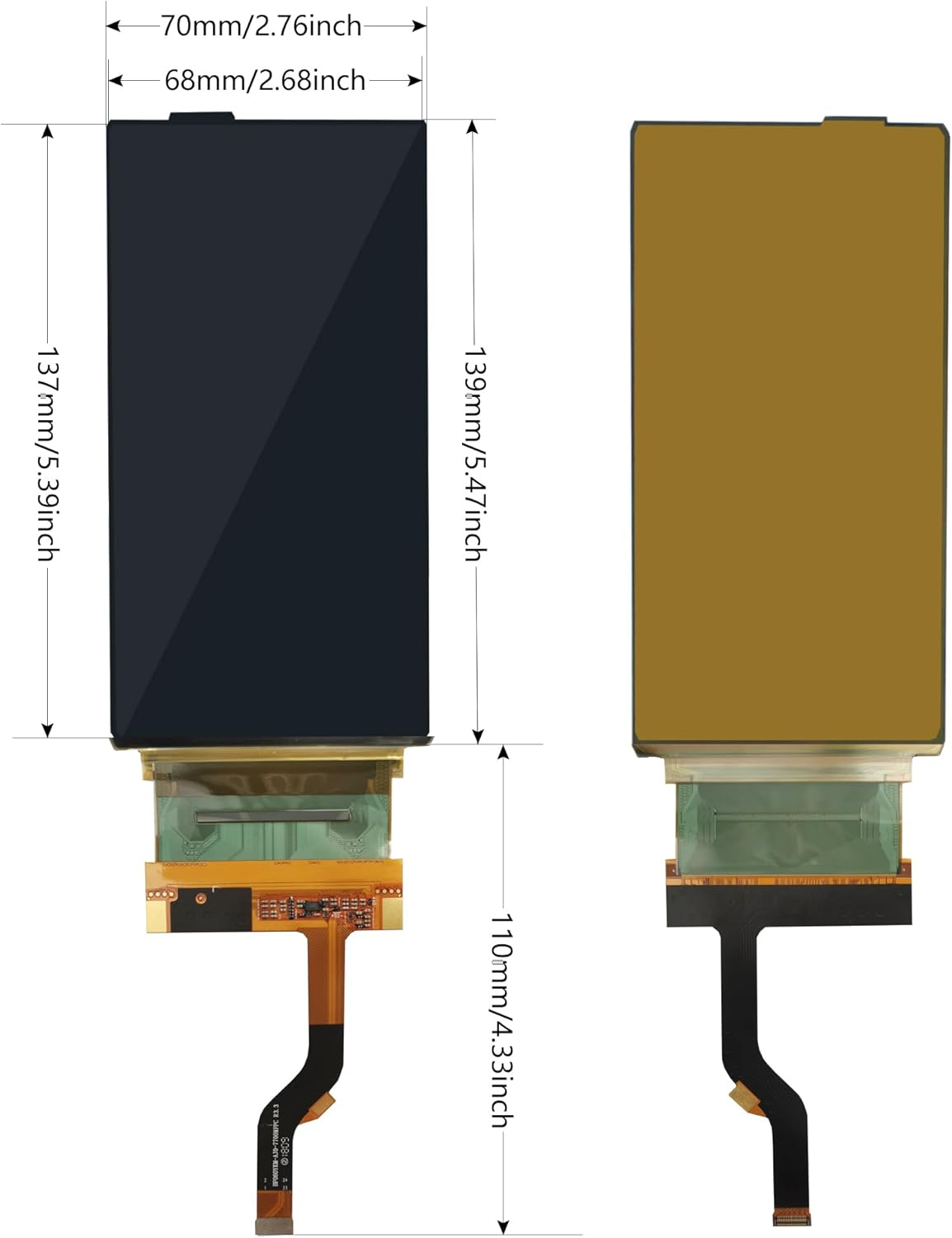
Figure 8: Detailed dimensions of the flexible screen and its driver board components.
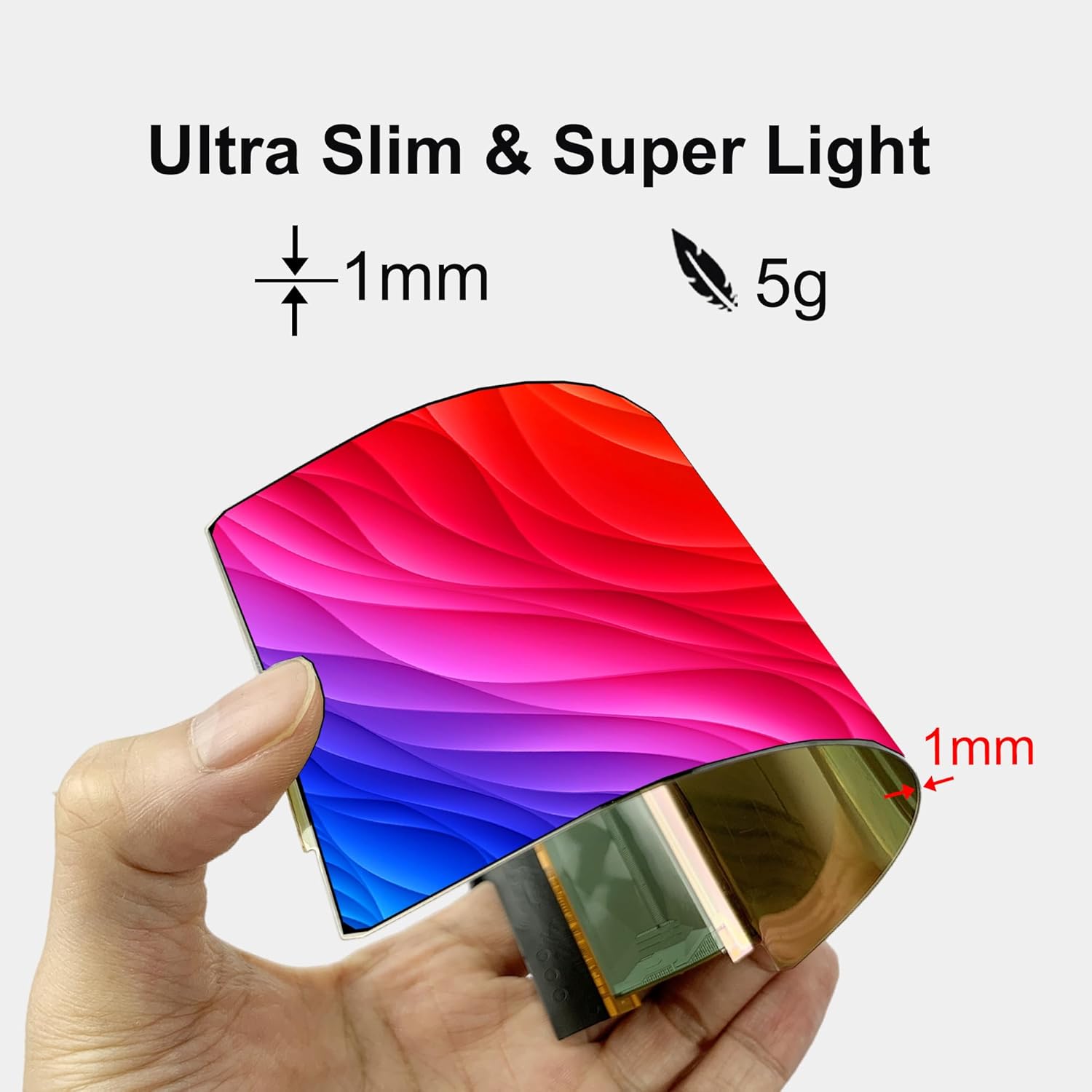
Figure 9: The flexible screen's ultra-slim profile (1mm) and lightweight design (5g).
8. การสมัคร
The flexible nature and high resolution of this OLED screen open up a wide range of creative and practical applications:
- เทคโนโลยีสวมใส่ได้: Integrate into clothing, hats, or accessories for dynamic displays.
- Automotive Displays: Custom displays for vehicle interiors.
- Advertising & Retail: Unique advertising displays in shops or windows.
- โครงการ DIY: Ideal for custom electronics projects requiring a compact, high-quality, and flexible display.
- Art Installations: Incorporate into interactive art pieces.

รูปที่ 10: อดีตamples of diverse applications for the flexible OLED screen, showcasing its adaptability in various environments and products.
9. การรับประกันและการสนับสนุน
For technical assistance, detailed specifications, or any inquiries regarding your Wisecoco 6-inch 2K Flexible OLED Screen Display Module, please contact the seller directly after purchase. Non-professionals are advised to exercise caution during installation and operation due to the delicate nature of flexible screens. This kit is primarily intended for prototype design, demonstrations, and DIY projects.