
1. บทนำ
Thank you for choosing the PalliPartners G3040 Metal Detector. This device is designed for efficient and accurate metal detection across various terrains. Featuring an advanced DSP chip, a 12-inch waterproof search coil, and multiple operating modes, it is suitable for both beginners and experienced users. Please read this manual thoroughly before operating the device to ensure proper usage and to maximize your treasure hunting experience.
2. ข้อมูลด้านความปลอดภัย
- ควรขออนุญาตก่อนเสมอ ก่อนที่จะค้นหาในทรัพย์สินส่วนบุคคล
- หลีกเลี่ยงการค้นหาในบริเวณที่อาจมีสายเคเบิลหรือท่ออยู่ใต้ดิน
- ควรระมัดระวังในการขุดเพื่อป้องกันการบาดเจ็บหรือความเสียหายต่อทรัพย์สิน
- กล่องควบคุมคือ ไม่กันน้ำ. Protect it from moisture and submersion.
- เก็บอุปกรณ์ให้ห่างจากอุณหภูมิที่สูงหรือต่ำเกินไปและถูกแสงแดดโดยตรง
- กำจัดแบตเตอรี่อย่างมีความรับผิดชอบตามกฎระเบียบท้องถิ่น
3. เนื้อหาบรรจุภัณฑ์
ตรวจสอบว่ามีส่วนประกอบทั้งหมดอยู่ในแพ็คเกจของคุณ:
- PalliPartners G3040 Metal Detector Main Unit (Control Box and Stem)
- คอยล์ค้นหาแบบกันน้ำขนาด 12 นิ้ว
- Armrest with Thick Sponge Pad
- คู่มือการใช้งาน
- Shovel (may be included as an accessory)
4. การประกอบและการติดตั้ง
ทำตามขั้นตอนต่อไปนี้เพื่อประกอบเครื่องตรวจจับโลหะของคุณ:
- ติดตั้งคอยล์ค้นหา: Secure the 12-inch search coil to the lower stem using the provided bolt and nut. Ensure it is firmly attached but can still be adjusted for angle.
- เชื่อมต่อก้าน: Connect the lower stem to the middle stem, and then connect the middle stem to the upper stem (which includes the control box and armrest). The adjustable stem allows for lengths between 43.3 inches and 60.2 inches.
- พันสายเคเบิลให้เรียบร้อย: Carefully wrap the search coil cable around the stem, ensuring it is not too tight or loose, and plug the connector into the control box.
- ปรับที่วางแขน: Position the armrest for comfortable use. The thick sponge pad and arc upgraded handle provide ergonomic support.
- ติดตั้งแบตเตอรี่: Open the battery compartment on the control box and insert the required batteries (not included).

The 10-inch wide IP68 waterproof search coil is shown in use for underwater treasure hunting. Inset images highlight the thick sponge pad and arc upgraded handle for comfort, and the coil's ultrasonic heatfusion sealing for water resistance.

This diagram illustrates the comprehensive functionality and components of the metal detector, including the 12-inch waterproof search coil, anti-interference nylon material, LCD backlight display, adjustable stem (36.2" to 47.2"), ergonomically designed hand rest, and EVA foam handshake.
5. คู่มือการใช้งาน
5.1. จอแสดงผล LCD ด้านบนview

This diagram illustrates the main control panel and LED display of the G3040 metal detector. Key indicators and buttons are numbered for easy reference: 1. Sens Level Indicator, 2. Power/Light Control Button, 3. Coin Depth Indicator, 4. Volume Indicator, 5. Sens/Volume Control Button, 6. Increase Control Button, 7. Pinpoint Control Button, 8. Decrease Control Button, 9. Target ID, 10. Mode Indicator, 11. Low Battery Indicator.
5.2. เปิด/ปิดเครื่องและควบคุมระดับเสียง
- ในการเปิดเครื่อง ให้หมุน ปริมาณ หมุนปุ่มตามเข็มนาฬิกาเพื่อปิดเครื่อง หมุนทวนเข็มนาฬิกาจนกว่าจะมีเสียงคลิก
- ปรับระดับเสียงโดยการหมุน ปริมาณ ลูกบิด
- การ Power/Light Control Button (2) can be used to turn on/off the backlight for the LCD display.
5.3. โหมดการทำงาน
The G3040 offers 5 distinct modes for various detection scenarios:

This image details the five distinct search modes available on the metal detector: DISC Mode, PP (Pinpointer) Mode, Memory Mode, Jewelry Mode, and All Metal Mode. Each mode is designed for specific detection needs.
- โหมดโลหะทั้งหมด: Detects all types of metal without discrimination. Ideal for general searching when you want to find any metallic object.
- DISC MODE (Discrimination Mode): Allows you to eliminate certain types of metals from detection. This is useful for ignoring junk metals like iron and focusing on more valuable targets. Use the Increase Control Button (6) และ Decrease Control Button (8) to adjust the discrimination level.
- โหมดหน่วยความจำ: This mode allows the detector to remember a specific target metal and only respond to that type of metal, ignoring others.
- JEWELRY MODE: Specifically designed to eliminate iron signals and primarily respond to other metals commonly found in jewelry.
- PINPOINTER (PP) MODE: Used to precisely locate the exact position of a detected target. Once a target is found in another mode, switch to PP mode to narrow down its location before digging.
5.4. Discrimination and Target ID
The detector provides visual and auditory cues to help identify targets:
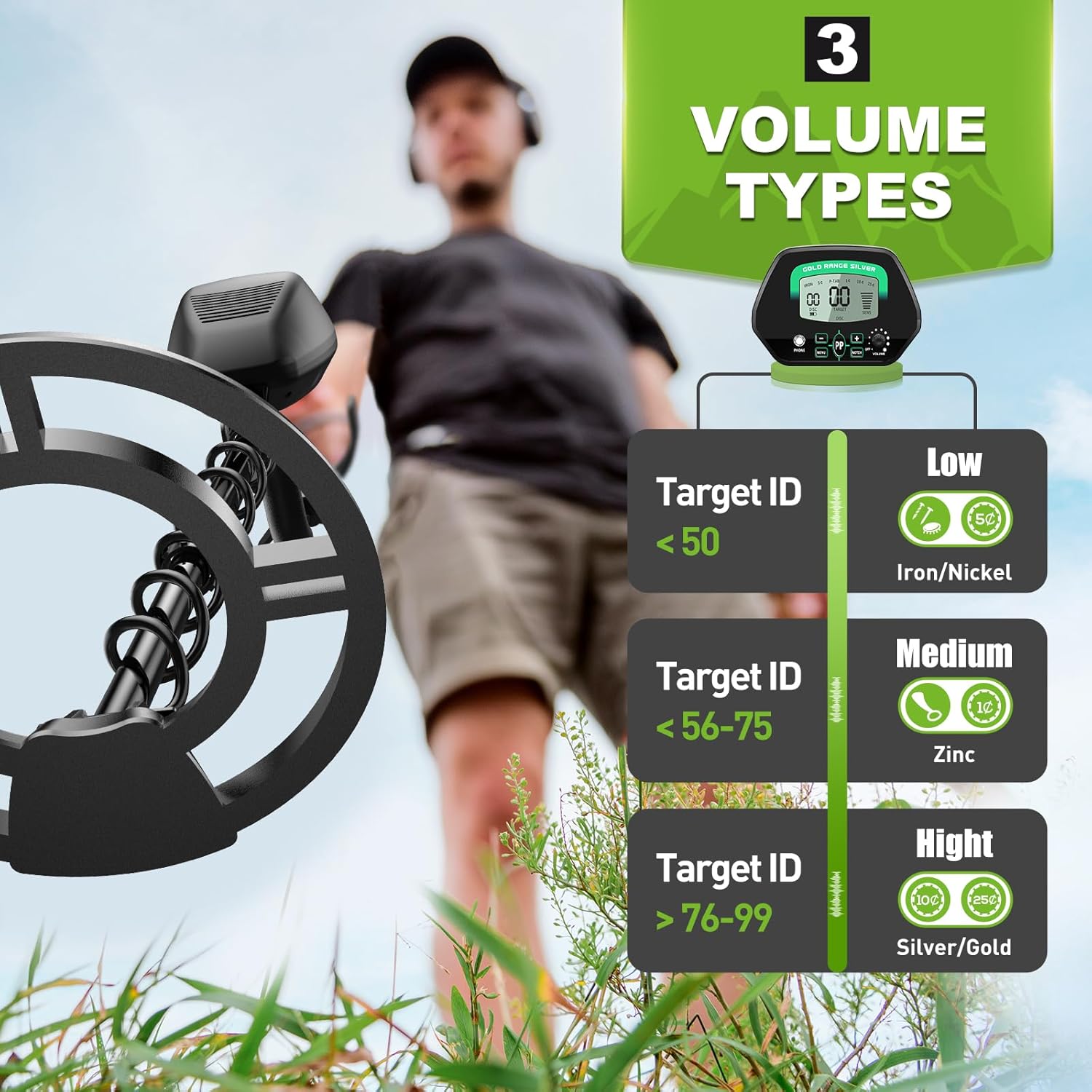
The metal detector provides three distinct audio tones to help identify target metals: Low tone for Target ID < 50 (e.g., Iron/Nickel), Medium tone for Target ID 56-75 (e.g., Zinc), and High tone for Target ID > 76-99 (e.g., Silver/Gold).
- Target ID (9): The LCD display shows a numeric Target ID, which helps categorize the detected metal.
- โทนเสียง: Different metals produce different tones:
- Low Tone (Target ID 1-40): Typically indicates iron or nickel.
- Medium Tone (Target ID 41-75): Often indicates zinc, copper, or smaller silver items.
- High Tone (Target ID 76-99): Usually indicates larger silver items or gold.
5.5. การปรับความไว
ปรับความไวโดยใช้ Sens/Volume Control Button (5) และ Increase Control Button (6) or Decrease Control Button (8). Higher sensitivity increases detection depth but can also increase false signals in mineralized ground or areas with electromagnetic interference. Lower sensitivity reduces false signals but may decrease detection depth.
5.6. เคล็ดลับการใช้งานทั่วไป
- Sweep the search coil slowly and steadily, keeping it parallel to the ground.
- Overlap your sweeps to ensure complete coverage of the search area.
- When a target is detected, use the Pinpointer mode to narrow down its exact location.
- The 12-inch search coil is IP68 waterproof, allowing for detection in shallow water. Remember, the control box is not waterproof.
This video demonstrates the PalliPartners G3040 metal detector in various outdoor environments, showcasing its features like the waterproof search coil, ergonomic design, and discrimination capabilities. It illustrates how to use the detector for finding objects in different terrains, including shallow water.
6. การบำรุงรักษา
- Clean the search coil with fresh water after use, especially after detecting in saltwater environments.
- Wipe the control box and stem with a damp ผ้า ห้ามใช้น้ำยาทำความสะอาดที่มีฤทธิ์กัดกร่อน
- Store the metal detector in a dry, cool place when not in use.
- ถอดแบตเตอรี่ออกหากจะไม่ได้ใช้งานอุปกรณ์เป็นเวลานานเพื่อป้องกันการรั่วไหล
- Regularly check all connections and bolts for tightness.
7 การแก้ไขปัญหา
| ปัญหา | สาเหตุที่เป็นไปได้ | สารละลาย |
|---|---|---|
| ไม่มีไฟฟ้า | แบตเตอรี่หมดหรือติดตั้งไม่ถูกต้อง | เปลี่ยนแบตเตอรี่หรือตรวจสอบให้แน่ใจว่าได้ติดตั้งแบตเตอรี่โดยหันขั้วถูกต้องแล้ว |
| สัญญาณผิดพลาด/เสียงรบกวนอย่างต่อเนื่อง | High sensitivity, electromagnetic interference, mineralized ground | Reduce sensitivity. Move away from power lines or other electronic devices. Try ground balancing if available (refer to advanced settings). |
| ไม่มีการตรวจจับ | Search coil not connected, incorrect mode, low sensitivity | Check coil connection. Switch to ALL METAL mode. Increase sensitivity. |
| รหัสเป้าหมายไม่ถูกต้อง | Deep target, multiple targets, highly mineralized ground | Sweep slower. Try different angles. Adjust sensitivity. |
8. ข้อมูลจำเพาะ
| คุณสมบัติ | รายละเอียด |
|---|---|
| ยี่ห้อ | ปัลลีพันธมิตร |
| หมายเลขรุ่น | จี3040 |
| สี | สีเขียว |
| วัสดุ | โลหะ |
| แหล่งพลังงาน | ใช้พลังงานจากแบตเตอรี่ (ไม่รวมแบตเตอรี่) |
| ความยาวที่ปรับได้ | Yes, 43.3 to 60.2 inches |
| การให้คะแนนการคุ้มครองระหว่างประเทศ | มาตรฐาน IP68 (เฉพาะคอยล์ค้นหา) |
| ความถี่ในการใช้งาน | ความถี่ 9 กิโลเฮิรตซ์ |
| การใช้ที่แนะนำ | การตรวจจับโลหะ |
| ขนาดสินค้า | 10 x 8 x 47 นิ้ว |
| น้ำหนักสินค้า | 6.32 ปอนด์ |
9. การรับประกันและการสนับสนุน
For warranty information or technical support, please refer to the contact details provided with your purchase documentation or visit the official PalliPartners webไซต์ โปรดเก็บใบเสร็จรับเงินไว้เป็นหลักฐานการซื้อ