
1. ข้อมูลด้านความปลอดภัย
Please read these safety instructions carefully before using your Ledwood XTREM140 speaker. Keep this manual for future reference.
- อย่าวางลำโพงไว้ในที่ที่มีอุณหภูมิสูงหรือต่ำเกินไป แสงแดดโดยตรง หรือเปลวไฟ
- หลีกเลี่ยงการทำตกหรือให้ลำโพงได้รับแรงกระแทกรุนแรง
- The speaker is IPX5 waterproof, meaning it is protected against low-pressure water jets from any direction. Do not immerse it in water.
- อย่าพยายามถอดประกอบ ซ่อมแซม หรือดัดแปลงลำโพงด้วยตนเอง โปรดติดต่อช่างผู้ชำนาญการ
- โปรดใช้เฉพาะสายชาร์จ USB-C ที่ให้มา หรือสายชาร์จที่ได้รับการรับรองเทียบเท่าเท่านั้น
- เก็บให้พ้นจากมือเด็ก
2. สินค้าหมดview
Familiarize yourself with the components and controls of your Ledwood XTREM140 speaker.
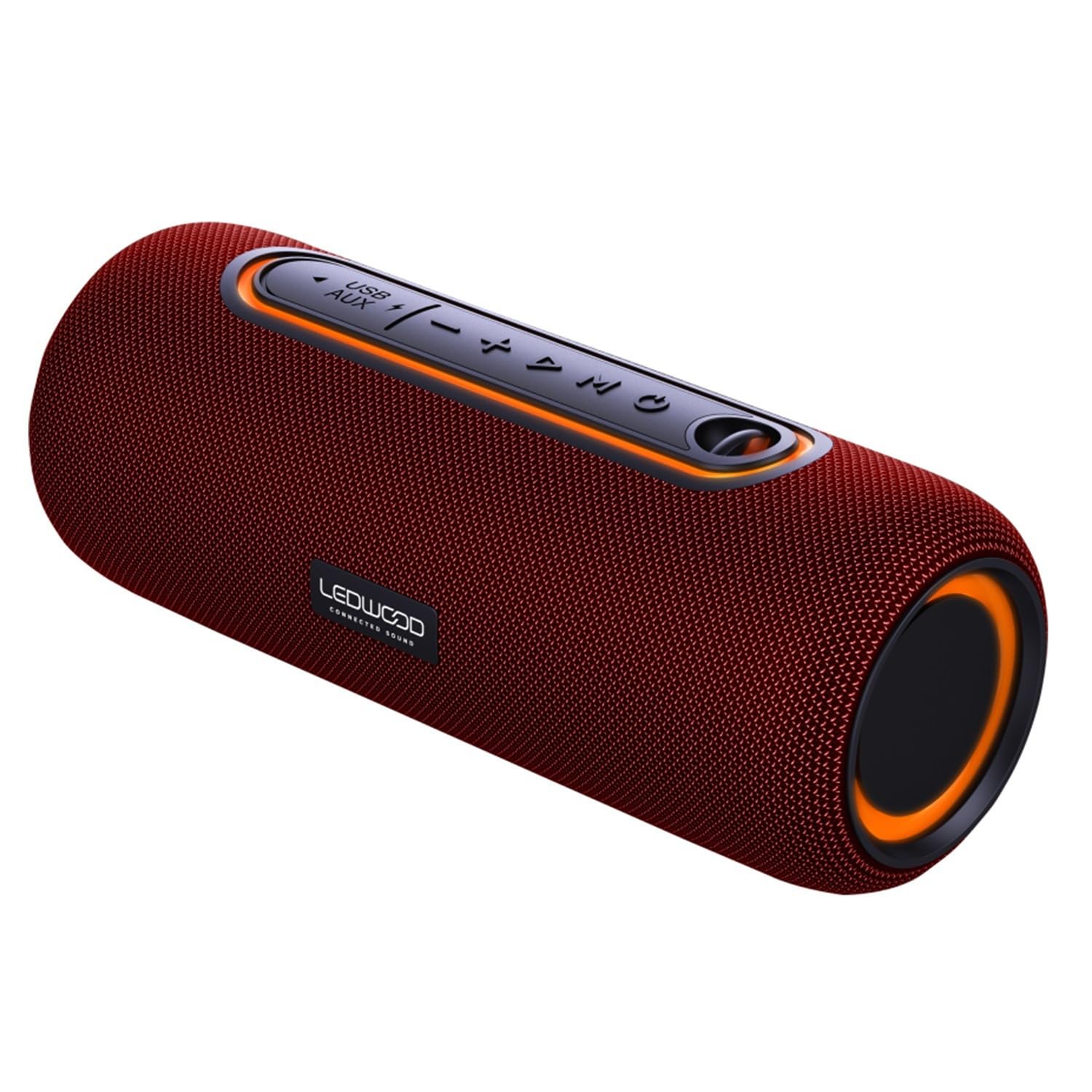
Image 1: Ledwood XTREM140 speaker, angled view showing the control panel and carrying strap.
เค้าโครงแผงควบคุม

ภาพที่ 2: รายละเอียด view of the speaker's control buttons, including power, volume, play/pause, and mode selection.
- ปุ่มเปิด/ปิด: กดค้างไว้เพื่อเปิด/ปิด
- ปุ่มเล่น/หยุดชั่วคราว: กดเพื่อเล่นหรือหยุดเสียงชั่วคราว
- ลดระดับเสียง/เพลงก่อนหน้า: กดเพื่อลดระดับเสียง กดค้างไว้เพื่อไปยังแทร็กก่อนหน้า
- เพิ่มระดับเสียง / แทร็กถัดไป: กดเพื่อเพิ่มระดับเสียง กดค้างไว้เพื่อไปยังเพลงถัดไป
- ปุ่มโหมด (M): กดเพื่อสลับระหว่างโหมด Bluetooth, AUX และ USB
- ปุ่ม TWS: Press to activate True Wireless Stereo pairing.
- พอร์ต USB: For USB playback or charging.
- อินพุต AUX: สำหรับการเชื่อมต่อเสียงแบบมีสาย
- พอร์ตชาร์จ USB-C: สำหรับชาร์จลำโพง
3. อะไรอยู่ในกล่อง
ตรวจสอบว่ามีสินค้าทั้งหมดอยู่ในบรรจุภัณฑ์:
- Ledwood XTREM140 Portable Bluetooth Speaker
- สายชาร์จ USB-C
- สายสัญญาณเสียง AUX 3.5 มม.
- คู่มือการใช้งาน (เอกสารนี้)
4. การตั้งค่า
4.1 การชาร์จลำโพง
- Connect the provided USB-C cable to the speaker's USB-C charging port.
- ต่อปลายอีกด้านของสาย USB-C เข้ากับอะแดปเตอร์แปลงไฟ USB (ไม่ได้รวมอยู่ในชุด) หรือพอร์ต USB ของคอมพิวเตอร์
- ไฟแสดงสถานะการชาร์จจะสว่างขึ้น และจะดับหรือเปลี่ยนสีเมื่อชาร์จเต็ม
- A full charge takes approximately 3-4 hours and provides up to 6 hours of playback.
4.2 การเปิด/ปิดเครื่อง
- การเปิดเครื่อง: Press and hold the Power button for 2-3 seconds. You will hear an audible prompt.
- วิธีปิดเครื่อง: Press and hold the Power button for 2-3 seconds. You will hear an audible prompt.
4.3 การจับคู่บลูทูธ
- ตรวจสอบให้แน่ใจว่าลำโพงเปิดอยู่และอยู่ในโหมดบลูทูธ (แสดงโดยไฟ LED สีน้ำเงินกะพริบ) หากไม่เป็นเช่นนั้น ให้กดปุ่ม 'M' (โหมด) เพื่อเปลี่ยนเป็นโหมดบลูทูธ
- เปิดใช้งานบลูทูธบนสมาร์ทโฟน แท็บเล็ต หรืออุปกรณ์อื่นๆ ที่รองรับบลูทูธ
- ค้นหา "XTREM140" in your device's Bluetooth list.
- Select "XTREM140" to connect. Once paired, the LED indicator will stop flashing and remain solid blue, and you will hear a confirmation sound.
- ลำโพงจะเชื่อมต่อกับอุปกรณ์ที่จับคู่ล่าสุดโดยอัตโนมัติเมื่อเปิดเครื่อง หากบลูทูธของอุปกรณ์นั้นเปิดใช้งานอยู่และอยู่ในระยะทำการ
การจับคู่ระบบเสียงสเตอริโอไร้สาย 4.4 True Wireless Stereo (TWS)
TWS allows you to connect two XTREM140 speakers for a stereo sound experience.
- Ensure both XTREM140 speakers are powered on and in Bluetooth mode, but ไม่ เชื่อมต่อกับอุปกรณ์ใดก็ได้
- On one of the speakers (this will be the primary speaker), press the 'TWS' button. You will hear a prompt indicating TWS pairing mode.
- The two speakers will automatically search for and connect to each other. Once connected, you will hear a confirmation sound, and the TWS indicator light will be solid on both speakers.
- Now, connect your Bluetooth device to the primary speaker (the one you pressed the TWS button on) as described in section 4.3.
- To disconnect TWS, press the TWS button on either speaker.
4.5 การเชื่อมต่อ AUX
- ต่อปลายด้านหนึ่งของสายสัญญาณเสียง AUX ขนาด 3.5 มม. เข้ากับพอร์ตอินพุต AUX บนลำโพง
- ต่อปลายอีกด้านของสายเคเบิลเข้ากับช่องเสียบเอาต์พุตเสียงของอุปกรณ์ของคุณ (เช่น เครื่องเล่น MP3, คอมพิวเตอร์)
- Press the 'M' (Mode) button on the speaker to switch to AUX mode.
- ขณะนี้เสียงจะเล่นผ่านลำโพงจากอุปกรณ์ที่เชื่อมต่อของคุณแล้ว
4.6 การเล่น USB
- เสียบแฟลชไดรฟ์ USB (ที่ฟอร์แมตเป็น FAT32) ที่มีไฟล์เสียง MP3 อยู่ fileเข้าสู่พอร์ต USB บนลำโพง
- Press the 'M' (Mode) button to switch to USB mode.
- ลำโพงจะเริ่มเล่นเสียงโดยอัตโนมัติ fileจากไดรฟ์ USB
5. คู่มือการใช้งาน
5.1 การควบคุมการเล่นขั้นพื้นฐาน
- เล่น/หยุดชั่วคราว: กดปุ่ม เล่น/หยุดชั่วคราว ปุ่ม.
- ปรับระดับเสียงขึ้น: กดปุ่ม เพิ่มระดับเสียง (+) ปุ่ม.
- ลดเสียงลง: กดปุ่ม ลดเสียงลง (-) ปุ่ม.
- เพลงถัดไป: กดปุ่มค้างไว้ เพิ่มระดับเสียง (+) ปุ่ม.
- แทร็กก่อนหน้า: กดปุ่มค้างไว้ ลดเสียงลง (-) ปุ่ม.
5.2 ผู้ช่วยเสียง
The speaker supports voice assistant functionality when connected via Bluetooth to a compatible smartphone.
- To activate your device's voice assistant (e.g., Siri, Google Assistant), press the เล่น/หยุดชั่วคราว ปุ่มสองครั้งอย่างรวดเร็ว
5.3 การจัดการสายเรียกเข้า (ผ่านบลูทูธ)
เมื่อเชื่อมต่อกับสมาร์ทโฟนผ่านบลูทูธ ลำโพงนี้สามารถใช้สำหรับการโทรแบบแฮนด์ฟรีได้
- รับสาย: กดปุ่ม เล่น/หยุดชั่วคราว ปุ่มหนึ่งครั้ง
- วางสาย: กดปุ่ม เล่น/หยุดชั่วคราว กดปุ่มหนึ่งครั้งระหว่างการโทร
- ปฏิเสธสาย: กดปุ่มค้างไว้ เล่น/หยุดชั่วคราว กดปุ่มนี้เป็นเวลา 2 วินาที
6. การบำรุงรักษา
6.1 การทำความสะอาด
- เช็ดลำโพงด้วย d . นุ่มๆamp ผ้า ห้ามใช้สารทำความสะอาดที่มีฤทธิ์กัดกร่อนหรือตัวทำละลาย
- ตรวจสอบให้แน่ใจว่าพอร์ตทั้งหมดแห้งก่อนชาร์จหรือเชื่อมต่อสายเคเบิล
6.2 พื้นที่จัดเก็บ
- เก็บลำโพงไว้ในที่แห้งและเย็น หลีกเลี่ยงแสงแดดโดยตรงและอุณหภูมิที่สูงหรือต่ำเกินไป
- หากจัดเก็บเป็นเวลานาน ควรชาร์จแบตเตอรี่ทุกๆ 3-6 เดือน เพื่อรักษาสุขภาพแบตเตอรี่
7 การแก้ไขปัญหา
| ปัญหา | สาเหตุที่เป็นไปได้ | สารละลาย |
|---|---|---|
| ลำโพงไม่เปิด | แบตเตอรี่ต่ำ | ชาร์จลำโพงอย่างน้อย 30 นาที |
| ไม่สามารถจับคู่ผ่านบลูทูธได้ | Speaker not in pairing mode; Device Bluetooth off; Speaker already connected to another device; Device too far. | Ensure speaker is in Bluetooth pairing mode (flashing blue LED). Turn on device Bluetooth. Disconnect from other devices. Move device closer to speaker. |
| ไม่มีเสียง | Volume too low; Incorrect mode selected; AUX/USB cable not fully inserted. | Increase speaker and device volume. Press 'M' to select correct mode (Bluetooth, AUX, USB). Ensure cables are securely connected. |
| การจับคู่ TWS ล้มเหลว | ลำโพงเชื่อมต่อกับอุปกรณ์อยู่แล้ว; ลำโพงอยู่ห่างกันเกินไป | Ensure both speakers are disconnected from any Bluetooth device before TWS pairing. Place speakers within 5 meters of each other. |
8. ข้อมูลจำเพาะ
| คุณสมบัติ | ข้อมูลจำเพาะ |
|---|---|
| ชื่อรุ่น | XTREM140 |
| หมายเลขรุ่น | LD-XT140BT |
| เวอร์ชันบลูทูธ | 5.0 |
| ระดับการกันน้ำ | IPX5 |
| RMS กำลังขับ | 10วัตต์ |
| Total Admissible Power | 100วัตต์ |
| ไดรเวอร์ลำโพง | 2 x 3.5 inch (9cm) |
| การตอบสนองความถี่ | 80Hz - 16KHz |
| ความจุของแบตเตอรี่ | 5V, 2000mAh |
| เวลาการเล่น | นานถึง 6 ชั่วโมง |
| เวลาในการชาร์จ | ประมาณ 3-4 ชั่วโมง |
| การเชื่อมต่อ | บลูทูธ, USB, ช่องต่อ AUX 3.5 มม. |
| ขนาด (กว้าง x ยาว x สูง) | 24.2ซม. x 9.2ซม. x 9.2ซม. |
| วัสดุ | High-quality fabric |
| คุณสมบัติพิเศษ | TWS Function, Voice Assistance |
9. การรับประกันและการสนับสนุน
Ledwood products are designed and manufactured to the highest quality standards. For detailed warranty information and customer support, please refer to the warranty card included with your purchase or visit the official Ledwood webเว็บไซต์.
If you encounter any issues not covered in this manual, please contact Ledwood customer service for assistance.