
Deiss DT-116A
Deiss PRO Bluetooth Meat Thermometer Wireless - Instruction Manual
ยี่ห้อ: Deiss | แบบอย่าง: DT-116A
1. สินค้าหมดview
The Deiss PRO Bluetooth Meat Thermometer is designed to provide precise, instant-read temperatures for various meats, ensuring perfect cooking results. It features dual probes for multi-zone cooking and connects wirelessly to your smartphone via a dedicated app, allowing remote monitoring and alerts.

Figure 1: Deiss PRO Bluetooth Meat Thermometer and App Interface.
คุณสมบัติหลัก:
- การอ่านอุณหภูมิที่แม่นยำ: Provides precise, instant-read temperatures for various food types.
- การออกแบบโพรบคู่: Allows simultaneous monitoring of two different temperatures, such as two cuts of meat or meat and ambient oven/smoker temperature.
- การเชื่อมต่อบลูทูธ: Connects to iOS/Android devices for remote monitoring and alerts.
- USDA-Recommended Presets: Includes pre-programmed temperature settings for common meats, with options to create custom settings.
- ช่วงอุณหภูมิที่กว้าง: Operates from 32°F to 572°F (0°C to 300°C) with probes built to withstand up to 716°F (380°C).
- ตัวเลือกการติดตั้งหลายตัว: Features anti-slip pads, a hanging hole, and an internal magnet for versatile placement.
2. อะไรอยู่ในกล่อง
เมื่อเปิดบรรจุภัณฑ์ ให้แน่ใจว่ามีส่วนประกอบทั้งหมดครบถ้วน:
- Deiss PRO Bluetooth Meat Thermometer Unit
- 2 x Stainless Steel Probes with Waterproof Probe Cables
- แบตเตอรี่ AAA 2 ก้อน (ติดตั้งไว้ล่วงหน้าหรือรวมแยกต่างหาก)
- คู่มือการใช้งาน (เอกสารนี้)

รูปที่ 2: เนื้อหาบรรจุภัณฑ์
3. คู่มือการติดตั้ง
3.1. การตั้งค่าเริ่มต้น
- ใส่แบตเตอรี่: If not already installed, open the battery compartment on the back of the thermometer unit and insert 2 AAA batteries, observing polarity.
- เปิดเครื่อง: Press the power button on the thermometer unit to turn it on.
- ดาวน์โหลดแอป: Scan the QR code provided in the product packaging or search for "Deiss Thermo" in your device's app store (iOS or Android). Download and install the application.

Download the Deiss Thermo App.
- เชื่อมต่อหัววัด: Insert the probe cables into the corresponding ports (Probe 1 and Probe 2) on the side of the thermometer unit. Ensure they are securely connected.

Connect the probes.
3.2. การจับคู่บลูทู ธ
- เปิดใช้งานบลูทูธ: ตรวจสอบให้แน่ใจว่าได้เปิดใช้งาน Bluetooth บนสมาร์ทโฟนของคุณแล้ว
- เปิดแอป: Launch the "Deiss Thermo" app. The app will automatically scan for and connect to your thermometer unit.
- ยืนยันการเชื่อมต่อ: Once connected, the app will display the current temperatures from the probes.

Figure 3: Connecting the thermometer to the app.
3.3. วิดีโอสาธิตผลิตภัณฑ์
วิดีโอ 1: จบแล้วview and demonstration of the Deiss PRO Bluetooth Meat Thermometer, showing unboxing, setup, and usage.
4. คู่มือการใช้งาน
4.1. การใช้งานโพรบ
- ใส่โพรบ: Carefully insert the stainless steel probe into the thickest part of the meat, avoiding bones. For dual probe use, insert the second probe into another piece of meat or position it to measure ambient oven/smoker temperature.

ใส่หัววัดเข้าไปในอาหารของคุณ
- ตรวจสอบอุณหภูมิ: The thermometer unit and the app will display real-time temperatures from both probes.

รูปที่ 4: การสอดหัววัดอย่างถูกต้องเพื่อให้ได้ค่าที่แม่นยิง
4.2. Using the Deiss Thermo App
- เลือกประเภทอาหาร: In the app, tap on the probe you wish to configure (P1 or P2). Select a food type from the USDA-recommended presets (e.g., Beef, Chicken, Pork, Fish, Turkey, Lamb, Hamburger, BBQ Smoke, Hot Smoke, Cold Smoke, Bread).

Select food type in the app.
- Customize Temperature (Optional): For certain food types like beef, you can select desired doneness (Rare, Medium Rare, Medium, Medium Well, Well Done). You can also create custom temperature alerts by setting a specific target temperature.
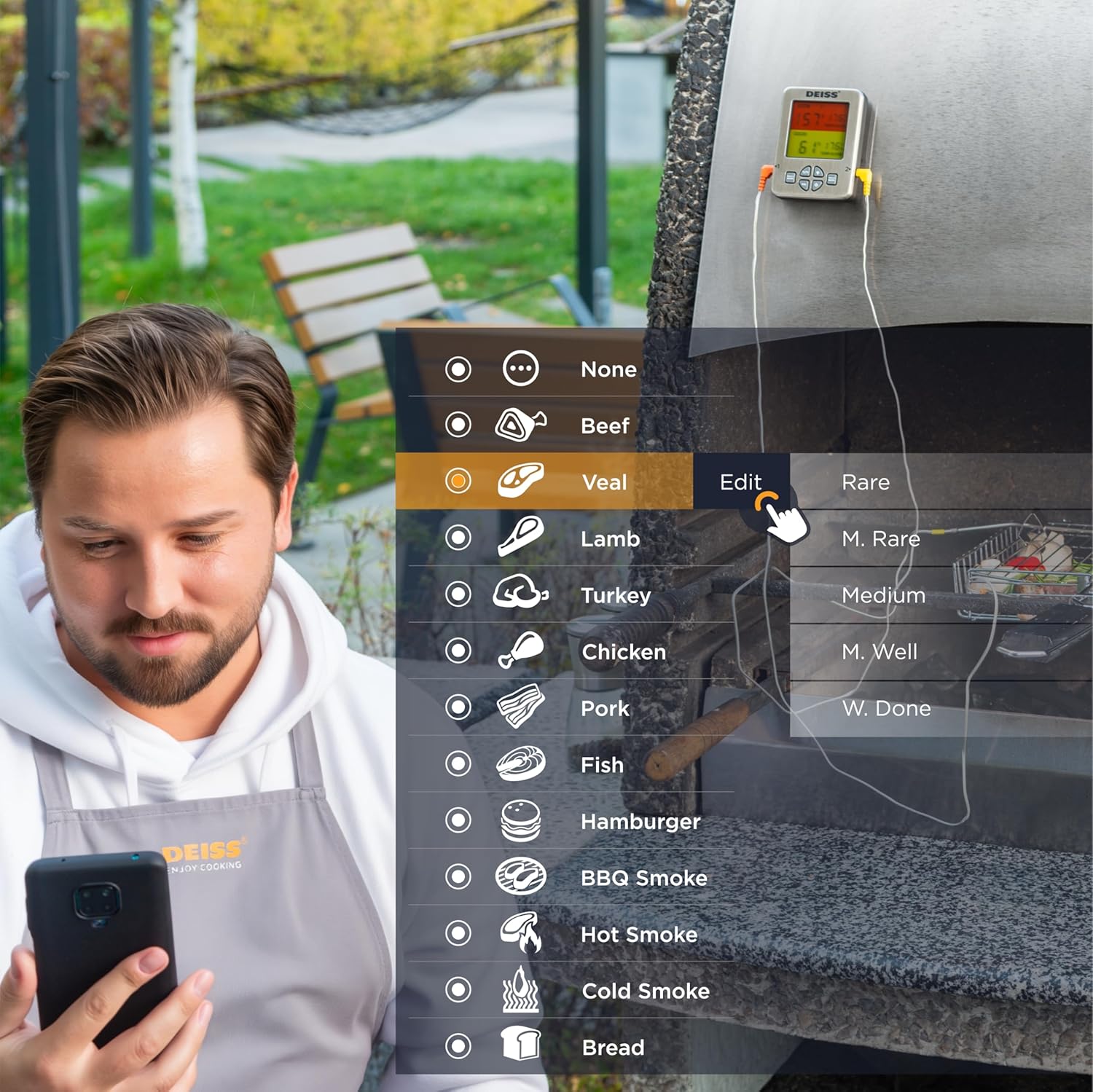
Figure 5: Customizing temperature settings in the app.
- ตั้งเวลา: The app allows you to set a countdown timer for your cooking.

Utilize the timer function.
- กราฟอุณหภูมิ: View a historical graph of the temperature readings for better cooking insights.

View temperature trends.
- รับการแจ้งเตือน: The app will send real-time alerts to your phone when the target temperature is reached, or if the temperature deviates significantly. The thermometer unit also has an audible alarm.

Receive alerts for perfect doneness.
4.3. Unit Controls
- สวิตช์°C/°F: Press the "C/F" button on the unit to toggle between Celsius and Fahrenheit temperature display.

สลับระหว่างเซลเซียสและฟาเรนไฮต์
- การควบคุมระดับเสียง: Use the "VOL" button to adjust the alarm volume.
- แสงไฟด้านหลัง: The unit features a backlight for easy reading in low light conditions.

Figure 6: Thermometer unit controls and features.
5. การดูแลรักษา
- การทำความสะอาดหัววัด: The stainless steel probes are food-safe and designed to withstand high temperatures. After each use, wipe the probes clean with a damp cloth and mild detergent. Rinse thoroughly and dry completely before storage. Do not immerse the entire probe cable or the main unit in water.
- หน่วยทำความสะอาด: เช็ดตัวเครื่องวัดอุณหภูมิด้วยผ้าเนื้อนุ่มและแห้งamp ผ้า ห้ามใช้น้ำยาทำความสะอาดที่มีฤทธิ์กัดกร่อนหรือจุ่มตัวเครื่องลงในน้ำ
- พื้นที่จัดเก็บ: Store the thermometer and probes in a clean, dry place when not in use. The unit has a hanging hole and internal magnets for convenient storage.

Figure 7: Multiple mounting and storage options.
- การเปลี่ยนแบตเตอรี่: Replace AAA batteries when the display indicates low power or the unit does not turn on.
6 การแก้ไขปัญหา
| ปัญหา | สาเหตุที่เป็นไปได้ | สารละลาย |
|---|---|---|
| Thermometer not turning on. | แบตเตอรี่หมดหรือใส่ไม่ถูกต้อง | เปลี่ยนแบตเตอรี่ด้วยแบตเตอรี่ AAA ใหม่ โดยตรวจสอบให้แน่ใจว่าใส่ขั้วถูกต้อง |
| ไม่มีการเชื่อมต่อบลูทูธ | Bluetooth is off on phone; app not open; device out of range; interference. | Ensure Bluetooth is enabled on your phone. Open the "Deiss Thermo" app. Move closer to the thermometer unit. Avoid strong electromagnetic interference. Restart both the thermometer and the app. |
| การอ่านอุณหภูมิไม่ถูกต้อง | Probe not inserted correctly; probe damaged; temperature range exceeded. | Ensure the probe is inserted into the thickest part of the meat, away from bones. Check probes for visible damage. Ensure temperatures are within the specified range (32-572°F / 0-300°C). |
| App alarms are not working or are too frequent. | App notification settings; incorrect temperature set points. | Check your phone's notification settings for the "Deiss Thermo" app. Verify the target temperature settings in the app are correct for your desired doneness. Adjust alarm interval settings in the app if available. |
| จอภาพมืดหรือกระพริบ | แบตเตอรี่อ่อน | เปลี่ยนแบตเตอรี่ |
7. ข้อมูลจำเพาะผลิตภัณฑ์
| คุณสมบัติ | รายละเอียด |
|---|---|
| หมายเลขรุ่น | DT-116A |
| ขนาดสินค้า | 3.86 x 2.93 x 1 นิ้ว; 8.15 ออนซ์ |
| ช่วงอุณหภูมิ | 32°F ถึง 572°F (0°C ถึง 300°C) |
| Probe Withstand Temperature | สูงถึง 716 ° F (380 ° C) |
| ความแม่นยำ | ±1.8°F (±1°C) resolution |
| การเชื่อมต่อ | บลูทูธ |
| แหล่งพลังงาน | แบตเตอรี่ AAA จำนวน 2 ก้อน (รวมอยู่ด้วย) |
| ประเภทจอภาพ | จอ LCD ดิจิทัลพร้อมไฟแบ็คไลท์ |
| วัสดุโพรบ | สแตนเลส |
| วัสดุภายนอก | พลาสติก |
| คำแนะนำในการดูแล | Oven Safe (probes), Wipe Clean (unit) |
| ผู้ผลิต | Deiss Kitchenware |
| ประเทศต้นกำเนิด | จีน |

รูปที่ 8: ขนาดผลิตภัณฑ์
8. การรับประกันและการสนับสนุน
For warranty information, technical support, or any inquiries regarding your Deiss PRO Bluetooth Meat Thermometer, please contact Deiss Kitchenware customer service or visit their official website. Refer to the product packaging or the Deiss Thermo app for specific contact details.
You can also visit the Deiss Store on Amazon for more information: Deiss Kitchenware Store.
Ask a question about this manual
Ask about setup, troubleshooting, compatibility, parts, safety, or missing instructions. Manuals+ will review the question and use this page’s manual context to help answer it.