
1. บทนำ
This manual provides detailed instructions for the setup, operation, and maintenance of your LOKMAT APPLLP Max 4G Smart Watch. This device combines advanced smartwatch features with 4G cellular capabilities, running on Android 9.0. Please read this manual thoroughly to ensure proper usage and to maximize your experience with the product.
2. เนื้อหาบรรจุภัณฑ์
เมื่อเปิดบรรจุภัณฑ์ ตรวจสอบว่ามีสิ่งของครบทั้งหมด:
- LOKMAT APPLLP Max Smart Watch
- สายชาร์จ
- คู่มือการใช้งาน
- เครื่องมือถอดซิมการ์ด (ถ้ามี)
3. อุปกรณ์โอเวอร์view
Familiarize yourself with the physical components of your smartwatch.

ภาพที่ 3.1: ด้านหน้า view of the LOKMAT APPLLP Max Smart Watch, displaying an active video call. The large rectangular screen is prominent, showing a contact's image and call controls.

ภาพที่ 3.2: ด้านข้างและด้านบน views illustrating the dimensions of the LOKMAT APPLLP Max Smart Watch. The watch measures approximately 77.2mm in length, 53.6mm in width, and 15mm in thickness.
- แสดง: 2.88-inch LCD touchscreen (480 x 640 resolution).
- ปุ่มด้านข้าง: Typically for power on/off, screen wake, and back functions.
- กล้อง: Dual cameras for video calls and photography.
- ช่องใส่ซิมการ์ด: สำหรับการเชื่อมต่อเครือข่ายมือถือ 4G
- พอร์ตชาร์จ: มีขั้วชาร์จแม่เหล็กอยู่ด้านหลัง
- เซ็นเซอร์วัดอัตราการเต้นของหัวใจ: อยู่ด้านหลังสำหรับตรวจสอบสุขภาพ
4. การตั้งค่า
4.1. การติดตั้งซิมการ์ด
The LOKMAT APPLLP Max supports 4G cellular connectivity via a Nano SIM card. Follow these steps to install your SIM card:
- ปิดสมาร์ทวอทช์ให้สนิท
- หาช่องใส่ซิมการ์ดที่ด้านข้างของนาฬิกา
- Use the provided SIM ejector tool (or a small pin) to open the SIM tray.
- Carefully place your Nano SIM card into the tray, ensuring correct orientation.
- Insert the SIM tray back into the watch until it clicks into place.

ภาพที่ 4.1: Illustration of a Nano SIM card being inserted into the LOKMAT APPLLP Max Smart Watch. The image highlights the SIM card slot and the 4G network capability.
4.2. การเปิดเครื่องครั้งแรกและการกำหนดค่า
Press and hold the power button (usually on the side) until the LOKMAT logo appears. Follow the on-screen prompts to select your language, connect to a Wi-Fi network, and set up your Google account. Adjust date, time, and other personal preferences as guided by the Android 9.0 operating system.
5. คู่มือการใช้งาน
5.1. การนำทางพื้นฐาน
- ปัดขึ้น/ลง/ซ้าย/ขวา: นำทางผ่านเมนู การแจ้งเตือน และการตั้งค่าด่วน
- แตะ: เลือกรายการหรือเปิดแอปพลิเคชัน
- กดแบบยาว: เข้าถึงตัวเลือกเพิ่มเติมหรือปรับแต่งหน้าปัดนาฬิกา
- ปุ่มด้านข้าง: Typically acts as a 'back' button or returns to the home screen.
5.2. การโทรออกและรับสาย
With the installed Nano SIM card, your smartwatch can make and receive 4G calls, including video calls.
- การโทรด้วยเสียง: Open the 'Phone' app, dial a number, or select a contact.
- วิดีโอคอล: Utilize compatible video calling applications (e.g., Google Duo, WhatsApp) through the watch's dual cameras.
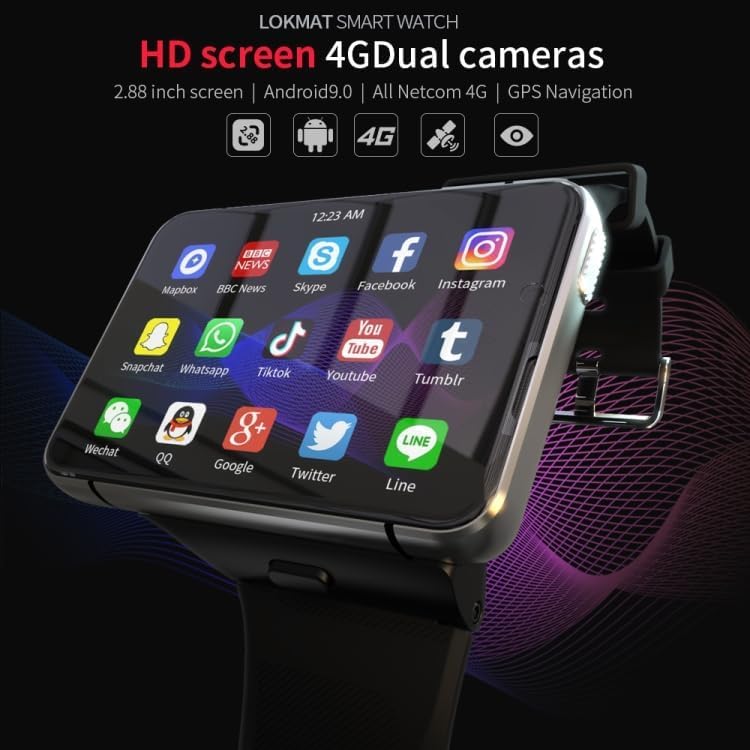
ภาพที่ 5.1: The LOKMAT APPLLP Max Smart Watch screen showing a grid of application icons, including social media, news, and communication apps, demonstrating its Android 9.0 capabilities.
5.3 การติดตามการออกกำลังกาย
The smartwatch includes sensors for monitoring various fitness activities and health metrics.
- การตรวจสอบอัตราการเต้นของหัวใจ: Access the heart rate app to measure your pulse.
- Movement Patterns: Track activities such as outdoor running, indoor running, walking, hiking, and mountaineering.
- เครื่องนับก้าว: ติดตามจำนวนก้าว ระยะทาง และปริมาณแคลอรี่ที่เผาผลาญในแต่ละวัน

ภาพที่ 5.2: A visual representation of the smartwatch's fitness tracking capabilities, showing options for various movement patterns like running and hiking, along with real-time display of heart rate, duration, and steps.
5.4. ระบบนำทาง GPS
The built-in GPS allows for accurate location tracking and navigation. Use compatible mapping applications available on the Android 9.0 platform.
5.5. ฟังก์ชันของกล้อง
The LOKMAT APPLLP Max features dual cameras for various photographic and video functions.
- ถ่ายภาพ: Open the camera app to capture photos.
- วิดีโอแชท: Engage in video conversations using supported applications.
- เล่นวิดีโอซ้ำ: View recorded videos directly on the watch.

ภาพที่ 5.3: ภาพระยะใกล้ view of the smartwatch's camera lens, highlighting its capabilities for video chat, video replay, and taking pictures.
6. การบำรุงรักษา
6.1. การชาร์จไฟ
To charge your smartwatch, connect the provided charging cable to the magnetic charging pins on the back of the watch and a compatible USB power source. Ensure the pins are clean and dry before charging.
6.2. การทำความสะอาด
Wipe the watch screen and body with a soft, lint-free cloth. For stubborn smudges, slightly dampชุบผ้าด้วยน้ำ หลีกเลี่ยงการใช้สารเคมีรุนแรงหรือวัสดุที่มีฤทธิ์กัดกร่อน
6.3. การจัดเก็บ
When not in use for extended periods, store the smartwatch in a cool, dry place. It is recommended to charge the device to about 50% before long-term storage to preserve battery health.
7 การแก้ไขปัญหา
- นาฬิกาไม่เปิดใช้งาน: ตรวจสอบให้แน่ใจว่านาฬิกาชาร์จเต็มแล้ว ลองเสียบนาฬิกาเข้ากับเครื่องชาร์จอย่างน้อย 30 นาที
- ไม่มีสัญญาณ 4G: ตรวจสอบว่าใส่ซิมการ์ดถูกต้องและเปิดใช้งานแล้ว ตรวจสอบความครอบคลุมของเครือข่ายในพื้นที่ของคุณ
- หน้าจอสัมผัสไม่ตอบสนอง: รีสตาร์ทนาฬิกา หากปัญหายังคงอยู่ โปรดตรวจสอบให้แน่ใจว่าหน้าจอสะอาดและแห้ง
- แอปขัดข้องหรือประสิทธิภาพช้า: Close background applications. Clear app cache or consider a factory reset if problems continue (back up data first).
- GPS ไม่แม่นยำ: ให้แน่ใจว่าคุณอยู่ในพื้นที่เปิดโล่งและมีน้ำใส view ของท้องฟ้า ตรวจสอบว่าได้เปิดใช้งานบริการระบุตำแหน่งในการตั้งค่าแล้วหรือไม่
8. ข้อมูลจำเพาะ
| แบบอย่าง | APPLLP Max |
| ระบบปฏิบัติการ | แอนดรอยด์ 9.0 |
| โปรเซสเซอร์ | MTK6761 ควอดคอร์ |
| หน่วยความจำ | แรม 4GB + พื้นที่เก็บข้อมูล 64GB |
| แสดง | 2.88 inches LCD, 480 x 640 resolution |
| การเชื่อมต่อ | 4G (Nano SIM), Wi-Fi, Bluetooth |
| จีพีเอส | มี GPS ในตัว |
| กล้องถ่ายรูป | Dual Cameras (1300W + 500W) |
| คุณสมบัติพิเศษ | Video Call, Heart Rate Monitor, Multiple Movement Patterns |
| ความจุของแบตเตอรี่ | 2300 มิลลิแอมป์ |
| ขนาด | ประมาณ 77.2 x 53.6 x 15 มม. |
| น้ำหนัก | 320 กรัม |
หมายเหตุ: ข้อมูลจำเพาะอาจมีการเปลี่ยนแปลงได้โดยไม่ต้องแจ้งให้ทราบล่วงหน้า
9. การรับประกันและการสนับสนุน
For warranty information and technical support, please refer to the warranty card included in your product packaging or visit the official LOKMAT webไซต์ โปรดเก็บใบเสร็จรับเงินไว้เป็นหลักฐานการซื้อสำหรับการเรียกร้องการรับประกัน