
Roseland GE015877
Roseland Over-Ear Bluetooth Headphones User Manual
รุ่น : GE015877
การแนะนำ
Thank you for choosing Roseland Over-Ear Bluetooth Headphones. These wireless headphones are designed to provide an optimal audio experience with comfort and convenience. Featuring soft ear cushions and an integrated microphone, they are perfect for listening to music and making calls on the go. This manual provides essential information on setting up, operating, maintaining, and troubleshooting your headphones.
สินค้าเกินview

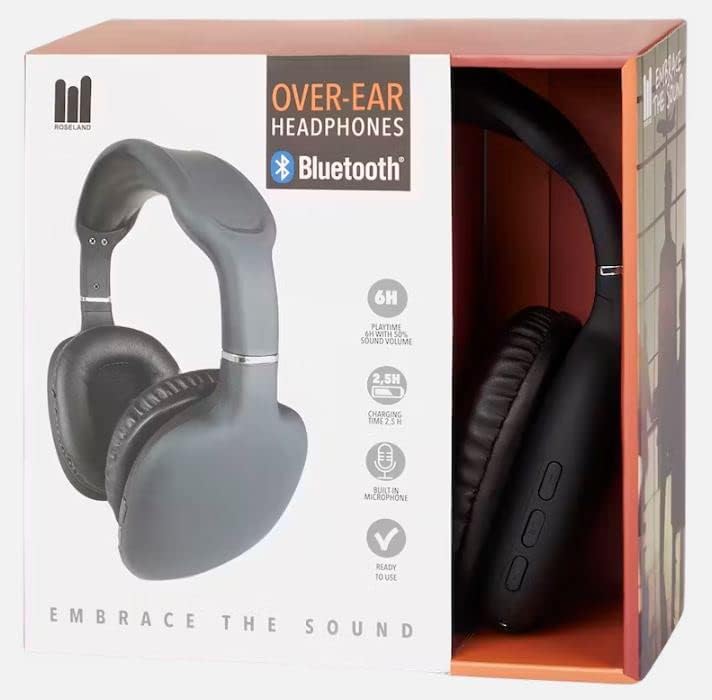
การตั้งค่า
1. การชาร์จหูฟัง
Before first use, fully charge your headphones. Connect the included charging cable to the charging port on the headphones and the other end to a USB power source (e.g., computer USB port, wall adapter). The charging indicator light will show the charging status. A full charge takes approximately 2.5 ชั่วโมง.
2. การเปิด/ปิดเครื่อง
- วิธีเปิดเครื่อง: กดปุ่มเปิด/ปิดค้างไว้จนกว่าไฟแสดงสถานะจะกะพริบ
- วิธีปิดเครื่อง: กดปุ่มเปิด/ปิดค้างไว้จนกว่าไฟแสดงสถานะจะดับลง
3. การจับคู่บลูทู ธ
The Roseland headphones use Bluetooth 5.0 for stable and efficient connection.
- ตรวจสอบให้แน่ใจว่าหูฟังปิดอยู่
- กดปุ่มเปิด/ปิดค้างไว้ประมาณ 5-7 วินาที จนกว่าไฟแสดงสถานะจะกะพริบสลับกันระหว่างสีแดงและสีน้ำเงิน ซึ่งแสดงว่าเข้าสู่โหมดจับคู่แล้ว
- บนสมาร์ทโฟนหรืออุปกรณ์ที่รองรับบลูทูธ ให้ไปที่การตั้งค่าบลูทูธ
- ค้นหา "Roseland Casque Bluetooth" or a similar name in the list of available devices.
- Select the headphones to connect. Once connected, the indicator light will turn solid blue or flash slowly.
- หากได้รับแจ้งให้ป้อนรหัสผ่าน ให้ป้อน "0000"
Note: The headphones will automatically try to reconnect to the last paired device when powered on.
คำแนะนำการใช้งาน
Basic Controls (Buttons on the side)
- ปุ่มเปิด/ปิด: Power on/off, Play/Pause music, Answer/End calls.
- เพิ่มระดับเสียง (+): เพิ่มระดับเสียง เลือกเพลงถัดไป (กดค้างไว้)
- ลดเสียงลง (-): ลดระดับเสียง เพื่อเล่นเพลงก่อนหน้า (กดค้าง)
การเล่นเพลง
- เล่น/หยุดชั่วคราว: กดปุ่มเปิดปิดหนึ่งครั้ง
- เพลงถัดไป: กดปุ่มเพิ่มระดับเสียง (+) ค้างไว้
- แทร็กก่อนหน้า: กดปุ่มลดระดับเสียง (-) ค้างไว้
- ปรับระดับเสียง: กดปุ่มเพิ่มเสียง (+) หรือปุ่มลดเสียง (-) สั้นๆ
การโทรศัพท์
ไมโครโฟนในตัวช่วยให้สามารถโทรแบบแฮนด์ฟรีได้
- รับสาย: Press the Power button once when a call comes in.
- วางสาย: Press the Power button once during a call.
- ปฏิเสธสาย: กดปุ่มเปิด/ปิดค้างไว้เมื่อมีสายเรียกเข้า
- โทรซ้ำหมายเลขล่าสุด: กดปุ่มเปิด/ปิดสองครั้ง
อายุการใช้งานแบตเตอรี่
The headphones provide approximately เวลาเล่น 6 ชั่วโมง on a single charge, depending on volume level and usage.
การสวมใส่ที่สบาย
The soft, memory foam earcups are designed for superior comfort during extended listening sessions. They provide a circum-aural fit, enveloping your ears for an immersive sound experience. For optimal comfort and ear health, it is recommended to remove the headphones every 2 ถึง 3 ชั่วโมง to allow your ears to rest.
การซ่อมบำรุง
- การทำความสะอาด: ใช้ผ้านุ่มและแห้งเช็ดทำความสะอาดหูฟัง ห้ามใช้น้ำยาทำความสะอาดหรือสารละลายที่มีฤทธิ์กัดกร่อน
- พื้นที่จัดเก็บ: เก็บหูฟังไว้ในที่แห้งและเย็น หลีกเลี่ยงแสงแดดโดยตรงและอุณหภูมิที่สูงหรือต่ำเกินไป
- ความต้านทานน้ำ: หูฟังเหล่านี้เป็น ไม่กันน้ำ. Avoid exposure to water, rain, or excessive moisture. While they are sweat-resistant, prolonged exposure to heavy sweat should be avoided.
- การชาร์จ: Always use the provided charging cable or a certified equivalent.
การแก้ไขปัญหา
- หูฟังไม่สามารถเปิดได้: ตรวจสอบให้แน่ใจว่าหูฟังชาร์จเต็มแล้ว
- ไม่สามารถจับคู่กับอุปกรณ์:
- ตรวจสอบให้แน่ใจว่าได้เปิดใช้งานบลูทูธบนอุปกรณ์ของคุณแล้ว
- Ensure the headphones are in pairing mode (flashing red and blue).
- ย้ายหูฟังให้เข้าใกล้อุปกรณ์ของคุณมากขึ้น
- ปิดและเปิดหูฟังและอุปกรณ์ของคุณใหม่อีกครั้ง
- หากมีการบันทึกการเชื่อมต่อบลูทูธเก่าไว้มากเกินไป ให้ลบการเชื่อมต่อเหล่านั้นออก
- ไม่มีเสียงหรือระดับเสียงต่ำ:
- ตรวจสอบระดับเสียงทั้งบนหูฟังและอุปกรณ์ที่เชื่อมต่อของคุณ
- โปรดตรวจสอบให้แน่ใจว่าได้เชื่อมต่อหูฟังอย่างถูกต้องแล้ว
- ลองเล่นเสียงจากแอปพลิเคชันหรือแหล่งอื่น
- คุณภาพเสียงไม่ดี:
- ขยับเข้าไปใกล้อุปกรณ์ที่เชื่อมต่อของคุณเพื่อหลีกเลี่ยงการรบกวน
- Ensure there are no physical obstructions between the headphones and the device.
- ตรวจสอบว่าคุณภาพแหล่งเสียงดีหรือไม่
- ปัญหาการชาร์จ:
- ตรวจสอบให้แน่ใจว่าได้เชื่อมต่อสายชาร์จอย่างแน่นหนา
- ลองใช้พอร์ต USB หรืออะแดปเตอร์จ่ายไฟอื่น
ข้อมูลจำเพาะ
| ยี่ห้อ | โรสแลนด์ |
| หมายเลขรุ่น | GE015877 |
| เทคโนโลยีการเชื่อมต่อ | ไร้สาย (บลูทูธ 5.0) |
| สไตล์ | หูฟังแบบครอบหู (Circum-Aural) |
| การวางตำแหน่งหู | Supra-Aural |
| สี | สีดำ |
| วัสดุ | พลาสติก |
| อายุการใช้งานแบตเตอรี่ (เวลาเล่น) | ประมาณ 6 ชั่วโมง |
| เวลาในการชาร์จ | ประมาณ 2.5 ชั่วโมง |
| ช่วงความถี่ | 20 เฮิรตซ์ - 20,000 เฮิรตซ์ |
| ประเภทการควบคุม | การควบคุมระดับเสียง |
| คุณสมบัติพิเศษ | Lightweight, Sweat-resistant, Built-in Microphone |
| ระดับความต้านทานต่อน้ำ | ไม่กันน้ำ |
| อุปกรณ์ที่รองรับ | สมาร์ทโฟน |
| การใช้ที่แนะนำ | Sport, Running, Calls, Music Listening |
| ส่วนประกอบที่รวมอยู่ | สายชาร์จ |
การรับประกันและการสนับสนุน
Specific warranty information for the Roseland Over-Ear Bluetooth Headphones (Model: GE015877) is not available in the provided product details. Please refer to the product packaging or the retailer's website for any applicable warranty terms.
For technical support or further assistance, please contact the manufacturer, ZD Trading, or your point of purchase. Contact details are typically found on the product packaging or the manufacturer's official webเว็บไซต์.
Ask a question about this manual
Ask about setup, troubleshooting, compatibility, parts, safety, or missing instructions. Manuals+ will review the question and use this page’s manual context to help answer it.