
1. บทนำ
ขอบคุณสำหรับการซื้อasing the CANYON BSP-8 Bluetooth Speaker. This manual provides essential information for the safe and efficient use of your device. Please read it thoroughly before operation and retain it for future reference.
คุณสมบัติหลัก:
- กำลังขับเสียง 10 วัตต์: ให้เสียงที่คมชัดและทรงพลัง
- Bluetooth 5.2: For stable and energy-efficient wireless connection up to 10 meters.
- ไฟแบ็คไลท์ RGB: Integrated lighting for enhanced ambiance.
- สเตอริโอไร้สายจริง (TWS): Connect two BSP-8 speakers for a full stereo sound experience.
- ตัวเลือกการเล่นหลายแบบ: Supports Bluetooth, AUX, USB, and MicroSD card inputs.
- การออกแบบพกพา: Compact size with a convenient hanger for easy transport.
- อายุการใช้งานแบตเตอรี่ยาวนาน: สามารถเล่นได้นานถึง 3 ชั่วโมงต่อการชาร์จเพียงครั้งเดียว
2. ข้อมูลด้านความปลอดภัย
- ห้ามให้ลำโพงสัมผัสกับอุณหภูมิที่สูงหรือต่ำเกินไป แสงแดดโดยตรง หรือความชื้นสูง
- หลีกเลี่ยงการทำตกหรือให้ลำโพงได้รับแรงกระแทกรุนแรง
- ห้ามถอดประกอบหรือพยายามซ่อมลำโพงด้วยตนเอง โปรดติดต่อช่างผู้ชำนาญการ
- เก็บลำโพงให้ห่างจากน้ำและของเหลวอื่นๆ ลำโพงไม่กันน้ำ
- ใช้เฉพาะสายชาร์จที่ให้มาหรือสาย Type-C ที่ผ่านการรับรองสำหรับการชาร์จเท่านั้น
- ทิ้งแบตเตอรี่และลำโพงตามระเบียบข้อบังคับของท้องถิ่น
3. เนื้อหาบรรจุภัณฑ์
- CANYON BSP-8 Bluetooth Speaker
- สายชาร์จแบบ USB Type-C
- คู่มือการใช้งาน
4. สินค้าหมดview
ทำความคุ้นเคยกับส่วนประกอบและการควบคุมของลำโพง
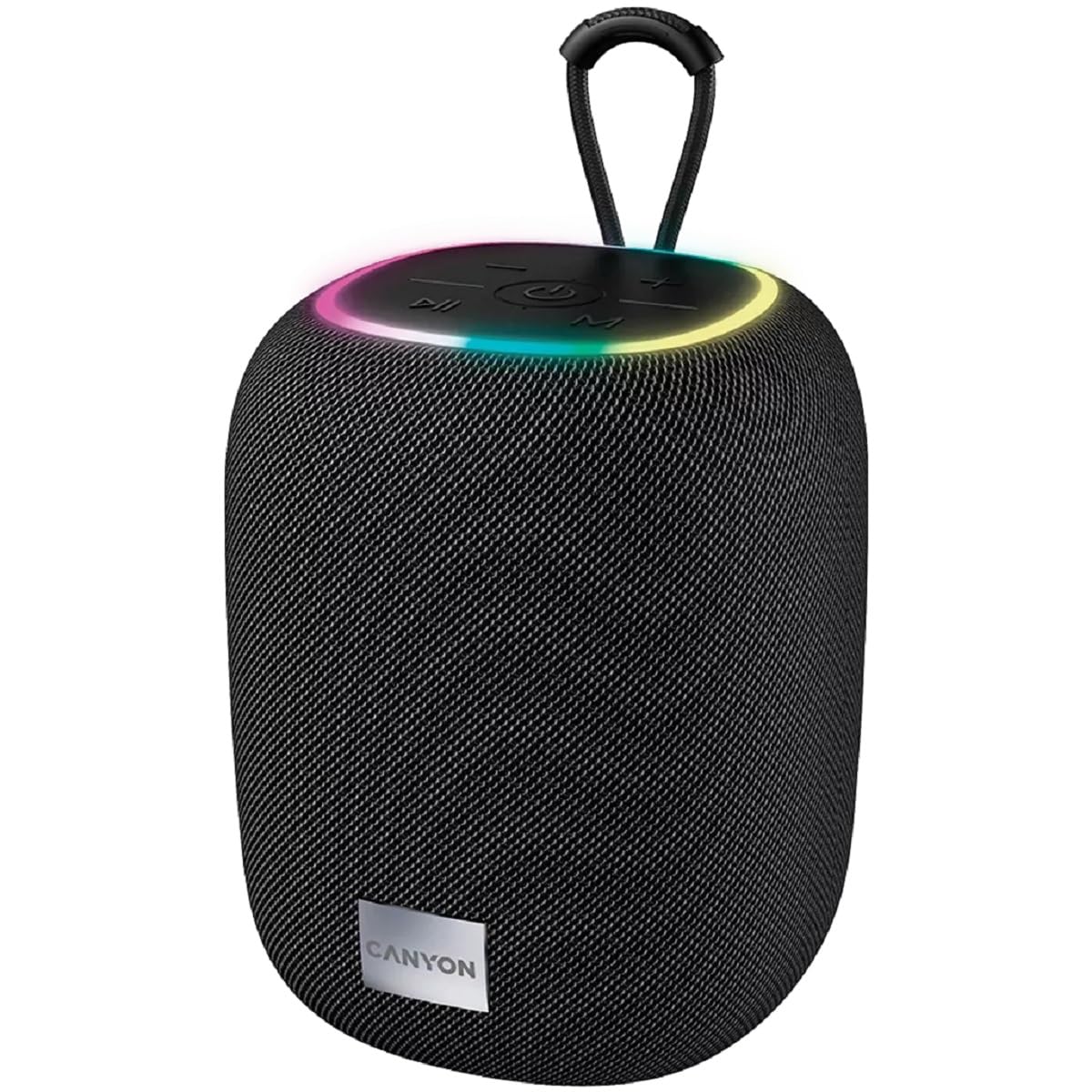
ภาพที่ 1: ด้านบน view of the CANYON BSP-8 speaker, showing the control buttons, RGB backlight, and integrated hanger.
ปุ่มควบคุม (แผงด้านบน):
- ปุ่มเปิด/ปิด: กดค้างไว้เพื่อเปิด/ปิด กดสั้นๆ เพื่อเล่น/หยุดชั่วคราว
- ปุ่มลดระดับเสียง / ปุ่มเพลงก่อนหน้า: กดสั้นเพื่อลดระดับเสียง กดยาวเพื่อเล่นเพลงก่อนหน้า
- ปุ่มเพิ่มระดับเสียง / ปุ่มเพลงถัดไป: กดสั้นๆ เพื่อเพิ่มระดับเสียง กดยาวเพื่อเล่นเพลงถัดไป
- ปุ่มโหมด (M): กดสั้นๆ เพื่อสลับระหว่างโหมด Bluetooth, AUX, USB และ MicroSD

ภาพที่ 2: ด้านหลัง view of the CANYON BSP-8 speaker, illustrating the various input ports including AUX, USB, TF (MicroSD) card slot, and DC5V Type-C charging port.
Input Ports (Rear Panel):
- พอร์ต AUX: สำหรับเชื่อมต่ออุปกรณ์เสียงภายนอกผ่านสายสัญญาณเสียงขนาด 3.5 มม.
- พอร์ต USB: สำหรับเล่นไฟล์เสียงจากแฟลชไดรฟ์ USB
- ช่องเสียบการ์ด TF (MicroSD): สำหรับเล่นไฟล์เสียงจาก MicroSD การ์ด
- DC5V (Type-C) Port: สำหรับชาร์จลำโพง
5. การตั้งค่า
5.1 การชาร์จลำโพง
- Connect the provided USB Type-C cable to the DC5V port on the speaker.
- ต่อปลายอีกด้านของสายเคเบิลเข้ากับอะแดปเตอร์แปลงไฟ USB (แนะนำ 5V/1A) หรือพอร์ต USB ของคอมพิวเตอร์
- ไฟแสดงสถานะการชาร์จจะสว่างขึ้น และจะดับหรือเปลี่ยนสีเมื่อชาร์จเต็ม
หมายเหตุ: เพื่ออายุการใช้งานแบตเตอรี่ที่ดีที่สุด โปรดชาร์จลำโพงให้เต็มก่อนใช้งานครั้งแรก

Image 3: Illustration showing the 1800 mAh battery capacity and up to 3 hours of playtime for the CANYON BSP-8 speaker.
5.2 การเปิด/ปิดเครื่อง
- การเปิดเครื่อง: Press and hold the Power button for approximately 3 seconds. You will hear an audible prompt.
- วิธีปิดเครื่อง: Press and hold the Power button for approximately 3 seconds. You will hear an audible prompt.
5.3 การจับคู่บลูทูธ
- เปิดลำโพง ลำโพงจะเข้าสู่โหมดจับคู่บลูทูธโดยอัตโนมัติ ซึ่งจะแสดงด้วยไฟ LED กระพริบ
- เปิดใช้งานบลูทูธบนอุปกรณ์เคลื่อนที่ของคุณ (สมาร์ทโฟน แท็บเล็ต คอมพิวเตอร์)
- ค้นหา available Bluetooth devices and select "CANYON BSP-8" from the list.
- Once paired, the LED light will stop flashing, and you will hear a confirmation sound.
Note: The speaker will automatically reconnect to the last paired device if it is within range and Bluetooth is enabled.

Image 4: Illustration highlighting the stable and energy-efficient Bluetooth 5.2 connection with an operating range of up to 10 meters.
การจับคู่ระบบเสียงสเตอริโอไร้สาย 5.4 True Wireless Stereo (TWS)
To connect two CANYON BSP-8 speakers for a stereo sound experience:
- Ensure both BSP-8 speakers are powered on and not connected to any Bluetooth device.
- On one speaker (this will be the primary speaker), double-press the Power button. It will enter TWS pairing mode.
- ลำโพงทั้งสองตัวจะค้นหาและเชื่อมต่อกันโดยอัตโนมัติ คุณจะได้ยินเสียงยืนยันเมื่อเชื่อมต่อเสร็จแล้ว
- Once TWS is established, connect your mobile device to the primary speaker via Bluetooth as described in section 5.3.
Note: TWS mode only works with two identical CANYON BSP-8 speakers.
6. คู่มือการใช้งาน
6.1 การเล่นเสียง
- โหมดบลูทู ธ : หลังจากจับคู่สำเร็จแล้ว เสียงจากอุปกรณ์ที่เชื่อมต่อจะเล่นผ่านลำโพง
- โหมด AUX: Connect a 3.5mm audio cable from your external audio device to the AUX port on the speaker. Press the 'M' button to switch to AUX mode.
- โหมด USB: เสียบแฟลชไดรฟ์ USB เข้ากับพอร์ต USB ลำโพงจะเปลี่ยนไปใช้โหมด USB โดยอัตโนมัติและเริ่มเล่นเสียง files. If not, press the 'M' button.
- โหมดการ์ด MicroSD: Insert a MicroSD card into the TF card slot. The speaker will automatically switch to MicroSD mode and begin playing audio files. If not, press the 'M' button.
6.2 การควบคุมการเล่น
- เล่น/หยุดชั่วคราว: กดปุ่มเปิดปิดสั้น ๆ
- ปรับระดับเสียงขึ้น: กดปุ่มเพิ่มระดับเสียง (+) สั้นๆ
- ลดเสียงลง: กดปุ่มลดระดับเสียง (-) สั้นๆ
- เพลงถัดไป: กดปุ่มเพิ่มระดับเสียง (+) ค้างไว้
- แทร็กก่อนหน้า: กดปุ่มลดระดับเสียง (-) ค้างไว้
6.3 ไฟแบ็คไลท์ RGB
The speaker features an integrated RGB backlight on the top panel. The backlight activates automatically when the speaker is powered on. There are no specific controls for changing the RGB pattern or turning it off/on independently of the speaker's power state.