1. บทนำ
Thank you for choosing the Generic BT 1304 Bluetooth 5.0 Wireless Neckband Earphones. This manual provides detailed instructions for setting up, operating, and maintaining your device to ensure optimal performance and longevity.
2. เนื้อหาบรรจุภัณฑ์
กรุณาตรวจสอบแพ็คเกจสำหรับรายการต่อไปนี้:
- Generic BT 1304 Wireless Neckband Earphones
- แผ่นรองหูฟัง (หลายขนาด)
- สายชาร์จ (USB)
- คู่มือการใช้งาน

Figure 2.1: Generic BT 1304 Neckband Earphones and retail packaging.
3. คุณสมบัติของผลิตภัณฑ์
- 10MM Dynamic Driver: Delivers clear sound details with enhanced bass.
- การเชื่อมต่อบลูทูธ 5.0: Stable wireless connection with a range of up to 10 meters (33 feet).
- Multi-function Controls: Integrated buttons for music playback and call management.
- เวลาเล่นนาน: สามารถเล่นเพลงได้นานสูงสุด 10 ชั่วโมงต่อการชาร์จหนึ่งครั้ง
- ชาร์จเร็ว: Quick charging capability, 1-2 hours for a full charge.
- ความเข้ากันได้กว้าง: Compatible with most Android and iOS devices.
- Lightweight Neckband Design: Easy to wear and carry.
- ไมโครโฟนในตัว: สำหรับการโทรแบบแฮนด์ฟรี
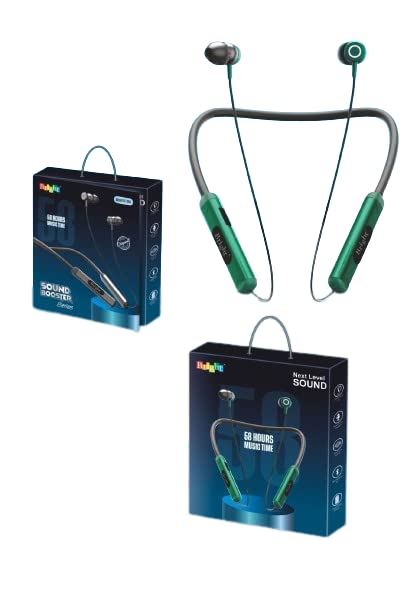
รูปที่ 3.1: เกินview of the Generic BT 1304 Neckband Earphones design.
4. การตั้งค่าและการใช้งานเบื้องต้น
4.1. การชาร์จหูฟัง
- Locate the hidden charging port on the side panel of the neckband.
- Connect the provided USB charging cable to the charging port on the earphones.
- เชื่อมต่อปลายอีกด้านหนึ่งของสาย USB เข้ากับแหล่งพลังงาน USB ที่ใช้งานร่วมกันได้ (เช่น พอร์ต USB ของคอมพิวเตอร์ อะแดปเตอร์ติดผนัง)
- The charging indicator light will illuminate, indicating that the earphones are charging.
- A full charge typically takes 1-2 hours. The indicator light will change or turn off once charging is complete.
บันทึก: เพื่อให้แน่ใจว่าหูฟังชาร์จเต็มก่อนใช้งานครั้งแรก จะช่วยให้ใช้งานได้นานที่สุด
4.2. การจับคู่บลูทู ธ
- ตรวจสอบให้แน่ใจว่าหูฟังได้รับการชาร์จและปิดเครื่องแล้ว
- Press and hold the multi-function button on the neckband until the indicator light flashes, usually alternating between blue and red, indicating pairing mode.
- บนสมาร์ทโฟนหรืออุปกรณ์ของคุณ เปิดใช้งาน Bluetooth และค้นหาอุปกรณ์ที่มีอยู่
- Select "BT 1304" from the list of available devices.
- Once connected, the indicator light will typically show a steady blue light or flash slowly.
- The earphones will automatically connect to the last paired device when powered on, if the device's Bluetooth is active and within range.
เคล็ดลับ: For best connectivity, ensure your device is within 10 meters (33 feet) of the earphones.
5. คู่มือการใช้งาน
5.1. เปิด/ปิดเครื่อง
- เปิดเครื่อง: Press and hold the multi-function button for approximately 3 seconds until the indicator light flashes blue.
- หมดแรง: Press and hold the multi-function button for approximately 5 seconds until the indicator light flashes red and then turns off.
5.2. การควบคุมเพลง
- เล่น/หยุดชั่วคราว: กดปุ่มมัลติฟังก์ชั่นหนึ่งครั้ง
- เพลงถัดไป: กดปุ่มเพิ่มระดับเสียง (+) ค้างไว้
- แทร็กก่อนหน้า: กดปุ่มลดระดับเสียง (-) ค้างไว้
- ปรับระดับเสียงขึ้น: Press the Volume Up (+) button briefly.
- ลดเสียงลง: Press the Volume Down (-) button briefly.
5.3. Call Controls
- รับ/วางสาย: กดปุ่มมัลติฟังก์ชั่นหนึ่งครั้ง
- ปฏิเสธสาย: กดปุ่มมัลติฟังก์ชันค้างไว้ประมาณ 2 วินาที
- โทรซ้ำหมายเลขล่าสุด: กดปุ่มมัลติฟังก์ชันสองครั้ง
6. การบำรุงรักษาและการดูแล
- Keep the earphones dry. Avoid exposure to moisture, rain, or liquids.
- Clean the earphones with a soft, dry cloth. Do not use abrasive cleaners.
- Store the earphones in a cool, dry place away from extreme temperatures.
- หลีกเลี่ยงการทำหูฟังตกหรือได้รับแรงกระแทกรุนแรง
- Do not attempt to disassemble or modify the earphones, as this will void the warranty.
7 การแก้ไขปัญหา
7.1. Earphones not turning on
- Ensure the earphones are fully charged. Connect them to a power source and allow them to charge for at least 30 minutes before attempting to power on again.
7.2. Cannot pair with device
- Make sure the earphones are in pairing mode (indicator light flashing blue/red).
- โปรดตรวจสอบให้แน่ใจว่าได้เปิดใช้งานบลูทูธบนอุปกรณ์ของคุณแล้ว และอุปกรณ์ของคุณอยู่ห่างจากหูฟังไม่เกิน 10 เมตร
- ปิดบลูทูธบนอุปกรณ์ของคุณ จากนั้นเปิดใหม่อีกครั้ง
- If previously paired, try "forgetting" or "unpairing" the earphones from your device's Bluetooth settings and then re-pair.
- รีสตาร์ททั้งหูฟังและอุปกรณ์ของคุณ
7.3. ไม่มีเสียงหรือเสียงเบา
- ตรวจสอบระดับเสียงทั้งบนหูฟังและอุปกรณ์ที่เชื่อมต่อของคุณ
- ตรวจสอบให้แน่ใจว่าหูฟังเชื่อมต่อกับอุปกรณ์ของคุณอย่างถูกต้อง
- ลองเล่นแหล่งเสียงอื่นๆ เพื่อตรวจสอบว่าปัญหาเกิดจากอุปกรณ์มีเดียหรือไม่ file.
7.4. Intermittent connection
- ตรวจสอบให้แน่ใจว่าไม่มีสิ่งกีดขวางระหว่างหูฟังและอุปกรณ์ของคุณ
- ย้ายออกห่างจากอุปกรณ์ไร้สายอื่นๆ ที่อาจก่อให้เกิดการรบกวน
- Keep your device within the recommended 10-meter Bluetooth range.
8. ข้อมูลจำเพาะ
| คุณสมบัติ | รายละเอียด |
|---|---|
| ชื่อรุ่น | บีที 1304 |
| เทคโนโลยีการเชื่อมต่อ | ไร้สาย (บลูทูธ 5.0) |
| เทคโนโลยีการสื่อสารไร้สาย | บลูทูธ |
| ขนาดไดร์เวอร์ | 10MM Dynamic Driver |
| ช่วงบลูทูธ | สูงถึง 10 เมตร (33 ฟุต) |
| เวลาเล่น | ประมาณ 10 ชั่วโมง |
| เวลาในการชาร์จ | 1-2 ชั่วโมง |
| วิธีการควบคุม | สัมผัส/ปุ่ม |
| ไมโครโฟน | Included (In-Ear format) |
| แหล่งพลังงาน | ใช้พลังงานจากแบตเตอรี่ |
| ฟอร์มแฟกเตอร์ | In Ear, Neckband |
| วัสดุ | พลาสติก |
| ขนาดสินค้า | 15 x 12 x 3 ซม. |
| น้ำหนักสินค้า | 200 กรัม |
| ความเข้ากันได้ | แอนดรอยด์, ไอโอเอส |
9. การรับประกันและการสนับสนุน
This product comes with a standard warranty. For details regarding the warranty period and terms, please refer to the warranty information provided at the time of purchase or contact your retailer.
For technical support or further assistance, please contact the manufacturer or your local distributor. Keep your purchase receipt as proof of purchase for warranty claims.
ผู้ผลิต: ทั่วไป
ที่อยู่ผู้ผลิต: MD IMRAN KHAN 13A, Kantal Parahoo, Mansatala Lane, Kolkata, WEST BENGAL, India


