
เอฟ3030
คู่มือผู้ใช้คีย์บอร์ดเกมมิ่ง AULA F3030
รุ่น: F3030 | ยี่ห้อ: Generic
1. บทนำ
Welcome to the user manual for your AULA F3030 Gaming Keyboard. This mechanical wired keyboard is designed for an enhanced gaming and typing experience, featuring a durable metal panel, responsive Blue mechanical switches, and vibrant green backlighting. This manual will guide you through the setup, operation, and maintenance of your new keyboard.
2. คุณสมบัติหลัก
- ปุ่มมัลติมีเดีย: Easily adjust volume or mute audio with a simple turn or press.
- แผงโลหะที่ทนทาน: Provides a robust and stable base for intense gaming sessions.
- สวิตช์กลไกสีน้ำเงิน: Offer tactile feedback and an audible click for precise keystrokes.
- ไฟแบ็คไลท์สีเขียว: Illuminates keys for visibility in low-light conditions and adds aesthetic appeal.
- EN 104 Key Layout: Standard full-size keyboard layout for comprehensive functionality.
- การพลิก N-Key เต็มรูปแบบและการป้องกันภาพซ้อน: ช่วยให้มั่นใจได้ว่าทุกการกดแป้นพิมพ์จะถูกบันทึกอย่างแม่นยำ แม้ในขณะที่กดอย่างรวดเร็วและพร้อมกัน

ภาพ: เหนือview of key features including the metal panel, blue light, and mechanical switches.
3. เนื้อหาบรรจุภัณฑ์
กรุณาตรวจสอบเนื้อหาในแพ็คเกจเพื่อให้แน่ใจว่ามีสินค้าครบทั้งหมด:
- AULA F3030 Gaming Keyboard
- คู่มือการใช้งาน (เอกสารนี้)
4. คู่มือการติดตั้ง
Setting up your AULA F3030 Gaming Keyboard is straightforward:
- แกะแป้นพิมพ์ออกจากบรรจุภัณฑ์
- ค้นหาพอร์ต USB ที่มีอยู่ในคอมพิวเตอร์ของคุณ
- Plug the USB cable of the keyboard into the USB port.
- Your operating system should automatically detect and install the necessary drivers. No additional driver installation is typically required for basic functionality.

Image: The AULA F3030 Gaming Keyboard ready for connection.
5. คู่มือการใช้งาน
5.1 Multimedia Knob and Buttons
The AULA F3030 keyboard features a versatile multimedia knob and dedicated multimedia buttons for quick control over your audio and media playback:
- ปุ่มมัลติมีเดีย: Rotate the knob clockwise to increase volume, counter-clockwise to decrease volume. Press the knob to mute or unmute audio.
- M1 Button: Typically functions as 'Previous Track'.
- M2 Button: Typically functions as 'Play/Pause'.
- M3 Button: Typically functions as 'Next Track'.
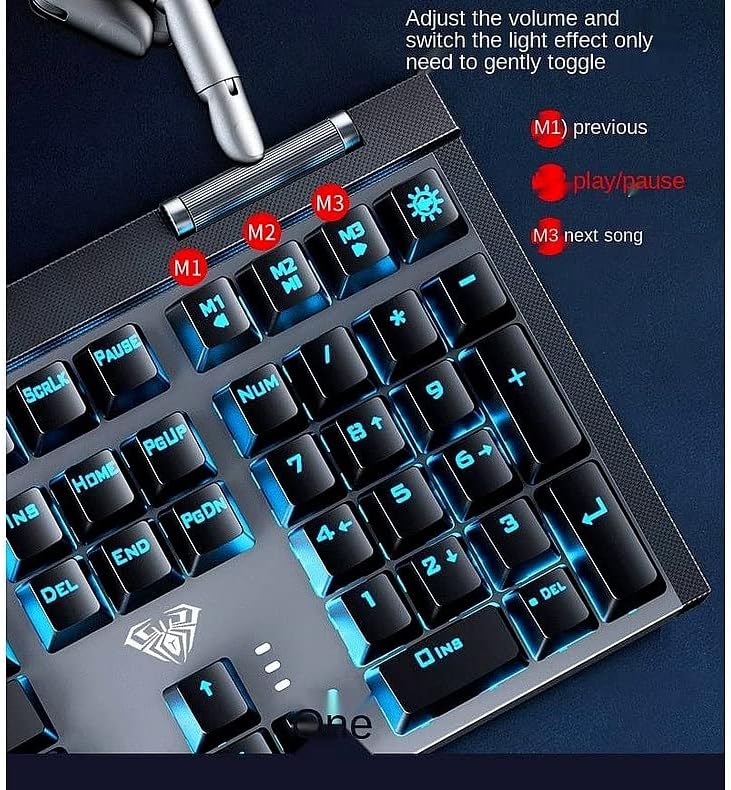
ภาพ: รายละเอียด view of the multimedia knob and dedicated media control buttons.
การควบคุมแบ็คไลท์ 5.2
The keyboard features a green backlight. Specific controls for changing backlight modes or brightness may be available through function key combinations (e.g., Fn + specific keys). Refer to the keyboard's keycap legends or try common combinations like Fn + directional arrows or Fn + Ins/Home/PgUp/Del/End/PgDn for backlight adjustments.

Image: The AULA F3030 keyboard showcasing its green backlight.
5.3 สวิตช์เชิงกล
The AULA F3030 uses Blue mechanical switches, known for their distinct tactile bump and audible click. This provides clear feedback with each keystroke, which is preferred by many typists and gamers for its responsiveness and accuracy.

Image: A close-up of the Blue mechanical switch, highlighting its design.
6. การบำรุงรักษาและการดูแล
To ensure the longevity and optimal performance of your AULA F3030 Gaming Keyboard, follow these maintenance tips:
- การทำความสะอาด: Use a soft, dry cloth to wipe down the keyboard surface. For dust and debris between keys, use compressed air. For stubborn grime, a slightly damp cloth (not wet) can be used, ensuring no liquid enters the keyboard.
- หลีกเลี่ยงของเหลว: เก็บของเหลวให้ห่างจากแป้นพิมพ์เพื่อป้องกันไม่ให้ส่วนประกอบภายในได้รับความเสียหาย
- พื้นที่จัดเก็บ: When not in use, store the keyboard in a clean, dry environment away from direct sunlight or extreme temperatures.
7 การแก้ไขปัญหา
If you encounter any issues with your AULA F3030 Gaming Keyboard, please refer to the following common solutions:
- แป้นพิมพ์ไม่ตอบสนอง:
- ตรวจสอบให้แน่ใจว่าสาย USB เสียบเข้ากับคีย์บอร์ดและคอมพิวเตอร์อย่างแน่นหนา
- ลองเสียบคีย์บอร์ดเข้ากับพอร์ต USB อื่นบนคอมพิวเตอร์ของคุณ
- รีสตาร์ทเครื่องคอมพิวเตอร์ของคุณ
- แสงไฟไม่ทำงาน:
- Check if the backlight has been turned off via a function key combination (e.g., Fn + light icon key).
- ตรวจสอบให้แน่ใจว่าแป้นพิมพ์เชื่อมต่ออย่างถูกต้องและได้รับพลังงาน
- กุญแจไม่ลงทะเบียน:
- ทำความสะอาดบริเวณรอบๆ ปุ่มที่ได้รับผลกระทบ เพื่อให้แน่ใจว่าไม่มีเศษสิ่งสกปรกใดๆ อุดตันสวิตช์
- หากมีเพียงบางปุ่มเท่านั้นที่ได้รับผลกระทบ อาจบ่งชี้ถึงปัญหาด้านฮาร์ดแวร์
หากปัญหายังคงมีอยู่หลังจากลองขั้นตอนเหล่านี้แล้ว โปรดติดต่อฝ่ายสนับสนุนลูกค้า
8. ข้อมูลจำเพาะผลิตภัณฑ์
| ข้อมูลจำเพาะ | รายละเอียด |
|---|---|
| ขนาดสินค้า | 27 x 22 x 5 ซม. |
| น้ำหนัก | 1.55 กก. |
| ผู้ผลิต | อูลา |
| เทคโนโลยีการเชื่อมต่อ | สาย USB |
| คำอธิบายแป้นพิมพ์ | มัลติมีเดีย |
| คุณสมบัติพิเศษ | Backlit, Anti-Ghosting, N-Key Rollover |
| จำนวนคีย์ | 104 |
| สไตล์ | ทันสมัย |
| วัสดุ | โลหะ |
| ธีม | การเล่นเกม |
| อุปกรณ์ที่รองรับ | Laptop (and other devices with USB port) |
9. การรับประกันและการสนับสนุน
For information regarding warranty coverage and technical support for your AULA F3030 Gaming Keyboard, please refer to the warranty card included with your purchase or contact the retailer/manufacturer directly. Keep your proof of purchase for warranty claims.
Ask a question about this manual
Ask about setup, troubleshooting, compatibility, parts, safety, or missing instructions. Manuals+ will review the question and use this page’s manual context to help answer it.