
การแนะนำ
The Y&H MPPT Solar Charge Controller is an advanced device designed to efficiently manage power flow from solar panels to various battery types. Utilizing Maximum Power Point Tracking (MPPT) technology, it ensures optimal energy harvesting from your solar array. This controller is suitable for a wide range of applications, including communication base stations, home power systems, traffic lights, solar street lights, and courtyard lamp ระบบ.
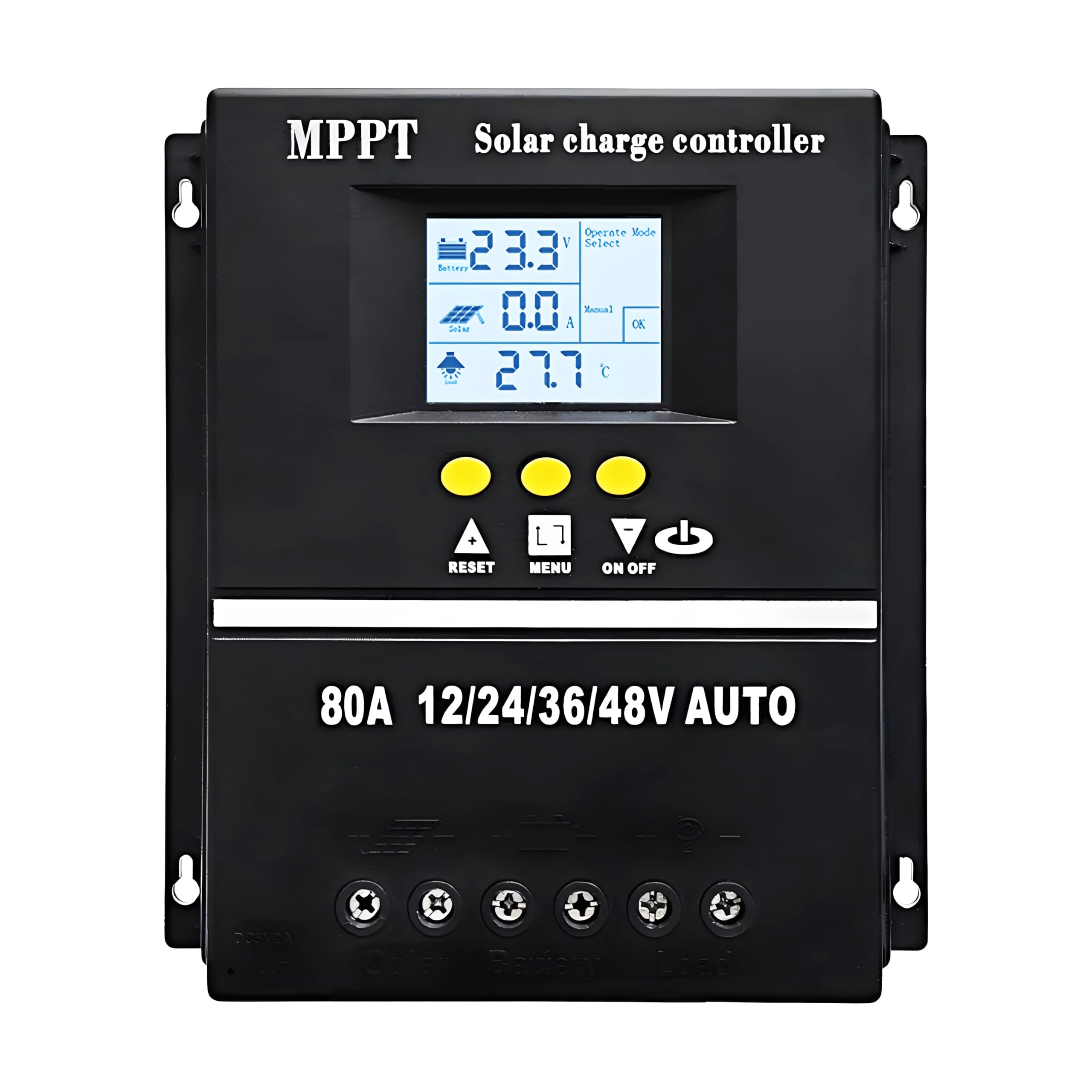
Figure 1: Y&H MPPT Solar Charge Controller 80A.
คุณสมบัติหลัก
- Advanced MPPT tracking technology with an efficiency of not less than 99.5%.
- Multifunction LCD screen with backlight for dynamic display of operating data and status.
- Compatibility with Sealed, GEL, Flooded, and LifePO4 battery types.
- Dual 5V USB charging ports for external devices.
- ระบบอัตโนมัติ voltage detection for 12V, 24V, 36V, and 48V systems.
- Integrated protection features: overvoltage, overcurrent, and overheating protection.
- Seven selectable working modes for diverse application requirements.
- User-adjustable and savable control parameters.
การติดตั้งและการตั้งค่า
Proper installation is crucial for the safe and efficient operation of your solar charge controller. Please follow these guidelines carefully:
- การตระเตรียม: Ensure all components (solar panels, batteries, load) are disconnected and powered off before beginning installation.
- การติดตั้ง: Mount the controller in a well-ventilated area, away from direct sunlight, high temperatures, and moisture. Ensure there is sufficient space around the unit for heat dissipation.
- การเชื่อมต่อแบตเตอรี่: Connect the battery to the controller first. Ensure correct polarity (positive to positive, negative to negative). The controller will automatically detect the battery voltage.
- การเชื่อมต่อแผงโซลาร์เซลล์: Connect the solar panel array to the controller. Again, observe correct polarity.
- โหลดการเชื่อมต่อ: Connect your DC load to the controller's load terminals. Ensure the load's voltage and current requirements are within the controller's specifications.
- เปิดเครื่อง: Once all connections are secure, power on your solar panel array and then your battery. The controller's LCD display should illuminate.
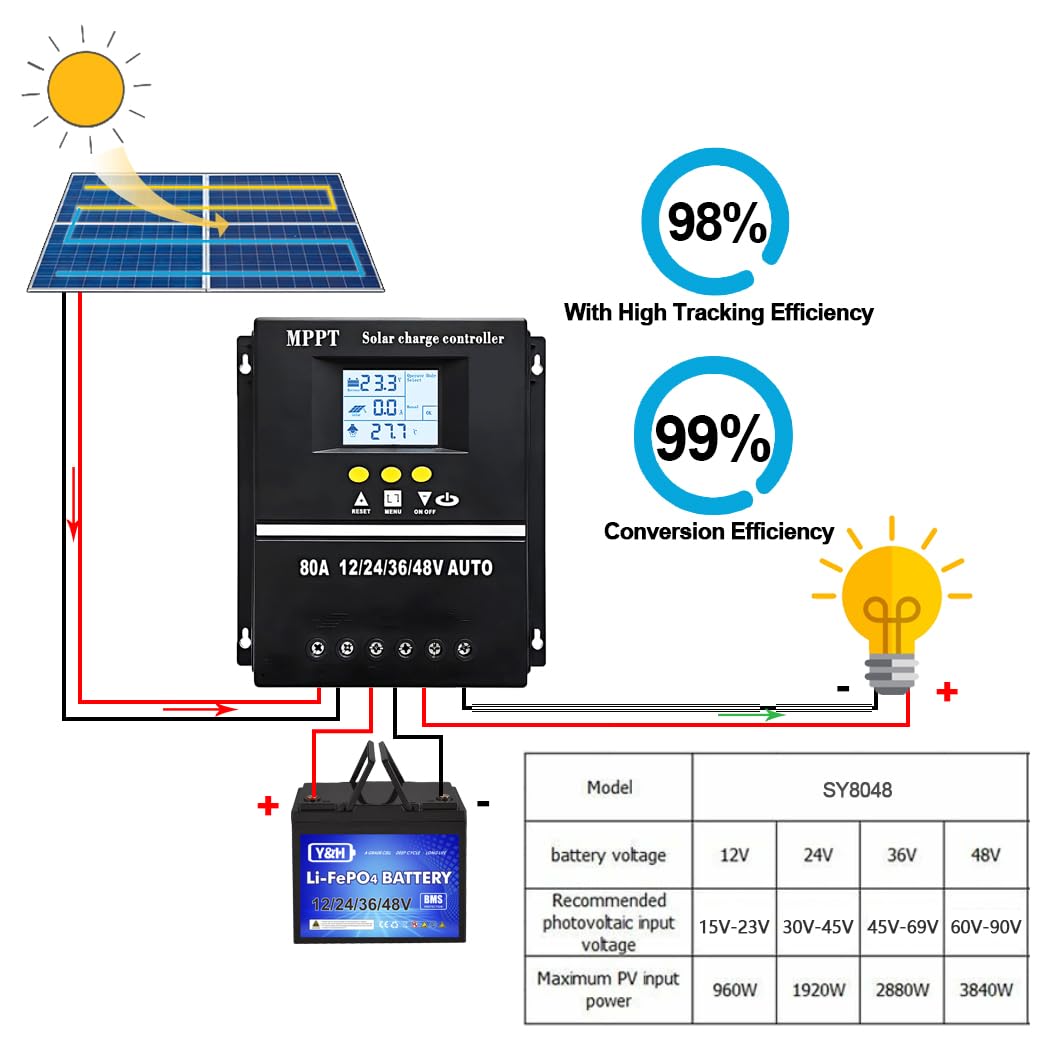
Figure 2: Wiring diagram illustrating the correct connection sequence for the solar charge controller, battery, solar panel, and load. Ensure positive and negative terminals are connected correctly.
การใช้งานคอนโทรลเลอร์
ตัวควบคุมนี้มีหน้าจอ LCD ที่ใช้งานง่ายและปุ่มควบคุมเพื่อการใช้งานและการตรวจสอบที่สะดวก
อินเทอร์เฟซการแสดงผล LCD
The LCD screen provides real-time operational data and status indicators:
- Battery Work Status: แสดงปริมาณแบตเตอรี่ปัจจุบันtage and charge/discharge status.
- Solar Panel Operating Status: Shows PV input voltage และกระแสไฟชาร์จ
- Load Output Status: Indicates load current and status.
- Mode Control Display: Shows the currently selected operating mode.
- Normal/Fault Status: Displays system health and any error codes.
- Product Operating Temperature: Shows the internal temperature of the controller.

รูปที่ 3: รายละเอียด view of the LCD display interface, showing areas for battery work status, solar panel operating status, load output status, mode control, and normal/fault status indicators.
โหมดการทำงาน
The controller offers seven distinct working modes to suit various application needs. These modes can be selected and adjusted via the menu buttons on the LCD interface:
- โหมดการชาร์จ: Standard battery charging.
- โหมดควบคุมแสง: ระบบจะเปิดทำงานเมื่อพระอาทิตย์ตกและปิดทำงานเมื่อพระอาทิตย์ขึ้น
- Light Control + Delay Mode: ระบบจะเริ่มทำงานเมื่อพระอาทิตย์ตกดินและทำงานต่อเนื่องเป็นระยะเวลาที่กำหนดไว้
- Universal Control Mode: มีการเปิดใช้งานโหลดอย่างต่อเนื่อง
- โหมดควบคุมด้วยตนเอง: Load can be manually switched on/off.
- โหมดควบคุมเวลา: Load operates according to a programmed schedule.

Figure 4: Illustration of various load working modes available on the controller, including Manual Mode (24H), Solar Light Control Mode (Sunset-Sunrise), and Solar Light Time Control.
Battery Compatibility and Charging Stages
The controller is designed to work with a variety of battery chemistries and employs a sophisticated four-stage charging algorithm to optimize battery health and longevity.

Figure 5: This image highlights the controller's compatibility with various battery types, including Sealed, GEL, Flooded, and Lithium (LiFePO4) batteries.
The four charging stagคือ:
- การเรียกเก็บเงินจำนวนมาก: Rapid charging phase where the maximum current is delivered to the battery.
- บูสต์ชาร์จ: After bulk charge, the voltage is held constant to ensure full charge.
- ค่าลอย: เมื่อชาร์จเต็มแล้ว แรงดันไฟฟ้าtage is reduced to a lower level to maintain the battery without overcharging.
- ค่าปรับสมดุล: ใช้ปริมาตรที่สูงขึ้นเป็นระยะtage to flooded batteries to balance cell voltagและป้องกันการเกิดซัลเฟต

Figure 6: This image illustrates the four charging stages: Bulk Charge, Boost Charge, Float Charge, and Equalization Charge, which ensure rapid, efficient, and safe battery charging.
การซ่อมบำรุง
To ensure the longevity and optimal performance of your Y&H MPPT Solar Charge Controller, regular maintenance is recommended:
- ตรวจสอบการเชื่อมต่อ: Periodically check all wiring connections for tightness, corrosion, or damage. Loose connections can lead to power loss or overheating.
- ทำความสะอาดหน่วย: รักษาตัวควบคุมให้สะอาด ปราศจากฝุ่นและสิ่งสกปรก ใช้ผ้าแห้งนุ่มๆ ในการทำความสะอาด ห้ามใช้น้ำยาทำความสะอาด
- ตรวจสอบให้แน่ใจว่ามีการระบายอากาศ: Verify that the installation area provides adequate airflow around the controller to prevent overheating, especially during peak operation.
- การตรวจสอบแบตเตอรี่: Regularly inspect battery terminals for any signs of wear, corrosion, or damage. Ensure batteries are properly maintained according to their manufacturer's guidelines.
การแก้ไขปัญหา
If you encounter issues with your solar charge controller, consider the following troubleshooting steps:
- ไม่มีจอแสดงผล/ไม่มีพลังงาน: ตรวจสอบการเชื่อมต่อแบตเตอรี่และตรวจสอบให้แน่ใจว่าแบตเตอรี่มีประจุเพียงพอ ตรวจสอบการเชื่อมต่อแผงโซลาร์เซลล์ด้วย
- ไม่มีการชาร์จ: Confirm solar panel output voltage and current. Check for shading on solar panels. Ensure correct polarity of solar panel connections.
- โหลดไม่ทำงาน: Check load connections and ensure the load is within the controller's specifications. Verify the selected operating mode.
- รหัสข้อผิดพลาด: Refer to the controller's LCD display for any specific error codes. Consult the full product manual (if available) for detailed explanations of error codes.
- ความร้อนสูงเกินไป: Ensure the controller is installed in a well-ventilated area. Reduce load if necessary.
If issues persist after performing these checks, please contact Y&H customer support for further assistance.
ข้อมูลจำเพาะ
| คุณสมบัติ | ข้อมูลจำเพาะ |
|---|---|
| แบบอย่าง | SY8048 |
| ปริมาณแบตเตอรี่tage | อัตโนมัติ 12V/24V/36V/48V |
| กระแสไฟชาร์จ | 80เอ |
| Max Solar Input (Voc) | 15-25V (12V battery); 30-50V (24V battery); 45-75V (36V battery); 60-100V (48V battery) |
| กำลังอินพุต PV สูงสุด | 960W (12V battery); 1920W (24V battery); 2880W (36V battery); 3840W (48V battery) |
| ขนาดสินค้า (กว้าง x ยาว x สูง) | 19.5 x 18.4 x 6.6 ซม. |
| น้ำหนักผลิตภัณฑ์ | 660 กรัม |
| ประเภทจอภาพ | จอแอลซีดี |
| อุณหภูมิในการทำงาน | สูงถึง 60 องศาเซลเซียส |
| เอาท์พุต USB | Dual 5V ports |
| สี | สีดำ |
แอปพลิเคชั่น
The Y&H MPPT Solar Charge Controller is versatile and can be integrated into various solar power systems:
- Home power systems
- Communication base stations
- Traffic lights and solar street lights
- Courtyard lamp ระบบ
- Camping setups and RVs
- Marine applications (boats)
- Other outdoor and travel power needs

Figure 7: This image illustrates various applications for the solar charge controller, such as camping, RVs, boats, outdoor activities, home use, and travel.
การรับประกันและการสนับสนุน
Y&H products are backed by a warranty. For technical assistance, troubleshooting, or any product-related inquiries, please contact the Y&H support team. Our dedicated engineers are available to provide guidance and solutions to any issues you may encounter.
Please refer to your purchase documentation or the official Y&H webเว็บไซต์สำหรับเงื่อนไขการรับประกันและข้อมูลการติดต่อโดยเฉพาะ