
1. บทนำ
This manual provides detailed instructions for the installation, setup, operation, and maintenance of your Decdeal WKQ-BL WLAN Thermostat. This programmable room thermostat is designed for water underfloor heating systems and features remote control via the Tuya app. Please read this manual thoroughly before installation and use to ensure proper function and safety.
2. ข้อมูลด้านความปลอดภัย
- การติดตั้งจะต้องดำเนินการโดยช่างไฟฟ้าที่มีคุณสมบัติตามมาตรฐานไฟฟ้าท้องถิ่น
- โปรดตรวจสอบให้แน่ใจว่าได้ตัดกระแสไฟแล้วก่อนทำการติดตั้งหรือบำรุงรักษา เพื่อป้องกันไฟฟ้าช็อต
- This thermostat is designed for 230V systems. Verify your system's voltage ก่อนการเชื่อมต่อ
- Do not use this thermostat for electric underfloor heating systems. It is specifically for water underfloor heating and boiler-controlled heating.
- เก็บอุปกรณ์ให้ห่างจากน้ำและสภาพแวดล้อมที่มีความชื้นสูง
3. สินค้าหมดview
The Decdeal WKQ-BL WLAN Thermostat offers precise temperature control for your home. It features an LCD display, Wi-Fi connectivity for remote control via the Tuya app, and a 6+1 programmable function for customized heating schedules.
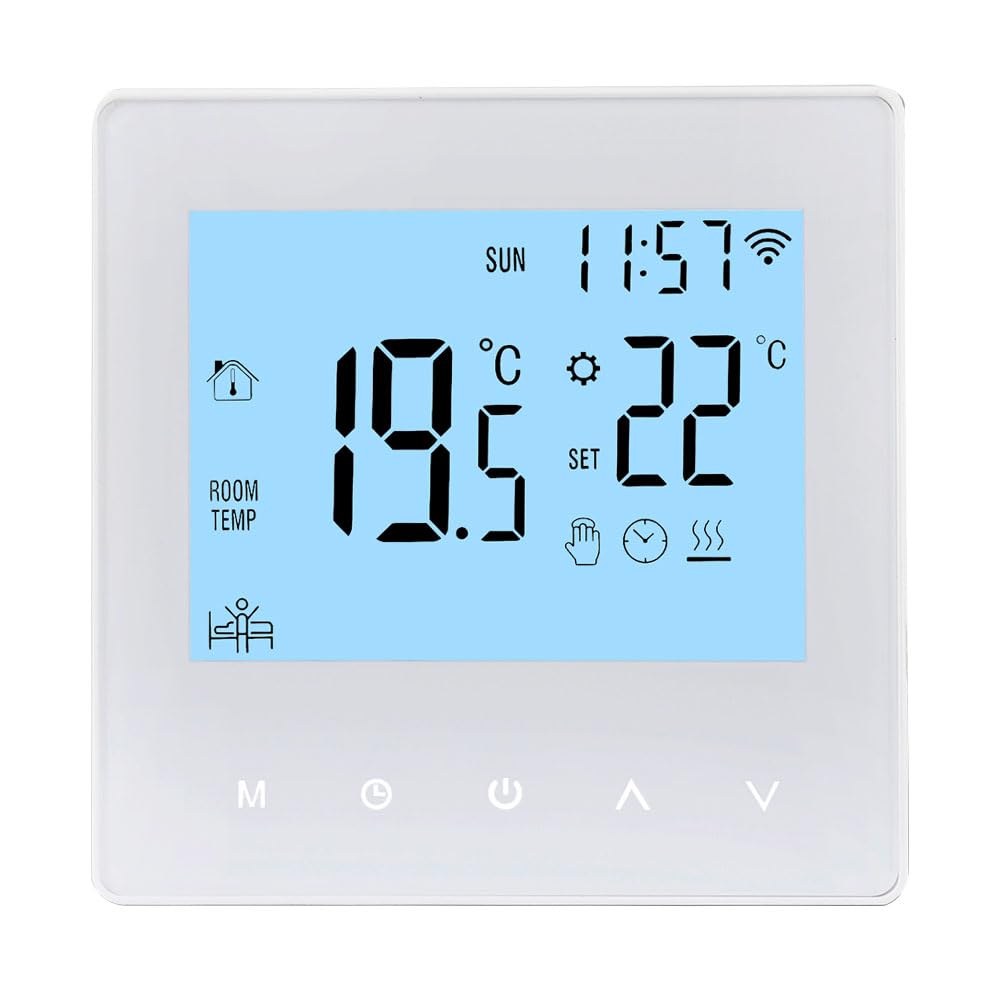
Image: The Decdeal WKQ-BL WLAN Thermostat shown alongside its control interface on the Tuya mobile application. This illustrates the remote control capability.

ภาพ: รายละเอียด view of the Decdeal WKQ-BL thermostat's LCD screen and physical buttons. Labels indicate functions such as Time, Week, Room Temperature, Heat indicator, Programming, Manual mode, Mode selection, Clock setting, Power, Up, Down, and Wi-Fi status.
4. การติดตั้ง
The thermostat is designed for wall mounting. Ensure the installation location is free from direct sunlight, drafts, or other heat sources that could affect temperature readings. Connect the thermostat to your water underfloor heating system's wiring according to the provided wiring diagram (not included in this general manual, refer to product packaging for specific diagrams). Remember to disconnect power before beginning installation.
5. การตั้งค่า
5.1 การเปิดเครื่องครั้งแรก
After successful installation and power connection, the thermostat's LCD screen will illuminate, displaying current room temperature and time.

Image: The Decdeal WKQ-BL thermostat displaying its LCD color screen, showing room temperature, set temperature, time, and Wi-Fi status in a living room setting.
5.2 Wi-Fi and App Connection (Tuya App)
- Download the Tuya Smart app from your mobile device's app store.
- ลงทะเบียนหรือเข้าสู่ระบบบัญชี Tuya Smart ของคุณ
- Ensure your mobile phone's Wi-Fi and Bluetooth are enabled simultaneously.
- Switch your Wi-Fi network to a 2.4GHz band or use a mobile phone hotspot for the initial connection process.
- Follow the in-app instructions to add your Decdeal WKQ-BL thermostat. This typically involves putting the thermostat into pairing mode (refer to the device's specific instructions for pairing mode activation, usually by holding a button).
- Once connected, you can control the thermostat remotely via the Tuya app.
6. คู่มือการใช้งาน
6.1 Manual and Automatic Operation
The thermostat supports both manual and automatic (programmable) operation modes. You can switch between these modes using the designated button on the thermostat or through the Tuya app.

Image: A hand interacting with the Decdeal WKQ-BL thermostat, illustrating its manual and automatic operation capabilities. The display shows current temperature and settings.
6.2 Programming Function (6+1 Schedule)
The thermostat features a 6+1 programming function, allowing you to set different temperature schedules for weekdays (6 periods) and weekends (1 period). This optimizes energy consumption and comfort.

Image: A table illustrating the programming options for the Decdeal WKQ-BL thermostat, showing key, option, icon, time, and adjustable default temperatures for workday and holiday schedules. Below the table, the thermostat is shown in a living room setting, with the Tuya app on a phone.
การตั้งค่าโปรแกรม:
- Access the programming menu on the thermostat or via the Tuya app.
- For each period (e.g., morning, day, evening, night for weekdays, and specific times for holidays), set the desired start time and target temperature.
- Save your settings. The thermostat will then automatically adjust the heating according to your schedule.
7. การบำรุงรักษา
เพื่อให้มั่นใจว่าเทอร์โมสตัทของคุณทำงานได้อย่างมีประสิทธิภาพสูงสุดและมีอายุการใช้งานยาวนาน โปรดปฏิบัติตามคำแนะนำในการบำรุงรักษาอย่างง่ายเหล่านี้:
- ทำความสะอาดหน้าจอเทอร์โมสตัทและ...asinเช็ดทำความสะอาดเป็นประจำด้วยผ้าแห้งเนื้อนุ่ม หลีกเลี่ยงน้ำยาทำความสะอาดที่มีฤทธิ์กัดกร่อนหรือตัวทำละลาย
- Do not attempt to open or repair the thermostat yourself. Refer to qualified service personnel for any issues.
- Ensure the area around the thermostat is clear of obstructions that could block airflow or affect temperature readings.
8 การแก้ไขปัญหา
| ปัญหา | สาเหตุที่เป็นไปได้ | สารละลาย |
|---|---|---|
| เทอร์โมสตัทไม่เปิดเครื่อง | ไม่มีแหล่งจ่ายไฟ การเดินสายไฟไม่ถูกต้อง | Check circuit breaker; verify wiring connections (consult electrician if unsure). |
| Cannot connect to Wi-Fi/Tuya app | Incorrect Wi-Fi band; Bluetooth off; incorrect pairing procedure | Ensure 2.4GHz Wi-Fi; enable Bluetooth; follow app pairing instructions carefully. |
| การอ่านอุณหภูมิดูเหมือนจะไม่แม่นยำ | Thermostat exposed to drafts/direct sunlight; sensor issue | Relocate thermostat if possible; ensure no external factors are influencing the sensor. |
| ระบบทำความร้อนไม่เปิด/ปิดตามกำหนดเวลา | Incorrect programming; thermostat in manual mode | Review and adjust programming schedule; ensure thermostat is in automatic mode. |
9. ข้อมูลจำเพาะ
| คุณสมบัติ | ข้อมูลจำเพาะ |
|---|---|
| ยี่ห้อ | เด็คดีล |
| ชื่อรุ่น | WKQ-BL |
| ขนาดสินค้า | 3.9D x 8.6W x 8.6H ซม. |
| ประเภทการควบคุม | Google Assistant, Remote Control (via app) |
| คุณสมบัติพิเศษ | Remote control via app, programmable |
| สี | สีฟ้าอ่อน |
| การใช้งานเฉพาะ | Boiler-controlled heating, water underfloor heating |
| ประเภทการควบคุมอุณหภูมิ | สามารถตั้งโปรแกรมได้ |
| เทคโนโลยีการเชื่อมต่อ | ไวไฟ |
| แหล่งพลังงาน | สายไฟ |
| เล่มที่tage | 230 โวลต์ |
| ประเภทจอภาพ | จอแอลซีดี |
| โปรโตคอลการสื่อสาร | ไวไฟ |
| ประเภทการติดตั้ง | ติดผนัง |
| แสงไฟแบ็คไลท์ | ใช่ |
| น้ำหนักสินค้า | 210 กรัม |
| รูปร่าง | สี่เหลี่ยม |
| สไตล์ | ขนาดกะทัดรัด |
| วัสดุ | อะคริโลไนไตรล์ บิวทาไดอีน สไตรีน (ABS) |
10. การรับประกันและการสนับสนุน
For warranty information or technical support, please refer to the documentation included with your product packaging or contact Decdeal customer service. Keep your purchase receipt as proof of purchase.