
Behringer สี่ LFO
Behringer Four LFO 4-channel LFO Eurorack Module
คู่มือการใช้งาน
1. บทนำ
The Behringer Four LFO is a versatile 4-channel Low Frequency Oscillator Eurorack module designed for modular synthesis systems. It provides a wide range of modulation possibilities with user-assignable waveforms and various operational modes, making it an essential tool for creating dynamic and evolving soundscapes.
คุณสมบัติที่สำคัญ ได้แก่:
- 14HP 4-channel LFO Module with 4 Creative Modes
- User-assignable Waveforms
- Reset/Sync Modes
- โหมดซูม
- CV (ชุดควบคุมฉบับที่tage) capabilities
2. คำแนะนำด้านความปลอดภัยที่สำคัญ
Always follow basic safety precautions when using electrical products to reduce the risk of fire, electric shock, and injury to persons.
- อ่านคำแนะนำเหล่านี้
- เก็บคำแนะนำเหล่านี้ไว้
- จงใส่ใจคำเตือนทั้งหมด
- ปฏิบัติตามคำแนะนำทั้งหมด
- ห้ามใช้อุปกรณ์นี้ใกล้น้ำ
- ทำความสะอาดด้วยผ้าแห้งเท่านั้น
- ห้ามปิดกั้นช่องระบายอากาศ ควรติดตั้งตามคำแนะนำของผู้ผลิต
- ห้ามติดตั้งใกล้แหล่งความร้อน เช่น หม้อน้ำ เครื่องทำความร้อน เตา หรืออุปกรณ์อื่น ๆ (รวมถึง ampเครื่องให้ความร้อน) ที่ผลิตความร้อน
- อย่าละเลยจุดประสงค์ด้านความปลอดภัยของปลั๊กแบบมีขั้วหรือแบบมีสายดิน ปลั๊กแบบมีขั้วจะมีใบมีด 2 ใบ โดยใบหนึ่งจะกว้างกว่าอีกใบ ปลั๊กแบบมีสายดินจะมีใบมีด 2 ใบและขาต่อสายดินที่สาม ขาที่กว้างหรือขาต่อสายดินที่สามนั้นมีไว้เพื่อความปลอดภัยของคุณ หากปลั๊กที่ให้มาไม่พอดีกับเต้ารับของคุณ ให้ปรึกษาช่างไฟฟ้าเพื่อขอเปลี่ยนเต้ารับที่ล้าสมัย
- ปกป้องสายไฟไม่ให้ถูกเหยียบหรือถูกหนีบ โดยเฉพาะที่ปลั๊ก เต้ารับไฟฟ้า และจุดที่สายไฟออกจากเครื่อง
- ใช้เฉพาะอุปกรณ์เสริม/สิ่งที่แนบตามที่ผู้ผลิตกำหนดเท่านั้น
- ใช้ได้เฉพาะกับรถเข็น ขาตั้ง ขาตั้งกล้อง ขายึด หรือโต๊ะที่ผู้ผลิตกำหนด หรือจำหน่ายพร้อมกับอุปกรณ์เท่านั้น เมื่อใช้รถเข็น ควรใช้ความระมัดระวังในการเคลื่อนย้ายรถเข็น/อุปกรณ์รวมกันเพื่อหลีกเลี่ยงการบาดเจ็บจากการล้ม
- ถอดปลั๊กอุปกรณ์นี้ในระหว่างพายุฝนฟ้าคะนองหรือเมื่อไม่ได้ใช้งานเป็นเวลานาน
- แจ้งบริการทั้งหมดให้ช่างที่ผ่านการรับรองทราบ จำเป็นต้องให้บริการเมื่ออุปกรณ์ได้รับความเสียหายในลักษณะใดก็ตาม เช่น สายไฟหรือปลั๊กชำรุด ของเหลวหกหรือมีวัตถุตกลงไปในอุปกรณ์ อุปกรณ์โดนฝนหรือความชื้น ไม่สามารถทำงานได้ตามปกติ หรือตกหล่น
2.1 FCC Compliance Information
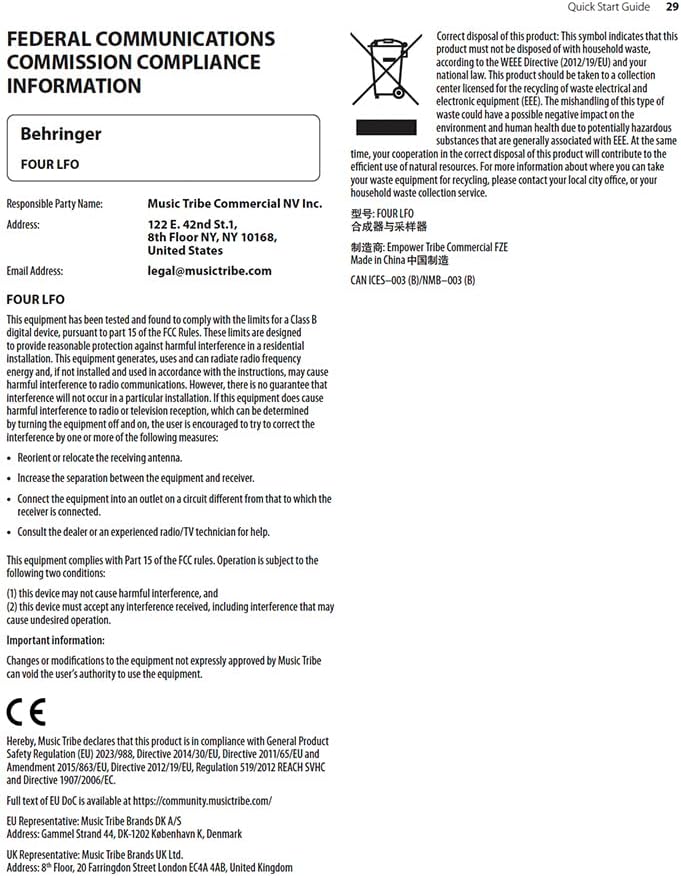
อุปกรณ์นี้ได้รับการทดสอบและพบว่าเป็นไปตามขีดจำกัดสำหรับอุปกรณ์ดิจิทัลคลาส B ตามส่วนที่ 15 ของกฎ FCC ขีดจำกัดเหล่านี้ได้รับการออกแบบมาเพื่อให้การป้องกันที่เหมาะสมต่อการรบกวนที่เป็นอันตรายในการติดตั้งในที่อยู่อาศัย อุปกรณ์นี้สร้าง ใช้ และสามารถแผ่พลังงานความถี่วิทยุ และหากไม่ได้ติดตั้งและใช้งานตามคำแนะนำ อาจทำให้เกิดการรบกวนที่เป็นอันตรายต่อการสื่อสารทางวิทยุ อย่างไรก็ตาม ไม่มีการรับประกันว่าการรบกวนจะไม่เกิดขึ้นในการติดตั้งโดยเฉพาะ

Figure 2.1: FCC Compliance and WEEE Directive Information. This image details the Federal Communications Commission compliance statement and the WEEE (Waste Electrical and Electronic Equipment) directive symbol, indicating proper disposal of the product.
หากอุปกรณ์นี้ก่อให้เกิดสัญญาณรบกวนที่เป็นอันตรายต่อการรับวิทยุหรือโทรทัศน์ ซึ่งสามารถตรวจสอบได้โดยการปิดและเปิดอุปกรณ์ ผู้ใช้ควรพยายามแก้ไขสัญญาณรบกวนดังกล่าวโดยใช้วิธีการต่อไปนี้วิธีใดวิธีหนึ่งหรือมากกว่า:
- ปรับทิศทางหรือย้ายตำแหน่งของเสาอากาศรับสัญญาณ
- เพิ่มระยะห่างระหว่างอุปกรณ์และตัวรับ
- เชื่อมต่ออุปกรณ์เข้ากับเต้าเสียบในวงจรที่แตกต่างไปจากวงจรที่เชื่อมต่อเครื่องรับอยู่
- ปรึกษาตัวแทนจำหน่ายหรือช่างวิทยุ/โทรทัศน์ที่มีประสบการณ์เพื่อขอความช่วยเหลือ
อุปกรณ์นี้เป็นไปตามกฎ FCC ส่วนที่ 15 การทำงานต้องอยู่ภายใต้เงื่อนไขสองประการต่อไปนี้:
- อุปกรณ์นี้จะต้องไม่ก่อให้เกิดการรบกวนที่เป็นอันตรายและ
- อุปกรณ์นี้ต้องยอมรับการรบกวนใดๆ ที่ได้รับ รวมถึงการรบกวนที่อาจทำให้เกิดการทำงานที่ไม่พึงประสงค์
ข้อมูลสำคัญ: Changes or modifications to the equipment not expressly approved by Music Tribe can void the user's authority to use the equipment.
3. การตั้งค่าและการติดตั้ง
The Behringer Four LFO is a Eurorack module and requires a compatible Eurorack case with a power supply. Ensure your Eurorack case provides sufficient power for the module.
3.1 การติดตั้งทางกายภาพ
- หมดแรง: Before installing, ensure your Eurorack case's power supply is completely turned off.
- เชื่อมต่อสายริบบิ้น: Connect the included ribbon cable to the module's power header. Ensure the red stripe on the ribbon cable aligns with the -12V pin on both the module and your Eurorack power bus board. Incorrect connection can damage the module.
- โมดูลติดตั้ง: Carefully align the module with the rail nuts in your Eurorack case. Use the provided screws to secure the module firmly to the rails. Do not overtighten.
- เปิดเครื่อง: Once securely mounted and connected, you can power on your Eurorack case.
3.2 การเชื่อมต่อ
The Four LFO module features various jacks for integration into your modular system:
- RESET/SYNC Jacks: These inputs allow external signals to reset or synchronize the LFOs.
- SINE Jacks: Output for the sine waveform of each LFO.
- ASSIGN Jacks: Assignable outputs for various waveforms or modes, depending on the module's settings.
- SQUARE Jacks: Output for the square waveform of each LFO.

Figure 3.1: Front panel of the Behringer Four LFO module, showing all controls and jacks.
4. การดำเนินการ
The Four LFO module offers four independent LFO channels, each with dedicated controls and outputs. Understanding the different modes and controls is key to unlocking its full potential.
4.1 การควบคุมมากกว่าview
รูปที่ 4.1: ระยะใกล้ view of the Behringer Four LFO's control section, highlighting the sliders and switches.
- Hz Slider: Controls the frequency of the LFOs. The range can be adjusted from very slow (0.01 Hz) to audio rates (100 Hz).
- Φ (Phase) Slider: Adjusts the phase relationship between the LFOs, particularly relevant in certain modes.
- DIV (Divide) Slider: Sets the division factor for LFO frequencies in divide modes.
- สวิตช์โหมด: Selects the operational mode of the LFOs.
- ปุ่มฟรี: Toggles between free-running and synchronized operation.
- ASSIGN Switch: Configures the function of the ASSIGN outputs.
4.2 โหมดการทำงาน
The MODE switch allows you to select between four distinct operational modes, each offering unique modulation capabilities:
- FREQ (Frequency) Mode: In this mode, each of the four LFOs operates independently, and their frequencies are controlled by the Hz slider. This is ideal for general-purpose modulation where individual control over each LFO's speed is desired.
- QUAD Mode: This mode links the four LFOs, allowing for complex polyrhythmic or synchronized modulation. The exact behavior depends on the phase and divide settings.
- FRQ-PH-DIV (Frequency-Phase-Divide) Mode: This mode offers advanced control where the frequency, phase, and division of the LFOs are interconnected, enabling intricate rhythmic and evolving patterns.
- PHASE Mode: Focuses on phase relationships between the LFOs. The Φ slider becomes central to shaping the modulation.
- DIVIDE Mode: In this mode, the frequencies of LFOs 2, 3, and 4 are divisions of the frequency of LFO 1, as set by the DIV slider. This is excellent for creating harmonically related or synchronized LFO patterns.
4.3 การซิงโครไนซ์และรีเซ็ต
The Four LFO module can be synchronized to external clock signals or reset manually:
- RESET/SYNC Inputs: Patch a gate or trigger signal into these jacks to reset or synchronize the corresponding LFO. This is crucial for keeping LFOs in time with sequencers or drum machines.
- ปุ่มฟรี: Pressing the FREE button toggles between free-running LFO operation and synchronized operation. When synchronized, the LFOs will restart or sync to an incoming signal.
5. การบำรุงรักษา
Proper care and maintenance will ensure the longevity and optimal performance of your Behringer Four LFO module.
- การทำความสะอาด: Use a soft, dry cloth to clean the module's surface. Do not use abrasive cleaners, solvents, or waxes, as these can damage the finish and controls.
- สิ่งแวดล้อม: Keep the module in a dry environment, away from direct sunlight, extreme temperatures, and excessive dust.
- การเชื่อมต่อ: Periodically check all patch cable connections for secure fit. Avoid excessive force when inserting or removing cables.
- พื้นที่จัดเก็บ: If storing the module for an extended period, ensure it is disconnected from power and stored in a protective case or anti-static bag.
6 การแก้ไขปัญหา
If you encounter issues with your Behringer Four LFO module, refer to the following common problems and solutions:
| ปัญหา | สาเหตุที่เป็นไปได้ | สารละลาย |
|---|---|---|
| No LFO output | Module not powered; incorrect power cable connection; output jack not connected. | Ensure Eurorack case is powered on. Verify ribbon cable orientation (red stripe to -12V). Connect a patch cable from a SINE, ASSIGN, or SQUARE output to an audio or CV input. |
| LFOs not synchronizing | Incorrect RESET/SYNC input; FREE button engaged (free-running mode). | Ensure a proper gate or trigger signal is patched to the RESET/SYNC input. Press the FREE button to disengage free-running mode and enable synchronization. |
| Unexpected LFO behavior | Incorrect MODE selection; conflicting CV input. | Check the MODE switch setting and ensure it matches your desired operation. Disconnect any CV inputs to isolate the issue. |
| Module not recognized by software (if applicable) | USB connection issue; driver not installed. | Ensure USB cable is securely connected. Install necessary drivers if required by your operating system or software (e.g., VCV Rack). |
If the problem persists after attempting these solutions, please contact Behringer customer support or refer to the official Behringer webเว็บไซต์เพื่อขอความช่วยเหลือเพิ่มเติม
7. ข้อมูลจำเพาะ
| คุณสมบัติ | รายละเอียด |
|---|---|
| ชื่อรุ่น | สี่แอลเอฟโอ |
| ยี่ห้อ | เบห์ริงเกอร์ |
| น้ำหนักสินค้า | 9.6 ออนซ์ (ประมาณ 272 กรัม) |
| ขนาดสินค้า | 6.95 x 4.1 x 3.05 นิ้ว (ประมาณ 17.65 x 10.41 x 7.75 ซม.) |
| แหล่งพลังงาน | DC power supply (Eurorack standard) |
| ประเภทขั้วต่อ | USB Type B (for potential future firmware updates or specific software integration) |
| ซอฟต์แวร์ที่รองรับ | VCV Rack or Modular (implies compatibility with virtual modular environments) |
| สี | สีดำ |
| ผู้ผลิต | เบห์ริงเกอร์ |
| ASIN | B0C5TQQFSP |
| ยูพีซี | 787790557753 |
8. การรับประกันและการสนับสนุน
สำหรับข้อมูลการรับประกันโดยละเอียดและการสนับสนุนทางเทคนิค โปรดเยี่ยมชมเว็บไซต์อย่างเป็นทางการของ Behringer website or contact Music Tribe Commercial NV Inc., the manufacturer's representative.
- เป็นทางการ Webเว็บไซต์: music.tribe.com
- การสนับสนุนทางอีเมล์: legal@musictribe.com
- ผู้ผลิต: มิวสิค ไทรบ์ คอมเมอร์เชียล เอ็นวี อิงค์
- ที่อยู่: 122 E 42nd St.1, 8th Floor, NY NY 10168, United States
โปรดเก็บหลักฐานการซื้อไว้เพื่อใช้ในกรณีเรียกร้องการรับประกัน
Ask a question about this manual
Ask about setup, troubleshooting, compatibility, parts, safety, or missing instructions. Manuals+ will review the question and use this page’s manual context to help answer it.