
การแนะนำ
The Hama C-Rotate Pro is a versatile and robust flash drive designed for convenient data storage and transfer. Featuring both USB-C 3.0 and USB 3.0/3.1 (Gen. 1) Type-A connectors, it offers broad compatibility with various devices. Its rotating mechanism protects the connectors, making it ideal for on-the-go use. This manual provides essential information for setting up, operating, maintaining, and troubleshooting your device.
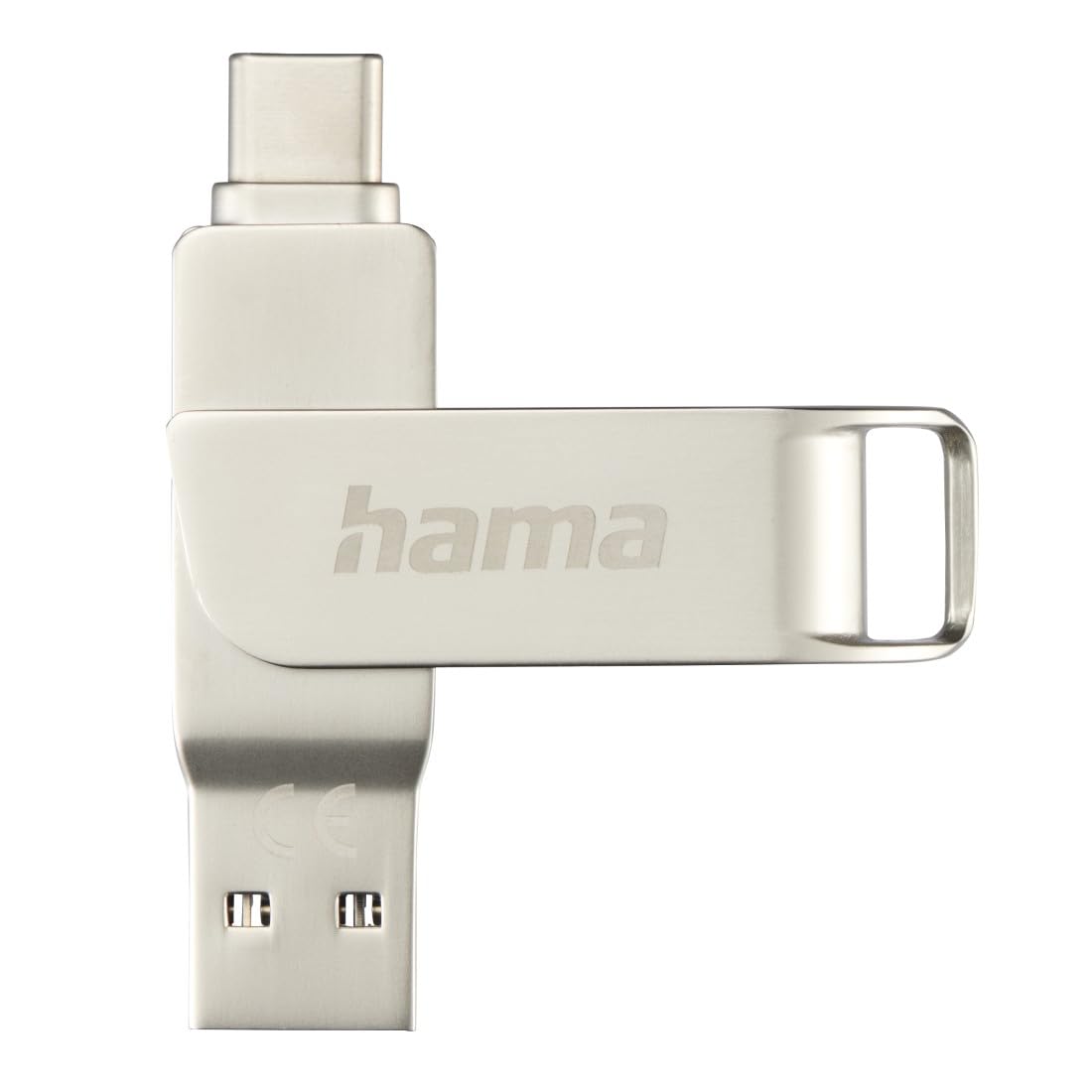
Image: The Hama C-Rotate Pro flash drive, showcasing its dual USB-A and USB-C connectors and the protective rotating metal casing.
การตั้งค่า
The Hama C-Rotate Pro flash drive is designed for plug-and-play functionality, requiring no special driver installation for most operating systems.
- เลือกพอร์ตที่ถูกต้อง: Determine whether your device has a USB-C port or a standard USB-A port.
- Rotate the connector: ค่อยๆ หมุนตัวโลหะasing to expose either the USB-C or the USB-A connector.
- Insert the flash drive: Plug the appropriate connector into the corresponding port on your computer, smartphone, or other compatible device.
- Device recognition: Your operating system (Windows 10/8/7, MacOS 9.x or higher) should automatically recognize the flash drive as a removable storage device.
Important Note: Never attempt to use both the USB-C and USB-A connectors simultaneously. Only one connector should be exposed and connected at a time.
คำแนะนำการใช้งาน
Once connected, the Hama C-Rotate Pro functions like any standard removable storage device.
- การเข้าถึง Files: เปิดคอมพิวเตอร์ของคุณ file explorer (Windows) or Finder (macOS) and locate the drive, typically labeled as a removable disk.
- การโอนย้าย Files: ลากและวาง files to and from the flash drive. For optimal speed, ensure you are using a USB 3.0/3.1 (Gen. 1) or USB-C 3.0 port.
- Full HD Video Playback/Recording: The drive supports direct recording and playback of Full HD videos, provided your device and software support this functionality.
- การกำจัดอย่างปลอดภัย: Always safely eject the flash drive from your operating system before physically removing it to prevent data corruption.

Image: The Hama C-Rotate Pro with its USB-C connector ready for use.

Image: The Hama C-Rotate Pro with its USB-A connector ready for use.
การซ่อมบำรุง
The Hama C-Rotate Pro is designed with a robust metal casing for durability. Minimal maintenance is required.
- การทำความสะอาด: Use a soft, dry cloth to wipe the exterior of the flash drive. Avoid liquid cleaners or abrasive materials.
- พื้นที่จัดเก็บ: When not in use, rotate the casing to protect both connectors from dust and physical damage. Store in a cool, dry place.
- การจัดการ: ควรหลีกเลี่ยงการทำอุปกรณ์ตกหรือการใช้แรงกระแทกมากเกินไป
การแก้ไขปัญหา
- Issue: Flash drive not recognized by the device.
- สารละลาย:
- Ensure the flash drive is fully inserted into the USB port.
- ลองใช้พอร์ต USB อื่นบนอุปกรณ์ของคุณ
- Ensure only one connector (USB-C or USB-A) is exposed and connected at a time.
- รีสตาร์ทเครื่องคอมพิวเตอร์หรืออุปกรณ์ของคุณ
- Check if your operating system is compatible (Windows 10/8/7, MacOS 9.x or higher).
- ปัญหา: ความเร็วในการถ่ายโอนข้อมูลช้า
- สารละลาย:
- Ensure you are connecting the flash drive to a USB 3.0/3.1 (Gen. 1) or USB-C 3.0 port on your device. Connecting to a USB 2.0 port will result in significantly slower speeds.
- ตรวจสอบว่า files being transferred are not excessively fragmented or corrupted.
- ปิดแอปพลิเคชันอื่นๆ ที่อาจกำลังใช้ทรัพยากรระบบหรือกำลังดำเนินการกับดิสก์อยู่
- Issue: Data corruption or loss.
- สารละลาย:
- Always use the "Safely Remove Hardware" or "Eject" option in your operating system before physically disconnecting the flash drive.
- หลีกเลี่ยงการถอดสายฮาร์ดไดรฟ์ขณะที่กำลังถ่ายโอนข้อมูลอยู่
ข้อมูลจำเพาะ
| ชื่อรุ่น | C-Rotate Pro |
| หมายเลขรุ่น | ham_n17_00182490 |
| ความจุในการเก็บข้อมูล | 64GB |
| อินเทอร์เฟซ | USB-C 3.0, USB 3.0/3.1 (Gen. 1) Type-A |
| ความเร็วในการอ่าน | Up to 70 MB/s (with USB 3.0/3.1 Gen. 1 or USB-C 3.0 interface) |
| วัสดุ | โลหะ |
| ขนาด (กว้าง x ยาว x สูง) | 62.2 มม. x 14 มม. x 8.9 มม. |
| น้ำหนัก | 16.34 กรัม |
| ความเข้ากันได้ของระบบปฏิบัติการ | Windows 10/8/7, MacOS 9.x or higher |
| คุณสมบัติพิเศษ | Rotating mechanism, OTG (On-The-Go) functionality |
ข้อมูลการสนับสนุน
For further assistance or to access the official product page and additional resources, please visit the Hama webเว็บไซต์.
- คู่มือออนไลน์: The user manual for the Hama C-Rotate Pro USB stick can be found on www.hama.com under item number 00182490.
- ผู้ผลิต Webเว็บไซต์: For general product information and support, visit www.hama.com.
โดยทั่วไป ข้อมูลการรับประกันจะระบุไว้ในบรรจุภัณฑ์ของผลิตภัณฑ์ หรือสามารถดูได้จากเว็บไซต์อย่างเป็นทางการของผู้ผลิต website. Please refer to those resources for details regarding your product's warranty.